Recommended resources
The freely available resources this lesson will direct you to.
Introduction
Hello and welcome back. In our previous lessons, you've done the foundational work of building your "external brain." First, you performed a comprehensive Mind Sweep to capture all your commitments, tasks, and ideas into a single inbox. Then, you learned the critical skill of deconstructing large, intimidating projects into small, concrete, verb-first action steps.
Your inbox is now full of this raw material, but it's still a disorganized list. A long, undifferentiated list can be just as overwhelming as trying to keep everything in your head.
Today's lesson addresses the final step in setting up your system. Our learning outcome is to organize captured items into actionable categories (e.g., projects, next actions, calendar) using a defined workflow. We will implement a systematic process to go through your inbox, item by item, and move each one to its proper home. This brings order to the chaos, significantly reduces decision fatigue, and sets the stage for effective prioritization, which we'll cover next.
As a CIO, you're accustomed to designing and managing complex information systems. Think of this lesson as applying that same systematic rigor to your personal productivity. You're building a reliable operating system for your life's "data."
The Core Workflow: Clarify and Organize
The gold standard for processing an inbox comes from David Allen's "Getting Things Done" (GTD) methodology. It's particularly effective for the ADHD brain because it externalizes decision-making into a consistent, repeatable process, freeing up mental bandwidth.
The process involves two main phases for each item in your inbox:
- Clarify: Ask, "What is this, and is it actionable?"
- Organize: If it's actionable, decide where it goes and what the next step is. If not, file it appropriately.
This flowchart provides a complete visual map of the workflow we're about to build.
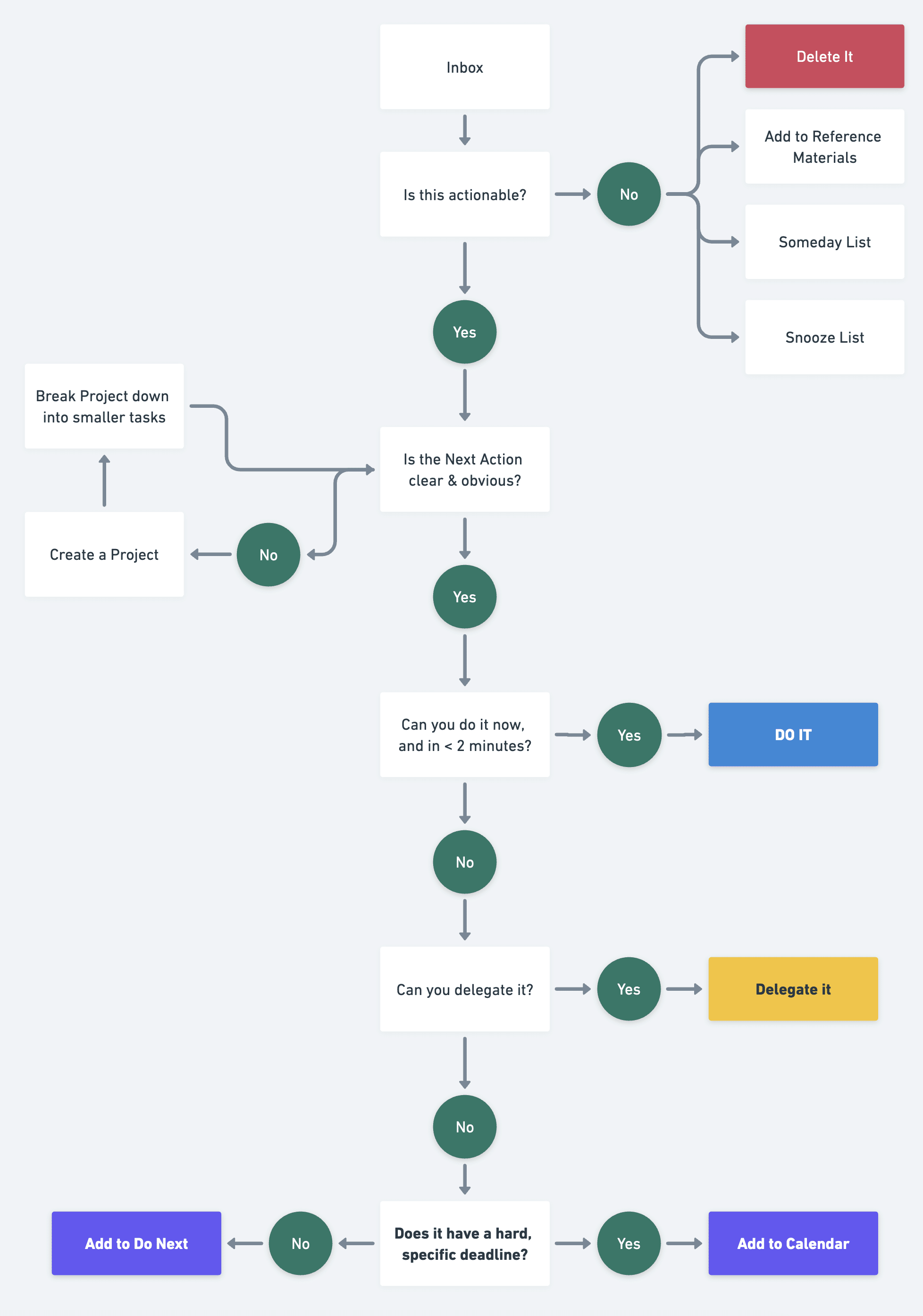
Let's start by focusing on the first part of the process: clarifying what each item is and making a quick decision.
Beginner’s Guide to GTD (Getting Things Done)
The Todoist channel has an excellent 'Beginner's Guide to GTD' that clearly explains this initial processing step, which they call 'Clarify.' It's the decision-making engine of your system.
Please watch from 02:59 to 04:09. Focus on the four decisions you can make for any item in your inbox: Do it (if it takes less than 2 minutes), Delete it, Delegate it, or Defer it (by defining the next action).
The Buckets: Creating a Home for Everything
After you've clarified an item using the 2-minute rule, delegation, or deletion, the remaining items need to be organized into specific lists or "buckets." This is what transforms a long, stressful list into a calm, organized system.
These categories give you different lenses through which to view your work, allowing you to find the right task for the right moment.
Beginner’s Guide to GTD (Getting Things Done)
The same video continues by explaining the standard GTD categories. These 'buckets' are where your clarified items will live until you're ready to engage with them.
Now, watch from 04:09 to 07:46. Pay attention to the purpose of each of these core categories: Projects: For multi-step outcomes. Next Actions: The single, next physical step to move a project forward. Waiting For: Tasks you've delegated and are awaiting a response on. Someday/Maybe: Ideas to review in the future, with no immediate commitment. Reference: Non-actionable information you want to keep. Contexts: A powerful way to tag tasks by the tool, place, or person needed (e.g., @computer, @calls, @office).
These categories form the backbone of your system. A task manager like Todoist, which you've seen, is designed around these concepts, but they can be implemented with any tool, from a simple notebook to more advanced software.
Adapting the System for Your Brain and Role
A rigid, "pure" GTD system can sometimes feel too complex. The key to sustainability, especially with ADHD, is to adapt the principles to fit your specific needs and avoid what some call "productivity porn"—building a system so elaborate that maintaining it becomes a task in itself.
Start Simple
Your life has distinct domains: your work as a CIO, your personal life, and your music. A simple, high-level organization can be a great start. In the video below, the creator advocates for a minimalist approach, starting with just two main folders: "Work" and "Personal." This reduces initial friction and allows you to build complexity only as needed.
My Task & Project Management System
In his video 'My Task & Project Management System,' Christopher Lawley argues for finding the 'minimum effective organization.' His approach is a healthy antidote to over-engineering your system.
Watch from 00:29 to 05:26. Absorb his philosophy of avoiding 'productivity porn' and notice how he starts with a simple 'Work' and 'Personal' split before breaking things down into more detailed projects. This is a very practical way to begin organizing your lists.
The Power of Contexts and Energy-Based Tagging
The "Contexts" mentioned in the GTD video are a superpower for the ADHD brain. They allow you to filter your task list based on your current situation. For example, if you're waiting for a meeting to start and only have your phone, you can pull up a list of all tasks tagged with @calls or @email.
We can take this a step further by creating contexts for your mental state.
The Executive’s Guide to Planning and Prioritization with ADHD
The article 'The Executive's Guide to Planning and Prioritization with ADHD' offers a critical adaptation. It suggests categorizing work not just by project, but by the mental energy it requires. This fits perfectly into the GTD 'Contexts' concept.
Please read the section 'Managing Executive Energy', focusing on the idea of 'Energy-Based Scheduling.' Think about how you could use tags or labels in your task manager (e.g., #high-energy, #medium-energy, #low-energy) as a powerful form of context. This allows you to match your work to your capacity at any given moment.
Visualizing Complex Projects: Kanban Boards
As a CIO and a musician, you manage projects that have multiple, sequential stages. A simple "Next Action" list might not give you the big-picture view you need. For this, a Kanban board is an incredibly effective tool. It visualizes the flow of work through different stages.
My Task & Project Management System
For managing complex, multi-stage projects—whether it's an investment strategy, a software deployment, or producing a music track—a simple list can be limiting. Christopher Lawley explains how he uses Kanban boards to visualize his project workflows.
Watch the segment from 20:11 to 24:54. Focus on how he uses columns like 'Research,' 'Scripting,' 'Filming,' and 'Editing' to track the progress of each project. Consider how you could apply a similar stage-based approach to your own projects (e.g., 'Ideation' -> 'Drafting' -> 'Review' -> 'Finalize' for a report, or 'Tracking' -> 'Mixing' -> 'Mastering' for a song).
Your Turn: Process Your Inbox
It's time to apply this workflow. The goal is not to empty your entire inbox in one sitting—that can be draining. Instead, aim to process a manageable chunk (perhaps for 20-30 minutes) to get comfortable with the flow.
- Open your task manager where you completed your Mind Sweep.
- Start with the very first item in your inbox. Do not skip around.
- Follow the Workflow: For each item, ask yourself the questions from the flowchart:
- What is it? Is it actionable?
- If No: Is it trash? (Delete it). Is it something you might do one day? (Move it to a
Someday/Maybelist). Is it useful info? (Move it to yourReferencesystem, e.g., a specific folder in your notes app or cloud storage).
- If No: Is it trash? (Delete it). Is it something you might do one day? (Move it to a
- If Yes: What's the project or outcome?
- If it's a single action, move on.
- If it has multiple steps, create a
Projectfor it (e.g., "Q3 Investor Report," "Record New Single").
- What's the Next Action?
- You practiced this last lesson. Make sure the task starts with a verb.
- Can the Next Action be done in under 2 minutes?
- If Yes: Do it immediately. Don't defer it.
- If No: Should I delegate it?
- If Yes: Delegate it (e.g., send the email), and move the task to a
Waiting Forlist. It's helpful to note who you're waiting on and the date.
- If Yes: Delegate it (e.g., send the email), and move the task to a
- If No: Defer it. Does it need to be done on a specific date/time?
- If Yes: Put it on your Calendar. This is for hard appointments and deadlines only.
- If No: Add it to your
Next Actionslist. This is the list of things you can do whenever you have time.
- What is it? Is it actionable?
- Add Context: As you process items, add context tags like
#high-energy,@computer,@calls, or#errands.
Repeat this process until your inbox is clear or your allotted time is up.
Conclusion
You have now built a complete, functional "external brain." You have a system to capture everything, a method to break down complex projects, and a workflow to organize every single item into a trusted place. This structure is the foundation for reducing overwhelm and making clear, confident decisions about your time and attention.
Key Takeaways:
- Process your inbox systematically. Use the GTD workflow (Clarify & Organize) to handle every item, ensuring nothing falls through the cracks.
- Everything has a home. Your core categories are Projects, Next Actions, Calendar, Waiting For, Someday/Maybe, and Reference.
- Don't let the inbox become a to-do list. The goal of this process is to keep your inbox at zero.
- Adapt the system to you. Start simple (e.g., Work/Personal folders) and use ADHD-friendly enhancements like energy-based context tags and visual Kanban boards.
Preview of the Next Lesson:
Your system is now beautifully organized. You have lists of projects and next actions. The next logical question is, "With all these options, what should I actually work on?" In our next lesson, we will address this by learning how to apply a prioritization framework, such as the Eisenhower Matrix adapted for ADHD, to decide what to work on next.