Recommended resources
The freely available resources this lesson will direct you to.
In our previous lesson, we looked at configuration files like package.json and tsconfig.json, which act as the instruction manuals and settings panels for your project's tools. Today, we're zooming in on a very special type of configuration file that Claude or other LLMs frequently ask you to create: the .env file. Its purpose is both simple and critical: to keep your project's secrets safe.
This lesson will explain what environment variables are and why they are the standard for managing sensitive information like API keys, database passwords, and other credentials. By the end of our 60 minutes, you'll understand why you should never paste an API key directly into your code and how .env files provide a secure and flexible alternative, both on your local machine and when you publish your app to the world.
The Danger of Hardcoded Secrets
When you're "vibe coding" and want to connect your app to a service like OpenAI, Supabase, or Google Maps, you'll be given an API key. This key is a unique secret password that proves your app has permission to use the service. The most obvious way to use this key is to just paste it into your code as a string of text. This is known as hardcoding.
Hardcoding a secret is like writing your debit card's PIN directly on the card. If you share your code publicly on GitHub, you've just given away the keys to your account. This can lead to unauthorized access, data breaches, and potentially large bills if someone else starts using a paid service with your credentials.
You might think this is an obvious mistake to avoid, but it's incredibly common. In fact, the very LLMs you use for coding can sometimes be the source of this bad advice, because they were trained on vast amounts of public code, much of which contains this insecure practice.
LLMs are Teaching Developers to Hardcode API Keys ◆ Truffle Security Co.
This blog post from Truffle Security highlights a significant risk in AI-assisted coding: the tendency for LLMs to suggest hardcoding secrets. It's a great real-world example of why understanding this topic is so important for your workflow.
Read the introduction of the article, from the start down to the tl;dr summary, to grasp the core problem. Then, skip to the end and read the sections "What does this all mean?" and "So what can you do today?". This part offers practical takeaways that are directly relevant to your work with LLMs.
The key takeaway is that you cannot blindly trust the code an LLM generates, especially when it comes to security. You need to be the human in the loop who knows why hardcoding is wrong and what the correct approach is.
The Secure Solution: Environment Variables
The correct way to handle secrets and other configuration settings is with environment variables.
An environment variable is a value that lives outside of your application's code, within the "environment" where your code is running. This could be your local computer during development, or a server (like Vercel) when your app is live.
What Are Environment Variables: A Guide For Beginners - DreamHost
This article from DreamHost offers a fantastic analogy to explain the concept in a simple, non-technical way before diving into the core benefits.
First, read the section What Are Environment Variables? to understand the cookie recipe analogy. It perfectly illustrates how you can change settings without changing the underlying instructions. Next, read through the three main reasons under Why Are Environment Variables Valuable? focusing on: Separating Application Code From Configurations: Your code isn't tangled up with specific settings. Simplifying Configuring Applications: You can easily switch between different settings (e.g., for development vs. production). Managing Secrets And Credentials: This is the most crucial security benefit.
To summarize, instead of putting the secret API key directly in your code, your code will reference a variable name, like OPENAI_API_KEY. The actual secret value for that variable is then provided by the environment where the code is running. This separates the secret from the source code.
How to Use Environment Variables: The .env File
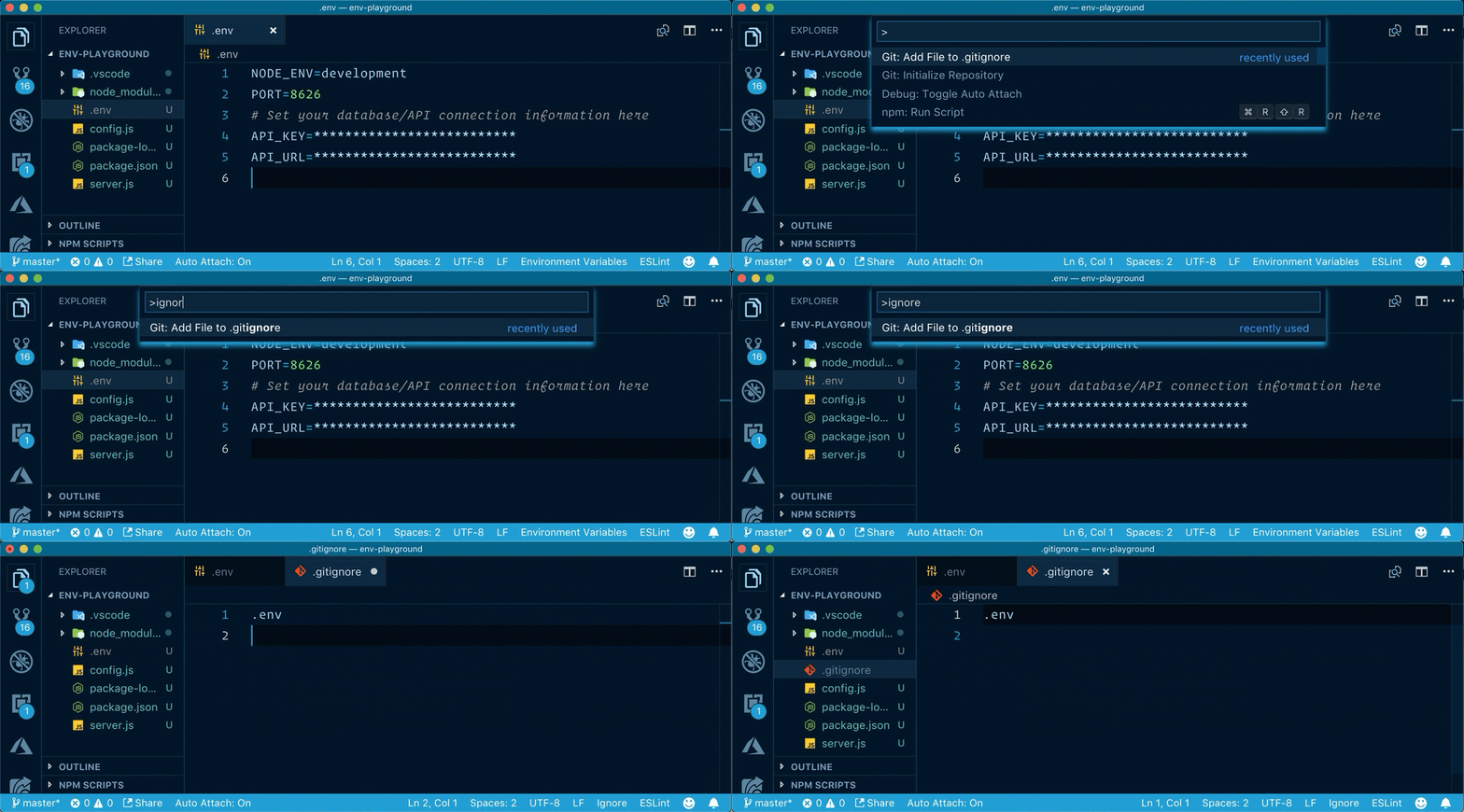
For your local development environment, the most common way to manage these variables is by using a .env file. This is a simple text file that you create at the root of your project.
The format is a straightforward list of key-value pairs:
# This is a comment
API_KEY=abc123supersecretkey
DATABASE_URL=postgres://user:password@host:port/database
The video below gives a clear, practical demonstration of how to set this up in a Next.js project, which is a common framework you'll encounter when vibe coding web apps.
Keeping Your Data Secure: Environment Variables in NextJS / React
This video by Josh tried coding provides a concise walkthrough of creating and using environment variables in a React/Next.js application.
Watch the first two segments to see the process in action: The introduction explains the problem with hardcoding keys. The demonstration shows how to create a .env.local file and add a key-value pair.
.env vs. .env.local
You'll often see .env.local used instead of just .env. This is a common convention in modern frameworks like Next.js:
.env: Use this file for default, non-secret variables that the whole team can share. This file can be committed to GitHub..env.local: Use this for your personal, secret variables (like API keys). This file should never be committed to GitHub. Any variables in this file will override the ones in.env.

This brings us to a critical rule. The file containing your secrets (.env.local) must be listed in your .gitignore file. As you learned in the DreamHost article, .gitignore is a file that tells Git (the version control tool) which files to ignore. By adding .env.local to .gitignore, you prevent yourself from accidentally uploading your secrets to GitHub.
Accessing Variables in Code and Production
Now that you have your secrets in a .env.local file, how does your code use them? And if that file isn't on GitHub, how does your live website on Vercel get the values?
Server vs. Client-Side Access
In a JavaScript/Node.js environment, you typically access these variables with process.env.YOUR_VARIABLE_NAME.
Crucially, for security, these standard environment variables are only available in server-side code—code that runs on a server, not in the user's browser. If you expose a secret API key to the client-side (the browser), a user could easily find it by inspecting the page's source.
Frameworks like Next.js have a special convention for variables that are safe to expose to the browser (like a Google Analytics ID): you must prefix them with NEXT_PUBLIC_.
From Local to Live
So, if .env.local is ignored by Git, how does your deployed app work? Deployment platforms like Vercel have their own secure "environment" where you can define your production variables. You simply copy and paste your keys from your local .env.local file into the settings UI on Vercel. Your live app will then read the variables from there, not from a file.
The same video from earlier explains these concepts perfectly.
Keeping Your Data Secure: Environment Variables in NextJS / React
This part of the video explains how to access variables in code and how they are managed in production.
Watch the section on server-side access. This explains that variables are only available on the server for security and shows how to access them with process.env. Next, watch how to expose variables to the browser using the NEXT_PUBLIC_ prefix. This is for non-sensitive data only. Finally, and most importantly, watch the part that explains how production environments work. It shows the Vercel UI where you'll add your secrets for your live app.
This workflow is central to modern development: develop locally with secrets in an ignored .env.local file, and configure the same secrets in your deployment provider's secure dashboard for the live version.
Conclusion
You now understand one of the most important security principles in app development. Environment variables are not just a technical formality; they are a fundamental practice for protecting your application and your users. When Claude asks you to create a .env file and add an API key, you now know it's guiding you to separate your secret keys from your source code to prevent them from being exposed.
Key Takeaways:
- Never hardcode secrets like API keys or passwords directly in your code.
- Use environment variables to load sensitive data from outside your source code.
- The
.env.localfile is where you store these variables for your local development environment. - Always add
.env.local(or any file with secrets) to your.gitignorefile to keep it out of version control. - Deployment platforms like Vercel provide a secure interface to manage the environment variables for your live application.
In our next lesson, we will tie together everything we've learned about project structure and configuration files to draw a clear line between the source code you actively create and the other files you generally don't touch.