Recommended resources
The freely available resources this lesson will direct you to.
In the previous lesson, we established control over our lead's primary dynamic shape using the amplitude envelope, ENV 1. We learned how to sculpt plucky, sustained, and percussive forms, giving our sound a fundamental structure in time. However, a truly impactful lead often has a life of its own at the very instant a note is played—a distinct character in its attack that helps it punch through a dense DnB mix.
This lesson delves into creating that initial impact. We will go beyond the overall volume shape and learn how to assign a secondary envelope (like ENV 2) to key timbral parameters like filter cutoff and FM amount. This technique is fundamental to designing leads that have a sharp, defined transient, giving them a professional sense of punch and presence. You'll understand the strategic decision to separate the amplitude's shape from the timbre's shape, a core concept in intentional sound design.
Decoupling Dynamics: Amplitude vs. Timbre
Think of ENV 1, our amplitude envelope from the last lesson, as controlling the sound's silhouette over time. It dictates the overall volume from start to finish. A secondary envelope, by contrast, controls a burst of textural change within that silhouette, most often right at the beginning.
By using a separate envelope for timbre, we can create a sharp, fast timbral event (like a filter quickly opening and closing) while the sound's overall volume might be sustaining or decaying more slowly. This decoupling is what creates a sense of "punch" or "snap" without simply making the sound's attack louder.

For this purpose, the secondary envelope is typically shaped like an aggressive pluck:
- Attack: Very fast (0-5 ms)
- Decay: Short (e.g., 50-300 ms). This is your main control for the length of the transient effect.
- Sustain: Zero (-inf dB). This is crucial. You want the timbral effect to be a "one-shot" event at the start of the note, not something that continues as you hold the key.
- Release: Very short (e.g., 10-50 ms).
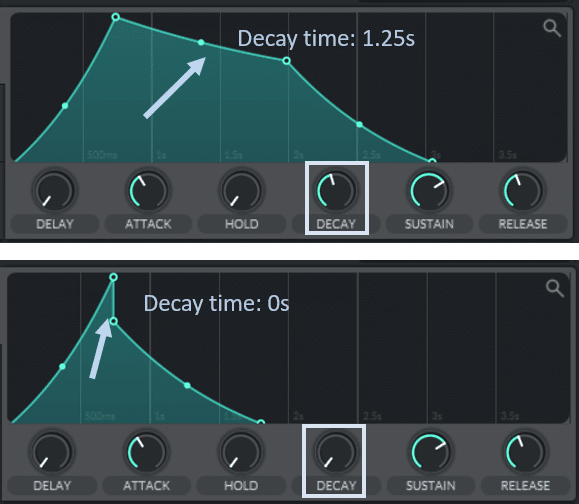
Let's explore the two most powerful applications of this technique for DnB lead design.
Application 1: Filter Cutoff for Transient Punch
Modulating the filter cutoff is the classic way to add a percussive click or "zap" to the start of your lead. This helps the note's attack cut through the mix, especially on smaller speakers, without adding harsh, sustained high frequencies.
The "Why" and "How"
The Goal: To create a brief moment of brightness at the note's inception that quickly resolves to the sound's main body.
The Process:
- Set your filter's Cutoff knob to a position that represents the main body of your sound. For a lead, this might be somewhere in the mid-to-high range, but not fully open.
- In an unused envelope slot (e.g., ENV 2), create the fast, plucky shape described above (zero sustain, short decay).
- Drag ENV 2 onto the Filter Cutoff knob.
- Adjust the modulation amount (the blue arc that appears around the knob). A small amount will add a subtle "tick," while a large amount will create a prominent "zap" or "laser" effect at the start.
When a note is played, the filter cutoff instantly jumps up by the modulation amount and then rapidly sweeps down to the knob's static position, governed by ENV 2's decay time.
The following reading reinforces this exact professional workflow. Pay attention to the justification for applying an envelope to the filter.
This Q&A with a producer provides direct insight into creating aggressive DnB leads.
Focus on the answer to question 9, "In DnB the leads are quite aggressive, what are some sound design tips for making those scorching synth leads?" The author explicitly recommends using an envelope automation on both an oscillator's warp mode and the filter unit to make the sound "go almost screechy." This confirms the technique's role in creating aggressive transients.
Application 2: FM Amount for Metallic/Gritty Transients
While filter modulation adds punch, modulating the FM amount adds texture. This is a go-to technique in Neurofunk and for creating the gritty, characterful leads found in tracks by artists like Fox Stevenson.
The "Why" and "How"
The Goal: To introduce a burst of complex, often inharmonic or metallic, frequencies right at the start of the note, adding aggression and a unique textural fingerprint.
The Process:
- Set up your oscillators for FM. A common starting point is having OSC B performing FM on OSC A. Choose a harmonically simple wavetable (like a sine wave from 'Analog_BD_Sin') for OSC B to start.
- Turn the FM (from B) knob on OSC A all the way down.
- Assign a very fast secondary envelope (ENV 2 or 3) to the FM (from B) knob. The decay for this can be even shorter than for a filter pluck (e.g., 20-150 ms) to create a sharp, "spitting" transient.
- Dial in the modulation amount. Even small amounts can have a dramatic effect.
This creates a brief, aggressive burst of FM synthesis at the note's attack, which then disappears, leaving the core tone of the oscillator. It's an incredibly effective way to make a lead sound intricate and "alive."
The following video, while demonstrating a variety of DnB sounds, shows this principle in action. The creator often uses LFOs in "Envelope" mode, which function identically to a standard envelope for our purposes.
How to Make EVERY SOUND in DRUM & BASS - SERUM (COMPLETE GUIDE) FL Studio 21
The video "How to Make EVERY SOUND in DRUM & BASS" by Inverse Audio is a rapid-fire demonstration of sound design techniques.
Watch the section on creating a "Fog Horn" sound. Pay close attention to how the creator uses one LFO (set to ENV mode) to modulate both the filter and the FM amount simultaneously. Observe the LFO being applied to the filter cutoff. Notice the same LFO being applied to the FM amount. This demonstrates how a single secondary modulation source can be used to shape multiple timbral parameters at once to create a cohesive and dynamic transient.
Advanced Control: LFOs as Multi-Stage Envelopes
As you've seen, Serum's LFOs can be set to ENV mode, allowing them to act as one-shot modulators that re-trigger with each new note. Since you're comfortable with Serum's interface, this unlocks a significant advantage: you can draw much more complex envelope shapes than the standard ADSR allows.
This is perfect for creating intricate transients with multiple stages of movement. For more detail on this and other advanced modulation tweaks, the following resource is highly recommended.
25 Essential Serum Sound Design Tips
This article from CFA-Sound offers several power-user tips relevant to our goal.
First, read tip #24 LFO AS MULTISTAGE ENVELOPE. This explains the mechanics and creative potential of using an LFO in Env mode to get more complex shapes than a standard ADSR. Then, review tip #16 TWEAKING INSIDE THE MODULATION MATRIX. This covers how to fine-tune your modulation's direction (uni-directional vs. bi-directional), which is crucial for ensuring your transient envelope only moves the parameter in the intended direction.
Conclusion
You've now learned a technique that is central to modern, impactful sound design. By using a secondary envelope to modulate timbre independently from amplitude, you can give your leads the necessary punch, aggression, and character to stand out.
Key Takeaways:
- Decouple Dynamics: Use ENV 1 for the overall volume shape and a secondary envelope (like ENV 2 or an LFO in
Envmode) for timbral movement. - Transient Envelope Shape: For transients, a secondary envelope should have a fast attack, short decay, and zero sustain.
- Modulating Filter Cutoff: The primary method for adding a clean "punch" or "zap" to the start of a sound.
- Modulating FM Amount: A powerful technique for adding a burst of metallic grit or aggressive texture to the transient, essential for Neurofunk and other complex styles.
- The Decay Time Is Key: The decay setting on your secondary envelope directly controls the length of the transient effect.
In our next lesson, we will shift from one-shot modulation to cyclic modulation. You'll learn how to apply a tempo-synced LFO to parameters like panning and wavetable position to create the continuous rhythmic movement that gives DnB leads their hypnotic, driving quality.