Recommended resources
The freely available resources this lesson will direct you to.
- Serum Tutorial - Dynamic Lead Sound with LFO & Velocity | Sound Designwww.youtube.com
- Complete Guide To Master Serum 2 – EP6: LFO Movement Tricks For Better Sound Designwww.youtube.com
- Hidden Serum Tip: Modulate the Unison Engine on the Global Pagewww.adsrsounds.com
- How to Make a Supersaw Wavetable in Xfer Serum - ADSR Soundswww.adsrsounds.com
Hello! In our last session, we focused on creating sharp, defined transients using secondary envelopes—a "one-shot" modulation technique to give your leads initial punch and character. We saw how a quick burst of modulation on a filter or FM amount can make a sound cut through a dense mix.
Today, we shift our focus from initial impact to sustained energy. This lesson is all about creating the continuous, rhythmic movement that makes DnB leads feel alive and hypnotic. We will achieve this by learning how to apply a tempo-synced Low-Frequency Oscillator (LFO) to key parameters. You'll understand how this cyclic modulation provides the driving groove and texture that is essential for high-energy genres, moving beyond static, sustained notes into territory that is dynamic and rhythmically engaging.
From One-Shot Impact to Cyclic Groove
In the previous lesson, we treated modulation sources like a single event: a note is hit, the envelope fires once, and its job is done. This is perfect for transients.
A looping LFO, however, is fundamentally different. It's a continuous, repeating cycle of modulation that runs as long as a note is held (and sometimes even when it isn't). This is the engine that drives rhythmic interest in your sound. The key is to lock this cycle to your project's tempo, making the modulation a core part of the track's groove.
The following video provides an excellent overview of Serum's LFO section. As you watch, focus on the fundamental controls that enable rhythmic modulation.
Complete Guide To Master Serum 2 – EP6: LFO Movement Tricks For Better Sound Design
This video, "Complete Guide To Master Serum 2 – EP6," by Zen World, breaks down the LFO section's core functionality.
First, watch the introduction to basic LFO application. Note how the LFO is assigned to the level parameter to create a rhythmic pulse, and how the Rate knob is used to select tempo-synced values like 1/8 and 1/16. Next, jump to the explanation of the different LFO modes. Pay close attention to the distinction between Trig (re-triggers from the start on each new note) and Free (runs continuously, synced to the DAW clock). This is a critical sound design choice: Trig Mode: Use this when you want a consistent, predictable rhythmic pattern every time you play a note. It's ideal for creating tight, arpeggiator-like lead lines. Free Mode: Use this when you want the modulation to feel less locked to the performance, creating a more organic, evolving texture that seems to have a life of its own within the track's tempo. Env Mode: You'll recognize this from our last lesson; it makes the LFO behave as a one-shot envelope. Finally, watch the concluding summary, which perfectly reinforces the conceptual difference between LFOs (constant, looping movement) and envelopes.
Now that you're familiar with the core mechanics, let's explore the most effective parameters to modulate for creating rhythmic interest in a DnB lead.
Core Rhythmic Modulation Targets
Choosing what to modulate is just as important as how you modulate it. For a DnB lead, our goal is typically to add energy and movement without cluttering the mix. Here are four primary targets.
1. Wavetable Position
Modulating the wavetable position rhythmically scans through the wavetable's different frames, creating a constant timbral evolution. This is arguably the most powerful way to make a lead sound dynamic and complex.
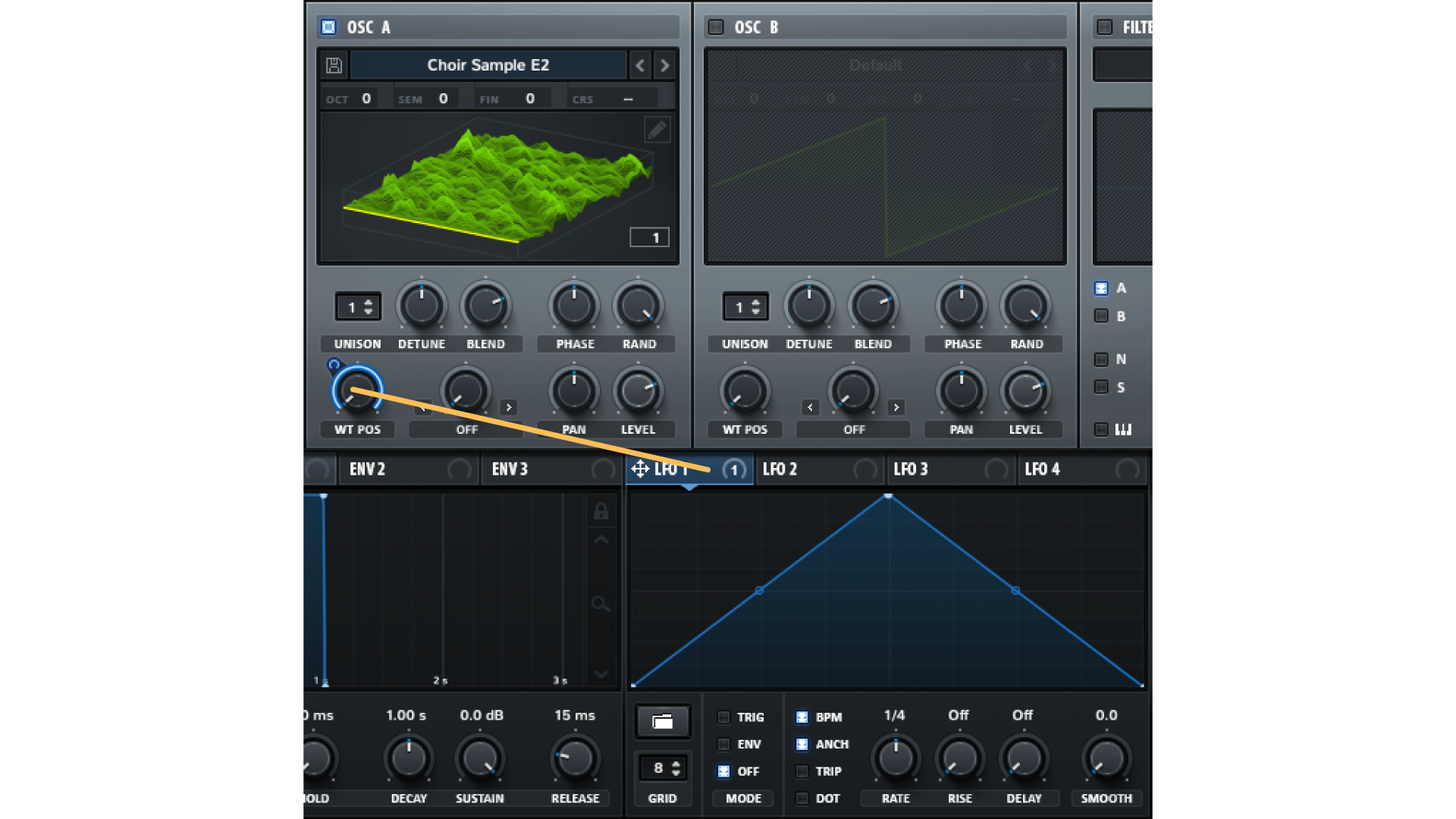
Why it's effective for DnB:
For a supersaw lead, rhythmically modulating the wavetable position can create a sense of movement and "phasing" that enhances its width and energy. If you've created a custom wavetable by resampling a supersaw (a technique you might find useful), modulating its position with an LFO simulates the evolving detune of the original sound but in a controlled, rhythmic way.
The following resource discusses this exact application.
How to Make a Supersaw Wavetable in Xfer Serum
This article from ADSR Sounds details a technique for creating custom supersaw wavetables. We're interested in how it suggests animating them.
Read Step 3 – Clean Up and Explore and Step 5 – Make It Move. Notice the specific recommendation to "Modulate the Wavetable Position with an LFO" to make the sound feel alive. It highlights that using a tempo-synced LFO (e.g., 1/2 or 1/4 notes) keeps this movement musical and intentional.
2. Filter Cutoff
This is a classic synthesis technique for creating rhythmic pulses in brightness. By applying a tempo-synced LFO to the filter's cutoff frequency, you can create everything from subtle rhythmic filtering to aggressive, wobbling textures.
Why it's effective for DnB:
In a fast-paced DnB track, a lead with a static filter setting can sound dull. A rhythmic filter modulation helps the lead "breathe" with the track's groove. A 1/8 or 1/16 note LFO on the cutoff is a staple for adding drive and energy to dancefloor leads. You saw a practical example of this in the Zen World video (LINK) in the section from 00:21:54 to 00:22:40, where an LFO was used to create a rhythmic "wub" by modulating the filter.
3. Panning
Applying a slow, synced LFO to an oscillator's pan control creates automatic stereo movement.
Why it's effective for DnB:
Panning modulation is a simple way to give a lead a sense of space and prevent it from sounding static and one-dimensional. It helps the lead occupy a wider area in the stereo field, making it feel more expansive. Be cautious with fast LFO rates here, as they can become distracting; slower rates like 1/2, 1 bar, or even 2 bars often work best.
The video below shows a clean, simple example of this.
Serum Tutorial - Dynamic Lead Sound with LFO & Velocity | Sound Design
This tutorial from Production Music Live demonstrates a dynamic lead. While its main topic is velocity modulation, it contains a perfect demonstration of pan modulation.
Watch the short segment on using an LFO to control panning. The goal is simply to increase the stereo field, and you can clearly hear how this subtle movement adds width.
4. Level (Volume)
Modulating an oscillator's level with an LFO creates a tremolo (amplitude modulation) or gating effect.
Why it's effective for DnB:
This is perfect for creating rhythmic, trance-gate-style patterns. By using an LFO with a sharp, rectangular shape (like a square wave), you can chop a sustained note into a rhythmic sequence. This can add intricate rhythmic layers without adding new melodic notes. A common application is to apply this to a noise oscillator or a subtle secondary oscillator layer to add rhythmic texture underneath the main lead melody.
Advanced Technique: Modulating Global Unison Parameters
Since you're comfortable with Serum, here is a more advanced technique that offers a unique way to generate stereo movement. Instead of modulating an oscillator's pan, try modulating the unison parameters on the Global tab.
Hidden Serum Tip: Modulate the Unison Engine on the Global Page
This ADSR Sounds tutorial reveals a powerful, often overlooked feature in Serum.
Read through this article, focusing on Step 3 (Modulate the Unison Width) and Step 4 (Modulate Wavetable Position (Per Unison Voice)). The key insight here is that modulating these global parameters affects how the individual unison voices behave relative to each other. Modulating the global Width creates a complex "swirling" texture, and modulating the global Wavetable Position moves the wavetable differently for each voice. This produces a far more organic and complex stereo movement than simple left-right panning. It's an excellent technique for making wide leads and pads feel more "alive."
Conclusion
You now have a complete toolkit for adding rhythmic, cyclic movement to your lead sounds. By understanding the "why" behind tempo-synced LFOs, you can intentionally design leads that are not just harmonically interesting but also rhythmically compelling.
Key Takeaways:
- Cyclic vs. One-Shot: Envelopes provide one-shot impact, while looping LFOs provide continuous, rhythmic groove.
- Tempo Is King: Use the
BPMsetting on LFOs to lock modulation to your track's tempo for musically relevant movement. Trigvs.Free: ChooseTrigfor consistent, note-for-note patterns andFreefor more organic, free-flowing textures.- Primary Targets: The most effective parameters for rhythmic modulation are Wavetable Position (timbre), Filter Cutoff (brightness), Pan (stereo width), and Level (gating/tremolo).
- Advanced Stereo: For more complex and organic stereo movement, modulate the unison parameters on the Global tab.
In our next lesson, we'll take this a step further. We've been using Serum's stock LFO shapes (triangle, sine, saw). Next, you'll learn how to design custom LFO shapes in Serum's editor, allowing you to create unique and complex modulation patterns that go far beyond the basics.