Recommended resources
The freely available resources this lesson will direct you to.
Introduction
In our last lesson, you learned how to perform a detailed diagnosis of a CNN's performance using confusion matrices, precision, recall, and F1-scores. This allows you to pinpoint not just if a model is underperforming, but where it's getting confused. A common reason for such confusion and for a gap between training and validation accuracy is that the model hasn't seen enough variety in the training data, causing it to overfit.
This lesson directly addresses that problem. We will explore data augmentation, a powerful and widely-used technique to artificially expand your training dataset. The goal is to teach your model to generalize better by exposing it to a wider range of variations of your existing images.
By the end of this lesson, you will be able to apply common data augmentation techniques to your image datasets in PyTorch, leading to more robust and accurate models.
1. What is Data Augmentation?
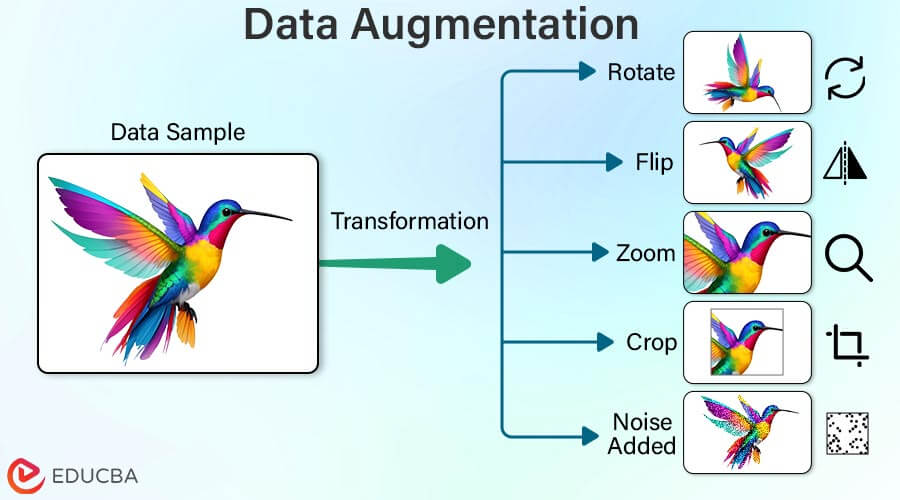
At its core, data augmentation is the process of creating new, modified training samples from your existing ones. For an image of a cat, you might create new versions that are horizontally flipped, slightly rotated, or have different brightness levels. The key is that these transformations don't change the image's fundamental label—a flipped cat is still a cat.
By training on this expanded, more diverse dataset, the model learns to become invariant to these minor changes. It focuses on the essential features that define the object (e.g., the cat's ears and whiskers) rather than superficial ones (e.g., its orientation or the lighting conditions). This process helps reduce overfitting and improves the model's ability to generalize to new, unseen data.
To get a concise overview of why this is so effective, watch the beginning of the following video.
Data Augmentation in PyTorch: Improve Models with Existing Data
The video 'Data Augmentation in PyTorch' from NeuralNine provides a great introduction to the concept and its purpose.
Watch the first 1 minute and 23 seconds. Focus on the explanation of how augmentation makes a model more robust and helps it generalize.
2. A Tour of Common Augmentation Techniques
Data augmentation techniques can be grouped into several categories. Let's explore the most common ones you'll encounter in computer vision.
A Practical Guide to Data Augmentation in PyTorch ...
This article, 'A Practical Guide to Data Augmentation in PyTorch', provides an excellent overview of different types of augmentations. We'll use it to structure our understanding.
Read the section 'Types of Data Augmentation'. Pay attention to the two main categories we'll focus on today: Geometric Transformations and Color and Appearance Adjustments. Just read the descriptions and examples for these two categories for now.
As you just read, the main types of simple augmentations are:
- Geometric Transformations: These alter the spatial properties of the image. Examples include
RandomHorizontalFlip,RandomRotation, andRandomCrop. They teach the model to recognize an object regardless of its position, orientation, or scale. - Color and Appearance Adjustments: These change the pixel values. Examples include
ColorJitter(which modifies brightness, contrast, and saturation) andRandomGrayscale. These help the model become robust to variations in lighting and camera quality.
To see these transformations in action, the following video demonstrates several of them individually.
Pytorch Data Augmentation using Torchvision
The video 'Pytorch Data Augmentation using Torchvision' by Aladdin Persson offers clear, visual examples of individual transforms. This helps build intuition for what each one does.
Watch the following segments to see different transforms applied: Random Horizontal Flip (02:36 - 04:11): A very common and effective technique. Color Jitter (04:15 - 04:48): Simulates different lighting conditions. Resize and Random Crop (04:48 - 05:03): Forces the model to focus on different parts of the object. Random Rotation (05:03 - 05:21): Helps with objects that can appear at different angles. Random Grayscale (05:49 - 06:03): Teaches the model to rely on shape and texture, not just color. \nNotice how each transform introduces a plausible variation of the original image.
It is crucial to choose augmentations that make sense for your dataset. For example, a vertical flip might not be suitable for digit recognition (a "6" could become a "9"), but it could be perfectly fine for aerial satellite imagery.
3. Implementing an Augmentation Pipeline in PyTorch
In PyTorch, you can easily chain these transformations together into a pipeline using torchvision.transforms.Compose. This pipeline is then passed to your Dataset during initialization.
A key concept here is online augmentation: the transformations are applied on-the-fly each time an image is loaded from the dataset during a training epoch. This means the model sees a slightly different version of each image in every epoch, which is a very efficient way to expand the dataset's diversity without saving all the augmented images to disk.
The following video demonstrates the complete workflow:
- Defining a transform pipeline with
Compose. - Creating two versions of the dataset: one with augmentation for training and one without for testing.
- Training a model on both and comparing the final accuracy.
Data Augmentation in PyTorch: Improve Models with Existing Data
Let's return to the NeuralNine video to see a complete, end-to-end implementation. This will connect the concepts to practical code.
Watch the following sections carefully: Defining Transform Pipelines (04:07 - 06:42): See how transforms.Compose is used to create a pipeline of augmentations (transforms_augmented). Note that a separate, simpler pipeline is used for the test set, which typically only includes resizing and normalization. Applying Transforms to the Dataset (06:42 - 10:36): Observe how the augmentation pipeline is passed to the CIFAR10 dataset. The presenter also shows how to concatenate the original and augmented datasets to double the data, though a more common modern approach is to apply random augmentations to the training set on-the-fly. Comparing Results (10:36 - 15:28): The most important part! The presenter trains the same model twice—once without augmentation and once with it. Pay close attention to the final accuracy scores. The improvement you see is a direct result of data augmentation.
As demonstrated, applying a simple set of augmentations can lead to a significant improvement in your model's performance on the test set. This is a clear sign of improved generalization.
4. Advanced Concepts and Further Exploration
While the torchvision.transforms module is your starting point, the field of data augmentation is vast. Here are a few advanced topics that are valuable to be aware of as an aspiring AI Engineer.
Sample Mixing Techniques
Instead of modifying a single image, techniques like Mixup and CutMix create new samples by combining two different images and their labels.
- Mixup performs a linear interpolation of two images and their one-hot encoded labels. The result is a blended image with a soft label (e.g., 70% "cat", 30% "dog").
- CutMix cuts a patch from one image and pastes it onto another, and the labels are mixed proportionally to the area of the patch.
These methods act as strong regularizers, forcing the model to learn less confidently and make smoother predictions, which often improves robustness. You can read more about them in the "Mixing Samples to Improve Learning" section of the Medium article (Resource ID LINK).
Specialized Augmentation Libraries
For more complex tasks or higher performance, you might turn to specialized libraries:
- Albumentations: A very fast and flexible library that works on NumPy arrays. It's popular in industry and Kaggle competitions, especially for tasks involving more than just images, like segmentation masks and bounding boxes.
- Kornia: A GPU-accelerated, differentiable library that works directly on PyTorch tensors. Because its operations are differentiable, gradients can flow through the augmentations, which enables advanced research applications.
You can explore these further in the "Going Beyond torchvision" section of the same Medium article (Resource ID LINK).
Conclusion
In this lesson, you've learned how to leverage data augmentation to build more robust computer vision models. By artificially creating more training data, you help your model learn the core features of objects and become less sensitive to irrelevant variations.
Key Takeaways:
- Data augmentation is a regularization technique that creates new training data by applying transformations (e.g., flips, rotations, color shifts) to existing images.
- The goal is to improve model generalization and reduce overfitting by teaching the model invariance to these transformations.
- In PyTorch, augmentation pipelines are built using
torchvision.transforms.Composeand are applied online (on-the-fly) during training via theDataset'stransformargument. - Choosing appropriate augmentations depends on the dataset; transformations should create plausible variations of the original data.
- Even simple augmentations can lead to significant improvements in validation and test accuracy.
In our next lesson, we'll explore another powerful technique for boosting model performance, especially when you have limited data: transfer learning. We'll see how you can take a model that has already been trained on a massive dataset like ImageNet and adapt it to solve your specific task.