Recommended resources
The freely available resources this lesson will direct you to.
Introduction
Welcome back! In our last lesson, you successfully trained your first Convolutional Neural Network and evaluated its performance using a single number: overall accuracy. While accuracy is a useful starting point, it often hides crucial details about a model's performance. For example, a model with 90% accuracy might be excellent at identifying 9 out of 10 classes but fail completely on the 10th one.
To become a proficient AI engineer, you need to move beyond a single score and learn to perform a more detailed diagnosis of your model. This lesson is dedicated to that skill. We will explore how to evaluate a CNN using an accuracy score, a confusion matrix, and per-class metrics like precision, recall, and F1-score.
By the end of this lesson, you will be able to answer not just "how accurate is my model?" but also "where is my model getting confused, and how well does it perform on each specific category?"
1. The Limits of Accuracy and the Power of the Confusion Matrix
Overall accuracy tells us the percentage of correct predictions across all classes. It's a great high-level metric, but it doesn't show us the types of errors the model is making. To see that, we need a confusion matrix.
A confusion matrix is a grid that compares the model's predicted labels against the actual (true) labels. This allows us to see, for instance, how many times the model mistook a "Shirt" for a "Pullover".
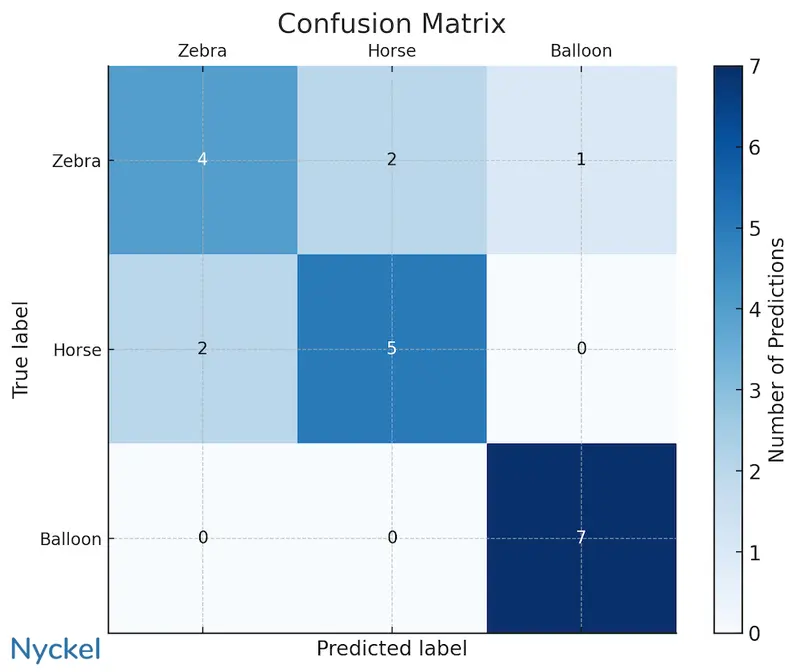
To understand how to interpret a confusion matrix in more detail, let's watch a short video.
CNN Confusion Matrix with PyTorch - Neural Network Programming
This video from the deeplizard channel provides an excellent explanation of how to read a confusion matrix, using the Fashion-MNIST dataset as an example.
Watch from 01:27 to 04:29. Focus on understanding why the dark diagonal represents correct predictions and how the off-diagonal cells reveal specific points of confusion for the network.
Implementing a Confusion Matrix in PyTorch
Generating a confusion matrix involves three main steps:
- Run the entire test dataset through your trained model to get predictions for every sample.
- Use a library to compute the matrix from these predictions and the true labels.
- Plot the matrix for visual interpretation.
A modern and clean way to do this is by using the torchmetrics library for computation and mlxtend for plotting.
This guide from learnpytorch.io demonstrates a best-practice workflow for creating a confusion matrix. It's a great reference for practical implementation.
Please read section 10, 'Making a confusion matrix for further prediction evaluation'. Pay attention to the three steps outlined: Making predictions: Notice the loop over the test_dataloader inside a torch.inference_mode() context to gather all model predictions (y_preds). Creating the matrix: See how torchmetrics.ConfusionMatrix is instantiated and used to generate the confmat_tensor. Plotting: Observe the use of mlxtend.plotting.plot_confusion_matrix to create the final visualization.
This process gives you a powerful visual diagnostic tool to understand your model's behavior at a glance.
2. Quantifying Performance: Precision, Recall, and F1-Score
The confusion matrix is excellent for visualization, but we also need quantitative metrics to describe per-class performance. This is where Precision, Recall, and F1-Score come in.
Before defining them, we need to understand four basic terms for a given class (e.g., "Cat"):
- True Positive (TP): The model correctly predicts "Cat" when the image is a cat.
- False Positive (FP): The model incorrectly predicts "Cat" when the image is not a cat (e.g., a dog).
- True Negative (TN): The model correctly predicts "Not Cat" when the image is not a cat.
- False Negative (FN): The model incorrectly predicts "Not Cat" when the image is a cat.
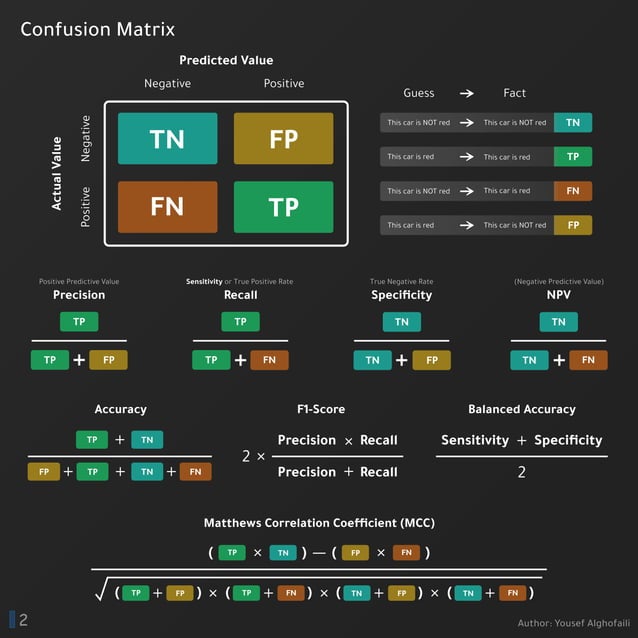
With these terms, we can define our metrics:
Precision
Precision answers the question: "Of all the times the model predicted a certain class, how often was it correct?"
A high precision for the "Cat" class means that when the model says it's a cat, it's very likely to be a cat. This metric is important in scenarios where false positives are costly (e.g., a spam filter incorrectly marking an important email as spam).
Recall (or Sensitivity)
Recall answers the question: "Of all the actual instances of a class, how many did the model correctly identify?"
A high recall for the "Cat" class means the model is good at finding all the cats in the dataset. This metric is critical where false negatives are costly (e.g., a medical test failing to detect a disease).
F1-Score
The F1-score is the harmonic mean of Precision and Recall. It provides a single score that balances both metrics.
The F1-score is useful when you need a balance between precision and recall, especially if you have an uneven class distribution.
The following video provides a clear, step-by-step walkthrough of how these metrics are calculated directly from a confusion matrix.
Precision, Recall and F1 Score for Multiclass Classification - sklearn | Python
To solidify your understanding, this video from RegenerativeToday manually calculates precision, recall, and F1-score for a multi-class problem. This will help you connect the formulas to the numbers in a confusion matrix.
Watch the following segments: Precision Calculation (05:22 - 07:48): Follow how precision is calculated for two different classes by identifying TP and FP in the confusion matrix. Recall Calculation (07:48 - 09:49): See how recall is calculated by identifying TP and FN. F1-Score (09:49 - 10:31): Understand how the F1-score is derived from the precision and recall values.
3. The Classification Report: All Metrics at a Glance
Manually calculating these metrics is insightful but impractical. Fortunately, scikit-learn provides a convenient function, classification_report, that does all the work for us.
To use it, you first gather your model's predictions on the test set (as you did for the confusion matrix), and then pass the true labels and predicted labels to the function.
PyTorch: Training your first Convolutional Neural Network (CNN)
Let's look at a practical guide from pyimagesearch.com that shows how to generate a complete classification report after training a PyTorch model.
Read the section '[INFO] evaluating network...'. In the code block, observe the following: The loop over testDataLoader to collect all the preds. The final call to classification_report, passing in the true targets (testData.targets) and the model's predictions. Look at the example output to see the final report, which contains precision, recall, and f1-score for every class.
The output of classification_report is a text table that gives you a comprehensive summary of your model's performance, including:
- Precision, recall, and F1-score for each class.
- Support: The number of true instances for each class.
- Macro Avg: The average of the metric across all classes (each class has equal weight).
- Weighted Avg: The average of the metric, weighted by the support of each class. This is more representative if you have class imbalance.
Conclusion
In this lesson, you've expanded your model evaluation toolkit far beyond a single accuracy score. You now have a framework for deeply analyzing your model's performance.
Key Takeaways:
- Overall accuracy provides a high-level summary but can be misleading, especially with imbalanced datasets.
- A confusion matrix is a powerful visual tool that shows exactly where your model is making errors by comparing predicted labels to true labels.
- Precision measures the reliability of your model's positive predictions (minimizing false positives).
- Recall measures your model's ability to find all actual positive instances (minimizing false negatives).
- The F1-score provides a single, balanced measure of both precision and recall.
- Libraries like
torchmetrics,mlxtend, andscikit-learnmake it easy to generate these visualizations and reports.
You've learned to identify what and where your model's weaknesses are. In our next lesson, we will start exploring techniques to address these weaknesses. We will begin with data augmentation, a powerful method for creating more training data and building more robust models that generalize better to unseen images.