Recommended resources
The freely available resources this lesson will direct you to.
Introduction
Welcome back! In our previous lesson, you successfully designed the "blueprint" for a Convolutional Neural Network by defining its architecture in PyTorch. You learned how to stack nn.Conv2d and nn.MaxPool2d layers and, critically, how to calculate the tensor dimensions to connect them to the final nn.Linear classifier.
So far, our network is just a structure with random, uninitialized weights. It doesn't "know" anything. Today, we will bring it to life. This lesson focuses on the core process of training your CNN on a standard image dataset and monitoring its performance.
We will cover the complete workflow:
- Loading and preparing a dataset (CIFAR-10).
- Defining a loss function and an optimizer.
- Implementing the training loop to update the model's weights.
- Evaluating the trained model's accuracy on unseen data.
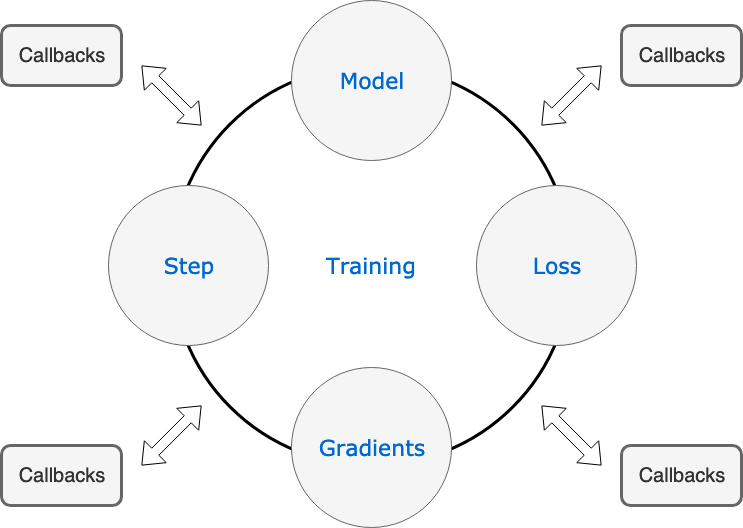
This entire process is often called the training loop, a fundamental concept in deep learning.
1. Preparing for Training: Data, Loss, and Optimizer
Before we can start training, we need three key components:
- Data: A labeled dataset to learn from. We'll use CIFAR-10, a popular benchmark dataset of 32x32 color images in 10 classes (airplanes, cars, birds, etc.).
torchvisionmakes it incredibly easy to load. - Loss Function: A way to measure how wrong the model's predictions are. For multi-class classification,
nn.CrossEntropyLossis the standard choice. It combines a softmax activation and the negative log-likelihood loss, making it perfect for our needs. - Optimizer: An algorithm that updates the model's weights based on the calculated loss. We will use Stochastic Gradient Descent (SGD) with momentum, a classic and effective choice.
The following reading from the official PyTorch tutorials demonstrates how to set up these three components in code.
This official PyTorch tutorial, 'Training a Classifier', walks through the essential setup steps for training. It's a foundational resource for any PyTorch practitioner.
Please read the following two sections: '1. Load and normalize CIFAR10': Observe how torchvision.datasets.CIFAR10 is used to download the data and transforms.Compose is used to convert images to tensors and normalize their pixel values. Notice the creation of the trainloader. '3. Define a Loss function and optimizer': See the simple one-line instantiations of nn.CrossEntropyLoss and optim.SGD.
To recap, your setup will include:
- A
transformpipeline to convert images to normalized tensors. - A
trainsetandtestsetcreated usingtorchvision.datasets. - A
trainloaderandtestloadercreated usingtorch.utils.data.DataLoaderto serve data in batches. - An instance of
nn.CrossEntropyLossfor yourcriterion. - An instance of
torch.optim.SGDfor youroptimizer, passing in the model's parameters (net.parameters()) and a learning rate.
2. The Training Loop: Teaching the Network
The training loop is where the learning happens. It consists of two nested loops:
- An outer loop that iterates over the entire dataset multiple times. Each full pass over the dataset is called an epoch.
- An inner loop that iterates over the
DataLoader, processing one batch of data at a time.
For each batch, we perform five core steps:
- Get the
inputsandlabelsfrom theDataLoader. - Zero the gradients:
optimizer.zero_grad(). - Forward pass: Feed the
inputsto the network to getoutputs. - Compute loss: Compare the network's
outputswith the truelabelsusing thecriterion. - Backward pass & Optimize: Calculate gradients with
loss.backward()and update the weights withoptimizer.step().
A common point of confusion is Step 2: optimizer.zero_grad(). Why is this necessary? In PyTorch, gradients are accumulated (i.e., added up) on subsequent backward passes. If we didn't clear them, the new gradients would be added to the gradients from the previous batch, leading to incorrect weight updates.
The following video provides an exceptionally clear explanation and visual demonstration of this concept.
CNN Training Loop Explained - Neural Network Code Project
This video from deeplizard provides an excellent, in-depth explanation of why optimizer.zero_grad() is necessary and even uses a debugger to show what's happening under the hood.
Watch from 06:57 to 16:17. Pay close attention to the explanation of gradient accumulation. The debugging session starting at 10:45 is particularly insightful, as it visually demonstrates the gradients being populated by loss.backward() and then being reset to zero by optimizer.zero_grad() before the next batch.
Now that you understand the "why" behind each step, let's see the complete training loop in code.
Let's return to the official PyTorch tutorial to see these five steps assembled into a complete training loop.
Read the section '4. Train the network'. Analyze the code block. Identify the outer loop for epochs and the inner loop for batches. Trace the five key steps we've just discussed. Also, note how the running_loss variable is used to accumulate the loss over many batches and print it periodically to monitor progress.
3. Monitoring Loss and Measuring Accuracy
As you saw, printing the running_loss gives us an idea of whether the network is learning. If the loss is consistently decreasing, the training is on the right track.

However, loss is an indirect measure. We ultimately care about accuracy: how many images does the model classify correctly? To measure this, we evaluate the model on the testloader, which contains data the model has never seen during training. This gives us an honest assessment of its generalization ability.
The evaluation process involves:
- Setting the model to evaluation mode with
net.eval(). This deactivates layers like dropout or batch normalization that behave differently during training and inference. - Looping through the test data within a
with torch.no_grad():block. This tells PyTorch not to calculate gradients, saving memory and computation. - For each batch, getting the model's predictions. The model outputs raw scores (logits) for each class. We use
torch.max(outputs, 1)to find the index (i.e., the class) with the highest score. - Comparing the predicted classes to the ground-truth labels and counting the number of correct predictions.
- Calculating the final accuracy percentage.
Let's see how this is implemented.
The final step after training is to evaluate the model's performance on the test set. The PyTorch tutorial provides a clear example of how to calculate accuracy.
Read the section '5. Test the network on the test data'. Focus on the loop that calculates the overall accuracy. Pay close attention to the use of torch.no_grad() and the torch.max function to get the predicted class from the model's output scores.
To tie everything together, let's watch a final video that provides a concise, narrated walkthrough of the entire training and evaluation process. This will reinforce the concepts you've just read about.
PyTorch Tutorial 14 - Convolutional Neural Network (CNN)
To see the whole process—training and evaluation—in a single, narrated walkthrough, let's watch the relevant parts of Patrick Loeber's familiar video.
Watch the following segments: Training Loop (05:17 - 06:15): See how the standard training loop is structured. Evaluation (06:15 - 06:46): Observe the code for calculating accuracy on the test set. Running the Code (20:06 - 22:00): Watch the training in progress, see the loss decreasing, and view the final accuracy results.
Conclusion
Congratulations! You have now walked through the entire process of training and evaluating a Convolutional Neural Network. This is a milestone in your journey from theory to practice.
Key Takeaways:
- Training requires a dataset (
DataLoader), a loss function (nn.CrossEntropyLoss), and an optimizer (optim.SGD). - The training loop iterates through the data in epochs and batches.
- Each training step involves a forward pass, loss calculation, backward pass, and weight update.
optimizer.zero_grad()is essential to prevent gradients from accumulating across batches.- Monitoring the training loss helps verify that the model is learning.
- Evaluating the model on a separate test set using
torch.no_grad()provides a crucial measure of its accuracy and generalization ability.
In this lesson, we focused on a single metric: overall accuracy. In our next lesson, we will explore more detailed ways to evaluate a CNN's performance, including using a confusion matrix and calculating per-class metrics to understand where your model excels and where it struggles.