Recommended resources
The freely available resources this lesson will direct you to.
Introduction
Welcome to the next lesson in our journey into Convolutional Neural Networks! In our previous lessons, we explored the two fundamental building blocks of a CNN: the Conv2d layer for feature extraction and the MaxPool2d layer for downsampling. You've learned how each component works in isolation.
Today, we'll put these pieces together. The goal of this lesson is to define a complete CNN architecture for image classification. You will learn how to structure these layers within a PyTorch nn.Module class, creating a network that can take an image as input and produce classification scores as output. A key focus will be on the crucial step of calculating tensor dimensions as data flows through the network, ensuring all the layers connect correctly.
1. The Anatomy of a CNN
A typical CNN architecture for classification consists of two main parts:
- Feature Extractor: A sequence of convolutional and pooling layers. This part of the network processes the input image to extract hierarchical features. Early layers might detect simple features like edges and colors, while deeper layers combine these to recognize more complex patterns like textures, shapes, or parts of objects.
- Classifier: A standard feed-forward neural network, composed of one or more fully connected (
Linear) layers. This part takes the final, high-level feature maps from the feature extractor, flattens them into a vector, and performs the final classification.
The general "recipe" for building a CNN block is often: Convolution -> Activation -> Pooling. This block can be repeated multiple times.
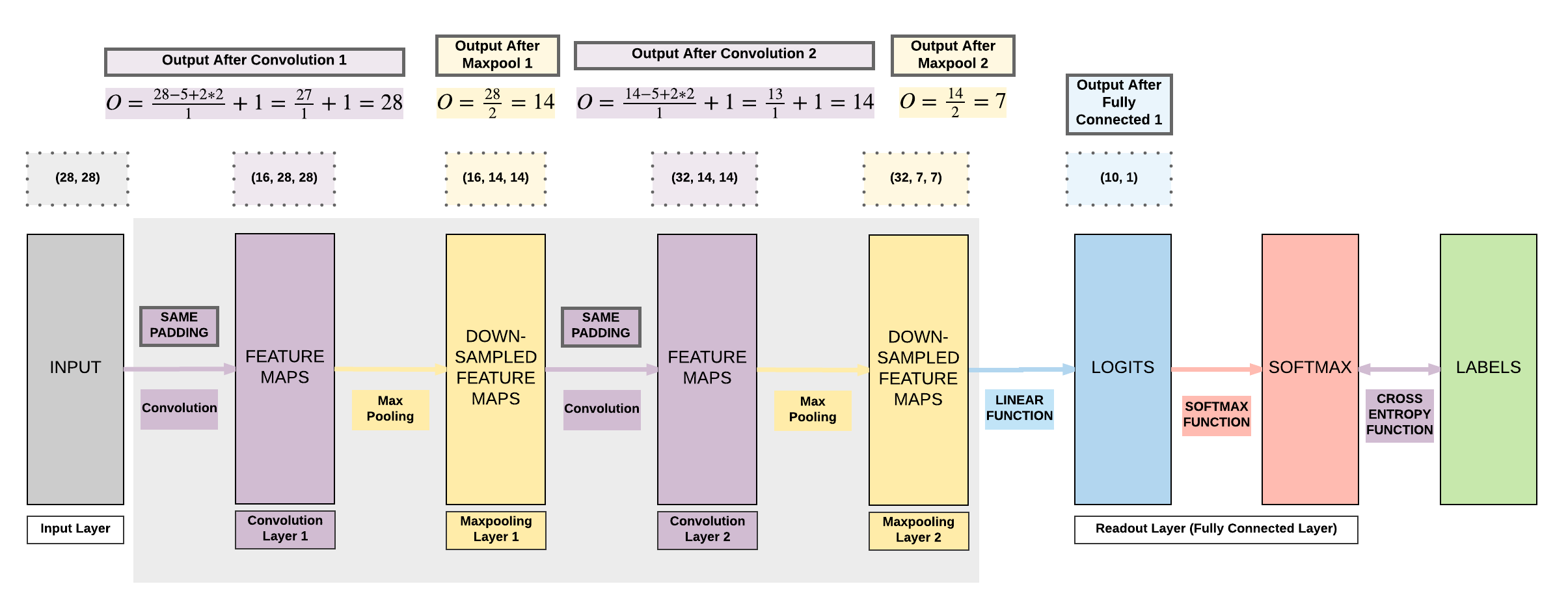
To build this in PyTorch, we define a class that inherits from torch.nn.Module. This class will contain two essential methods:
__init__(): This is the constructor where we initialize all the layers our network will use (e.g.,nn.Conv2d,nn.MaxPool2d,nn.Linear).forward(x): This method defines the "forward pass"—how the input dataxflows through the layers we defined in__init__.
2. Defining the Layers in __init__
Let's start by defining the layers for a simple CNN. Our network will have two convolutional blocks followed by two fully connected layers.
A great way to understand this is to see it in action. The following text provides a clear guide on the core layers and how to define a CNN architecture in a PyTorch class.
Build Simple PyTorch CNN | nn.Conv2d, nn.MaxPool2d
This guide from APXML.com introduces the essential PyTorch layers for a CNN and shows how to combine them into a complete architecture.
Read the sections 'Core CNN Layers in PyTorch' and 'Defining the CNN Architecture'. Pay close attention to how nn.Conv2d, nn.MaxPool2d, and nn.Linear are instantiated in the __init__ method of the SimpleCNN class. Notice the comments that track the changing tensor shape.
As you saw in the reading, we instantiate each layer as a class attribute in the __init__ method. For example:
# In the __init__ method of our nn.Module class:


# Convolutional Block 1
self.conv1 = nn.Conv2d(in_channels=1, out_channels=16, kernel_size=5, stride=1, padding=2)
self.pool1 = nn.MaxPool2d(kernel_size=2, stride=2)


# Convolutional Block 2
self.conv2 = nn.Conv2d(in_channels=16, out_channels=32, kernel_size=5, stride=1, padding=2)
self.pool2 = nn.MaxPool2d(kernel_size=2, stride=2)


# Classifier
# The in_features here is the tricky part we'll discuss next.
self.fc1 = nn.Linear(in_features=32 * 7 * 7, out_features=128)
self.fc2 = nn.Linear(in_features=128, out_features=10)
Notice that the in_channels of self.conv2 must match the out_channels of self.conv1. This ensures the output of the first convolutional layer can be fed into the second.
3. The Critical Step: Connecting Conv Layers to Linear Layers
The most common point of error when defining a CNN is determining the correct in_features for the first nn.Linear layer.
The convolutional part of the network outputs a 3D tensor with shape [channels, height, width]. However, a linear layer expects a 1D vector as input. Therefore, we must "flatten" the 3D tensor into a 1D vector. The size of this vector is channels * height * width, and this is the number you must provide as in_features to your first linear layer.
To find this number, you must calculate how the height and width of your tensor change after each convolution and pooling operation.
The formula for the output dimension after a 2D convolution is:
Where:
- is the input size (height or width)
- is the kernel size
- is the padding
- is the stride
For a max pooling layer, the formula is the same. A common case is using a kernel size of 2 and a stride of 2, which simply halves the input dimension.
Let's watch a video that provides an exceptionally clear, practical demonstration of how to track these dimensions.
PyTorch Tutorial 14 - Convolutional Neural Network (CNN)
In this video, Patrick Loeber meticulously calculates the tensor shape after each convolutional and pooling layer, explaining why the final flattened size is what it is.
Watch from 10:40 to 17:11. The presenter uses a helper script to pass a tensor through the layers one by one, printing the shape at each step. Follow his calculation for the output size of the Conv2d and MaxPool2d layers. This is the most important part of defining a CNN correctly.
Let's re-trace the calculation from the video for a 32x32 input image:
- Input:
[batch_size, 3, 32, 32] conv1(out_channels=6,kernel_size=5,stride=1,padding=0):- New height/width = .
- Shape becomes:
[batch_size, 6, 28, 28].
pool1(kernel_size=2,stride=2):- New height/width = .
- Shape becomes:
[batch_size, 6, 14, 14].
conv2(out_channels=16,kernel_size=5,stride=1,padding=0):- New height/width = .
- Shape becomes:
[batch_size, 16, 10, 10].
pool2(kernel_size=2,stride=2):- New height/width = .
- Final feature map shape:
[batch_size, 16, 5, 5].
To flatten this for the linear layer, we multiply the dimensions: 16 * 5 * 5 = 400. So, the first linear layer must have in_features=400.
4. Defining the forward Pass
Now that all layers are initialized and dimensions are calculated, we define the data flow in the forward method. This involves calling the layers in sequence and applying activation functions (like ReLU) after the convolutions and hidden linear layers.
PyTorch Tutorial 14 - Convolutional Neural Network (CNN)
Let's return to Patrick Loeber's tutorial to see how he implements the forward pass, connecting all the layers he defined.
Watch from 17:18 to 20:00. Observe the pattern: the input x is passed through a conv layer, then a ReLU activation, then a pooling layer. Notice the x.view(-1, ...) call, which is how the tensor is flattened before being passed to the fully connected layers.
The forward pass code combines these steps fluidly. Using torch.nn.functional (commonly imported as F) for activation functions is standard practice.
# In the forward(self, x) method:


# Pass through first conv block
x = self.pool1(F.relu(self.conv1(x)))


# Pass through second conv block
x = self.pool2(F.relu(self.conv2(x)))


# Flatten the output for the classifier
# The -1 tells PyTorch to infer the batch size
x = x.view(-1, 16 * 5 * 5) # Or whatever your calculated size is


# Pass through the fully connected layers
x = F.relu(self.fc1(x))
x = self.fc2(x) # No activation on the final output layer

return x
5. A Complete Example
Let's put everything together. The SimpleCNN class from the apxml.com resource provides a perfect, well-commented example of a complete CNN definition.
Build Simple PyTorch CNN | nn.Conv2d, nn.MaxPool2d
Let's revisit the apxml.com article to see the complete, unified code for our SimpleCNN.
Review the full SimpleCNN class definition under 'Defining the CNN Architecture'. Then, read the 'Using the Model' section to see how you can instantiate this model and pass a dummy tensor through it to verify that the output shape is correct. This is a vital debugging step.
By creating a dummy input tensor and passing it through the model, you can instantly check if your dimension calculations were correct. If the code runs without a size mismatch error, your architecture is correctly wired!
Conclusion
In this lesson, you have learned how to assemble the fundamental components of a CNN into a complete network architecture using PyTorch. This is a significant step from understanding the theory to practical implementation.
Key Takeaways:
- A CNN is typically defined as a Python class inheriting from
torch.nn.Module. - Layers like
nn.Conv2d,nn.MaxPool2d, andnn.Linearare defined as attributes in the__init__method. - The
forwardmethod dictates the sequence in which data flows through the layers, including activation functions and the flattening operation. - The most critical and error-prone step is calculating the correct number of
in_featuresfor the first linear layer by tracking how tensor dimensions change after each convolution and pooling operation. - The typical structure involves a feature extraction frontend (conv/pool blocks) and a classification backend (fully connected layers).
You have now successfully defined a CNN architecture. In our next lesson, you will take this model and learn how to train it on a standard image dataset, bringing your network to life by teaching it to recognize images.