Recommended resources
The freely available resources this lesson will direct you to.
Introduction
Welcome to a new module! We've just finished a deep dive into the essential techniques for training neural networks, culminating in our last lesson on early stopping to prevent overfitting. Now, you have a robust toolkit for making sure your models train effectively.
In this module, we pivot from general training methods to a specific, powerful architecture that revolutionized computer vision: the Convolutional Neural Network (CNN).
Why do we need a special architecture for images? A standard multi-layer perceptron (MLP) treats an image as a long, flat vector of pixels. This approach has two major flaws:
- It's inefficient: A simple 200x200 pixel color image would require a neuron in the first hidden layer to have
200 * 200 * 3 = 120,000weights. This number explodes for larger images, leading to a massive number of parameters, high computational cost, and a huge risk of overfitting. - It ignores spatial structure: By flattening the image, we lose the crucial 2D arrangement of pixels. Information like an object's shape, the proximity of pixels, and the presence of edges is discarded.
CNNs are designed to solve these problems by processing data in its grid-like topology. This lesson focuses on the absolute core of a CNN: the convolutional layer. You will learn about the convolution operation itself and the key hyperparameters that control it: filters, stride, and padding.
1. From Fully Connected to Locally Connected
Before diving into the mechanics of convolution, let's solidify our understanding of why a new approach is needed for images. The following reading from the renowned Stanford CS231n course notes explains the limitations of regular neural networks for image data and introduces the core idea of CNNs: arranging neurons in 3D volumes.
Convolutional Neural Networks (CNNs / ConvNets)
This resource provides the context for why CNNs are necessary and introduces their basic structure.
Read the sections 'Convolutional Neural Networks (CNNs / ConvNets)' and 'Architecture Overview', stopping at the visualization of the ConvNet layers. Focus on the explanation of why regular neural networks don't scale well to full images.
The key insight is moving from fully connected layers to layers that are locally connected. Instead of each neuron connecting to every single pixel in the input, a neuron in a convolutional layer only looks at a small, local region of the image. This small region is its receptive field.
2. The Intuition Behind Convolution
So, what exactly is this "convolution" operation? At its heart, it's a mathematical way to blend two sets of numbers. In the context of images, it involves sliding a small window (called a filter or kernel) over the image and, at each step, computing a single value.
The best way to build a deep intuition for this is to see it in action. The following video from 3Blue1Brown is a masterclass in explaining convolution from the ground up.
This video provides a beautiful and intuitive explanation of the convolution operation, starting with simple 1D examples and building up to 2D image processing.
Please watch these two segments: The Core Mechanic (02:05 - 05:27): This part uses a dice-rolling analogy to demonstrate the fundamental process of 'flip, slide, multiply, and sum'. This is the essence of convolution. Image Blurring (07:29 - 10:49): This segment applies the same idea to 2D images, showing how a simple averaging filter can blur an image. This directly connects the abstract operation to a visual effect.
The core takeaway is this repeating pattern:
- Take a small matrix of weights (the filter/kernel).
- Place it over a patch of the input image.
- Perform an element-wise multiplication between the filter's weights and the image pixel values.
- Sum up all the results into a single number.
- Slide the filter over to the next position and repeat.
The 2D grid of numbers you generate from this process is called a feature map or activation map.
3. Filters: The Learnable Feature Detectors
In the video, the filters were hand-picked to perform a specific task, like blurring. In a CNN, the values within these filters are not pre-defined; they are learnable parameters. The network learns the filter weights during training through backpropagation.
Each filter learns to "activate" (produce a high value) when it detects a specific visual feature in its receptive field.
- In early layers, filters might learn to detect simple features like horizontal, vertical, or diagonal edges, or patches of color.
- In deeper layers, filters learn to combine these simple features into more complex patterns like textures, shapes, or object parts.
The following video segment shows how different hand-crafted filters can detect vertical and horizontal edges, illustrating their role as feature detectors.
Let's return to the 3Blue1Brown video to see how changing the filter (or 'kernel') can create entirely different effects.
Watch from 10:49 to 12:52. Notice how a filter with positive values on one side and negative on the other can detect edges. The final sentence is key: in a CNN, the network learns what these kernels should be.
A crucial concept here is parameter sharing. The same filter is used across the entire image. This is what makes CNNs so efficient. Instead of learning a new set of weights for every single position in the image, we learn one filter and apply it everywhere. This assumes that if a feature (like a horizontal edge) is important to detect in one part of the image, it's probably important in other parts too.
4. Controlling the Output: Stride and Padding
We now have the core operation, but we need ways to control the output. Two key hyperparameters govern the spatial dimensions of the feature map: stride and padding.
Stride
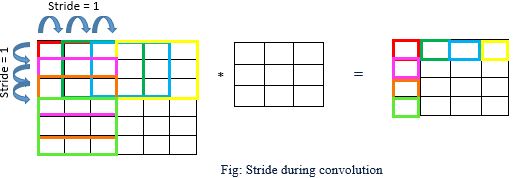
The stride is the number of pixels the filter moves at each step as it slides across the input image.
- A stride of 1 means the filter moves one pixel at a time, resulting in a large, detailed feature map.
- A stride of 2 means the filter skips every other pixel, moving two pixels at a time. This produces a smaller, more compressed feature map.
Padding
When the filter is centered on pixels near the border of the image, part of the filter hangs off the edge. This has two undesirable effects:
- The output feature map is smaller than the input image.
- The pixels at the borders are processed less often than the pixels in the center, meaning we lose information from the edges.
Padding solves this by adding extra pixels (usually with a value of zero) around the border of the input image. The most common use of padding is to ensure the output feature map has the same width and height as the input image. This is often called "same" padding.
Calculating Output Size
The spatial size of the output volume can be calculated using a simple formula. Given an input of size , a filter of size , a stride , and padding , the output size is:

For a more detailed explanation of these concepts, the following reading breaks them down clearly.
Visual Guide to Applied Convolution Neural Networks
This article from Pinecone offers another clear, concise explanation of stride and padding with helpful diagrams.
Read the sections that discuss the 'feature map', 'stride', and 'padding'. Pay attention to how each one affects the compression and dimensions of the output.
Summary of the Convolutional Layer
To put it all together, a single convolutional layer is defined by these components:
- Input Volume: An input with dimensions (width, height, depth/channels). For an initial RGB image, the depth is 3.
- Hyperparameters:
- Number of filters (): This determines the depth of the output volume (). Each filter learns a different feature.
- Filter size (): The spatial extent of the filter (e.g., 3x3, 5x5).
- Stride (): How many pixels the filter shifts at a time.
- Padding (): The number of zero-pixels added to the border.
- Output Volume: The layer produces an output volume (a stack of feature maps) of size .
This is the fundamental building block you will use to construct entire Convolutional Neural Networks.
Conclusion
In this lesson, we have deconstructed the most important component of a CNN. You've moved from understanding why fully-connected layers are insufficient for images to grasping the mechanics of the convolution operation.
Key Takeaways:
- CNNs use local connectivity and parameter sharing to efficiently process images, preserving spatial information.
- The convolution operation is a "slide, multiply, and sum" process where a filter moves across an image to produce a feature map.
- Filters (or kernels) are the learnable weights of the layer, trained to detect specific visual features like edges and patterns.
- Stride controls the step size of the filter, affecting the spatial dimensions of the output.
- Padding is used to manage border effects and control the output size, often to preserve the input's dimensions.
- The output size can be precisely calculated using the formula: .
In the next lesson, we will explore another essential component of CNNs: the pooling layer. You'll see how pooling works hand-in-hand with convolution to progressively reduce the spatial size of the feature maps, making the network more efficient and robust.