Recommended resources
The freely available resources this lesson will direct you to.
Welcome back! In our previous lesson, we established the foundations of NumPy by learning how to create, inspect, and access data within ndarray objects. You now have a solid understanding of the basic building block for numerical computing in Python.
This lesson takes the next logical step: performing computations with these arrays. Our focus will be on two of NumPy's most powerful features: vectorization and broadcasting. Mastering these concepts is the key to writing efficient, clean, and highly readable code, which is essential for implementing the machine learning algorithms we will encounter later in this course. By the end of this lesson, you will be able to apply vectorized arithmetic and broadcasting to perform complex calculations on arrays without writing slow, explicit Python loops.
The Power of Vectorization
In the last lesson, we touched upon why NumPy is so much faster than standard Python lists. The core reason is its ability to push computations down to optimized, pre-compiled C code. Vectorization is the process of applying an operation to an entire array at once, rather than iterating through its elements one by one.
When you write a + b where a and b are NumPy arrays, you are not just using a convenient shorthand. You are instructing NumPy to perform the addition in a highly optimized C loop, completely bypassing the Python interpreter's overhead.
The following article explains this distinction beautifully.
NumPy Optimization: Vectorization and Broadcasting
This article from Paperspace provides an excellent explanation of why vectorization is critical for performance.
Please read the sections A word about loops, which details why standard Python loops are inherently slow for numerical tasks, and Vectorization, which explains how NumPy overcomes this limitation. The rest of the section provides a practical example comparing the speed, which we will replicate now.
Let's see this performance difference in action. Consider the task of element-wise multiplication of two large vectors.
Using a classic Python loop with lists:
import numpy as np
import time


# Create two large Python lists
n = 1_000_000
list_a = list(range(n))
list_b = list(range(n))

start_time = time.time()
result_list = [list_a[i] * list_b[i] for i in range(n)]
end_time = time.time()
print(f"Python list loop took: {1000 * (end_time - start_time):.2f} ms")
Now, using NumPy's vectorized approach:
# Convert lists to NumPy arrays
arr_a = np.array(list_a)
arr_b = np.array(list_b)

start_time = time.time()
result_array = arr_a * arr_b
end_time = time.time()
print(f"NumPy vectorization took: {1000 * (end_time - start_time):.2f} ms")
When you run this code, you'll notice that the NumPy version is orders of magnitude faster. This is the practical impact of vectorization. Throughout this course, we will always strive to use vectorized operations instead of explicit loops.
Broadcasting: Operations on Arrays of Different Shapes
Vectorization is straightforward when arrays have the same shape. But what happens if you want to add a scalar to a vector, or add a row vector to every row of a matrix? This is where broadcasting comes in.
Broadcasting is a set of rules by which NumPy handles element-wise operations on arrays of different, but compatible, shapes. Instead of creating explicit copies of the smaller array to match the larger one's shape, NumPy conceptually "stretches" or "duplicates" it to perform the calculation. This is done without actually using more memory, making it highly efficient.
To understand broadcasting, you need to know the rules that govern it. The following video provides a crystal-clear explanation.
Numpy Array Broadcasting In Python Explained
This video from the mCoding channel provides a fantastic, example-driven explanation of the rules of broadcasting.
Please watch the segment from the rules. The presenter clearly breaks down how NumPy compares shapes for compatibility and determines the shape of the resulting array.
To summarize and formalize the rules discussed in the video:
-
Right-Align Shapes: NumPy compares the shapes of the two arrays by aligning them from right to left. If one array has fewer dimensions, its shape is padded with 1s on the left.
Ahas shape(3, 4)Bhas shape(4,)- NumPy compares
(3, 4)and(1, 4).
-
Check Compatibility: Two dimensions are compatible if:
- they are equal, or
- one of them is 1.
-
Determine Output Shape: If the shapes are compatible, the output array's shape is the maximum size along each dimension.
Let's trace the example A(3, 4) + B(4,):
- Align: Shapes are
(3, 4)and(1, 4). - Compare Axis 1 (right-most):
4and4are equal. Compatible. Output dimension is4. - Compare Axis 0 (left-most):
3and1are compatible because one is1. Output dimension is3. - Result: The operation is valid, and the resulting array will have a shape of
(3, 4). The vectorBis "broadcast" across the 3 rows ofA.
If at any point the dimensions are unequal and neither is 1, NumPy will raise a ValueError. For example, an array of shape (3, 4) cannot be added to an array of shape (3,) directly, because the trailing dimensions 4 and 3 do not match.
Visualizing Broadcasting
Thinking about these rules can be abstract. Visuals can make the concept much more concrete. The image below illustrates how broadcasting works for a few common scenarios.
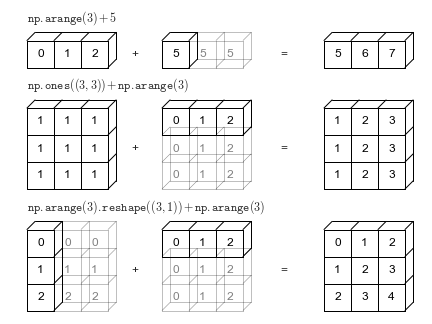
Let's walk through these examples with code.
Example 1: Array and a scalar
This is the simplest case. The scalar is broadcast to every element of the array.
a = np.arange(3)  # Shape (3,) -> [0, 1, 2]
b = 5             # A scalar
print(a + b)      # Output: [5 6 7]
Example 2: 2D Array and a 1D Array
Here, a 1D array [0, 1, 2] is added to each row of a (3, 3) matrix of ones. The 1D array's shape (3,) is treated as (1, 3) and is broadcast across the 3 rows.
m = np.ones((3, 3)) # Shape (3, 3)
v = np.arange(3)    # Shape (3,)
print(m + v)


# Output:
# [[1. 2. 3.]
#  [1. 2. 3.]
#  [1. 2. 3.]]
Example 3: Column vector and a Row vector
This is a powerful demonstration. We add a column vector (shape (3, 1)) to a row vector (shape (3,) or (1, 3)).
- Shapes:
(3, 1)and(1, 3) - Axis 1 (right):
1and3are compatible. Output dimension ismax(1, 3) = 3. - Axis 0 (left):
3and1are compatible. Output dimension ismax(3, 1) = 3. - Result: A
(3, 3)matrix is created.
col = np.arange(3).reshape((3, 1)) # Shape (3, 1) -> [[0], [1], [2]]
row = np.arange(3)                 # Shape (3,)   -> [0, 1, 2]
print(col + row)


# Output:
# [[0 1 2]
#  [1 2 3]
#  [2 3 4]]
Notice the use of .reshape((3, 1)). You can also use np.newaxis for a more concise way to add a dimension: col = np.arange(3)[:, np.newaxis].
This article provides more visual examples and connects broadcasting to a common machine learning task: calculating distances for the K-Means algorithm.
A Visual Guide To Broadcasting In Numpy - - Carlos F. Alcalá
This article gives an intuitive, visual walkthrough of several broadcasting scenarios.
Start with the Vector-Scalar Example and continue to the Matrix-Vector Example. Then, review the section on Array Shapes to understand how np.newaxis is used to manipulate dimensions for broadcasting.
A Practical Application: Data Normalization
Let's apply these concepts to a fundamental task in machine learning: feature scaling. Many algorithms perform better when input features are on a similar scale. A common technique is standardization, where we transform each feature to have a mean of 0 and a standard deviation of 1.
The formula for standardizing a feature is:
where is the mean of the feature and is its standard deviation.
With NumPy, we can do this for an entire dataset in a few vectorized lines, thanks to broadcasting.
# Create a sample dataset of 10 samples and 3 features
# np.random.seed(42) ensures the random numbers are the same every time
np.random.seed(42)
X = np.random.rand(10, 3) * np.array([10, 200, 0.5]) # Features with different scales
print("Original data (first 3 rows):\n", X[:3,:])


# 1. Calculate the mean and standard deviation for each feature (column)
# axis=0 tells NumPy to perform the operation along the columns
mu = X.mean(axis=0)
sigma = X.std(axis=0)

print("\nFeature means (mu):", mu.shape, "\n", mu)
print("Feature stds (sigma):", sigma.shape, "\n", sigma)


# 2. Apply the standardization formula
# X has shape (10, 3)
# mu and sigma have shape (3,)
# Broadcasting handles the element-wise operations!
X_scaled = (X - mu) / sigma

print("\nScaled data (first 3 rows):\n", X_scaled[:3,:])


# 3. Verify the result
# The mean of each column should be close to 0, and std dev close to 1
print("\nNew mean:", X_scaled.mean(axis=0))
print("New std dev:", X_scaled.std(axis=0))
In the line X_scaled = (X - mu) / sigma, both the subtraction and division operations use broadcasting. The mu and sigma vectors, both of shape (3,), are broadcast across all 10 rows of the (10, 3) matrix X. This is a perfect example of how these concepts lead to concise and efficient code for real-world data manipulation.
Key Takeaways
- Vectorization is the practice of performing operations on entire arrays, which delegates the work to fast, compiled C code and avoids slow Python loops.
- Broadcasting describes how NumPy performs element-wise operations on arrays of different but compatible shapes without creating costly copies of data.
- Broadcasting compatibility is determined by a set of rules: right-align shapes and ensure that for each dimension, the sizes are equal or one of them is 1.
- The shape of a broadcasted array is the element-wise maximum of the input array shapes.
- These features allow you to write clean, intuitive, and highly performant code for numerical tasks, a cornerstone of implementing ML algorithms.
Looking Ahead
Now that you can create, manipulate, and perform calculations on NumPy arrays, the next step is to visualize them. In the following lesson, we will introduce Matplotlib, the most popular plotting library in Python. You will learn to create simple line and scatter plots, which will allow you to "see" the functions and data you're working with, a critical skill for building intuition and debugging your models.