Recommended resources
The freely available resources this lesson will direct you to.
Hello! Welcome to the first lesson of your course on the mathematics and core topics for AI and machine learning. We're starting with the "Python Toolkit for AI & Machine Learning" module, which will equip you with the essential programming tools for our journey. Since you're already familiar with Python, we'll focus on leveraging specific libraries that are the bedrock of scientific computing.
Today, we'll dive into NumPy, the fundamental package for numerical operations in Python. You'll find that almost every data science and machine learning library, including those we'll use for building neural networks later, is built on top of NumPy. Our goal is to master the building block of this library: the NumPy array. By the end of this lesson, you will be able to create, inspect, and access data within one-dimensional and two-dimensional NumPy arrays. This skill is the first step towards implementing mathematical concepts like linear algebra and calculus in code.
Why NumPy?
Before we start writing code, it's worth understanding why NumPy is so central to the AI/ML ecosystem. Why not just use standard Python lists? The answer comes down to two main factors: performance and functionality. Python lists are flexible but can be slow for the kind of large-scale, repetitive mathematical calculations common in machine learning.
NumPy achieves its speed by using arrays that are:
- Homogeneous: All elements must be of the same data type (e.g., all integers or all floating-point numbers). This eliminates the overhead of checking the type of each element during computation.
- Stored in Contiguous Memory: Unlike Python lists, where elements can be scattered across your computer's memory, NumPy arrays store their elements in one continuous block. This allows for highly optimized, low-level C code to perform operations on the entire array at once, a concept known as vectorization.
For a deeper dive into the architectural advantages of NumPy, the following video provides an excellent and intuitive explanation.
Python NumPy Tutorial for Beginners
Watch the introductory segment of this "Python NumPy Tutorial for Beginners" from freeCodeCamp.org. The speaker does a great job explaining the performance benefits of NumPy over standard Python lists.
Focus on the first part of the video, from the beginning up to the background section. Pay attention to the discussion of fixed types and contiguous memory, as these are the core reasons for NumPy's efficiency.
Now that you have a sense of why we use NumPy, let's learn how to use it.
Creating Your First NumPy Arrays
The most common way to create a NumPy array is by converting a Python list. Given your Python background, this should feel quite natural. We follow a standard convention by importing NumPy with the alias np.
First, you'll need to make sure NumPy is installed. You can typically do this from your terminal:pip install numpy
Once installed, you can create arrays in your code.
1. From Python Lists
A one-dimensional array, which we can think of as a vector, is created from a simple list. A two-dimensional array, which we'll use to represent matrices, is created from a list of lists.
import numpy as np


# Create a 1D array (vector)
list_1d = [1, 2, 3, 4]
vec = np.array(list_1d)
print("1D Array (Vector):\n", vec)


# Create a 2D array (matrix)
list_2d = [[1, 2, 3], [4, 5, 6]]
mat = np.array(list_2d)
print("\n2D Array (Matrix):\n", mat)
The resource "How to Index, Slice and Reshape NumPy Arrays" provides clear, concise examples of this process.
How to Index, Slice and Reshape NumPy Arrays for ...
Please read the first section of this article from MachineLearningMastery.com. It reinforces how to create 1D and 2D arrays.
Focus on the subsections One-Dimensional List to Array and Two-Dimensional List of Lists to Array. Notice how the output formatting of a NumPy array differs from a standard Python list.
2. Using specialized functions
Often, you'll need to create arrays with initial placeholder values. NumPy provides several convenient functions for this.
np.zeros(shape): Creates an array of a given shape filled with zeros.np.ones(shape): Creates an array filled with ones.np.full(shape, fill_value): Creates an array filled with any number you specify.np.arange(start, stop, step): Creates an array with a range of evenly spaced values, similar to Python's built-inrange().
Here they are in action:
# Create a 2x3 array of zeros
zeros_array = np.zeros((2, 3))
print("Zeros Array:\n", zeros_array)


# Create a 3x2 array of ones
ones_array = np.ones((3, 2))
print("\nOnes Array:\n", ones_array)


# Create a 2x2 array filled with the number 7
sevens_array = np.full((2, 2), 7)
print("\nArray of Sevens:\n", sevens_array)


# Create an array with values from 0 to 9
range_array = np.arange(10)
print("\nRange Array:\n", range_array)
Inspecting Your Arrays: Shape, Size, and Type
Once you have an array, especially if it comes from loading a data file, the first thing you'll do is inspect its properties. The most important attributes are:
.shape: A tuple representing the dimensions of the array. For a 2D array, it's(rows, columns). This is arguably the most frequently used attribute..ndim: The number of dimensions (or axes). For a vector, it's 1; for a matrix, it's 2..size: The total number of elements in the array..dtype: The data type of the elements (e.g.,int64,float64).
Let's inspect the matrix we created earlier:
mat = np.array([[1, 2, 3], [4, 5, 6]])

print("Matrix:\n", mat)
print("\nShape:", mat.shape)      # Output: (2, 3) -> 2 rows, 3 columns
print("Dimensions:", mat.ndim)   # Output: 2
print("Size:", mat.size)         # Output: 6
print("Data Type:", mat.dtype)   # Output: e.g., int64
The official NumPy documentation provides a great summary of these fundamental concepts.
NumPy: the absolute basics for beginners#
This guide from the official NumPy website is an excellent reference. Read the sections on what an array is and its attributes.
First, read the section What is an “array”? to solidify your understanding of the structure. Then, read the section on Array attributes. Finally, review the section How do you know the shape and size for more examples.
The Anatomy of an Array: Understanding Axes
To effectively access data within an array, you must understand the concept of axes. Axes are the dimensions of the array. For a 2D array (a matrix), you have two axes:
- Axis 0 runs downwards across the rows.
- Axis 1 runs horizontally across the columns.
This terminology is fundamental and will be used in nearly every operation we perform, from simple aggregation to complex linear algebra.
The image below provides a fantastic visual breakdown of array anatomy.
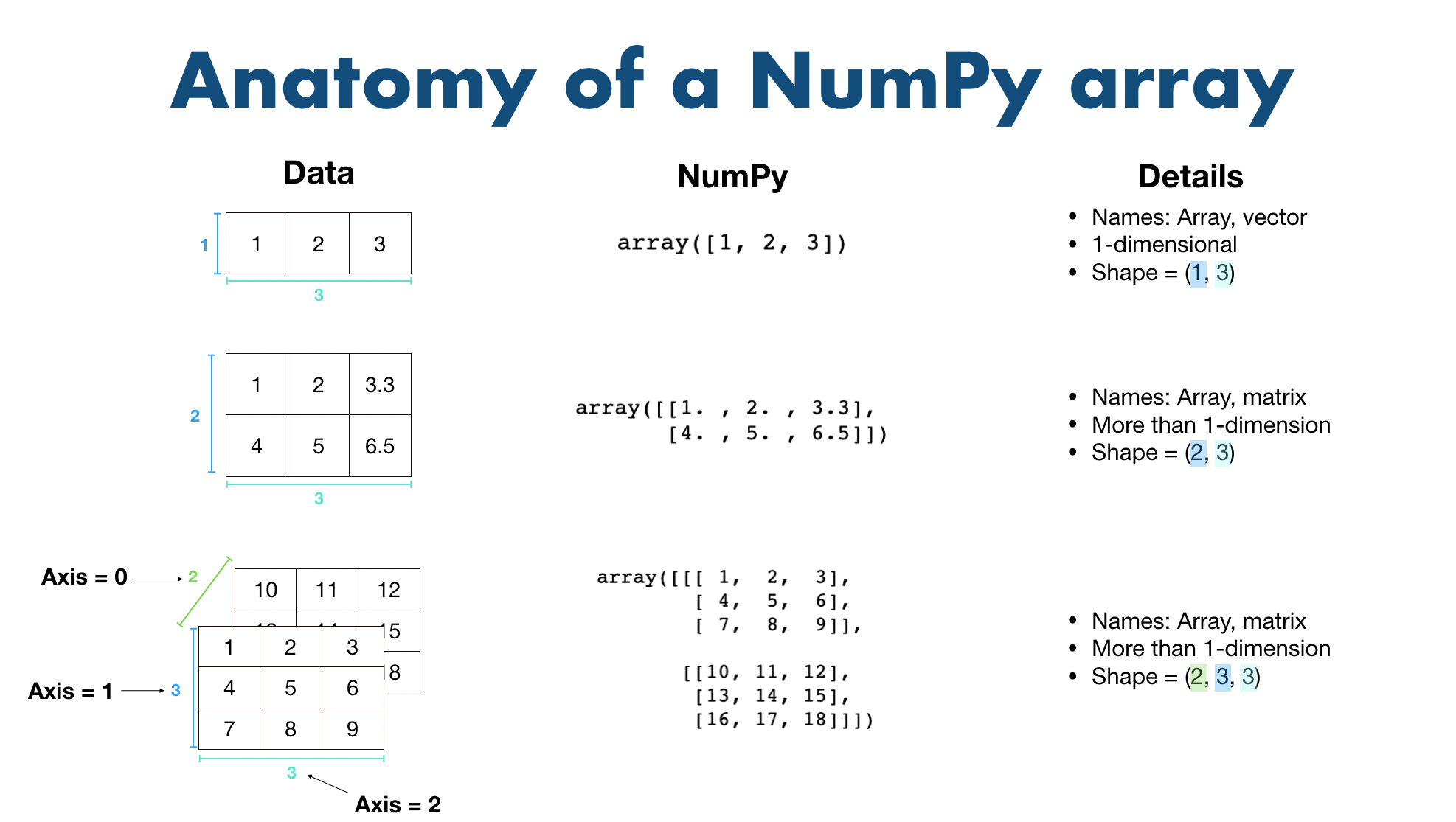
This next image gives a precise look at how indexing relates to axes in a 2D array.

Indexing and Slicing: Accessing Your Data
Now that we can create and inspect arrays, let's learn how to select specific elements, rows, and columns. This is where NumPy's power and concise syntax really begin to shine. While indexing a 1D array is very similar to a Python list, 2D array indexing is where you'll notice a key difference.
NumPy uses a comma-separated [row, column] notation.
Let's define a sample matrix:
a = np.array([[1, 2, 3, 4],
              [5, 6, 7, 8],
              [9, 10, 11, 12]])
-
To get a single element: Use its exact coordinates. For example, to get the number
7, which is in the 2nd row (index 1) and 3rd column (index 2):element = a[1, 2] print(element) # Output: 7 -
To get an entire row: Specify the row index and use a colon
:for the columns to select all of them. To get the first row:first_row = a[0, :] print(first_row) # Output: [1 2 3 4] -
To get an entire column: Use a colon
:for the rows and specify the column index. To get the third column:third_col = a[:, 2] print(third_col) # Output: [ 3 7 11] -
To slice a sub-matrix: You can use the
start:stopsyntax on both axes. To get the top-right 2x2 block ([[2, 3], [6, 7]]):sub_matrix = a[0:2, 1:3] print(sub_matrix)
The following video provides an excellent, step-by-step demonstration of these indexing and slicing techniques.
Python NumPy Tutorial for Beginners
Please watch this segment from the freeCodeCamp.org tutorial on accessing and changing elements in NumPy arrays.
Watch the part of the video from accessing elements. The presenter clearly demonstrates how to get specific elements, rows, columns, and more advanced slices using the [row, col] notation.
The article from MachineLearningMastery.com also offers a fantastic, ML-focused perspective on slicing, showing how it's used to separate features from labels.
How to Index, Slice and Reshape NumPy Arrays for ...
Read the sections on indexing and slicing in this article.
First, read the section on Array Indexing, paying close attention to the difference between 1D and 2D indexing. Then, read the section on Array Slicing. The example for "Split Input and Output Features" is a perfect demonstration of a task you will perform constantly in machine learning.
Key Takeaways
- NumPy is the foundational library for numerical computing in Python, prized for its performance and memory efficiency.
- The core data structure is the
ndarray(N-dimensional array), which is a grid of values of the same type. - You can create arrays from Python lists (
np.array()) or with helper functions likenp.zeros()andnp.ones(). - You can inspect arrays using attributes like
.shape,.ndim,.size, and.dtype. - You can index and slice arrays to access specific elements, rows, columns, or sub-grids using the
array[rows, columns]notation with colons for slicing.
Looking Ahead
You now have a solid grasp of the fundamental object in NumPy. In the next lesson, we will build directly on this by learning how to perform mathematical calculations on these arrays. We will cover vectorized arithmetic and broadcasting, two powerful concepts that allow you to write clean, efficient code without explicit loops, bringing us one step closer to implementing complex mathematical algorithms from scratch.