Recommended resources
The freely available resources this lesson will direct you to.
In our last lesson, you mastered NumPy's vectorization and broadcasting, giving you the power to perform complex numerical computations with speed and efficiency. Now that we can generate and manipulate data, our next logical step is to visualize it. After all, a picture is worth a thousand data points, especially in machine learning.
This lesson introduces Matplotlib, the cornerstone of Python's data visualization ecosystem. We will focus on two fundamental plot types: line plots and scatter plots. You will learn how to transform arrays of numbers into insightful graphs, allowing you to visually explore mathematical functions and analyze datasets. This skill is not just foundational; it's a critical part of the day-to-day workflow for building and understanding AI models.
The Anatomy of a Plot
Before we start plotting, it's helpful to understand the basic terminology Matplotlib uses. A plot is composed of a few key components. The main ones are the Figure, which is the overall window or page that everything is drawn on, and the Axes, which is the actual plot area where your data appears.
The following video provides a concise explanation of this structure.
Learn Matplotlib in 30 Minutes - Python Matplotlib Tutorial
This video from Tech With Tim offers a great introduction to the basic concepts and terminology of Matplotlib.
Please watch the segment from the concepts, where the presenter breaks down the hierarchy of Figure, Axes, and Axis.
The standard convention for importing Matplotlib's plotting interface is:
import matplotlib.pyplot as plt
import numpy as np # We'll need this too!
We use the alias plt to keep our code clean and concise.
Visualizing Functions with Line Plots
Your goal is to connect mathematical theory to Python code, and line plots are the perfect tool for this. They allow us to "see" a function's behavior by plotting its output over a range of inputs. The process generally follows these steps:
- Generate Input Values: Create a NumPy array of evenly spaced points for our x-axis. The
np.linspace()function is perfect for this. - Compute Output Values: Apply the mathematical function to the array of input values to get the corresponding y-axis values. Thanks to NumPy's vectorization, this is usually a single line of code.
- Plot: Use
plt.plot(x, y)to create the line plot. - Customize and Show: Add labels and a title to make the plot informative, and then use
plt.show()to display it.
Let's see this in action by plotting a simple parabola, .
Plot Mathematical Expressions in Python using Matplotlib - GeeksforGeeks
This article from GeeksforGeeks provides a straightforward example of plotting a mathematical function.
Focus on Example 1. Pay attention to how np.linspace is used to create the x values and how the expression y = x**2 generates all the y values at once.
The code from the article is a perfect template:
# 1. Generate Input Values
x = np.linspace(-2, 2, 100) # 100 points from -2 to 2


# 2. Compute Output Values
y = x**2


# 3. Create the plot object and plot the data
plt.plot(x, y)


# 4. Customize and Show
plt.title("Plot of y = x^2")
plt.xlabel("x-axis")
plt.ylabel("y-axis")
plt.grid(True) # Add a grid for better readability
plt.show()
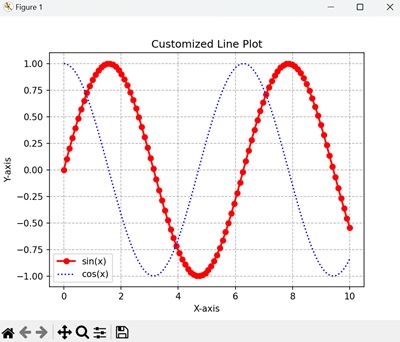
We can easily extend this to plot multiple functions on the same axes. This is useful for comparing functions, such as plotting sin(x) and cos(x) together. You simply call plt.plot() multiple times before calling plt.show(). Adding a label to each plot call and then using plt.legend() will display a legend to identify each line.
Visualizing Data with Scatter Plots
While line plots are great for continuous functions, much of the data in machine learning consists of individual, discrete samples. A scatter plot is the ideal tool for visualizing such data, where each point in the dataset is represented by a dot on the graph. This can help us spot patterns, clusters, and trends.
The function for this is plt.scatter(). The process is very similar to a line plot, but instead of connecting the points, it just draws markers at each (x, y) coordinate.
Scientific Computing in Python: Introduction to NumPy and ...
This article by Sebastian Raschka demonstrates how to create a basic scatter plot using randomly generated data.
Please read the short section titled Scatter Plots. The example uses np.random.RandomState to generate normally distributed random data, a common technique for creating sample datasets.
Here's the code to create a simple scatter plot:
# Generate some random data for demonstration
np.random.seed(42) # for reproducibility
x_data = np.random.rand(50) * 100 # 50 random x values
y_data = x_data + (np.random.randn(50) * 20) # y is related to x with some noise


# Create the scatter plot
plt.scatter(x_data, y_data, alpha=0.7) # alpha controls transparency


# Customize and Show
plt.title("Sample Data Scatter Plot")
plt.xlabel("Independent Variable")
plt.ylabel("Dependent Variable")
plt.grid(True)
plt.show()
Running this code will show a cloud of points that seem to have a linear trend, which is exactly the kind of pattern we look for when we start building models.
Combining Plots: From Data to Models
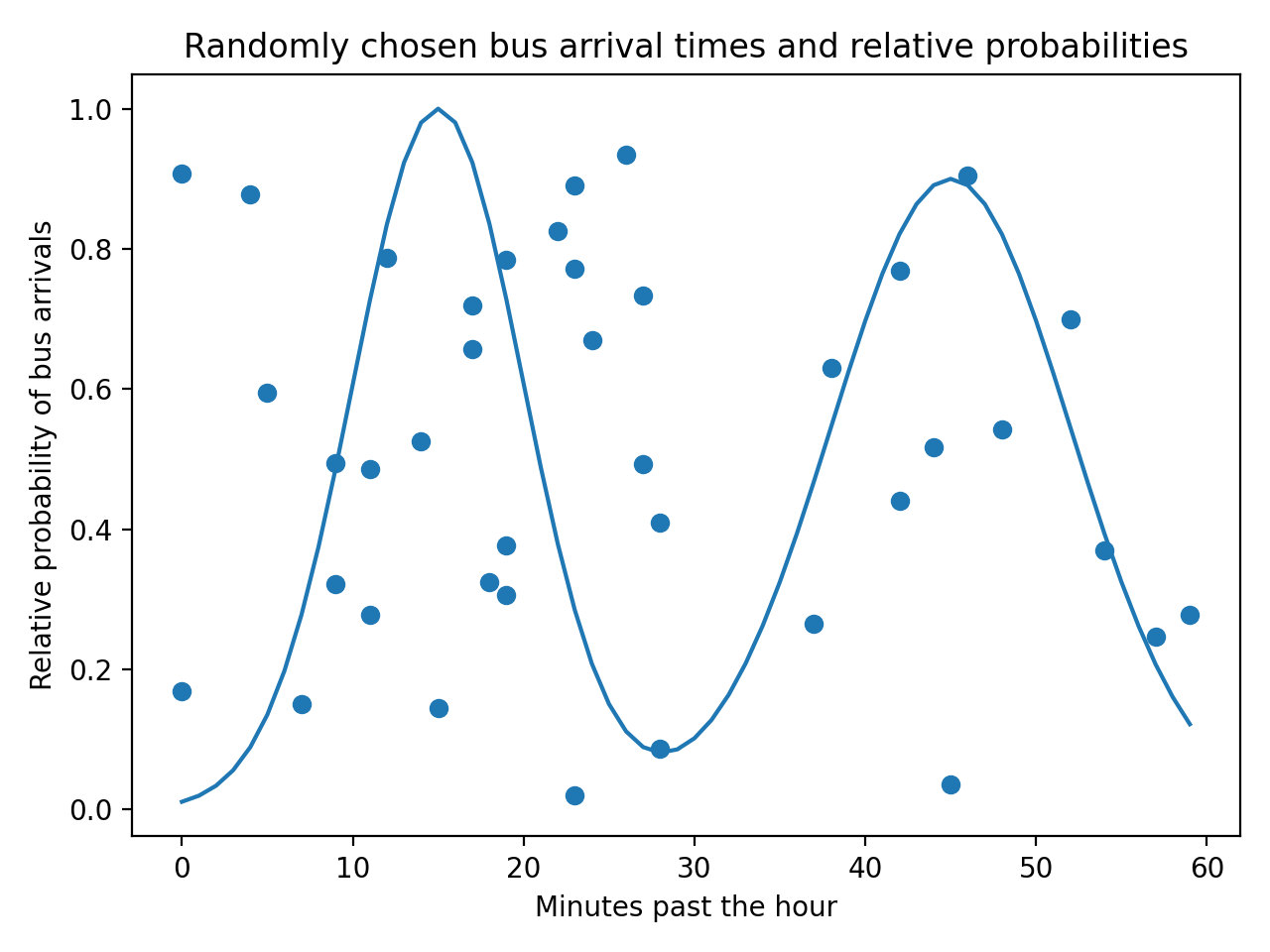
One of the most powerful uses of Matplotlib in machine learning is the ability to overlay plots. For instance, we can show our raw data as a scatter plot and then overlay a line plot representing a mathematical model that attempts to "fit" or explain that data.
This moves us from simply visualizing data to visualizing the relationship between data and theory—a core concept in AI and ML.
A Complete Walkthrough
Now let's tie everything together. The following video provides a complete, step-by-step walkthrough of the entire process: importing libraries, defining a function, generating data, plotting, and customizing the final graph.
How to: Plot a Function in Python
This video from HagesLab gives a concise end-to-end tutorial on plotting a function in Python.
Watch the video to see the full workflow in action. Notice how it combines the steps we've discussed: Importing libraries (imports) Defining a Python function (function definition) Creating x and y data (data creation) Plotting and customizing (plotting)
This process is a fundamental building block that you will use repeatedly throughout this course.
Conclusion
In this lesson, you've learned how to harness Matplotlib to turn abstract arrays of numbers into meaningful visualizations.
Key Takeaways:
- Line plots (
plt.plot) are used to visualize continuous functions and trends over a range. - Scatter plots (
plt.scatter) are used to visualize discrete data points and identify patterns or relationships. - The basic workflow involves generating
xandydata with NumPy, passing it to a plotting function, and then customizing the plot with titles, labels, and legends. - Combining plot types allows you to visualize the relationship between raw data (scatter) and theoretical models (line), a central task in machine learning.
In our next lesson, we will begin our journey into calculus by learning how to define a Python function and compute its numerical derivative from scratch. You will then immediately apply today's skills to visualize both a function and its derivative on the same graph, providing a powerful, intuitive understanding of what a derivative represents.