Recommended resources
The freely available resources this lesson will direct you to.
Hello. In the previous lessons, you refreshed Java collections, Streams, and exception handling. Those are code-level skills; Maven is the project-level mechanism that makes the same code reproducible on another machine, in a CI pipeline, or in a teammate’s IDE.
This lesson focuses on two closely connected responsibilities: declaring the libraries a project needs and using Maven’s lifecycle to compile, test, package, and locally install a Java application. By the end, you should be able to read a typical pom.xml, choose suitable dependency scopes, and select the right Maven command for local development or a pre-push verification.
Maven’s role: a repeatable project contract
Maven is a build tool. Instead of manually downloading JAR files, configuring classpaths, choosing output folders, and remembering the order in which to compile and test, you describe the project in one central file: pom.xml.
The POM is short for Project Object Model. It records such things as:
- the project’s identity and version;
- the Java version and build settings;
- external libraries and their scopes;
- build plugins;
- how Maven should package the application.
Maven then follows conventions. A standard project layout looks like this:
job-tracker-api/
├── pom.xml
├── mvnw
├── mvnw.cmd
├── src/
│   ├── main/
│   │   ├── java/
│   │   └── resources/
│   └── test/
│       ├── java/
│       └── resources/
└── target/              generated by Maven; do not commit it
The folders matter:
src/main/javacontains production Java code.src/main/resourcescontains runtime resources, such as Spring Boot’sapplication.properties.src/test/javacontains JUnit tests.src/test/resourcescontains test-only files such as sample JSON or test configuration.targetcontains generated output: compiled.classfiles, test reports, and packaged artifacts.
A useful distinction is that Maven is largely declarative. You declare, “this project uses JUnit” or “this project should produce a JAR.” Maven knows the conventional steps and plugins required to achieve that result.
Maven Getting Started Guide – Maven
Read Apache Maven’s official “Maven Getting Started Guide” to connect the POM, standard layout, dependency declarations, and generated output into one working model.
In “How do I make my first Maven project?”, read the POM overview. Focus on why the POM is the project’s central description and on the meanings of groupId, artifactId, and version. Then read the beginning of “How do I compile my application sources?” from the standard-layout explanation. Note the locations Maven expects for main code, test code, and compiled classes. Finally, in “How do I use external dependencies?”, read the dependency-coordinate discussion. Pay particular attention to what Maven needs in order to find a library.
Reading a POM and managing dependencies
Every Maven project has coordinates:
<groupId>io.github.yourname</groupId>
<artifactId>job-tracker-api</artifactId>
<version>0.0.1-SNAPSHOT</version>
Together, these identify the artifact Maven produces.
| Element | Meaning | Example |
|---|---|---|
groupId |
Organization or ownership namespace, conventionally a reversed domain | io.github.yourname |
artifactId |
Project and output-artifact name | job-tracker-api |
version |
Current project release version | 0.0.1-SNAPSHOT |
SNAPSHOT means the version is under active development. It is appropriate while building your portfolio application; it is not a claim that the project is production-released.
A typical dependency declaration has the same identifying information:
<dependency>
    <groupId>org.junit.jupiter</groupId>
    <artifactId>junit-jupiter</artifactId>
    <version>5.11.0</version>
    <scope>test</scope>
</dependency>
When Maven needs this library, it first checks the local repository, normally located under your user home directory:
~/.m2/repository
If the dependency is absent locally, Maven downloads it from a configured remote repository, commonly Maven Central, and stores a cached copy locally. This explains why the first build after cloning a project is often slower than later builds.
Dependency scopes answer “when is this library needed?”
A scope does not simply mean “important” or “unimportant.” It controls where a dependency is available in the build and whether it belongs in the deployed runtime classpath.
| Scope | Available for | Typical example |
|---|---|---|
compile |
Main-code compilation, tests, and runtime; this is the default when scope is omitted | A library directly used by application code |
test |
Test compilation and test execution only | JUnit, Mockito |
runtime |
Tests and runtime, but not main-code compilation | PostgreSQL JDBC driver when code relies on DataSource rather than PostgreSQL driver classes |
provided |
Compilation and tests, but supplied by the deployment environment at runtime | Servlet API in a traditional external servlet-container deployment |
For a Spring Boot application, you will commonly see dependencies resembling:
<dependencies>
    <dependency>
        <groupId>org.springframework.boot</groupId>
        <artifactId>spring-boot-starter-web</artifactId>
    </dependency>

    <dependency>
        <groupId>org.postgresql</groupId>
        <artifactId>postgresql</artifactId>
        <scope>runtime</scope>
    </dependency>

    <dependency>
        <groupId>org.springframework.boot</groupId>
        <artifactId>spring-boot-starter-test</artifactId>
        <scope>test</scope>
    </dependency>
</dependencies>
Notice two practical details:
- A dependency can bring further dependencies.
spring-boot-starter-web, for example, brings a curated set of libraries needed for web development. These indirect libraries are transitive dependencies. - Spring Boot usually manages compatible versions for its starters. If the project uses the Spring Boot parent POM or dependency management, do not add an arbitrary version to every Spring dependency. Overriding a managed version without a concrete reason can create incompatibilities.
One important correction to a common assumption: the ordinary Maven JAR packaging does not automatically put every dependency inside a JAR. It normally produces a thin JAR that expects dependencies separately. Spring Boot’s packaging plugin commonly repackages the result into an executable JAR with the runtime dependencies arranged inside it.
If you need to inspect the full resolved dependency graph, run:
./mvnw dependency:tree
On Windows PowerShell, use:
.\mvnw.cmd dependency:tree
This is particularly useful when a dependency conflict, a vulnerable transitive library, or an unexpected version appears in a project.
Maven lifecycles: choose the last result you need
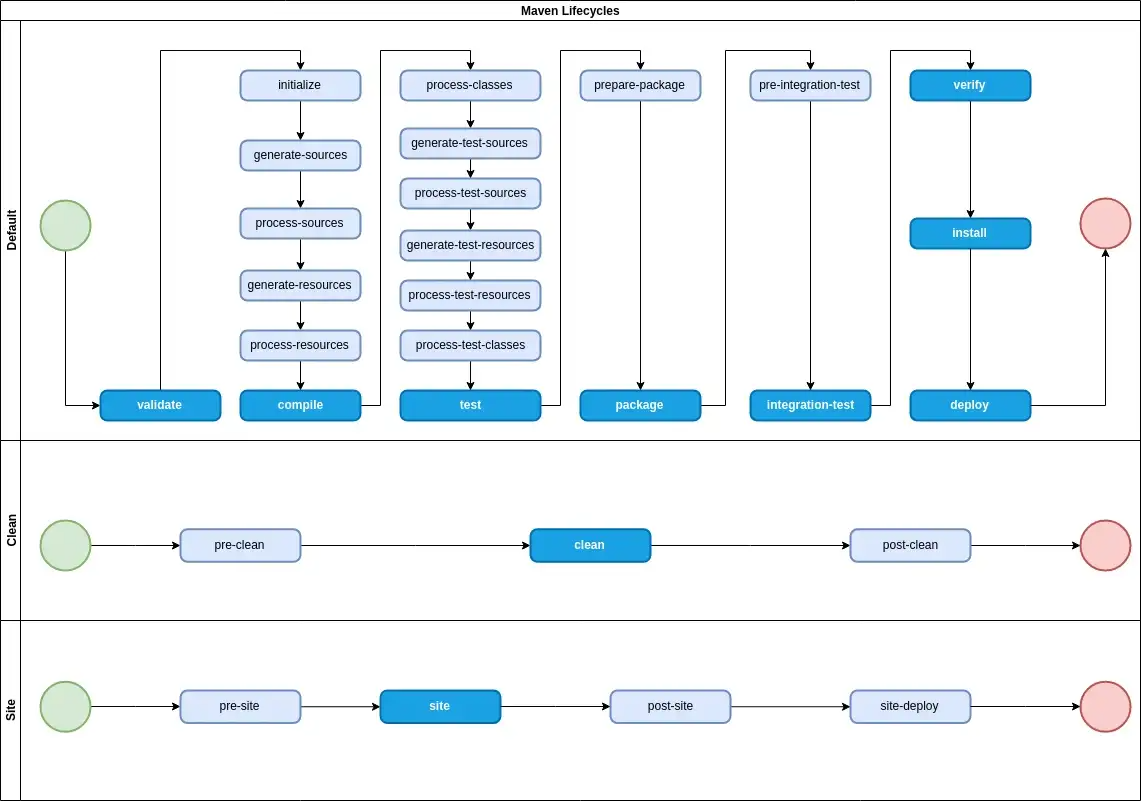
Maven has three built-in lifecycles:
- Default builds, tests, packages, verifies, installs, and can deploy the application.
- Clean removes output from earlier builds.
- Site generates project documentation sites.
For backend development, you will work mainly with the Clean and Default lifecycles.
The central rule is:
When you call a Maven phase, Maven runs that phase and every earlier phase in the same lifecycle.
So mvn package does not merely create a JAR. Before packaging, Maven validates the project, compiles main code, prepares resources, compiles tests, and runs tests.
The main Default lifecycle phases to remember are:
| Phase | What it means in day-to-day work |
|---|---|
validate |
Check that the project has the information Maven needs. |
compile |
Compile production code from src/main/java. |
test |
Compile and run unit tests from src/test/java. |
package |
Create the distributable artifact, commonly a JAR. |
verify |
Run additional checks that verify the package meets quality requirements. |
install |
Put the built artifact in your local Maven repository for use by other local projects. |
deploy |
Publish an artifact to a shared remote repository; normally handled by CI or release processes. |
The Clean lifecycle is simpler:
| Phase | Effect |
|---|---|
clean |
Removes generated files from the previous build, normally the target directory. |
Introduction to the Build Lifecycle - Apache Maven
Read this Apache Maven guide for the exact meaning of lifecycle phases and the reason one command can perform several build steps.
In “Build Lifecycle Basics,” read the lifecycle definition, then study the listed Default lifecycle phases immediately below it. Focus on the distinction between a lifecycle and an individual phase. Next, in “Usual Command Line Calls,” read the guidance on verify. Notice why verify is often a better confidence check than stopping at package. Finally, in “Setting Up Your Project to Use the Build Lifecycle,” read the packaging explanation. Use the jar bindings table to see how plugins such as the compiler, Surefire test runner, and JAR plugin participate in lifecycle phases.
A phase is a named stage such as test or package. A plugin goal is a concrete task that runs within a phase.
For example, in a typical JAR project:
- the Compiler plugin’s
compilegoal runs during thecompilephase; - the Surefire plugin’s
testgoal runs during thetestphase; - the JAR plugin’s
jargoal runs during thepackagephase.
You usually invoke the phase, not individual plugin goals. Maven then uses the POM’s packaging type and plugin configuration to select the needed goals.
Commands you will actually use
Prefer the Maven Wrapper when a repository provides it. The wrapper uses the Maven version intended for that project and avoids relying on whichever Maven version happens to be installed globally.
| Goal | macOS/Linux | Windows PowerShell | When to use it |
|---|---|---|---|
| Confirm Maven and JDK | ./mvnw -v |
.\mvnw.cmd -v |
First check after cloning or when Java versions seem wrong |
| Compile main code | ./mvnw compile |
.\mvnw.cmd compile |
Quick compilation check |
| Run tests | ./mvnw test |
.\mvnw.cmd test |
While implementing a focused change |
| Remove generated output and test | ./mvnw clean test |
.\mvnw.cmd clean test |
Reliable local test run from a clean state |
| Package the application | ./mvnw package |
.\mvnw.cmd package |
Create a JAR after tests pass |
| Verify the build | ./mvnw clean verify |
.\mvnw.cmd clean verify |
Good final check before pushing a branch |
| Install locally | ./mvnw install |
.\mvnw.cmd install |
When another local Maven project needs this artifact |
If the project does not include a wrapper, replace ./mvnw with mvn.
What happens with common commands?
./mvnw test
Maven compiles production code if necessary, compiles tests, and runs the test suite. It does not create a JAR.
./mvnw package
Maven performs all earlier Default lifecycle work through package. If a test fails, packaging stops. A successful package usually appears under target/.
./mvnw clean package
Maven first runs the Clean lifecycle, removing stale output. It then runs the Default lifecycle through package. This helps catch problems that incremental compilation can occasionally conceal.
./mvnw clean verify
This is an excellent final local command before pushing your work. It builds from scratch, executes unit tests, creates the package, and runs any configured verification checks. Later, when you add integration tests, quality checks, and CI, this command becomes even more valuable.
./mvnw install
This creates the package and copies it into your local Maven repository. Another local Maven project can then depend on your artifact using its coordinates. For a typical standalone Spring Boot backend, you will use install less often than test, verify, and package.
./mvnw deploy
Do not treat deploy as a routine local command. It publishes an artifact to a shared repository and can require credentials. In professional projects, deployment is usually controlled through CI/CD workflows.
Watch the lifecycle demonstration from “Maven Tutorial - Crash Course” by Marco Codes. It provides a useful terminal-level view of what changes in target when Maven cleans, compiles, tests, packages, and installs.
Start at clean through test. Watch how clean removes generated output, compile writes class files under target, and test compiles and executes test code. Then watch package and install. Focus on the difference between producing a JAR in target and installing that JAR into the local Maven repository.
A practical workflow for your backend projects
When you return to a Spring Boot repository, use this routine from the directory containing pom.xml.
-
Check the project toolchain.
./mvnw -vConfirm the reported Java version is compatible with the project. If a project is configured for Java 21 but Maven reports Java 17, the problem is usually the JDK selected by
JAVA_HOME, the IDE, or the terminal session. -
Let Maven establish the project dependencies.
./mvnw testThe first run may download dependencies and plugins. Let it finish rather than interrupting it midway.
-
Make a focused code change and rerun tests.
./mvnw test -
Before pushing a feature branch, verify from clean output.
./mvnw clean verify -
Package only when you need a runnable or distributable artifact.
./mvnw package
For a Spring Boot project, inspect target/ after packaging. Depending on the configured Spring Boot plugin, the JAR may be runnable with a command similar to:
java -jar target/job-tracker-api-0.0.1-SNAPSHOT.jar
Use the actual file name Maven generated rather than assuming it.
Interpreting failures without hiding them
Maven output can look noisy, but locate the first meaningful error, rather than only reading the final BUILD FAILURE line.
| Failure type | Likely cause | First response |
|---|---|---|
| Compilation failure | Invalid Java syntax, missing import, incompatible API, wrong Java release | Read the source-file line number and compiler message |
| Test failure | Production behavior does not match an assertion | Read the failed test name and assertion details |
| Dependency-resolution failure | Wrong coordinates, unavailable repository, network issue, proxy configuration | Check the dependency declaration and the earliest download error |
| Java-version failure | Maven runs with an incompatible JDK | Run ./mvnw -v; compare its Java version with the POM configuration |
| Tests unexpectedly not found | Test placement or naming does not follow Maven conventions | Check src/test/java and use names such as SomethingTest |
Do not make -DskipTests your normal workaround for a failing build. Skipping tests can be useful in a narrow situation, but it changes the meaning of a green build: it confirms compilation and packaging, not correctness.
Key takeaways
Maven turns a Java project into a reproducible build contract:
pom.xmldeclares project identity, dependencies, plugins, and build configuration.- Maven expects conventional directories such as
src/main/java,src/test/java, andtarget. - Dependencies are identified by group, artifact, and version; scopes determine when they are available.
testdependencies belong to tests, while runtime dependencies such as a JDBC driver can be absent from main-code compilation.- Calling a lifecycle phase runs all earlier phases in that lifecycle.
- Use
clean testduring development,clean verifyas a strong pre-push check, andpackagewhen you need an artifact. - Prefer
mvnwormvnw.cmdwhen a project includes the Maven Wrapper. - Read Maven failures from the first useful error, rather than suppressing tests or treating
BUILD FAILUREas the diagnosis.
Next, you will move from local project reliability to collaborative workflow: creating a focused Git feature branch, committing a coherent change, pushing it to GitHub, and opening a pull request.