Recommended resources
The freely available resources this lesson will direct you to.
A Java backend often fails at a boundary: a file cannot be read, a database driver rejects an operation, or input violates a business rule. The important question is not simply “how do I make the compiler stop complaining?” It is: which layer can make a meaningful decision, and what information must survive until it gets there?
In the previous lesson, you used Stream pipelines to transform in-memory collections without hiding the intent of the processing. Exception handling follows the same clarity principle: do not convert failure into a misleading normal result, and do not discard the original evidence needed to diagnose it.
By the end of this lesson, you should be able to propagate, handle, and wrap Java exceptions in a way that preserves both the immediate context and the original cause.
A failure needs an owner
An exception represents an abnormal outcome that ordinary return values cannot accurately express. A method that cannot read an application import file has not successfully returned an empty application; it has failed to read the file.
The method that detects a problem is not always the method that should resolve it. A useful rule is:
- Catch an exception only when you can recover, add meaningful context, translate it at a layer boundary, or perform required cleanup.
- Otherwise, let it propagate to code that can make the decision.
For example, a low-level file loader may not know whether a missing import file should cause a retry, a user notification, or a failed HTTP request. It can allow IOException to propagate:
import java.io.BufferedReader;
import java.io.IOException;
import java.nio.file.Files;
import java.nio.file.Path;

public class ApplicationFileLoader {

    public JobApplication load(Path file) throws IOException {
        try (BufferedReader reader = Files.newBufferedReader(file)) {
            return parse(reader);
        }
    }

    private JobApplication parse(BufferedReader reader) {
        // Parse input into a JobApplication.
        return new JobApplication();
    }
}
Notice the distinction:
throwactually creates and raises an exception object.throws IOExceptiondeclares that callers must account for this checked exception.
The loader has preserved the failure instead of pretending that a valid JobApplication exists.
Read Baeldung’s “Exception Handling in Java” to consolidate the practical choices between propagation, local handling, cleanup, wrapping, and harmful exception-handling shortcuts.
In Section 4, “Handling Exceptions,” read subsections 4.1 “throws” through 4.6 “Union catch Blocks.” Focus on the difference between propagating a failure and recovering from one, why resources need guaranteed cleanup, and why more specific catch blocks come first. Then read Section 5.3, “Wrapping and Rethrowing,” starting at the wrapping example. Finish with Section 6.1, “Swallowing Exceptions,” especially the passage beginning the lost-cause warning.
Choose an exception strategy that tells the truth
Before writing a catch block, decide what kind of situation occurred and what the caller can realistically do.
| Situation | Appropriate response |
|---|---|
| A method received an invalid argument | Throw an exception such as IllegalArgumentException. |
| A caller can reasonably recover from an external problem | Propagate a checked exception such as IOException, or handle it with a genuine fallback. |
| A lower-level technical failure must be expressed in business or application terms | Wrap it in a meaningful exception and preserve the cause. |
| The application cannot recover locally | Propagate the exception to a higher-level boundary. |
A serious JVM failure occurs, such as OutOfMemoryError |
Usually let it propagate; do not broadly catch Throwable. |
A “fallback” is only valid when it is genuinely acceptable in the domain. Returning an empty list when a database query failed is usually dangerous: callers may interpret “no applications exist” instead of “we could not determine whether applications exist.”
Similarly, this code is not recovery:
public List<JobApplication> findAll() {
    try {
        return repository.loadAll();
    } catch (Exception exception) {
        return List.of();
    }
}
It has changed a failure into a successful-looking empty result. A frontend might show “No applications yet,” and neither the user nor the developer learns that the data access failed.
Catch specifically, and preserve the original cause
Catching a broad Exception loses useful distinctions. A missing file and a malformed number may need different messages, different recovery paths, or different operational responses.
When related exception types need separate handling, place the most specific type first:
try {
    return fileLoader.load(file);
} catch (java.nio.file.NoSuchFileException exception) {
    throw new ApplicationImportException(
            "The application import file does not exist: " + file.getFileName(),
            exception
    );
} catch (IOException exception) {
    throw new ApplicationImportException(
            "Could not read the application import file: " + file.getFileName(),
            exception
    );
}
NoSuchFileException is a subclass of IOException, so reversing these catch blocks would make the second one unreachable.
The important detail is the second constructor argument:
exception
That argument becomes the cause of the new exception. Java retains the original stack trace and displays a causal chain such as:
ApplicationImportException: Could not read the application import file: applications.csv
Caused by: java.nio.file.AccessDeniedException: applications.csv
The outer exception explains what the application was trying to do. The cause explains what actually went wrong at the technical level. You need both.
Without the cause, this wrapper is incomplete:
catch (IOException exception) {
    throw new ApplicationImportException(
            "Could not import job applications"
    );
}
The caller receives a failure, but the most useful diagnostic evidence is gone.
A minimal custom exception for this boundary might be:
public class ApplicationImportException extends RuntimeException {

    public ApplicationImportException(String message, Throwable cause) {
        super(message, cause);
    }
}
Custom exceptions are useful when they represent a stable, meaningful category in your own application, such as ApplicationImportException or JobApplicationNotFoundException. Do not create custom types merely to rename every Java exception. Often an existing exception communicates the situation adequately.
Java Custom Exceptions Tutorial - It's Way Easier Than You Think
Watch “Java Custom Exceptions Tutorial - It’s Way Easier Than You Think” from Coding with John for the practical mechanics of message and cause constructors in a custom exception.
Watch constructors and causes. Focus on the super(message, cause) constructor call: it is what lets your custom exception add application context while retaining the exception that triggered it.
Exception chains across application layers
The following architecture diagram shows the general idea of exception translation across layers.
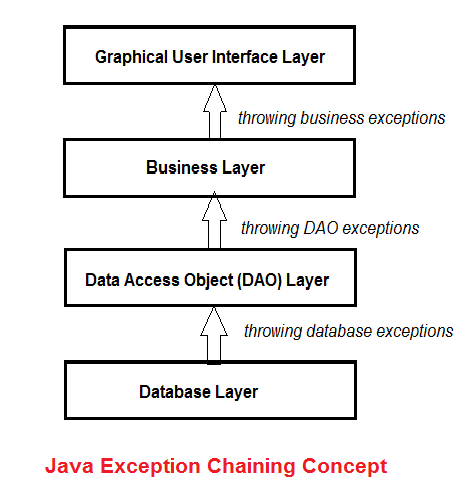
The diagram is useful, but do not interpret it as “every layer must catch and wrap every exception.” Excessive wrapping produces long chains with repetitive messages and makes control flow harder to understand.
Instead, translate at a boundary where the exception’s meaning changes:
- A data-access layer may turn a database-driver-specific failure into a repository or persistence failure.
- A service layer may add business context, such as which operation was being attempted.
- An outer application boundary can log the full failure and choose an appropriate user-facing response.
For example, a service method can convert a low-level import issue into an application-level failure without claiming it has recovered:
public class ApplicationImportService {

    private final ApplicationFileLoader fileLoader;

    public ApplicationImportService(ApplicationFileLoader fileLoader) {
        this.fileLoader = fileLoader;
    }

    public JobApplication importFrom(Path file) {
        try {
            return fileLoader.load(file);
        } catch (IOException exception) {
            throw new ApplicationImportException(
                    "Unable to import a job application from " + file.getFileName(),
                    exception
            );
        }
    }
}
The loader remains responsible for file access. The service gives the failure meaning in terms of the use case: importing a job application.
Java Exception Handling - 5 Best Practices That You Should Know!
Watch Visual Computer Science’s “Java Exception Handling - 5 Best Practices That You Should Know!” for two design rules that matter immediately in layered backend applications: catching specific types and handling failures at the layer with enough context.
Watch specific catches for why narrow exception types preserve diagnostic information. Then watch swallowing and layers. Focus on the explanation of “throw early, catch late”: signal failure near its source, but make the final application-level decision only where enough context exists.
Do not swallow failures
An exception is swallowed when code catches it but neither handles it meaningfully nor allows it to propagate.
The clearest bad example is an empty catch block:
try {
    fileLoader.load(file);
} catch (IOException exception) {
}
This code discards the failure completely. The program continues in an unknown state, and the original cause cannot be diagnosed from the caller’s perspective.
This variation is also usually misleading:
try {
    return fileLoader.load(file);
} catch (IOException exception) {
    exception.printStackTrace();
    return new JobApplication();
}
Printing a stack trace may expose some evidence during local development, but it does not make a fake JobApplication valid. In a backend application, use structured logging at an appropriate boundary and retain the exception object:
logger.error("Failed to import job application from {}", file.getFileName(), exception);
Pass the exception itself to the logger so its stack trace and causal chain are included.
Avoid logging the same exception at every layer and then rethrowing it. That creates duplicated stack traces and noise. A practical default is:
- Lower layers propagate or add necessary local context.
- A boundary responsible for handling the failure logs it once.
- The boundary returns or presents an error appropriate to its caller.
Do not include secrets, passwords, authentication tokens, or unnecessary personal data in either exception messages or logs.
Resources must close even when work fails
Files, streams, database connections, and similar objects hold resources outside Java’s ordinary heap memory. If an exception occurs before manual cleanup, those resources may remain open.
Use try-with-resources for any AutoCloseable resource:
public String readImportPreview(Path file) throws IOException {
    try (BufferedReader reader = Files.newBufferedReader(file)) {
        return reader.readLine();
    }
}
Java closes reader when the block finishes, whether the read succeeds or throws an exception. This is safer and clearer than manually closing resources in finally.
A finally block can still be useful for non-resource cleanup, but never return from it:
public String readImportPreview(Path file) throws IOException {
    try {
        return Files.readString(file);
    } finally {
        return "No preview available"; // Incorrect: hides IOException
    }
}
The return in finally replaces the pending result or exception. If reading fails, the caller receives "No preview available" instead of the IOException. This is another form of swallowing a failure.
A compact decision process
When you encounter a try block during backend work, apply this sequence:
- Name the failure. Is it invalid input, an unavailable external dependency, malformed data, or a programming error?
- Ask whether this method can truly recover. If not, do not invent a successful default value.
- Catch the narrowest useful type. Handle subclasses before broader parent types.
- Add context only when it improves understanding. State the attempted operation and relevant safe identifiers.
- Preserve the cause. Use
new SomeException(message, exception). - Close resources automatically. Prefer try-with-resources.
- Log once at the handling boundary. Preserve the full exception, but do not expose internal details to end users.
Key takeaways
Exception handling is not mainly about satisfying Java’s compiler. It is about maintaining a truthful record of failure through your application.
- Use
throwswhen a caller should decide how to handle a checked failure. - Catch exceptions only to recover, clean up, translate meaningfully, or make an application-level decision.
- Catch specific exception types before general ones.
- Wrap exceptions with both a clear message and the original cause.
- Never silently catch an exception, return a misleading fallback, or return from
finally. - Prefer try-with-resources so cleanup happens on both success and failure.
- Log the exception object at an appropriate boundary, avoiding duplicated logs and sensitive data.
Next, you will shift from code-level reliability to project-level reliability: using Maven to manage dependencies and run the build and test lifecycle.