Recommended resources
The freely available resources this lesson will direct you to.
Welcome back! Last lesson, you used loops to visit values in a sequence. Now the question is how to store those values so you can retrieve and change them appropriately. Python provides four everyday collection types: lists, tuples, sets, and dictionaries.
You’ll use product data as a running example. The aim is not to memorize four sets of syntax, but to decide whether your data needs a position, a fixed group of values, uniqueness, or a key for lookup. Those decisions will matter when you later represent products, carts, and API data.
Lists: ordered data that can change
Suppose you need to retain product IDs in the order they were requested, including repeated requests. A list fits:
requested_ids = ["A10", "B20", "A10"]

print(len(requested_ids))   # 3
print(requested_ids[0])     # A10
print(requested_ids[-1])    # A10
print(requested_ids[:2])    # ["A10", "B20"]
print("B20" in requested_ids)  # True
Like a JavaScript array, a list has positions starting at zero. A negative index counts from the end. A slice such as requested_ids[:2] produces a new list containing items before position 2; the stopping position is excluded. Unlike an index lookup, a slice can safely run beyond the list’s end. Trying requested_ids[3] here, however, raises IndexError.
Watch the list portion of Corey Schafer’s Python Tutorial for Beginners 4: Lists, Tuples, and Sets. It demonstrates indexing and slicing before showing the methods that change a list.
Python Tutorial for Beginners 4: Lists, Tuples, and Sets
Corey Schafer’s list walkthrough gives you a visual account of where items go when a list grows or shrinks.
Watch creating and retrieving for literals, length, indices, and slices. Then watch changing a list for adding and removing items. Focus especially on the difference between adding one object with append() and adding each item from another collection with extend().
Lists are mutable: their contents can change without creating a new list. Here are the operations you’ll reach for most often:
requested_ids = ["A10", "B20", "A10"]

requested_ids[1] = "C30"          # Replace an item by position
requested_ids.append("D40")        # Add one item at the end
requested_ids.extend(["E50", "F60"])  # Add two separate items

last_id = requested_ids.pop()      # Remove and return "F60"
requested_ids.remove("A10")        # Remove the first matching "A10"

print(requested_ids)               # ["C30", "A10", "D40", "E50"]
The distinction between append() and extend() matters when the argument is itself a list. requested_ids.append(["E50", "F60"]) would add one nested list, not two ID strings. Also, append() changes the existing list and returns None; do not assign its result back to requested_ids. By contrast, pop() returns the item it removed. remove(value) searches for a matching value and raises ValueError if none exists.
If you are accustomed to avoiding array mutation in Redux state updates, notice that ordinary Python lists explicitly support in-place changes. Whether to change a list or build a new one depends on who else might be using that same list; we’ll revisit that consideration when writing functions.
Tuples: positions in a fixed group
A product variant might be identified by a product ID and a color. If those two values belong together as a fixed pair, a tuple expresses that intent:
variant = ("A10", "blue")

print(variant[0])       # A10
print(variant[-1])      # blue

product_id, color = variant
print(color)            # blue
Tuples, like lists, preserve order, allow duplicates, and support indexing and slicing. The assignment to product_id, color is called unpacking: each name receives the value in the corresponding position. The number of names must match the number of values.
The crucial difference is that a tuple’s items cannot be replaced, added, or removed. variant[0] = "B20" raises TypeError. If you need one item in a tuple, include a trailing comma: ("A10",) is a tuple, while ("A10") is just a string in parentheses. An empty tuple is ().
Watch the tuple section of the same tutorial for the list-versus-tuple contrast. The video also shows two names referring to the same mutable list; that is why changing a list can affect code holding another reference to it.
Python Tutorial for Beginners 4: Lists, Tuples, and Sets
This portion of Corey Schafer’s tutorial makes mutability concrete rather than treating it as just a definition.
Watch tuples and mutability. Notice that tuple immutability prevents replacing an item of the tuple. It does not make an object stored inside a tuple immutable: a tuple containing a list can still contain a changing list.
Choose a tuple when the group of positions should remain fixed, not merely because you do not happen to edit a collection today. A list is usually clearer for a changing series of products; a tuple can be clearer for one fixed (product_id, color) pair.
Sets: unique values, with no meaningful position
Now imagine you only need to know which distinct product IDs appear in a batch. A set removes duplicates:
requested_ids = ["A10", "B20", "A10"]
unique_ids = set(requested_ids)

print(len(unique_ids))       # 2
print("A10" in unique_ids)    # True

unique_ids.add("C30")
unique_ids.discard("B20")
There is no useful “first product” in a set, so unique_ids[0] is not valid. Printed or iterated set elements may appear in a different order from the input. If request order or repeated IDs matter, keep the list; converting it to a set loses both.
Sets can also compare groups. If one list records requested products and another records available products, their intersection gives the IDs present in both:
requested = {"A10", "B20"}
available = {"A10", "C30"}

fulfillable = requested & available  # Contains "A10"
unavailable = requested - available  # Contains "B20"
all_seen = requested | available     # Contains all three IDs
You can create an empty set with set(). Bare {} creates an empty dictionary, which we’ll use next. Set members must be hashable values: strings and integers work, but a mutable list cannot be a set member.
Python Tutorial for Beginners 4: Lists, Tuples, and Sets
The final sections of Corey Schafer’s lists, tuples, and sets tutorial show uniqueness, group comparisons, and the empty-set syntax trap.
Watch unique members for duplicates, ordering, and membership. Continue through set comparisons for shared and differing elements, then empty collections to see why an empty set requires set().
Dictionaries: retrieve a value by its key
A list answers “what is at position zero?” A dictionary answers “what value belongs to this key?” For example, stock quantities can be stored under product IDs:
stock_by_sku = {"A10": 5, "B20": 0}

print(stock_by_sku["A10"])          # 5
print("B20" in stock_by_sku)        # True
print(stock_by_sku.get("C30", 0))   # 0
Each dictionary entry has a key and a value. Keys are unique: assigning to an existing key replaces its value, rather than creating a second entry. Strings are common keys; other hashable values can be keys too. Values can be numbers, strings, lists, or even other dictionaries.
Use brackets when a key must exist: stock_by_sku["C30"] raises KeyError if it does not. Use .get("C30", 0) when a missing key should produce a fallback value instead. The in test checks keys, not values. Although dictionaries retain insertion order in modern Python, retrieve their data by key rather than treating them as lists with numeric positions.
Corey Schafer’s Python Tutorial for Beginners 5: Dictionaries - Working with Key-Value Pairs develops those operations from a small record. If you are thinking in JavaScript, a Python dictionary is useful for similar keyed data, but access uses record["key"], not record.key.
Python Tutorial for Beginners 5: Dictionaries - Working with Key-Value Pairs
Corey Schafer’s dictionary tutorial covers creating a mapping, retrieving values safely, changing entries, and visiting its key-value pairs.
Watch create and look up for keys, bracket access, and get(). Continue with change and remove, then visit entries. Pay attention to what a plain for loop over a dictionary supplies versus what .items() supplies.
You can add, change, and remove entries without making a new dictionary:
stock_by_sku = {"A10": 5, "B20": 0}

stock_by_sku["A10"] = 4    # Replace an existing value
stock_by_sku["C30"] = 8    # Add a new key-value pair
del stock_by_sku["B20"]    # Remove that pair

for sku, quantity in stock_by_sku.items():
    print(sku, quantity)
A plain for sku in stock_by_sku visits keys. Use .items() when you need each key and its value; .keys() and .values() provide those parts separately. In this example, after the changes, the loop prints A10 4 and C30 8.
Putting the collections together
Real data often nests these types. A list can hold several product dictionaries, giving you ordered records whose fields have meaningful names:
products = [
    {"sku": "A10", "stock": 5},
    {"sku": "B20", "stock": 0},
]

print(products[0]["sku"])  # A10

for product in products:
    if product["stock"] > 0:
        print(product["sku"])  # A10
Read products[0]["sku"] in two parts: products[0] retrieves the first dictionary from the list; ["sku"] retrieves a value from that dictionary. This combines last lesson’s loop and conditional with today’s storage and lookup operations. You’ll encounter this shape frequently when working with web application data.
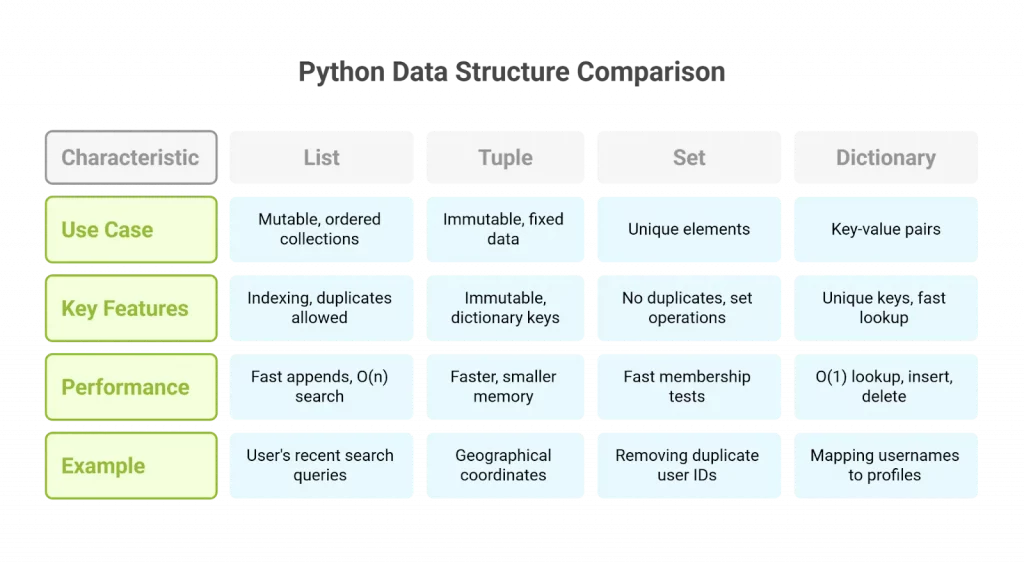
The comparison image below is a quick decision aid, not a performance guarantee. In particular, tuples are not automatically the fastest choice for every operation; choose by the behavior your data needs.
What to carry forward
Use a list when order and repeated values matter and the collection may change. Use a tuple for a fixed group of positioned values. Use a set when uniqueness and membership matter more than order. Use a dictionary when you need to retrieve a value by a meaningful key. Across them, watch what in tests: items in lists, tuples, and sets, but keys in dictionaries.
Next, you’ll define functions that accept data through parameters and return results. These collections will be the inputs and outputs of many of those functions.