Recommended resources
The freely available resources this lesson will direct you to.
Welcome back! Last lesson, you chose between lists, tuples, sets, and dictionaries to store product data. This time, you’ll put that data to work inside functions: named pieces of code that accept inputs and give results back.
By the end, you’ll be able to define a function, distinguish its parameters from the arguments supplied at a call, choose between positional and keyword arguments, set a sensible default, and use return rather than print() when another part of the program needs the result. These are the small building blocks you’ll later use for application rules such as calculating cart totals.
Define a function, then call it
A function lets you give a piece of behavior one name instead of rewriting it wherever it is needed. Here is a function that calculates the price of a line item in cents:
def line_total(unit_price_cents, quantity):
    subtotal_cents = unit_price_cents * quantity
    return subtotal_cents


total = line_total(750, 3)
print(total)  # 2250
The def keyword begins the definition. The name and parentheses form the function’s header, the colon ends that header, and the indented lines form its body. Python reads the definition without calculating a total yet. The body runs when line_total(750, 3) calls the function.
The names unit_price_cents and quantity are parameters: names declared by the function. The values 750 and 3 are arguments: values supplied by this particular call. Inside that call, subtotal_cents holds the calculation; return sends its value back to be assigned to total. Local names such as subtotal_cents are not available outside the function.
Watch Corey Schafer’s Python Tutorial for Beginners 8: Functions for the definition-and-call mechanics. Stop after the default-argument example; the later material on variable numbers of arguments is not needed here.
Python Tutorial for Beginners 8: Functions
Corey Schafer’s Python Tutorial for Beginners 8: Functions builds a function in stages, making it easier to see what changes when it begins accepting inputs and returning a result.
Watch defining and calling for the significance of indentation and the call parentheses. Continue through code reuse, then return values; pay particular attention to the difference between returning text and displaying it. In required parameters, notice what happens when an argument is omitted. Finish with a default value, which makes one parameter optional.
The call parentheses matter: line_total refers to the function itself, while line_total(750, 3) runs it. If you know JavaScript functions, that distinction is familiar; in Python, the indentation rather than braces marks which statements belong to the function.
Match arguments to parameters
In line_total(750, 3), Python matches values by position. The first argument becomes unit_price_cents; the second becomes quantity. Reversing them still produces the same multiplication result in this particular example, but that is an accident of the calculation—not a safe way to call functions generally.
You can instead name the parameters at the call site:
line_total(unit_price_cents=750, quantity=3)  # 2250
line_total(quantity=3, unit_price_cents=750)  # 2250
These are keyword arguments. Their order does not matter because each name identifies its destination. You can mix the two styles, with positional arguments first:
line_total(750, quantity=3) # 2250
For the function as currently defined, both parameters are required. line_total(750) raises a TypeError because quantity is missing. Supplying an unrecognized keyword, or supplying the same parameter twice—for example, line_total(750, unit_price_cents=800, quantity=3)—also raises a TypeError. Placing a positional argument after a keyword argument, as in line_total(quantity=3, 750), is a SyntaxError.
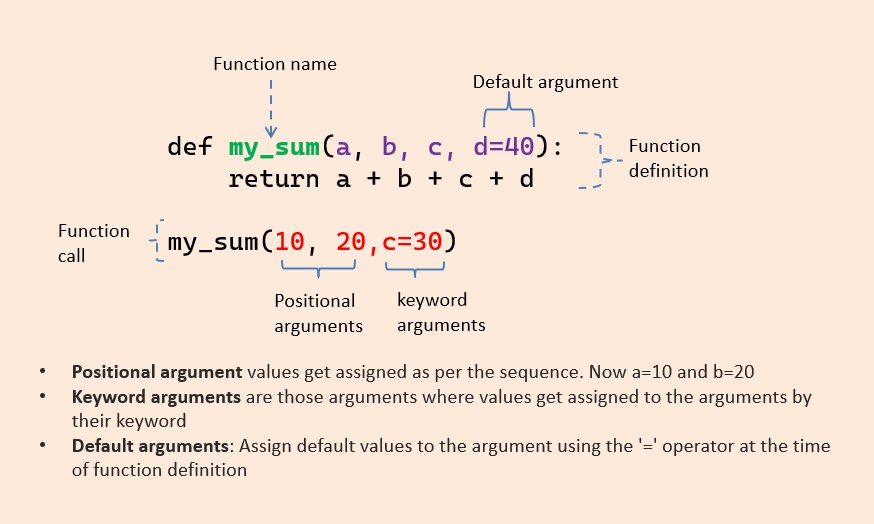
The image below identifies the same parts of a function call. In its example, a, b, and c receive values from the call, while d uses its default value of 40.
Return a value when the caller needs it
return does two jobs: it ends the current function call and hands a value to the caller. That value can be assigned, printed, compared, or used in another expression:
total = line_total(750, 3)
print(total)                    # 2250
print(line_total(750, 3) > 2000)  # True
Compare that with a function that only prints:
def show_line_total(unit_price_cents, quantity):
    print(unit_price_cents * quantity)


result = show_line_total(750, 3)  # Displays 2250
print(result)                     # Displays None
show_line_total() displays the number, but it does not return that number. A function that reaches its end without returning a value returns None, Python’s marker for the absence of a value. An explicit return with nothing after it also returns None.
This distinction matters when you assemble larger features. A cart calculation that returns a total can supply it to a response, compare it with a threshold, or display it. One that only prints the total has committed to console output and gives the caller no calculated value to use.
A function can also return from a conditional branch. For example:
def stock_message(quantity):
    if quantity == 0:
        return "Out of stock"

    return "Available"
When quantity is zero, the first return exits the function; the final line does not run. Either way, the caller receives a string.
Provide an optional argument with a default
Suppose a line total may include a delivery charge, but most calls have no charge. Put a default value in the definition:
def line_total(unit_price_cents, quantity, delivery_cents=0):
    return unit_price_cents * quantity + delivery_cents


print(line_total(750, 3))                       # 2250
print(line_total(750, 3, delivery_cents=250))   # 2500
delivery_cents=0 makes that parameter optional. Omitting it uses 0; providing an argument overrides 0 for that call. The required parameters come first, followed by the parameter with a default. In an ordinary definition like this, writing a required parameter after a default-valued one is invalid syntax.
Notice the different roles of = here. In the definition, delivery_cents=0 establishes a default. In the call, delivery_cents=250 supplies a keyword argument. The latter is often clearer than an unexplained third number, especially when several amounts have the same type.
Take care with mutable defaults
A default of 0 is straightforward. A default of [] or {} can be surprising because Python creates that default object once when the function is defined, not afresh for every call. Since lists and dictionaries can change in place, separate calls can inadvertently share data.
Read the focused discussion in Real Python’s Defining Your Own Python Function. It begins with a function whose list default retains values across calls and ends with the None pattern used to avoid that sharing.
Defining Your Own Python Function – Real Python
Read Real Python’s explanation of mutable default arguments to understand why a seemingly convenient empty-list default can make a function’s results depend on earlier calls.
In “Defining and Calling Functions: Advanced Features,” find the subsection “Default Argument Values.” After its greeting examples, begin at the paragraph introducing mutable defaults. Stop before “Variable Number of Positional Arguments: *args.” Focus on the outputs of repeated append_to() calls and why checking target is None lets the function create a fresh list.
Here is the same pattern with product IDs:
def add_requested_id(sku, requested=None):
    if requested is None:
        requested = []

    requested.append(sku)
    return requested


print(add_requested_id("A10"))  # ["A10"]
print(add_requested_id("B20"))  # ["B20"]
Each call without a requested argument makes its own list. If you do pass a list, however, append() changes that supplied list:
basket = ["A10"]
add_requested_id("B20", basket)
print(basket)  # ["A10", "B20"]
That is a separate choice from the default-argument issue. As with list updates in your earlier collection lesson, decide whether changing the caller’s list is intended. If it is not, build and return a new list instead; the next lesson will introduce concise ways to transform collections.
Put the pieces together
Here is a small function that accepts the kind of product dictionary you used last lesson and returns a calculated result:
def product_line_total(product, quantity=1):
    unit_price_cents = product["price_cents"]
    return unit_price_cents * quantity


product = {"sku": "A10", "price_cents": 750}

print(product_line_total(product))              # 750
print(product_line_total(product, quantity=3))  # 2250
The dictionary supplies the price by key. The required product parameter receives that dictionary, quantity defaults to one, and return makes the computed amount available to the caller. This function has a narrow responsibility: it calculates one product line’s total rather than printing it or changing the product record.
What to carry forward
Use def to give reusable behavior a name. Parameters belong to the definition; arguments are supplied at a call, either by position or by keyword. A default makes a parameter optional, while return ends the call and gives its result to the caller. If you omit a return value, the result is None. Avoid mutable objects such as lists as defaults unless you specifically intend calls to share them.
Next, you’ll transform collections with list and dictionary comprehensions. Functions like these will give those transformations a clear place in your programs.