Recommended resources
The freely available resources this lesson will direct you to.
Hello! Last lesson, you used if, elif, and else to choose one outcome for a request. A program often needs to make that decision repeatedly—for every quantity in a batch, or for each line of input until someone types a stopping word.
This lesson introduces Python’s two main loops. You’ll use for to process the items of a sequence and while to repeat work while a condition remains true. Both will be useful when you later work with collections of products, carts, and orders.
Process each item with for
Suppose you have several requested quantities. A for loop gives the name requested to each value in turn:
requested_quantities = [2, 0, 4, 1]

for requested in requested_quantities:
    print("Requested:", requested)

print("Finished")
The indented print runs four times, displaying 2, 0, 4, and 1 in order. The unindented print runs once, after the loop. As with an if block, the colon and indentation define the loop body. If the sequence is empty, the body runs zero times.
If you have written JavaScript’s for (const requested of requestedQuantities), the idea is similar: use each item directly rather than managing a position counter. Watch Corey Schafer’s Python Tutorial for Beginners 7: Loops and Iterations - For/While Loops for the basic for syntax. The video also demonstrates range(), which we’ll use shortly.
Python Tutorial for Beginners 7: Loops and Iterations - For/While Loops
Watch Corey Schafer demonstrate a loop over a list and a loop that runs a specified number of times.
Start with list iteration; notice how the loop variable receives a new item on each pass. Then skip ahead to numeric ranges, focusing on why the ending number is excluded.
A Python for loop works with more than lists. Read the “Traversing Built-in Collections in Python” → “Sequences: Lists, Tuples, Strings, and Ranges” subsection of Real Python’s Python for Loops: The Pythonic Way. For now, focus on the common looping behavior; the next lesson will examine the collection types themselves.
Python for Loops: The Pythonic Way – Real Python
Real Python shows how the same for syntax processes several kinds of sequence.
In “Traversing Built-in Collections in Python,” find “Sequences: Lists, Tuples, Strings, and Ranges.” Read the sequence examples, beginning with the explanation of sequence order and ending after the explanation of strings and numeric ranges. Notice that you usually do not need an index to visit each item.
For example, a string supplies one character at a time:
code = "SAVE"

for character in code:
    print(character)
It prints S, A, V, and E on separate lines. The essential pattern is the same whether the sequence contains numbers, characters, or other values: each pass runs the indented body with the next item.
Repeat a known number of times
Use range() when you need a sequence of numbers rather than items from an existing collection:
for number in range(3):
    print(number)
This prints 0, 1, and 2. The end value is excluded, so range(3) supplies three numbers. You can specify a starting value too:
for attempt in range(1, 4):
    print("Attempt", attempt)
That prints attempts 1, 2, and 3. This is useful for a fixed number of attempts, but not necessary just to traverse an existing list: for requested in requested_quantities is clearer than looking up each item by its numeric position.
Sometimes the position is part of the task—for instance, when displaying numbered request lines. enumerate() supplies both a position and an item:
requested_quantities = [2, 0, 4]

for position, requested in enumerate(requested_quantities, start=1):
    print("Line", position, "requests", requested)
The first pass assigns 1 to position and 2 to requested; the next assigns 2 and 0. The two names receive the two values supplied on each pass. start=1 makes the displayed line numbers start at one.
Read Real Python’s “Exploring Pythonic Looping Techniques” → “Iterating With Indices: The Pythonic Way” subsection for the comparison between manual indexing and enumerate().
Python for Loops: The Pythonic Way – Real Python
This part of the same Real Python guide explains when getting an item and its position together makes code clearer.
Under “Exploring Pythonic Looping Techniques,” open “Iterating With Indices: The Pythonic Way.” Read the indexing comparison, starting with the manual-index loop and stopping after the introduction to enumerate() and its optional starting value. Focus on what each of the two loop variables receives.
Make decisions during a loop
The conditional checks from last lesson can run once per item. Here, valid_count is an accumulator: it begins at zero and changes as the loop processes requests.
requested_quantities = [2, 0, 4, 1]
stock = 3
valid_count = 0

for requested in requested_quantities:
    if 0 < requested <= stock:
        valid_count += 1

print("Valid requests:", valid_count)
This prints Valid requests: 2. The quantities 2 and 1 pass the check; 0 is not positive, and 4 exceeds stock. Notice the two indentation levels: the if is inside the loop, and valid_count += 1 is inside the if. This example checks each quantity against the same stock value independently; it does not reserve or subtract stock.
Two statements let you change a loop’s usual behavior:
continueskips the rest of the current pass and moves to the next item.breakexits the entire loop, leaving any remaining items unprocessed.
Here, invalid quantities are skipped, but the first request exceeding stock stops the scan:
requested_quantities = [2, 0, 4, 1]
stock = 3

for requested in requested_quantities:
    if requested <= 0:
        continue

    if requested > stock:
        print("Cannot fulfill:", requested)
        break

    print("Can fulfill:", requested)

print("Scan finished")
It prints Can fulfill: 2, then Cannot fulfill: 4, then Scan finished. The 0 reaches continue, so it produces no message. The 4 reaches break, so the final 1 is never examined. Use break only when stopping early is genuinely correct; if every request needs checking, don’t stop at the first failure.
Watch the earlier portion of the same Corey Schafer video to see precisely which statements are skipped by each keyword.
Python Tutorial for Beginners 7: Loops and Iterations - For/While Loops
Return to the loop tutorial for its side-by-side demonstrations of break and continue.
Watch early exits. Pay particular attention to where the print statement sits relative to each keyword: statements already executed in a pass cannot be undone, while statements after continue or break are not reached.
Repeat while a condition holds
A for loop is the usual choice when you already have a sequence to traverse. A while loop is useful when repetition depends on a condition that may change—for example, accepting an unknown number of lines until someone enters "stop".
line = input("Enter a note (or stop): ")

while line != "stop":
    print("Received:", line)
    line = input("Enter a note (or stop): ")

print("Input finished")
The condition is checked before each pass. If the first entry is "stop", the body never runs. Otherwise, the body prints the current line and obtains another one. The new input is essential: without it, line would never change and a non-"stop" entry would keep the loop running. Here, "stop" is a sentinel—a value chosen to signal the end of input. It is not printed as a note.
The same condition-based loop can traverse a list, although for is generally simpler for that job:
requested_quantities = [2, 0, 4]
index = 0

while index < len(requested_quantities):
    requested = requested_quantities[index]
    print("Requested:", requested)
    index += 1

print("Finished")
len(requested_quantities) is 3, so the valid positions are 0, 1, and 2. Incrementing index eventually makes the condition false. If you put a continue before index += 1, a particular item could be revisited forever; this is one reason to prefer for when you simply need every item.
The While Loop Structure image labels the three parts to check when reading a while loop: the variable’s initial value, the condition, and the update that can eventually end the loop.
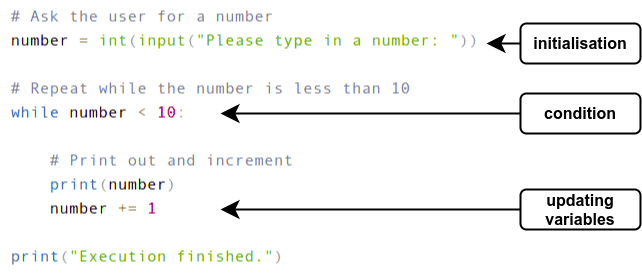
In the pictured code, starting at 8 prints 8 and 9; starting at 10 skips the loop entirely. int(input(...)) assumes the input can be converted to an integer, just as in the previous lesson’s example.
Watch the final loop segments of Corey Schafer’s tutorial for a second walkthrough of condition checks and early exits.
Python Tutorial for Beginners 7: Loops and Iterations - For/While Loops
The tutorial closes with while, including how changing a counter ends a loop and how break can end one early.
Watch condition checks for the counter update, then stopping loops for break and an intentionally open-ended loop. Notice why an exit condition matters; if a loop runs unexpectedly without stopping, the video shows how to interrupt it with Ctrl+C in many environments.
What to carry forward
Use for to visit the items of an existing sequence, range() for a known sequence of numbers, and enumerate() when you need both an item and its position. Use while when a changing condition determines whether another pass is needed. In either kind of loop, continue skips a pass’s remaining work and break stops the loop altogether.
Next, you’ll look more closely at the collections these loops can process: lists, tuples, sets, and dictionaries.