Recommended resources
The freely available resources this lesson will direct you to.
- Control Flow in Python - If Elif Else Statementswww.youtube.com
- Python Tutorial for Beginners 6: Conditionals and Booleans - If, Else, and Elif Statementswww.youtube.com
- Conditional Statements in Python – Real Pythonrealpython.com
- Lecture 1 - CS50's Introduction to Programming with Pythoncs50.harvard.edu
Hello! In the previous lesson, you used comparisons to produce True or False and built a can_fulfill value for a product request. Now you’ll use those results to decide what a program actually does.
This lesson covers if, elif, and else; the indentation that defines their blocks; and how to combine conditions without accidentally accepting an invalid request. These decisions are a foundation for the cart and inventory rules you’ll build later.
Make a decision with if
An expression such as requested <= stock gives you an answer. An if statement uses that answer to control whether a block of code runs:
requested = 3
stock = 5

if requested <= stock:
    print("Enough stock")
    print("Continue with the request")

print("Finished checking")
The first two messages appear because 3 <= 5 is True. Change requested to 7: Python skips both indented lines, but still prints Finished checking.
Watch the opening of Control Flow in Python - If Elif Else Statements from Programming with Mosh for a visual demonstration of the colon, indentation, and what happens after a conditional block.
Control Flow in Python - If Elif Else Statements
Programming with Mosh demonstrates how an if condition selects a block, then extends it with elif and else.
Watch the first block for the difference between indented lines and the line that runs afterward. Continue through alternative paths; focus on where each elif or else aligns.
The colon ends the condition line. The next line must be indented; four spaces is the usual Python style. Unlike JavaScript, Python does not use braces to mark this block. Moving a line back to the original indentation level ends the block and changes when that line runs.
Real Python’s Conditional Statements in Python explains why indentation is part of the program’s structure, not merely its appearance.
Conditional Statements in Python – Real Python
Read Real Python’s explanation of how Python groups statements into blocks. It will help you spot a misplaced line when a condition behaves unexpectedly.
In “Grouping Statements: Indentation and Blocks,” go to the subsection “Python: It’s All About the Indentation.” Read the block explanation, ending before the longer blocks.py example. Follow the example showing that execution resumes at the less-indented line whether the condition was true or false.
If a condition should do nothing when false, a lone if is enough. If you need to handle the false case too, give it an else.
Choose one of several paths
Consider a cart request. It is not enough to ask whether the quantity fits in stock: a request for -2 also satisfies requested <= stock when stock is 5. Check validity first, then availability:
requested = 3
stock = 5

if requested <= 0:
    status = "Enter a positive quantity"
elif requested > stock:
    status = "Not enough stock"
else:
    status = "Ready to add to cart"

print(status)
For requested = 3, the first two conditions are false, so else assigns the ready status. Try reading the code with requested set to 0, then 6. In each case, start at the top and stop at the first true condition. The final print runs afterward in every case.
The diagram below shows that if starts a group, elif adds further tests, and else handles the case in which none succeeded. Its “tab” labels indicate indentation; when writing Python, use four spaces consistently instead of mixing tabs and spaces.
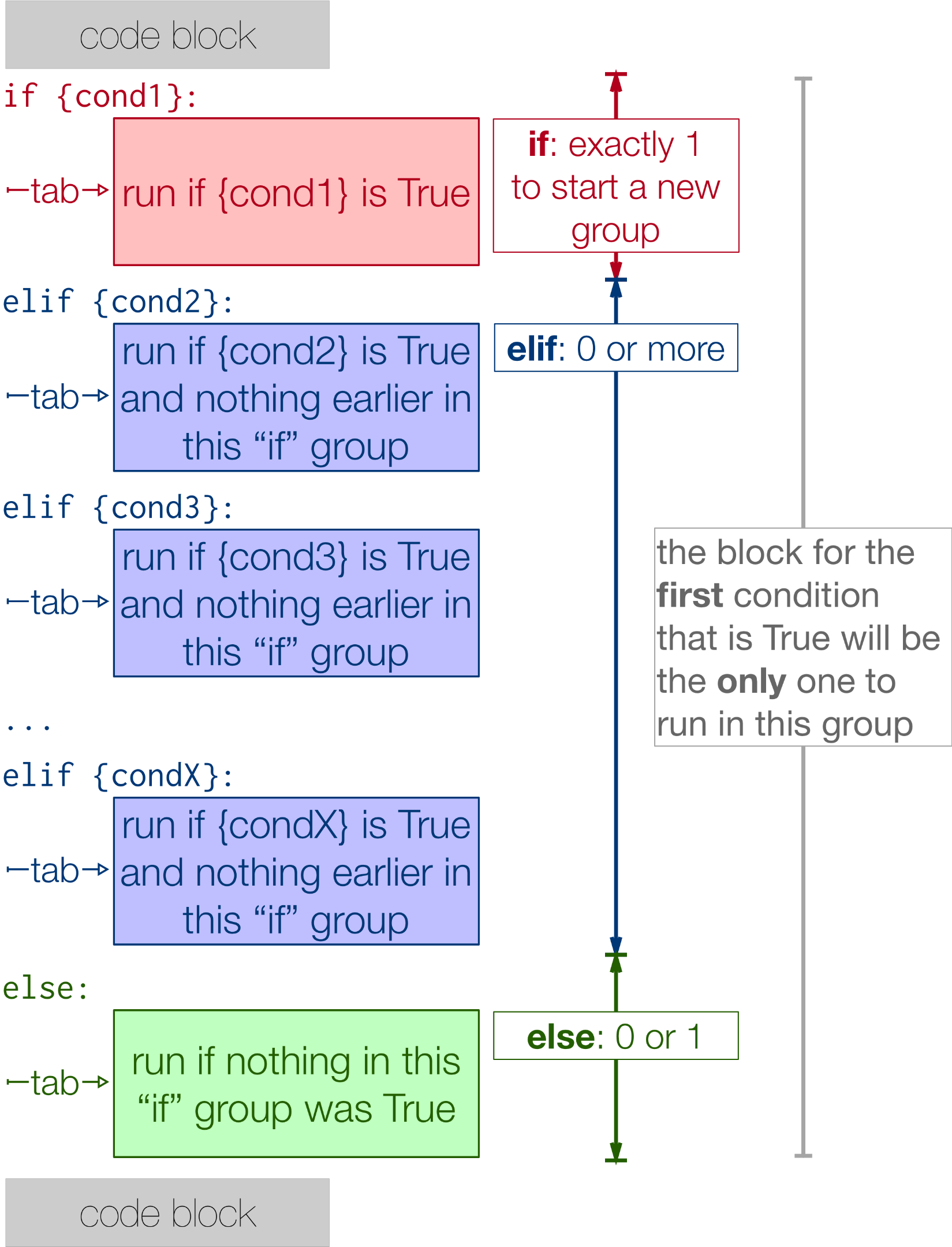
There may be multiple elif clauses, but else is optional and, when present, goes last. An else has no condition: it means “none of the earlier conditions matched.”
This differs from writing several separate if statements. Separate statements each get their own test and can each run; an if/elif/else group chooses at most one block. Use separate if statements for genuinely independent actions, and one group when the outcomes are alternatives.
Order matters. If you put a broad condition first, it may take a request before a more specific condition gets a chance to inspect it. That is why the positive-quantity check precedes the stock check in this example.
Combine conditions deliberately
Last lesson, you met and, or, and not. Inside an if, they let you state a rule without creating a branch for every combination:
requested = 3
stock = 5
is_active = True

if requested > 0 and requested <= stock and is_active:
    print("Request can proceed")
else:
    print("Request cannot proceed")
All three requirements must hold. For a rule allowing either of two delivery options, use or:
has_standard_delivery = False
has_pickup = True

if has_standard_delivery or has_pickup:
    print("A delivery option is available")
Use not when the condition is naturally expressed as an absence: if not is_active: selects the inactive case. Parentheses clarify rules that mix operators, for example:
if requested > 0 and (has_standard_delivery or has_pickup):
    print("Request has a delivery option")
Watch the later portion of the same video for these operators, short-circuiting, and chained comparisons. You can skip its intervening section on the shorter conditional-expression syntax; ordinary branches are the focus here.
Control Flow in Python - If Elif Else Statements
The video now combines conditions and shows when Python can stop evaluating them early.
Watch combined conditions for and, or, not, and grouping with parentheses. Then watch short-circuiting: with and, a false first part makes later parts unnecessary; with or, a true first part does the same. Finish with chained comparisons for Python’s compact way to express a range.
For example, requested > 0 and requested <= stock does not evaluate its second comparison if requested > 0 is false. To check a range, Python also permits 1 <= requested <= stock, meaning the quantity is at least 1 and no greater than stock. This syntax may be unfamiliar from JavaScript, so read it as two comparisons sharing the middle value.
A condition need not contain a comparison. Python also tests values for truthiness:
coupon_code = ""

if coupon_code:
    print("A coupon code was supplied")
else:
    print("No coupon code")
An empty string is falsy, so this prints No coupon code. A nonempty string is truthy—even the text "False". When your rule specifically asks whether stock is zero, if stock == 0: says more precisely what you mean than relying on truthiness.
Put the decisions together
Here is a small script you can run as cart_decision.py in the environment you set up earlier:
quantity_text = "3"       # Imagine text received from a form
stock = 5
is_active = True

requested = int(quantity_text)

if not is_active:
    message = "Product unavailable"
elif requested <= 0:
    message = "Quantity must be positive"
elif requested > stock:
    message = "Not enough stock"
else:
    message = "Ready to add to cart"

print(message)
The script prints Ready to add to cart. The branch order expresses a policy: an inactive product is unavailable regardless of quantity; for an active product, the quantity must be positive and fit in stock. Because the conditions form one group, only one message is selected. The unindented print displays that message after the decision is complete.
int(quantity_text) assumes the text represents an integer. Invalid numeric text would raise an error before these branches run. Later lessons will cover handling such failures; a conditional alone does not make conversion safe.
You can also place an if inside a selected block when a second decision only matters there—for example, choosing a delivery message after a request has passed its quantity checks. Keep the inner decision indented one further level, and avoid nesting when a straightforward elif expresses the rule more clearly.
What to carry forward
An if runs an indented block when its condition is truthy. elif tests alternatives in order; else handles the remaining case. Indentation determines which statements belong to each branch, while the order and breadth of your conditions determine which outcome wins. Combine conditions with and, or, and not when they express a single clear rule.
Next, you’ll use for and while loops to process more than one value. The same conditional checks will help decide what to do with each value you encounter.