Recommended resources
The freely available resources this lesson will direct you to.
Hello! Last time, you used strings as sequences and saw that changing one character requires creating a new string. This lesson introduces tuples, which let you group values into an immutable sequence. You’ll use them to represent pairs of values—such as a row and column—and to make those pairs into dictionary keys.
Allow about 35–40 minutes, including the short video and readings. Run the code as you go; the differences between tuples and lists are easiest to remember when you see them in Python.
A tuple groups values in a fixed order
A tuple resembles a list in the ways you already know: it has positions, supports indexing and slicing, and can be processed with a loop. The usual way to create one is with comma-separated values in parentheses:
position = (2, 5)

print(position[0])     # 2
print(position[-1])    # 5
print(position[:1])    # (2,)
print(len(position))   # 2

for value in position:
    print(value)
The slice position[:1] is itself a tuple. Its trailing comma matters: the comma, not the parentheses alone, makes a one-item tuple.
print(type((7)))    # <class 'int'>
print(type((7,)))   # <class 'tuple'>
print(())           # () — an empty tuple
Tuples can hold different types of values, such as ("A", 3). You can also unpack a tuple when each position has a clear meaning:
row, column = position
print(row)       # 2
print(column)    # 5
Unpacking requires the number of variables to match the number of values. For a pair, row, column is often clearer than repeatedly writing position[0] and position[1].
Immutable does not mean inaccessible
You can read a tuple’s items, but you cannot replace, append, or remove items in that tuple. For example, position[0] = 3 raises a TypeError. If the pair should change, make a new tuple and assign it to the variable:
position = (2, 5)
position = (3, position[1])

print(position)  # (3, 5)
The original tuple was not edited. The name position now refers to a different tuple.
Read Real Python’s “Exploring Tuple Immutability” section for the distinction between a tuple that cannot be changed in place and a mutable object stored inside one. That distinction will matter when we choose dictionary keys.
Python's tuple Data Type: A Deep Dive With Examples – Real Python
In Real Python’s tuple guide, this section shows what immutability prevents—and the important exception it does not prevent.
Find “Exploring Tuple Immutability,” just after the discussion of slicing. Begin with its opening explanation that tuples are immutable, then read the examples through the section’s final summary about dictionary keys. Focus on the tuple containing a list: which assignment fails, and which change to the list remains possible?
Here is that distinction in a compact example:
items = ["red"]
record = (items, 4)

items.append("blue")
print(record)  # (['red', 'blue'], 4)

# record[0] = ["green"]  # TypeError: cannot replace a tuple item
The tuple still holds the same list object at position 0; the list’s contents changed. So “tuple is immutable” does not mean “everything reachable through a tuple is immutable.”
If you need a tuple containing the list’s current values rather than the list itself, convert it:
items = ["red"]
snapshot = tuple(items)  # ("red",)

items.append("blue")
print(snapshot)           # ('red',)
Why some tuples can be dictionary keys
A dictionary associates a key with a value. Python requires its keys to be hashable: their hash must remain stable, and values that compare equal must have the same hash. A list is not hashable, which is why it cannot be a dictionary key. A tuple can be a key when all of its items are hashable—for example, when its items are integers or strings.
Watch Python Morsels’ What are hashable objects in Python for this rule and the reason stable values matter. The middle segment discusses lookup speed; you can leave its performance details for the later complexity lessons.
What are hashable objects in Python
Python Morsels’ “What are hashable objects in Python” connects dictionary keys to hashability and explains why equality and a stable hash have to agree.
Watch valid keys for the tuple-versus-list distinction. Then skip to hash stability; focus on why two equal tuples must have matching hashes and why a changing value would be troublesome as a key. A hash is useful for locating a key, but it is not guaranteed to be a unique identifier for every unequal value.
The image makes the immediate coding consequence visible:
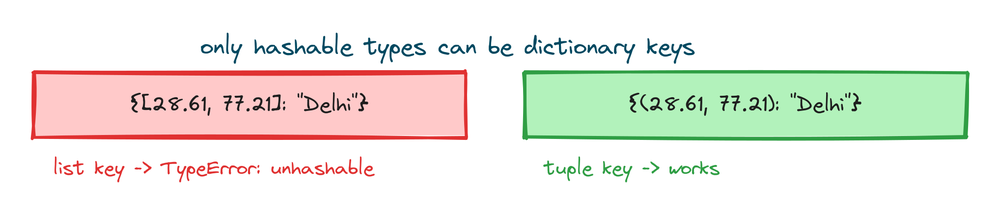
The rule applies inside tuples too:
good_key = (2, "east")       # Hashable items: valid dictionary key
bad_key = (2, ["east"])      # Contains a list: not a valid key

labels = {good_key: "open"}
# labels[bad_key] = "open"   # TypeError: unhashable type: 'list'
You do not need to calculate hashes yourself to use tuple keys. When uncertain about an item’s type, the useful question is: Is every part of this proposed key hashable?
Use one tuple to identify one pair
Suppose a small grid has labels at particular positions. A row number alone does not identify a position; neither does a column number alone. Together, (row, column) makes a composite key.
Read the beginning of “11.7. Using Tuples as Keys in Dictionaries” in Python for Everybody - Interactive. Its directory example uses the same idea with a different kind of pair.
11.7. Using Tuples as Keys in Dictionaries — Python for Everybody - Interactive
The “Using Tuples as Keys in Dictionaries” section of Python for Everybody - Interactive shows how two values can identify one dictionary entry.
In Section 11.7, skip the donation notice and start at the composite-key explanation. Read the directory[last, first] = number line immediately after it, then stop before the interactive prompts. Notice that the two values inside the brackets form one tuple key.
Apply that pattern to the grid:
labels = {}
labels[(1, 2)] = "start"
labels[(3, 4)] = "goal"

print(labels[(1, 2)])  # start
print(labels[1, 2])    # start
In labels[1, 2], Python treats 1, 2 as the tuple key (1, 2). Writing the parentheses explicitly can make the pair easier to spot. By contrast, labels[1][2] means something different: look up key 1 first, then index into the result.
Order is part of a tuple’s value. (1, 2) and (2, 1) are different keys, as they should be for two different grid positions. Equal tuples, however, identify the same key even if they were created separately:
cells = {}

for row, column, marker in [
    (0, 1, "A"),
    (1, 0, "B"),
    (0, 1, "C"),
]:
    cells[(row, column)] = marker

print(cells[(0, 1)])  # C
print(cells[(1, 0)])  # B
print(len(cells))     # 2
The loop unpacks each three-item tuple. It then constructs a two-item tuple as the key. The final (0, 1) updates the entry for that same pair rather than creating a third key. This is a useful pattern whenever several values together identify one thing.
Key takeaways
A tuple is an ordered, immutable sequence: you can index, slice, iterate over, and unpack it, but you cannot change its items in place. A tuple makes a useful composite dictionary key only when every item in it is hashable; putting a list inside a tuple does not make that list hashable.
Next, you’ll work with dictionaries directly—using keys for lookups and counting how often values occur. Tuple keys will give you a way to count or look up pairs when a single value is not enough.