Recommended resources
The freely available resources this lesson will direct you to.
Hello! In the previous lesson, you turned a line of input into a list and processed its values with a loop. This time, we’ll work with the text before or instead of converting it to numbers. String skills matter throughout DSA: problems may ask you to inspect characters, extract part of a word, or prepare text for comparison.
You’ll use indexing, slicing, iteration, and common string methods, then combine them in a small function. Allow about 35 minutes, or split the lesson across two study sessions.
A string has positions
A Python string is a sequence of characters. Like a list, it starts at index 0:
text = "Python"

print(text[0])   # P
print(text[2])   # t
print(text[-1])  # n
Negative indices count from the end, so -1 selects the last character. len(text) is 6, but text[6] raises an IndexError: the six valid positions are 0 through 5. An empty string has no valid character index, so check that it is nonempty before using text[0] or text[-1].
Watch the indexing and slicing portion of Corey Schafer’s Python Tutorial for Beginners 2: Strings - Working with Textual Data. Pay particular attention to the difference between a string’s length and its last index.
Python Tutorial for Beginners 2: Strings - Working with Textual Data
Corey Schafer demonstrates how to select individual characters and spans of text.
Watch character positions for len(), zero-based indexing, and the out-of-range error. Continue with slicing boundaries; notice which boundary is included and which is excluded.
Unlike a list, a string cannot have one of its positions changed in place. text[0] = "p" fails. To obtain different text, you create a new string; we’ll see how methods do that shortly.
A slice selects a span
An index selects one character. A slice selects a substring: text[start:stop] includes start but excludes stop. That exclusive stopping position is worth checking carefully in algorithm problems.
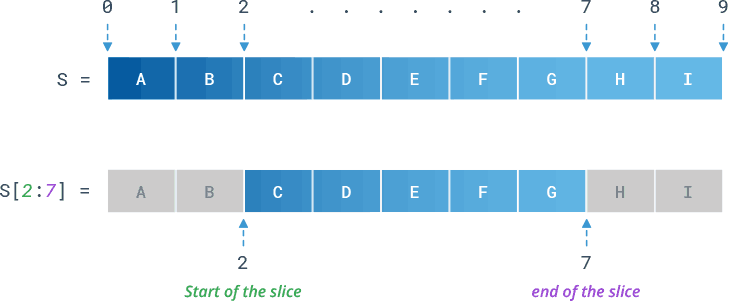
For example:
text = "Python"

print(text[1:4])  # yth
print(text[:2])   # Py — start at the beginning
print(text[2:])   # thon — continue to the end
print(text[-2:])  # on — take the last two characters
The length of text[1:4] is three characters: positions 1, 2, and 3. A slice with equal boundaries, such as text[2:2], returns "". Unlike a single-character lookup, text[2:100] does not raise an error; it stops at the end of the string.
Slices can also have a step: text[start:stop:step]. For now, two useful forms are text[::2], which takes every second character, and text[::-1], which produces the characters in reverse order. Use the ordinary two-boundary form when you need a contiguous substring; it makes your intent clearer.
Process characters one at a time
The loop pattern from the previous lesson works on strings too. If you only need each character, iterate directly:
vowels = 0

for char in "algorithm":
    if char in "aeiou":
        vowels += 1

print(vowels)  # 3
Here, in tests whether the current character appears in "aeiou". If your logic needs a position—perhaps to compare a character with the one before it—loop over indices instead:
text = "book"

for index in range(len(text)):
    print(index, text[index])
Read the short “String Loops” subsection of Stanford’s Python Strings for the distinction between these two forms.
Stanford’s “Python Strings” contrasts looping over character positions with looping directly over characters. Read it to choose the simpler form for a given task.
In the “String Loops” subsection, read the loop comparison, beginning with the index-based loop and ending after the note about converting a string to a list. Focus on what information the direct character loop does not provide.
A for loop over "" runs zero times. Just as an empty list left the previous lesson’s accumulator unchanged, an empty string leaves vowels at 0.
Let string methods do the routine work
Many text operations already have names in Python. Watch the next part of Schafer’s video for lower(), upper(), count(), find(), and replace(). The important detail is what happens to the original string.
Python Tutorial for Beginners 2: Strings - Working with Textual Data
The video demonstrates useful search and transformation methods, including why a returned string must be saved.
Watch case and search, then replacement. When replace() initially appears not to work, identify which value was printed and what must be assigned to retain the result.
String methods do not change a string in place:
word = "Data"
print(word.lower())  # data
print(word)          # Data

word = word.lower()   # Reassign if you want to use the new value
print(word)          # data
For common DSA input and text tasks, distinguish testing, locating, and transforming:
text = "banana"

print("ana" in text)           # True: is it present?
print(text.find("ana"))        # 1: where does it first start?
print(text.find("xyz"))        # -1: not found
print(text.count("a"))         # 3: how many occurrences?
print(text.replace("a", "o"))  # bonono: a new string
If you only need a yes-or-no answer, in expresses that directly. Use find() when you need the position, remembering that -1 means “not found.” startswith() and endswith() are similarly direct when only the beginning or end matters.
Two other methods often appear when preparing input. strip() removes whitespace at the ends, not between words. split() breaks a string into a list of strings; join() builds a string from string pieces. Read the specified parts of Python Strings for their behavior, especially the difference between splitting on whitespace and splitting on an explicit separator.
Return to Stanford’s “Python Strings” for methods that clean up, divide, and combine text.
In “String Functions,” read the “Test s.startswith() s.endswith()” subsection from end tests. Then find “Strip Whitespace s.strip()” and read from whitespace stripping. In “String split(),” start at the paragraph beginning “Special whitespace” and read default splitting. Finish in “String join()” with joining strings. Focus on what type each method returns.
Compare these results:
line = "  red   blue  "
print(line.strip())       # "red   blue"
print(line.split())       # ["red", "blue"]
print("a,,b".split(","))   # ["a", "", "b"]
print("-".join(["a", "b"]))  # "a-b"
With no argument, split() groups whitespace and ignores it at the ends. With "," supplied, it splits at each comma, so adjacent commas leave an empty field. join() is called on the separator, and the pieces it receives must be strings.
Combine the tools in a small text processor
Suppose you want a compact prefix signature for a line of words: lowercase each word, keep at most its first two characters, and separate the results with hyphens. This brings together a method, a loop, a slice, a list, and join():
def word_prefixes(line, width):
    pieces = []

    for word in line.lower().split():
        pieces.append(word[:width])

    return "-".join(pieces)


print(word_prefixes("  Python   DATA  ", 2))  # py-da
print(word_prefixes("I like algorithms", 2))  # i-li-al
Assume width is a positive integer. line.lower().split() supplies the words one at a time. Each word[:width] keeps as many starting characters as are available, so a one-letter word causes no error. Finally, join() combines the accumulated pieces.
Notice that this function does not need strip() first: whitespace-only input already gives an empty list from split(), and "-".join([]) returns "". Choosing a method based on its actual behavior helps keep an algorithm short without neglecting edge cases.
The main distinctions are now in place: indexing gets one character, slicing gets a span with an excluded stopping position, iteration processes characters, and methods search or produce new text. When working on a string problem, first decide whether you need a character, its position, a substring, or a transformed version of the whole string.
Next, you’ll study tuples—sequences that, like strings, are immutable—and learn when a group of values can serve as one key.