Recommended resources
The freely available resources this lesson will direct you to.
- Python Tutorial for Beginners 5: Dictionaries - Working with Key-Value Pairswww.youtube.com
- Accumulating with Python dictionarieswww.youtube.com
- Counting the Frequencies in a List Using Dictionary in Python - GeeksforGeekswww.geeksforgeeks.org
- Python Dictionaries for Beginners: A Complete Lesson With Exercises — CodeSolid.com 0.1 documentationcodesolid.com
Hello! In the previous lesson, you used tuples as dictionary keys when a pair of values identified one position. Now you’ll work with the dictionary itself: how to retrieve a value by its key, handle a key that is missing, and build a frequency map that records how often each item appears. These are small Python skills that recur throughout DSA problems.
Allow about 35–40 minutes, including the videos and time to run the code. If you’re studying in 30-minute sessions, you can leave the final section for the next day.
A dictionary answers questions by key
A list retrieves an element by its position: values[0]. A dictionary retrieves a value by a key you choose. For example, you might associate each task code with its current status:
status = {"A1": "waiting", "B2": "done"}

print(status["A1"])  # waiting
Here "A1" is a key and "waiting" is its value. Unlike a list index, the key does not tell Python where in a sequence to look. It identifies the entry you want.
Watch the opening of Corey Schafer’s Python Tutorial for Beginners 5: Dictionaries - Working with Key-Value Pairs for creation, lookup, and assignment. The video uses a student record; the same operations work for frequency maps.
Python Tutorial for Beginners 5: Dictionaries - Working with Key-Value Pairs
Corey Schafer introduces dictionary keys and values, then shows what happens when you retrieve or assign an entry.
Watch key-value pairs for the basic syntax, key lookups for brackets, missing keys, and get, and assignments for adding or changing entries. You can leave the video's multiple-entry update method aside; single-key assignment is enough for this lesson.
You can start with known entries or build a dictionary as data arrives:
status = {}
status["A1"] = "waiting"  # New key: add an entry
status["B2"] = "done"     # New key: add another entry
status["A1"] = "done"     # Existing key: replace its value

print(status)             # {'A1': 'done', 'B2': 'done'}
print(len(status))        # 2
Assigning to "A1" a second time did not create another entry. Each key identifies one value at a time. Keys must be hashable, as you saw with tuple keys last lesson; values can also be lists or other mutable objects.
Decide what a missing key should mean
Bracket lookup is appropriate when a key must be present. If it is absent, Python raises a KeyError:
status = {"A1": "done"}

print(status["A1"])       # done
# print(status["C3"])     # KeyError: 'C3'
When absence is expected, choose how to handle it. The expression key in dictionary tests whether the key exists, not whether it appears among the values:
print("C3" in status)     # False
print("done" in status)   # False: "done" is a value, not a key

if "C3" in status:
    print(status["C3"])
else:
    print("No status recorded")
Alternatively, get retrieves a value if present and supplies a fallback if absent:
print(status.get("A1", "unknown"))  # done
print(status.get("C3", "unknown"))  # unknown
print(status.get("C3"))             # None
get does not add the missing key to the dictionary. The choice between these forms depends on what your program means: use brackets when absence indicates a mistake, in when you need separate present/absent behavior, and get when a fallback value is useful.
Turn repeated items into counts
Suppose you need to know how often each item occurs in a list. Instead of keeping a separate variable for every possible item, use the item itself as a dictionary key and its count as the value.
The character-frequency picture shows the same idea for a string: each distinct character in "google.com" has one entry. Notice that punctuation is counted too; Python does not silently skip the period.
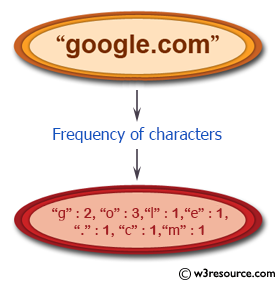
There is one obstacle to writing the loop. With an empty dictionary, counts[item] += 1 attempts to read counts[item] before it can add one. The first item has no entry yet, so that read raises KeyError.
Watch the relevant parts of Reuven Lerner’s Accumulating with Python dictionaries. They show both the initial error and two ways around it.
Accumulating with Python dictionaries
Reuven Lerner builds a character counter from an empty dictionary, making the first-occurrence problem visible before simplifying the solution.
Watch first occurrences for the failed increment and the if/else fix. Then skip to counting with get for the shorter version. Focus on what value each approach uses when a key has never appeared.
Start with the explicit version. It makes the two cases clear:
def count_items(items):
    counts = {}

    for item in items:
        if item in counts:
            counts[item] += 1
        else:
            counts[item] = 1

    return counts


print(count_items(["red", "blue", "red"]))
# {'red': 2, 'blue': 1}
print(count_items([]))  # {}
For ["red", "blue", "red"], the dictionary changes as follows:
| Item just processed | Dictionary afterward |
|---|---|
"red" |
{"red": 1} |
"blue" |
{"red": 1, "blue": 1} |
"red" |
{"red": 2, "blue": 1} |
After each pass through the loop, the dictionary holds the correct counts for the items processed so far. A new item starts at one; a repeated item increases its existing count. That observation explains why the returned counts are correct once the loop finishes.
Now express the same logic using get(item, 0). An unseen item contributes a previous count of zero; a seen item contributes its stored count:
def count_items(items):
    counts = {}

    for item in items:
        counts[item] = counts.get(item, 0) + 1

    return counts
The 0 is important. Without it, get returns None for a missing key, and adding 1 to None fails. The assignment stores the new count; get alone would not create an entry.
Look up and use the finished counts
A frequency map is useful because you can ask for the count of a particular item without scanning the original input again:
counts = count_items("google.com")

print(counts["o"])         # 3: the key is known to exist
print(counts.get("z", 0))  # 0: an absent character occurred zero times
The same function works on a list of integers or tuples, provided its items can be dictionary keys:
visits = [(0, 1), (1, 0), (0, 1)]
visit_counts = count_items(visits)

print(visit_counts[(0, 1)])  # 2
print(visit_counts[(1, 0)])  # 1
This connects to the previous lesson: a tuple can identify a pair, and the dictionary can record how often that pair appears.
Sometimes you need every count rather than a single lookup. Watch the final selected segment of Corey Schafer’s dictionary video for iteration:
Python Tutorial for Beginners 5: Dictionaries - Working with Key-Value Pairs
Return to Corey Schafer’s dictionary tutorial to see how a loop accesses keys and their associated values.
Watch iterating entries. Notice the difference between looping directly over a dictionary, which gives keys, and looping over .items(), which gives key-value pairs.
Use .items() when you need both parts of each entry:
for item, frequency in count_items(["red", "blue", "red"]).items():
    print(item, frequency)
The loop variables receive one key and its count together. If you only need keys, for item in counts: is sufficient.
A dictionary is particularly helpful when a problem repeatedly asks for information by item or identifier. Building a frequency map still requires visiting each input item once, but afterward you can look up a particular count directly. You’ll study the precise efficiency of this pattern in the upcoming complexity module.
Key takeaways
A dictionary maps unique, hashable keys to values. Brackets retrieve a known key or raise KeyError; in checks whether a key exists; get supplies a fallback without inserting an entry. To count frequencies, visit each item and either initialize its count or increase it—counts[item] = counts.get(item, 0) + 1 captures both cases.
Next, you’ll use sets when you care only whether an item is present, not what value or count is associated with it.