Recommended resources
The freely available resources this lesson will direct you to.
Hello! Last lesson, you wrote one focused pytest test for the rule “page an incident when it is critical and open.” That test checks an important case, but it cannot detect a function that pages every incident. This lesson turns the same arrange–act–assert structure into several independently reported cases. You’ll cover the available severities and statuses, then test both ends of a numeric incident-domain range.
Turn one example into a decision table
Before writing more tests, decide what the paging rule promises for each combination in our small domain:
| Severity | Status | Requires an immediate page? |
|---|---|---|
| Critical | Open | Yes |
| Critical | Acknowledged | No |
| High | Open | No |
| High | Acknowledged | No |
The expected answers come from the rule, not from running the function. That distinction matters: if the implementation is wrong, the test data must still describe the intended behavior.
Watch the relevant portion of pytest’s parametrize (beginner - intermediate) by anthonywritescode. The example uses a square function rather than incidents; concentrate on how each input-and-expected-output row becomes a separate test result.
pytest's parametrize (beginner - intermediate) anthony explains #027
In pytest's parametrize (beginner - intermediate), anthonywritescode demonstrates the decorator's basic structure and then shows how to give individual cases useful names.
Watch input-output rows for the relationship between decorator arguments, row values, and test-function parameters. Continue with case IDs; notice how a descriptive ID makes a failure easier to locate than an automatically generated one.
The pytest documentation provides the reference example and one caution that matters when tests grow beyond immutable values:
How to parametrize fixtures and test functions
Read pytest's How to parametrize fixtures and test functions to confirm how parameter sets become separate invocations and how values are passed to them.
In the subsection "@pytest.mark.parametrize: parametrizing test functions", start at the sentence introducing a typical input-and-expected-output example. Read the example and note, stopping after the warning about mutable lists and dictionaries. Focus on the correspondence between each tuple and the test's arguments.
The decorator’s first argument names the values pytest will pass into the test; each row supplies those values in the same order. Pytest runs the test function once per row. It does not make independent copies of parameter objects, so avoid mutating a list or dictionary supplied as shared test data. Our enum values and Boolean expectations do not have that problem.
Cover the severity–status combinations
Replace the single test in tests/test_paging.py from the previous lesson with the following. Keep your existing Incident, Severity, Status, and requires_page definitions; adjust the import if your package has a different name.
import pytest

from incident_app.domain.paging import Incident, Severity, Status, requires_page


@pytest.mark.parametrize(
    "severity,status,expected",
    [
        pytest.param(
            Severity.CRITICAL, Status.OPEN, True,
            id="critical-open-pages",
        ),
        pytest.param(
            Severity.CRITICAL, Status.ACKNOWLEDGED, False,
            id="critical-acknowledged-does-not-page",
        ),
        pytest.param(
            Severity.HIGH, Status.OPEN, False,
            id="high-open-does-not-page",
        ),
        pytest.param(
            Severity.HIGH, Status.ACKNOWLEDGED, False,
            id="high-acknowledged-does-not-page",
        ),
    ],
)
def test_requires_page_for_severity_and_status(
    severity: Severity,
    status: Status,
    expected: bool,
) -> None:
    incident = Incident(severity=severity, status=status)

    actual = requires_page(incident)

    assert actual is expected
The arrange–act–assert shape is still present. Arrange constructs a fresh incident from a row; act calls requires_page; assert compares its result with that row’s specified outcome. pytest.param(..., id="...") keeps the case description next to its data and gives you a meaningful name in test reports.
These four rows deliberately cover every combination of the two severities and two statuses shown in the previous lesson. That is manageable here; with a larger enum, choose combinations according to the rule and its risks rather than generating a huge matrix without examining what each case establishes. In particular, both “critical but acknowledged” and “open but high” matter: each checks that both conditions, rather than just one, are required.
Test the edges of a numeric rule
Status and severity are discrete categories. Numeric inputs pose a different risk: an implementation can be correct for ordinary values yet mishandle a limit. Suppose an incident can also receive an impact score from 1 through 100, inclusive. For this lesson, specify a small predicate that returns True for scores in that range and False otherwise. It is a separate rule; you do not need to change the existing Incident dataclass.
The boundary illustration marks exactly the cases worth distinguishing at each end:
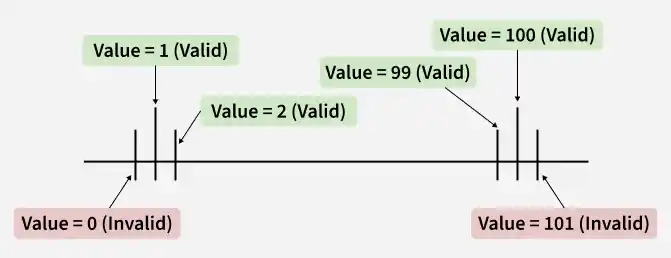
Add this function to your domain module, or place it in the appropriate domain-rules module in your project:
def is_valid_impact_score(score: int) -> bool:
    return 1 <= score <= 100
Then import is_valid_impact_score in tests/test_paging.py alongside the existing domain names and add a second parametrized test:
@pytest.mark.parametrize(
    "score,expected",
    [
        pytest.param(0, False, id="score-0-below-lower-limit"),
        pytest.param(1, True, id="score-1-at-lower-limit"),
        pytest.param(2, True, id="score-2-inside-lower-limit"),
        pytest.param(99, True, id="score-99-inside-upper-limit"),
        pytest.param(100, True, id="score-100-at-upper-limit"),
        pytest.param(101, False, id="score-101-above-upper-limit"),
    ],
)
def test_impact_score_range(score: int, expected: bool) -> None:
    actual = is_valid_impact_score(score)

    assert actual is expected
For each boundary, the cases immediately outside, at, and immediately inside the permitted range distinguish several plausible errors. For example, using a strict comparison at the upper end would reject 100; permitting one too many would accept 101. The nearby valid value 99 confirms that rejecting 101 has not inadvertently rejected values just below the limit.
Keep the two parametrized tests separate. Paging and score validity have different contracts, even though both benefit from rows of cases. Combining them would make every row carry irrelevant fields and obscure what a failure means.
Run and interpret the cases
From the project root, with the project installed in your isolated environment, run:
python -m pytest -v tests/test_paging.py
With the four paging rows and six score rows above, pytest should report 10 passed. Verbose output shows the case IDs, so a failure can identify, for example, critical-acknowledged-does-not-page rather than only the test function.
You can inspect the cases without executing them:
python -m pytest --collect-only -q tests/test_paging.py
This is useful when reviewing a test change in CI: check that the cases you intended to add were actually collected. If a row fails, read its ID alongside pytest’s observed and expected values. Do not change expected merely to turn the build green; first decide whether the rule, implementation, or test data is incorrect.
Parametrization reduces repeated test structure, not the need to reason about cases. A useful row has a clear reason to exist and an expected result chosen independently of the code under test.
Takeaways
@pytest.mark.parametrize runs one test function separately for each set of arguments. A severity–status table checks the combinations relevant to the paging rule; values just outside, at, and inside a numeric limit expose boundary mistakes. Descriptive IDs make those checks actionable when a CI run fails.
Next, you’ll use pytest fixtures to manage reusable setup and, when needed, teardown. The tests here need neither: constructing an in-memory incident for each case is already simple and isolated.