Recommended resources
The freely available resources this lesson will direct you to.
Hello! In the previous lesson, you used parametrization to give each severity, status, and boundary case its own test result. Those tests arranged their inputs in just one or two lines, so a fixture would have added little. Fixtures become useful when several tests need the same kind of preparation, or when preparation acquires a resource that must be released.
This lesson covers how a test requests a fixture, how a yield fixture pairs setup with teardown, and how scope determines whether that setup happens once per test or is shared. The goal is repeatable tests that remain understandable when a CI run fails.
Give reusable setup a name
A pytest fixture is a function decorated with @pytest.fixture. A test requests it by declaring a parameter with the fixture’s name. Pytest calls the fixture and supplies its result; you do not call the fixture yourself.
Watch the opening of pytest: everything you need to know about fixtures (intermediate) by anthonywritescode. The presenter distinguishes fixtures that provide data from fixtures that establish test state—and cautions against extracting every small arrangement merely to remove a line of duplication.
pytest: everything you need to know about fixtures (intermediate) anthony explains #487
Watch pytest: everything you need to know about fixtures (intermediate) by anthonywritescode for the basic fixture-request mechanism and the judgment involved in deciding whether a fixture helps.
In fixture basics, focus on the decorator, the matching test parameter, and the warning about over-engineering simple tests. The example uses a small class; we will apply the same mechanism to incidents.
The official pytest guide shows the same mechanism in its “Requesting fixtures” section.
Read the pytest documentation’s “Requesting fixtures” section to see what pytest does with a test parameter and why a default-scope fixture gives separate tests fresh values.
Start at “Requesting fixtures” and read fixture requests. Continue through “Quick example,” ending after the paragraph explaining how test_fruit_salad receives its bowl. Then, under “Fixtures are reusable,” read fresh results and its two-test list example. Notice that reuse of a definition does not imply sharing one mutable result.
Suppose several tests need a queue initially containing one critical, open incident. Add this file alongside your existing tests/test_paging.py; keep the earlier parametrized decision table, which still states the paging rule more completely.
# tests/test_incident_fixtures.py
import pytest

from incident_app.domain.paging import Incident, Severity, Status, requires_page


@pytest.fixture
def incident_queue() -> list[Incident]:
    return [Incident(severity=Severity.CRITICAL, status=Status.OPEN)]


def test_queue_with_nonpaging_incident(incident_queue: list[Incident]) -> None:
    incident_queue.append(
        Incident(severity=Severity.HIGH, status=Status.OPEN)
    )

    results = [requires_page(incident) for incident in incident_queue]

    assert results == [True, False]


def test_queue_starts_with_one_paging_incident(
    incident_queue: list[Incident],
) -> None:
    assert len(incident_queue) == 1
    assert requires_page(incident_queue[0]) is True
incident_queue is the arrange step. The first test mutates its list, but that mutation cannot add an incident to the second test’s list: the default fixture scope is function, so pytest calls incident_queue() separately for each test invocation. This applies to parametrized cases too—each case is a separate invocation.
Keep a fixture only when its name and reuse make tests clearer. An individual Incident(...) constructor in a short parametrized test is often easier to read than a fixture whose starting values you must look up elsewhere.
Keep a resource alive until the test finishes
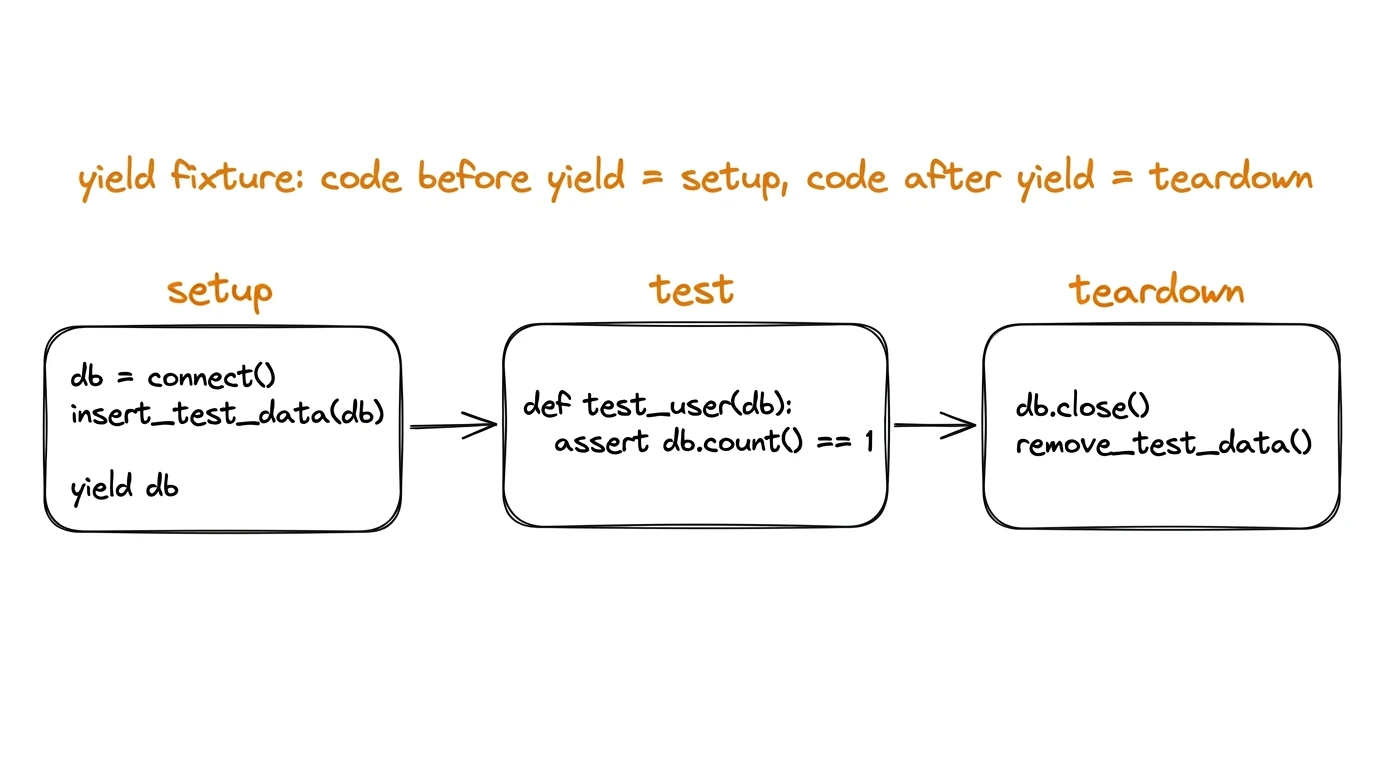
Returning a value is enough when preparation creates ordinary in-memory data. A resource such as an open stream or connection has a different requirement: it must still be available during the test, then be closed afterward. A yield fixture marks that boundary. Code before yield prepares the resource; the yielded value goes to the test; code after yield cleans up.
Watch the next part of the same video for the reason that returning a resource from inside a short-lived context manager can close it too early.
pytest: everything you need to know about fixtures (intermediate) anthony explains #487
Continue pytest: everything you need to know about fixtures (intermediate) for the setup-and-teardown behavior of yield.
In yield and cleanup, pay particular attention to the temporary-directory example: returning from inside the context manager would end its lifetime before the test could use it. The presenter then prints setup and teardown to make their timing visible. We will use an in-memory stream so no filesystem preparation is required.
The diagram makes the boundary visible:
Here is a small, closable resource you can add to tests/test_incident_fixtures.py:
from collections.abc import Iterator
from io import StringIO


@pytest.fixture
def event_stream() -> Iterator[StringIO]:
    stream = StringIO()
    yield stream
    stream.close()
The annotation describes the fixture function, which yields a StringIO. A test requesting it annotates its parameter as StringIO, the value it receives. For example, this short test makes the stream’s usable lifetime observable:
def test_page_decision_can_be_written(
    incident_queue: list[Incident],
    event_stream: StringIO,
) -> None:
    decision = requires_page(incident_queue[0])
    event_stream.write(f"{decision}\n")

    assert event_stream.getvalue() == "True\n"
This is a fixture-lifecycle demonstration, not a production audit-logging test: the test itself writes the line. To test application logging later, call the application code that writes it. After the test returns—or if its assertion fails—pytest resumes event_stream and calls close(). You do not need to close it in the test.
Consult the teardown explanation in the pytest guide to connect this example to the general rule.
Read the official guide’s recommended yield pattern to understand when cleanup runs, including when a fixture cannot finish setting up.
Under “Teardown/Cleanup (AKA Fixture finalization),” read “1. yield fixtures (recommended)” from its explanation of replacing return with yield through the sending_user and receiving_user example. In the explanation, setup timing describes how pytest reaches the test; read the following paragraph for reverse-order teardown. Then, under “Handling errors for yield fixture,” read setup failures. Focus on which cleanup can still run if a later fixture fails.
There is an important limit to the guarantee: if event_stream raises before it reaches yield, its own code after yield will not run. Fixtures that had already yielded can still be torn down. For resources with multiple potentially failing setup operations, keep acquisition and its cleanup close together rather than placing every operation before one final yield.
Choose scope for isolation first
Fixture scope controls the lifetime of its result. Visibility—which tests can find its name—is a separate question.
| Scope | One instance is used for |
|---|---|
function (default) |
One test invocation |
class |
Tests in one test class |
module |
Tests in one test file |
package |
Tests in the relevant test package |
session |
The pytest run |
A fixture is set up when first requested within its scope and torn down when that scope ends. Thus, a function-scoped yield fixture closes its resource after each test; a module-scoped one closes it after the last test using it in that module. Sharing saves setup time, but shared mutable state can make a test depend on another test’s behavior.
The video shows how changing only the decorator’s scope changes setup frequency, then shows where to put a fixture needed by multiple test files.
pytest: everything you need to know about fixtures (intermediate) anthony explains #487
Return to pytest: everything you need to know about fixtures (intermediate) for scope and fixture placement.
Watch scope in action to compare per-test and shared setup. Then watch sharing fixtures for conftest.py: focus on how its directory location determines which test files can request its fixtures.
For the precise lifetime definitions, use the official guide’s “Fixture scopes” subsection.
Read the pytest guide’s scope definitions so you can distinguish a fixture’s lifetime from the directory in which it is defined.
In “Scope: sharing fixtures across classes, modules, packages or session,” locate the “Fixture scopes” subsection. Read scope lifetimes, including all five bullet points. Stop before “Dynamic scope”; changing scope at runtime is not needed here.
Leave incident_queue function-scoped because it is mutable and cheap to create. A wider scope is appropriate when setup is sufficiently expensive and sharing is safe—for example, read-only reference data used throughout a module. An external service or database may justify costly shared setup, while the data each test changes still needs its own isolation. Do not widen scope simply because several tests request the same fixture.
If another test file later needs incident_queue, move its definition to tests/conftest.py and remove the definition from test_incident_fixtures.py:
# tests/conftest.py
import pytest

from incident_app.domain.paging import Incident, Severity, Status


@pytest.fixture
def incident_queue() -> list[Incident]:
    return [Incident(severity=Severity.CRITICAL, status=Status.OPEN)]
Tests beneath that tests/ directory can request it by name without importing conftest.py. Moving the fixture does not change its function scope: each test still gets a fresh list. Conversely, setting scope="session" on a fixture does not make it discoverable outside the directories where its definition is visible.
Pytest also supports autouse=True, which makes a fixture run without an explicit test parameter. Prefer explicit requests here. They show which tests need setup and avoid imposing a resource—and its potential failure—on unrelated tests.
Make teardown dependable
The most tempting fixture can also be the most fragile: one large fixture creates several resources, performs additional work, and only then yields. If a later setup operation raises, its code after yield is never reached. Instead, give a resource-owning fixture one clear acquisition and matching cleanup; let other fixtures request it if they need it. Pytest tears down successfully yielded fixtures in reverse setup order.
Read the short “Safe teardowns” discussion for the failure mode behind this guidance.
Read the pytest guide’s “Safe teardowns” example to see why compact setup is not necessarily safe setup.
In “Safe teardowns,” read the single setup fixture example and the paragraph immediately after it, ending at the observation that none of its teardown runs if setup raises before yield. Then, in “Safe fixture structure,” read resource ownership. Focus on pairing each successful state-changing action with its own cleanup.
For this lesson’s code, there is no reason to add teardown to incident_queue: its list requires no explicit release. event_stream does require close(), so its teardown belongs in its fixture. Run the examples from your project root with:
python -m pytest -v tests/test_incident_fixtures.py
You can inspect fixture setup and teardown activity with python -m pytest --setup-show tests/test_incident_fixtures.py. The output helps distinguish a test assertion failure from an error that prevented fixture setup.
Takeaways
A fixture names reusable preparation, and a test requests it through a parameter. Default function scope gives mutable test data a fresh instance for every test invocation. Use yield when a resource needs cleanup; keep acquisition and teardown together, and choose a broader scope only when the saved setup cost outweighs the risk of sharing state. conftest.py changes where fixtures are available, not how long their results live.
Next, you’ll use pytest’s built-in tmp_path and monkeypatch fixtures to isolate filesystem and environment-dependent behavior—cases where reliable setup matters, but writing your own cleanup machinery often does not.