Recommended resources
The freely available resources this lesson will direct you to.
Hello! This module shifts from writing well-structured Python to checking its behavior automatically. Your earlier work on project layout, type annotations, and incident-domain models gives us a useful starting point. We’ll begin with one focused pytest unit test, then build toward tests that handle more cases and more complex dependencies.
Today’s goal is practical: write a test for an incident rule using arrange, act, assert. Unlike a check performed through a deployed service, this test will run the domain logic directly. That makes it quick to run while you develop and suitable for a CI check long before a tester encounters the behavior.
What makes a useful unit test?
A unit test asks whether a small piece of code behaves as specified under particular conditions. Here, our unit will be a function that decides whether an incident requires an immediate page. The test will supply an incident, call the function, and check the decision. It will not need an API, database, or notification service: the decision itself is what we want to verify.
Watch how pytest finds a test function and reports a failed assertion. The example uses a shopping cart, but pay attention to the structure rather than the domain.
How To Write Unit Tests in Python • Pytest Tutorial
Watch “How To Write Unit Tests in Python • Pytest Tutorial” by pixegami for a compact demonstration of creating and running a test.
In test discovery, notice the test file naming convention. Then watch the first test: the author prepares an object, calls a method, and checks its result. Notice especially why a test containing only pass is discovered but provides no useful verification.
Pytest discovers files such as test_paging.py and functions whose names begin with test_. A test is an ordinary Python function; for the kind of check we are writing, its essential machinery is Python’s assert statement. If the assertion is false, pytest reports a failure and shows the values involved.
The pytest documentation gives the test a precise shape:
Read “Anatomy of a test” in the pytest documentation to distinguish preparing a test from performing the behavior it checks.
On the “Anatomy of a test” page, read setup through action, then assertion and cleanup. Focus on the distinction between the action under test and the observations made afterward. The final paragraph reinforces why the action and assertion are the core of the test.
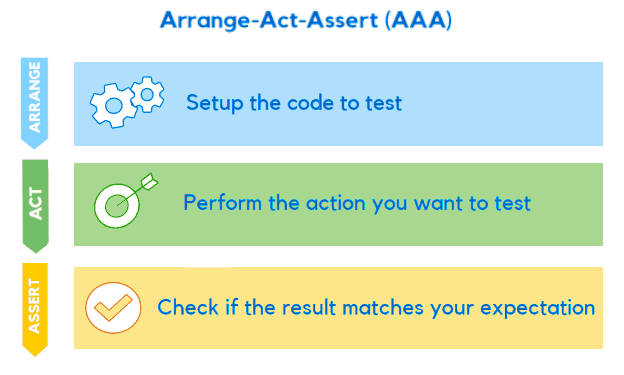
For our test, arrange means constructing an incident in a known state. Act means calling the paging decision function once. Assert means checking its answer against a decision we chose before calling it. The documentation also names cleanup: when tests create external state, they must prevent it from affecting later tests. Our example creates only in-memory values, so no cleanup is needed.
Give the incident rule a clear contract
Suppose the current business rule is: an incident requires an immediate page when it is both critical and open. A critical incident that has already been acknowledged does not satisfy this particular rule. We can express the decision in a small domain function.
If your project already has incident enums and a dataclass, use those rather than duplicating them. The following is a self-contained example showing the parts needed for this lesson. Place it in src/incident_app/domain/paging.py, adjusting the package name to match your project:
from dataclasses import dataclass
from enum import Enum


class Severity(str, Enum):
    HIGH = "high"
    CRITICAL = "critical"


class Status(str, Enum):
    OPEN = "open"
    ACKNOWLEDGED = "acknowledged"


@dataclass(frozen=True)
class Incident:
    severity: Severity
    status: Status


def requires_page(incident: Incident) -> bool:
    return (
        incident.severity is Severity.CRITICAL
        and incident.status is Status.OPEN
    )
The function takes an Incident and returns a bool. Its result depends only on the supplied value, which makes the rule easy to test without arranging infrastructure. The test should specify an expected business outcome, not copy the function’s expression into an assertion; copying the implementation could reproduce the same mistake in both places.
Create tests/test_paging.py:
from incident_app.domain.paging import Incident, Severity, Status, requires_page


def test_open_critical_incident_requires_page() -> None:
    # Arrange: choose an incident whose expected treatment is clear.
    incident = Incident(
        severity=Severity.CRITICAL,
        status=Status.OPEN,
    )

    # Act: perform the one behavior this test examines.
    actual = requires_page(incident)

    # Assert: compare the decision with the stated business rule.
    assert actual is True
The test name explains the situation and expected result, so a failure is meaningful in a CI report. The assertion is deliberately explicit: this function promises a Boolean answer, and for this situation that answer must be True. Comments mark the three phases while you are learning the pattern; in a short test, the variable names and spacing may eventually make them unnecessary.
Notice what the test does not establish. It says nothing yet about high-severity incidents or acknowledged incidents. One passing example is evidence for one specified behavior, not proof that every branch of the rule is correct.
Run the test and read its signal
Use the isolated environment and development-dependency installation workflow established for your project; pytest needs to be installed there, and the src package needs to be installable in that environment. From the project root, run:
python -m pytest -q tests/test_paging.py
A passing run should report one passed test. If pytest instead reports ModuleNotFoundError for incident_app, check that the package is installed in your active environment and that the import uses your project’s actual package name. Avoid adding path-manipulation code to the test merely to make the import work.
It is worth confirming that the test can detect a broken decision. Temporarily change requires_page() to return False, then rerun the command. Pytest should point to assert actual is True and show that the observed result was False. Restore the implementation afterward and rerun the test. That brief failure tells you more than an unexplained green result: the test genuinely observes the rule it claims to check.
This is the value of keeping the unit small. If this test fails during a later change to incident logic, you have a specific disagreement to investigate: for an open, critical incident, the paging decision is no longer the expected one. You do not first have to diagnose a web request, a database connection, or a deployment.
Takeaways
A pytest unit test can be a plain test_ function with a focused assertion. Arrange establishes a known incident, act calls the domain behavior, and assert checks the result against an independently chosen expectation. Keeping external systems out of this particular test makes its feedback fast and its failure easier to interpret.
Next, you’ll extend this approach to multiple severities, statuses, and boundary cases without writing a separate copy of the same test structure for each one.