Recommended resources
The freely available resources this lesson will direct you to.
- What is AAA | Configure AAA | Authentication | Authorization | Accountingwww.youtube.com
- Authentication, Authorization, and Accounting (AAA) with Cisco Modeling Labswww.youtube.com
- Understanding AAA (Authentication, Authorization & Accounting) in ...medium.com
- AAA Security - Www .howtonetwork .com.www.howtonetwork.com
Hello! In our last lesson, we secured administrative access to our network devices by configuring SSH and disabling Telnet. We used a local user database on the device itself for authentication. While effective for a single device, this approach quickly becomes unmanageable as a network grows.
This lesson introduces the solution to that problem: the AAA framework. We will move from device-centric security to a centralized, scalable model for controlling network access. Your goal for this lesson is to describe the function of AAA (Authentication, Authorization, and Accounting) in network access control. You'll learn what each component does, why this framework is crucial for modern network security, and how it is implemented at a high level.
1. The Problem with Local User Databases
In the previous lesson, we created a user on a single device with the username admin secret ... command. Now, imagine a network with 50 routers and switches. If a new administrator joins the team, you would need to manually add their account to every single device. If an administrator leaves, you would have to remove their account from all 50 devices. This is not only inefficient but also prone to error.
A centralized approach is needed, and this is the primary motivation for using AAA.
What is AAA | Configure AAA | Authentication | Authorization | Accounting
The video "What is AAA" from the PM Networking channel provides an excellent explanation of why a centralized security model is necessary.
Watch the segment that explains the drawbacks of local authentication and introduces the concept of a central Access Control Server (ACS), which is a type of AAA server. This will clarify the problem that AAA is designed to solve.
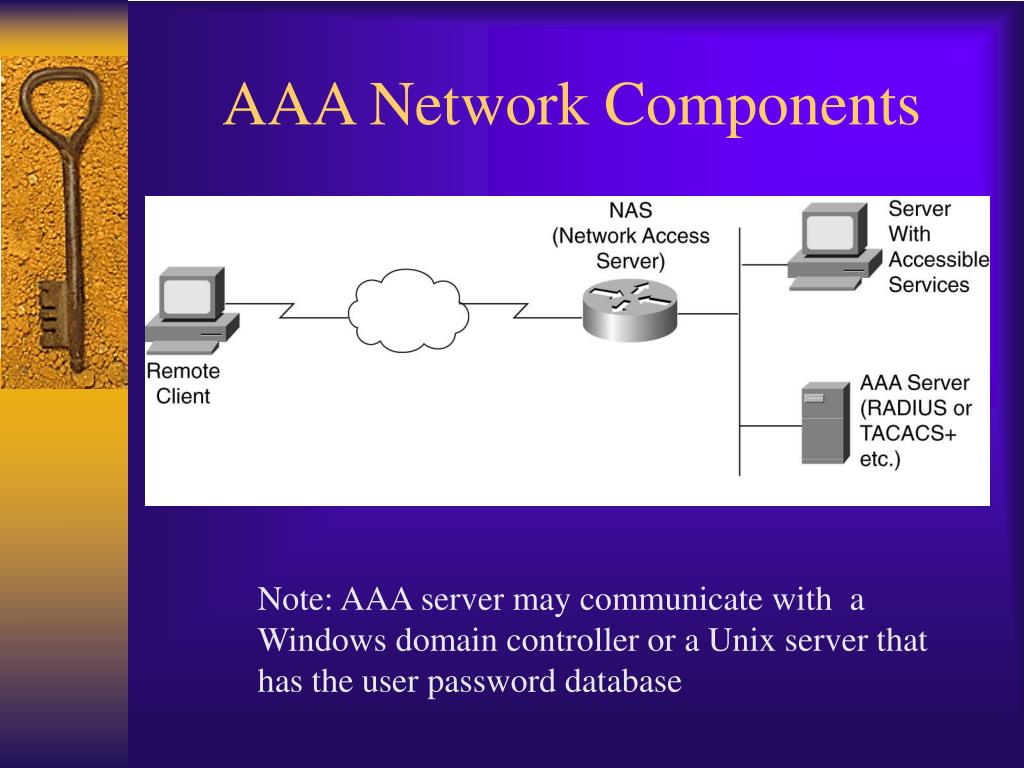
The device that a user connects to (like a router or switch) is called a Network Access Server (NAS). In the AAA model, the NAS doesn't store the user database. Instead, it acts as a client to a central AAA server, forwarding all access requests to it for validation.
2. The Three Pillars of AAA
AAA is a framework that provides three distinct but related security functions. They are often remembered by asking three simple questions: Who are you? What can you do? And what did you do?
Let's watch a video from Learn with Cisco that breaks down each component.
Authentication, Authorization, and Accounting (AAA) with Cisco Modeling Labs
This segment clearly defines Authentication, Authorization, and Accounting and the distinct role of each.
Watch the section that explains the three A's. Pay close attention to how the presenter distinguishes between Authentication and Authorization, as this is a common point of confusion.
Here is a breakdown of each function:
Authentication: "Who are you?"
This is the process of verifying a user's identity. The user presents credentials (like a username and password, a security token, or a digital certificate), and the AAA server validates them against its database.
- Success: The user is authenticated.
- Failure: Access is denied.
Authorization: "What are you allowed to do?"
Once a user is authenticated, authorization determines their level of access. It enforces policies that define which resources, services, or commands a user is permitted to use. This is where Role-Based Access Control (RBAC) is implemented. For example:
- A senior network administrator might be authorized to use all configuration commands.
- A junior operator might only be authorized to use
showcommands for monitoring. - An automated script might have access to a specific API but not CLI access.
Accounting: "What did you do?"
This is the logging and tracking component. The AAA server records user activities, creating an audit trail. This is essential for compliance, troubleshooting, and security incident investigations. Accounting logs typically include:
- User identity
- Session start and stop times
- Commands executed
- Data transferred

It's important to understand the dependencies between these functions. This article provides a concise written explanation.
This section from the "AAA Security" guide on howtonetwork.com clearly defines the three AAA components and their relationship to one another.
Read the section titled "The AAA Model". Focus on the descriptions of Authentication, Authorization, and Accounting, and pay special attention to the four points at the end that describe their correlation (e.g., "Authorization is not valid without Authentication").
3. AAA Protocols: RADIUS and TACACS+
For the NAS (your router) to communicate with the AAA server, it needs to use a specific protocol. The two most common protocols for this are RADIUS and TACACS+. While they achieve the same general goal, they have important differences.
| Feature | TACACS+ (Terminal Access Controller Access-Control System Plus) | RADIUS (Remote Authentication Dial-In User Service) |
|---|---|---|
| Origin | Cisco Proprietary | Open Standard (IETF) |
| Transport Protocol | TCP (Port 49) | UDP (Ports 1812/1813 or 1645/1646) |
| Encryption | Encrypts the entire packet payload | Encrypts only the user's password |
| AAA Separation | Separates Authentication, Authorization, and Accounting | Combines Authentication and Authorization |
| Common Use Case | Device Administration (managing routers, switches) | Network Access Control (802.1X, VPNs, dial-up) |
For your CCNA-level studies, TACACS+ is often preferred for securing administrative access to network devices due to its separate handling of AAA functions and full packet encryption.
4. A Glimpse into AAA Configuration
While this lesson focuses on describing the function of AAA, seeing the commands can help make the concepts more concrete. Enabling AAA on a Cisco device fundamentally changes how it handles logins.
The first command you would use is aaa new-model. This globally enables the AAA framework. After that, you create "method lists" for each service, which tell the router how to perform authentication, authorization, or accounting.
A typical method list might look like this:aaa authentication login default group tacacs+ local
Let's break that down:
aaa authentication login default: We are creating the default method list for user logins.group tacacs+: The router should first try to contact the servers in thetacacs+group.local: If all the TACACS+ servers are unreachable, then the router should fall back to using its local user database (the one we configured in the last lesson).
This provides redundancy, ensuring you can still log in even if the AAA server is down.
The following video demonstrates a full AAA configuration using TACACS+. You don't need to memorize the commands, but watch to see how the concepts we've discussed are put into practice.
Authentication, Authorization, and Accounting (AAA) with Cisco Modeling Labs
This part of the "Learn with Cisco" video shows the configuration steps on a router.
Watch the configuration demonstration from this point. Observe how the presenter enables aaa new-model, defines the TACACS+ server, and then configures separate aaa authentication, aaa authorization, and aaa accounting commands. This clearly illustrates the modularity of the framework.
Conclusion
You now understand the fundamental principles of the AAA framework, a cornerstone of modern network access security. By centralizing user management, you can create scalable, consistent, and auditable security policies across your entire network.
Key Takeaways:
- AAA provides a centralized framework for Authentication, Authorization, and Accounting, solving the scalability issues of local user databases.
- Authentication verifies identity ("Who are you?").
- Authorization enforces policies and assigns privileges ("What are you allowed to do?").
- Accounting creates an audit trail of user actions ("What did you do?").
- TACACS+ and RADIUS are the primary protocols used for communication between a network device (NAS) and an AAA server.
- TACACS+ is generally preferred for device administration because it encrypts the entire packet and separates the AAA functions, offering more granular control.
In our next and final lesson of this module, we will explore other essential network services that help with management and monitoring: NTP, SNMP, and Syslog.