Recommended resources
The freely available resources this lesson will direct you to.
Hello! In our previous lesson, we explored the AAA framework, which provides a centralized system for managing network access. A key part of that framework is Accounting, which tracks what users do. But how do we collect, organize, and make sense of those accounting logs and other important network events?
This brings us to the final lesson in our course, where we'll explore the essential protocols that enable network management and monitoring. Your goal is to describe the roles of NTP, SNMP, and Syslog in network management and monitoring. These three protocols work together to provide "observability"—the ability to understand the internal state of your network from the outside. They answer critical questions: Are my devices healthy? What events are happening? And when exactly did they happen?
Let's break down the role of each protocol.
1. The Foundation: Accurate Time with NTP
Imagine you're investigating a security incident. You see a suspicious login on your firewall at 10:05 AM, a configuration change on a router at 2:17 PM, and an interface flap on a switch at 9:58 AM. Are these events related? It's impossible to tell if each device has a different, incorrect time.
This is the problem that the Network Time Protocol (NTP) solves. Its sole purpose is to synchronize the clocks of all devices on a network to a single, authoritative time source.
Free CCNA | NTP | Day 37 | CCNA 200-301 Complete Course
The video "Free CCNA | NTP" from Jeremy's IT Lab starts by explaining exactly why time synchronization is so critical.
To see a practical example of this problem, watch the segment demonstrating troubleshooting with unsynchronized logs. It clearly shows how difficult it is to correlate events when timestamps don't match.
Accurate time is crucial for:
- Log Correlation: Matching event logs from multiple devices to reconstruct a sequence of events for troubleshooting or security analysis.
- Authentication Protocols: Some protocols, like Kerberos, require that clients and servers have closely synchronized clocks to prevent certain types of attacks.
- Certificate Validation: Digital certificates have validity periods (start and end dates). A device with an incorrect clock might wrongly reject a valid certificate or accept an expired one.
How NTP Works: The Stratum Hierarchy
NTP organizes time sources into a hierarchy of layers called strata.
- Stratum 0: These are the most precise time sources, like atomic clocks or GPS clocks. They are the reference for the entire NTP network.
- Stratum 1: These are servers directly connected to a Stratum 0 source. They are considered highly authoritative.
- Stratum 2: These servers get their time from Stratum 1 servers.
- Stratum 3: These servers get their time from Stratum 2 servers, and so on.
A device will always prefer to synchronize with a server at a lower stratum number because it is "closer" to the authoritative time source. A device's own stratum level will be one higher than the server it synchronizes with.
Free CCNA | NTP | Day 37 | CCNA 200-301 Complete Course
This next clip from the same video explains the core concepts of NTP.
Watch the section that covers NTP's purpose and then focus on the explanation of the stratum hierarchy.
2. Event Logging: Syslog
Now that our devices have the correct time, we need a way to collect their event messages. This is the job of Syslog. It is a standard for devices to send notification messages—or logs—to a central logging server.
Instead of logging into dozens of devices to check their individual log files, a network administrator can monitor a single Syslog server that collects messages from everything on the network.

Let's examine the specifics of how Syslog operates.
This resource from ITExamAnswers.net provides a solid technical breakdown of the Syslog protocol.
Please read the first part of the article, under the heading "Logging". Focus on the client-server model, the use of UDP port 514, and the three parts of a syslog message (priority, header, message). Pay close attention to Table 40.1, which details the Cisco IOS Syslog Priority (Severity) Levels. You should be familiar with the names and numbers for these levels (0-7), as they are fundamental to filtering and understanding logs.
As you read, note two key characteristics of Syslog:
- Transport: It typically uses UDP as its transport protocol, which is fast but unreliable. This means messages are not guaranteed to arrive at the server.
- Severity Levels: Each message is tagged with a severity level from 0 (Emergency) to 7 (Debug). This allows administrators to filter messages and focus on the most critical events.
3. Performance Monitoring: SNMP
While Syslog is great for capturing discrete events (like an interface going down or a user logging in), it doesn't tell you about the ongoing health and performance of a device. For that, we use the Simple Network Management Protocol (SNMP).
SNMP allows a central Network Management Station (NMS) to poll devices for information and monitor their status in near real-time. It is used to track metrics like:
- CPU and memory utilization
- Bandwidth usage on interfaces
- Device temperature
- The number of errors on a port
SNMP Components and Operations
The SNMP framework has a few key components:
- SNMP Manager (NMS): The software, often with a graphical interface, that administrators use to monitor the network. It sends requests to agents.
- SNMP Agent: Software running on the managed devices (routers, switches, servers) that responds to the manager's requests.
- Management Information Base (MIB): A database on the agent that stores all the variables that can be monitored. Each variable is identified by a unique Object ID (OID).
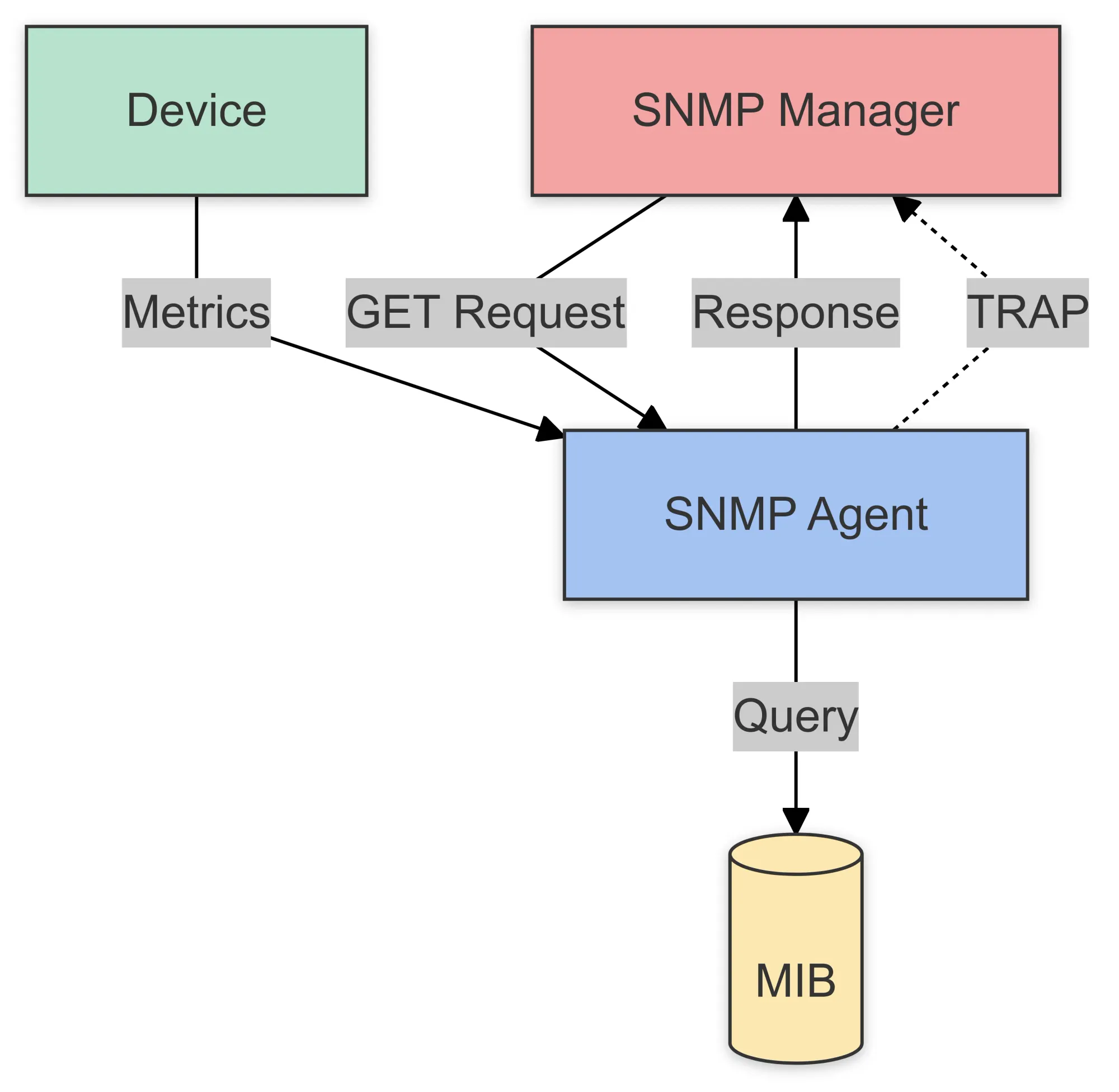
The primary operations in SNMP are:
- Get: The NMS requests the value of a specific OID from an agent.
- Set: The NMS changes the value of a variable on an agent (used for configuration).
- Trap: The agent sends an unsolicited message to the NMS to report a significant event, similar to a Syslog message.
Free CCNA | SNMP | Day 40 | CCNA 200-301 Complete Course
Jeremy's IT Lab also has an excellent video explaining the function of SNMP.
First, watch the overview of managed devices and the NMS. Then, see how SNMP works by watching the explanation of its three main operations. Next, take a deeper look at the core components, including the Agent and MIB. Finally, get a brief overview of the SNMP versions, noting the important security enhancements in SNMPv3.
Conclusion
You've now covered the three pillars of network observability. They provide a complete picture of your network's health and activity by working together:
- NTP provides the universal clock, ensuring all event data is accurately timestamped.
- Syslog collects a stream of event messages from all devices, telling you what happened.
- SNMP actively polls devices for performance metrics, telling you how things are running.
Mastering these concepts is essential for proactive network management, efficient troubleshooting, and robust security monitoring.
Key Takeaways:
- NTP synchronizes device clocks using a hierarchical stratum system, which is foundational for correlating logs and for certain security protocols.
- Syslog provides a standardized, centralized way to collect event messages from network devices. Messages are categorized by facility and severity level.
- SNMP enables a Network Management Station (NMS) to monitor device health and performance by querying variables stored in a device's Management Information Base (MIB).
- Together, these protocols give network administrators the visibility they need to maintain a healthy and secure network.
This lesson marks the end of our "Advanced Networking" course. You've built a strong foundation, from the fundamentals of IP addressing and subnetting all the way to the protocols that secure, manage, and monitor a modern network. Congratulations on completing the course