Recommended resources
The freely available resources this lesson will direct you to.
Hello! Let's get started with our next lesson.
In our previous session, you learned how to create VLANs and assign switch ports to them, effectively partitioning a single physical switch into multiple, isolated broadcast domains. However, this raises a practical question: what happens when your network grows beyond a single switch? How do you ensure a user in the 'Marketing' VLAN on one switch can communicate with other 'Marketing' users on a different switch?
This lesson addresses that exact challenge. We will explore trunking, the mechanism that allows a single link to carry traffic for multiple VLANs between switches. You will learn to configure and verify 802.1Q trunk links, a fundamental skill for building scalable and segmented networks.
1. The Need for Trunking
Imagine our network from the last lesson, with VLAN 10 (Marketing) and VLAN 20 (Finance). If we add a second switch, the simple approach would be to run one cable between the switches for VLAN 10 traffic and a second cable for VLAN 20 traffic. This is not scalable. If you have 20 VLANs, you would need 20 cables, which is inefficient and costly.
The solution is a trunk link. A trunk is a point-to-point link between two network devices (typically switches) that is configured to carry traffic for multiple VLANs simultaneously.
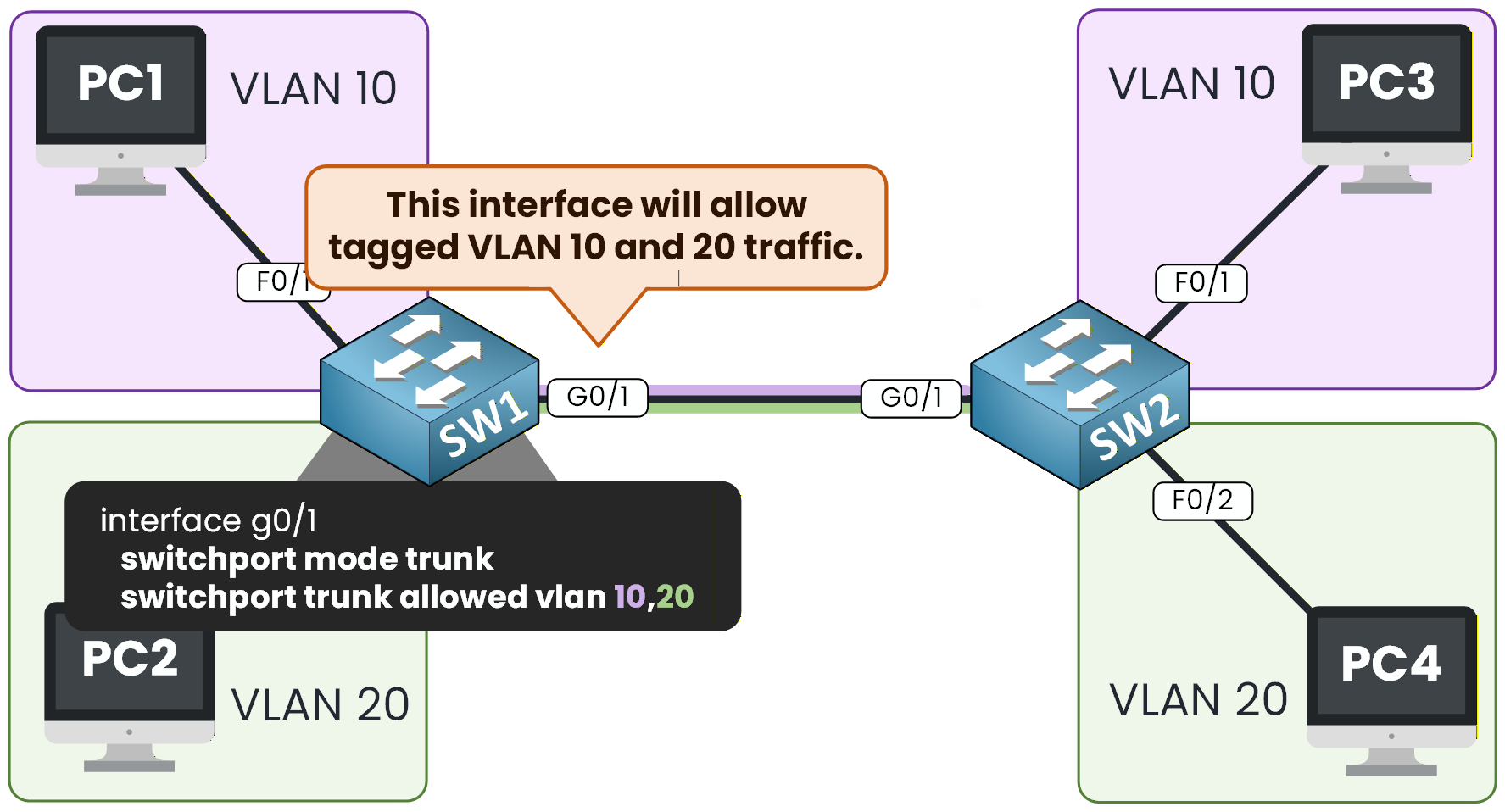
But how does the receiving switch know which VLAN an incoming frame belongs to? This is accomplished through a process called VLAN tagging.
2. Understanding 802.1Q VLAN Tagging
The industry-standard protocol for trunking is IEEE 802.1Q. When a frame from a specific VLAN (e.g., VLAN 10) needs to cross a trunk link, the sending switch inserts a 4-byte "tag" into the original Ethernet frame. This tag contains the VLAN ID (in this case, 10). When the frame arrives at the other end of the trunk, the receiving switch reads the tag, knows the frame belongs to VLAN 10, removes the tag, and forwards the frame only to other ports in VLAN 10.
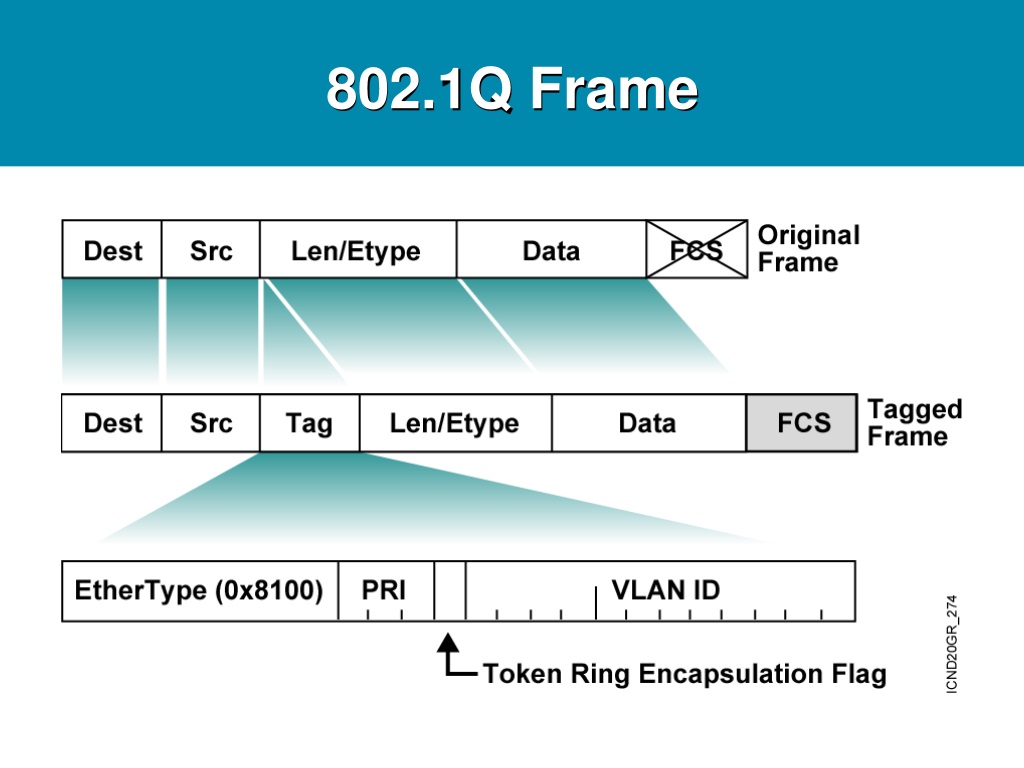
End devices like PCs are never aware of this tagging process; it happens transparently between the switches.
Let's watch a short video that provides a clear overview of why trunks are necessary and how the tagging process works.
IEEE 802 1Q: Tagging and Trunking 101
The video "IEEE 802 1Q: Tagging and Trunking 101" from Sunny Classroom provides a great conceptual foundation for this topic.
Please watch from this section. As you watch, focus on: Why a link between switches is needed for VLANs to communicate. The difference between an access port (for a single VLAN, untagged traffic) and a trunk port (for multiple VLANs, tagged traffic). The basic components of the 4-byte VLAN tag. The complete process: a frame leaves a PC, gets tagged by the first switch, travels the trunk, is untagged by the second switch, and is delivered to the destination PC.
3. Configuring and Verifying a Trunk Link
Now that you understand the theory, let's put it into practice. Configuring a basic trunk link involves telling the switchport to operate in trunk mode.
There are several key commands you'll use:
| Command | Purpose |
|---|---|
switchport mode trunk |
Statically configures the interface to be a trunk port. |
switchport trunk encapsulation dot1q |
On older switches, this specifies 802.1Q. On modern switches, it's often the only option and may not be required. |
switchport trunk native vlan <id> |
Defines which VLAN's traffic will be sent untagged. |
switchport trunk allowed vlan <list> |
A security best practice to control which VLANs are permitted on the trunk. |
The Native VLAN
An important concept in 802.1Q is the native VLAN. Frames belonging to the native VLAN are the only frames that cross the trunk link untagged. By default, this is VLAN 1. For security, it's a best practice to change the native VLAN to an unused VLAN ID. Crucially, the native VLAN must be configured with the same ID on both switches connected by the trunk. A mismatch will cause connectivity issues.
Let's read a quick explanation of this critical concept.
The Native VLAN — A Critical Concept
This section from the article "Mastering VLAN Trunking with 802.1Q" explains the native VLAN, why it matters, and security best practices associated with it.
Please read the section titled "The Native VLAN — A Critical Concept (and Common Exam Trap)". Pay close attention to why a mismatch is problematic and why leaving it as VLAN 1 is a security risk.
Configuration and Verification Walkthrough
The best way to learn configuration is to see it in action. The following video demonstrates the entire process, from basic trunk configuration to dealing with a native VLAN mismatch and finally, verifying the link.
CCNA (200-301): Ethernet Trunking and VLAN Pruning
The video "CCNA (200-301): Ethernet Trunking and VLAN Pruning" by Kevin Wallace provides a detailed, practical demonstration.
Please watch the configuration segment from this timestamp. As you follow along, observe: Using show interfaces ... switchport to see the initial state (dynamic auto). The commands to set the encapsulation, native VLAN, and mode. The console messages that appear when there is a native VLAN mismatch. How configuring the second switch correctly resolves the mismatch error. Using the show interfaces trunk command to verify the final configuration.
The primary verification command is show interfaces trunk. Its output tells you everything you need to know about your trunk links:
- Port: The interface acting as a trunk.
- Mode: How the trunk was formed (e.g.,
onfor static,desirablefor DTP). - Encapsulation: The trunking protocol used (e.g.,
802.1q). - Status: The operational state of the trunk (e.g.,
trunking). - Native vlan: The ID of the native VLAN.
- Vlans allowed on trunk: Which VLANs are permitted to cross the link.
4. Securing and Optimizing Trunks
Statically configuring a trunk with switchport mode trunk is the recommended best practice. However, you should also be aware of Cisco's Dynamic Trunking Protocol (DTP), which allows switches to automatically negotiate a trunk link.
dynamic auto(default on many switches): The port is willing to become a trunk, but only if the other side actively asks. Twoautoports will not form a trunk.dynamic desirable: The port actively attempts to form a trunk. If the other side isautoordesirable, a trunk will form.
Because DTP can allow an unauthorized device to trick a switch into forming a trunk, it's a security best practice to disable it on production ports using the switchport nonegotiate command after setting the mode to trunk or access.
Another key practice is VLAN pruning—explicitly defining which VLANs are allowed on a trunk using the switchport trunk allowed vlan command. This prevents unnecessary broadcast traffic from crossing the trunk and enhances security.
The next segment of the video demonstrates this.
CCNA (200-301): Ethernet Trunking and VLAN Pruning
Let's return to Kevin Wallace's video to understand DTP and VLAN pruning.
First, watch the explanation of DTP modes to understand how trunks can form dynamically. Then, watch the demonstration on VLAN pruning to see how to control which VLANs can use the trunk.
Conclusion
You have now learned how to bridge the gap between switches, allowing your VLANs to span across a larger physical topology. This is a fundamental building block of any scalable enterprise network.
Key Takeaways:
- Trunking Purpose: To carry traffic for multiple VLANs over a single physical link using the IEEE 802.1Q protocol.
- VLAN Tagging: A 4-byte tag containing the VLAN ID is inserted into Ethernet frames as they cross a trunk.
- Native VLAN: The one VLAN whose traffic crosses a trunk untagged. It must match on both ends of the link.
- Core Configuration:
interface <id>switchport mode trunkswitchport trunk native vlan <id>
- Verification: The
show interfaces trunkcommand is essential for confirming trunk status, native VLAN, and allowed VLANs. - Best Practices: Manually configure trunks, change the native VLAN from the default, disable DTP with
switchport nonegotiate, and useswitchport trunk allowed vlanto permit only necessary VLANs.
In our next lesson, we will tackle the final piece of the VLAN puzzle: inter-VLAN routing. Now that your networks are successfully segmented, we'll learn how to use a router to allow controlled communication between different VLANs when required.