Recommended resources
The freely available resources this lesson will direct you to.
Hello! Welcome to your fourth lesson.
In our last session, we focused on making your query results clear and presentable by renaming columns with the AS keyword. This is a vital step in transforming raw data into shareable insights for your team.
Lesson 4: Finding Unique Values with DISTINCT
Today's Goal: By the end of this lesson, you will be able to use DISTINCT to find unique values in a column (e.g., to identify all the unique event types your product tracks).
As a product designer, you often need to understand the variety within your data. For instance, you might ask: "What are all the different countries our users are from?" or "What are all the unique features they've interacted with this month?" Answering these questions requires filtering out all the noise and repetition to see a clean list of unique items. Today, you'll learn the SQL keyword designed for exactly this purpose: DISTINCT.
1. The Problem of Duplicates
Most of the tables you'll work with, like users or events, contain a lot of repeated information. For example, in an events table, the event_name column might have thousands of 'login' entries, thousands of 'play_video' entries, and so on.
If you wanted to see all the different types of events your app tracks, a simple SELECT event_name FROM events; query would return a massive, unhelpful list with thousands of duplicates. This is where DISTINCT becomes essential. It removes duplicate rows from your query results, giving you a concise list of unique values.
The image below perfectly illustrates this. On the right, a simple SELECT returns every single entry, including many duplicates. On the left, adding DISTINCT gives a clean list of each unique manufacturer, which is far more useful for analysis.
To get a formal definition and see the basic syntax, the following article provides a quick and clear overview.
SQL DISTINCT - Syntax, Use Cases, and Examples
This article from Hightouch provides a concise definition of the DISTINCT keyword and its primary use cases, which is a great starting point.
Please read the sections 'What is SQL DISTINCT?', 'When you would use it', and 'Syntax'. This will give you a solid foundation for the concept.
2. How to Use DISTINCT
The syntax is simple: you place the DISTINCT keyword directly after SELECT and before the column name(s).
Finding Unique Values in a Single Column
Let's imagine you're working on a streaming service and want to see all the different subscription plans your users are on. The users table has a plan_type column.
A standard query would be messy:
SELECT plan_type FROM users;
Result:
| plan_type |
|---|
| premium |
| free |
| premium |
| family |
| free |
| ... |
Using DISTINCT, you get a clean list:
SELECT DISTINCT plan_type FROM users;
Result:
| plan_type |
|---|
| premium |
| free |
| family |
Let's watch a short video that demonstrates this core functionality.
What Is SQL Distinct and How Can You Use It?
This video from Database Star clearly explains and demonstrates the basic use of DISTINCT on a single column.
Watch the section from 01:00 to 02:09. It shows a practical example of how DISTINCT removes duplicate names from a customer list.
Finding Unique Combinations of Multiple Columns
DISTINCT can also be applied to multiple columns. When you do this, it returns rows where the combination of values in the selected columns is unique.
For example, you might want to see the unique combinations of countries and device types your users have. This could help you spot patterns, like whether Android is more popular in one country versus another.
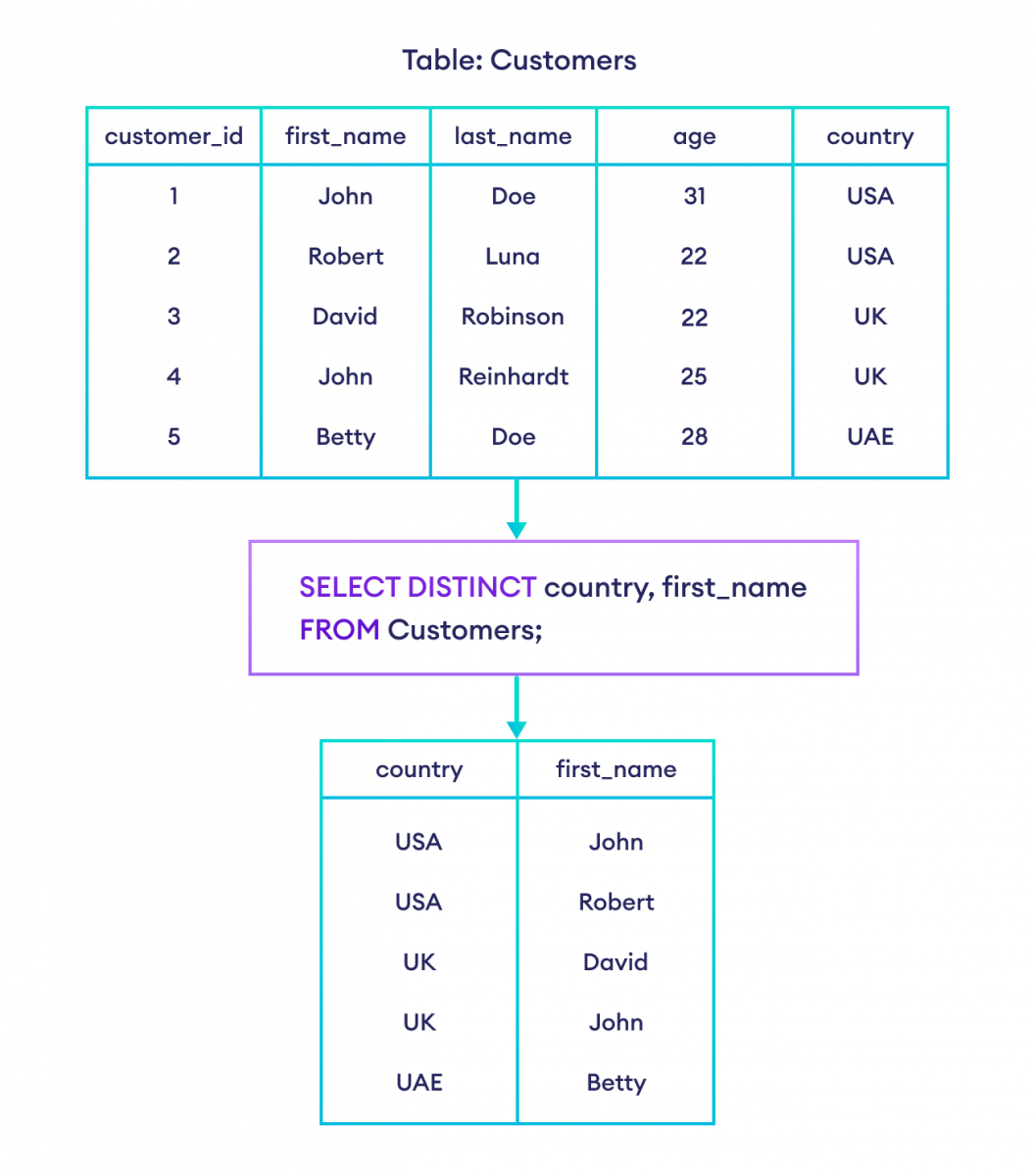
The query would look like this:
SELECT DISTINCT country, device_type
FROM users;
This would return a list where each row is a unique pair, such as ('USA', 'iPhone'), ('USA', 'Web'), ('Germany', 'Android'), etc.
Counting Unique Values: COUNT(DISTINCT ...)
One of the most powerful applications of DISTINCT for product analysis is combining it with the COUNT() function. This lets you answer questions like, "How many unique users logged in today?"
COUNT(user_id)would count every single login event. If one user logged in 5 times, they'd be counted 5 times.COUNT(DISTINCT user_id)would count each user only once, no matter how many times they logged in. This is often what you want for metrics like Daily Active Users (DAU).
Example: How many unique countries are our users from?
SELECT COUNT(DISTINCT country) AS "Number of Countries"
FROM users;
This is a much more direct way of getting the number than first selecting all distinct countries and then counting them manually.
This next video segment explains this concept very well.
What Is SQL Distinct and How Can You Use It?
Let's return to the Database Star video to see how to combine DISTINCT with the COUNT() function to get a count of unique values.
Watch the section from 03:03 to 04:30. It clearly demonstrates the difference between COUNT(column) and COUNT(DISTINCT column).
3. Practice Exercise
Time to apply what you've learned. Imagine you have access to an events table that logs user actions in your app. The table has columns like event_id, user_id, event_name, and event_timestamp.
Task 1:
You need to provide your team with a complete list of all the different types of events that are currently tracked in the product. Write a query to get a list of all unique event_name values from the events table.
Task 2:
Your product manager wants to know how many unique users have performed any action in the last month. Write a query to count the number of unique users who appear in the events table. For clarity, rename the resulting column to Unique Active Users.
Take a moment to write your queries before checking the solutions.
Click to reveal the solution for Task 1
SELECT DISTINCT
    event_name
FROM
    events;
This query will return a clean list of every unique event name, such as 'login', 'play_video', 'add_to_playlist', etc., without any repetitions.
Click to reveal the solution for Task 2
SELECT
    COUNT(DISTINCT user_id) AS "Unique Active Users"
FROM
    events;
This query counts each user_id only once, giving you the total number of unique users who have generated at least one event.
Conclusion
Excellent work! You've now learned how to cut through repetitive data to find and count unique values. This is a fundamental skill for exploring your data and calculating key product metrics.
Key Takeaways:
SELECT DISTINCT columnreturns a list of unique values from that column.SELECT DISTINCT column1, column2returns rows with unique combinations of values from those columns.COUNT(DISTINCT column)is a powerful pattern for counting unique items, such as users, sessions, or devices.DISTINCTis essential for discovery tasks, like identifying all the categories of items or types of user actions available in your data.
Next Lesson:
In our final lesson of this foundational module, we'll learn how to use LIMIT. This keyword is your best friend when exploring large tables, as it allows you to grab a small sample of rows for a quick look without having to wait for a massive query to finish running.