Recommended resources
The freely available resources this lesson will direct you to.
Hello! Welcome to the third lesson in your SQL course for product designers.
In the last lesson, we covered the fundamentals of retrieving data. You learned how to use SELECT to specify which columns you want and FROM to indicate which table to pull them from. This is the core of every query you'll write.
Lesson 3: Creating Clearer Reports with AS
Today's Goal: By the end of this lesson, you will be able to use AS to rename columns for clearer report outputs in Metabase.
Database column names are often designed for technical clarity (e.g., created_at, user_first_name, transaction_amt). While functional, they aren't ideal for reports or dashboards shared with stakeholders. Today, you'll learn how to give these columns temporary, human-readable names, a crucial skill for making your data analysis clear and presentable.
1. Why Renaming Columns Matters
As a product designer, you know that clarity in communication is everything. The same principle applies to data. When you pull data to analyze user behavior or create a report in a tool like Metabase, the column headers should be immediately understandable to anyone reading them, whether it's a product manager, a marketer, or yourself.
This is where the AS keyword comes in. It allows you to create an alias—a temporary, alternative name for a column in your query's results.
Let's start with a short article that frames this concept perfectly.
How to Use a SQL Alias to Simplify Your Queries
This article from Datacamp explains the various uses of SQL aliases. We'll focus on the section that directly relates to your work: making reports and dashboards clearer.
Please read the section titled 'When to Use a SQL Alias'. Pay special attention to the first bullet point, 'Making Reports and Dashboards More Clear'.
The key takeaway is that aliasing isn't just a technical trick; it's a core part of preparing data for effective communication and analysis.
2. The AS Keyword: Syntax and Usage
The syntax for aliasing is straightforward. You simply add AS after the column name, followed by the desired alias.
SELECT column_name AS "New Column Name"
Let's watch a short video that demonstrates this in action.
Intermediate SQL Tutorial | Aliasing
This video from Alex The Analyst provides a clear, concise introduction to aliasing. It shows the basic syntax and explains its purpose.
Watch the first 1 minute and 15 seconds of the video. The presenter explains what aliasing is and demonstrates the basic AS syntax.
As the video shows, the basic structure is:
SELECT
    first_name AS "First Name",
    last_name AS "Last Name"
FROM
    users;
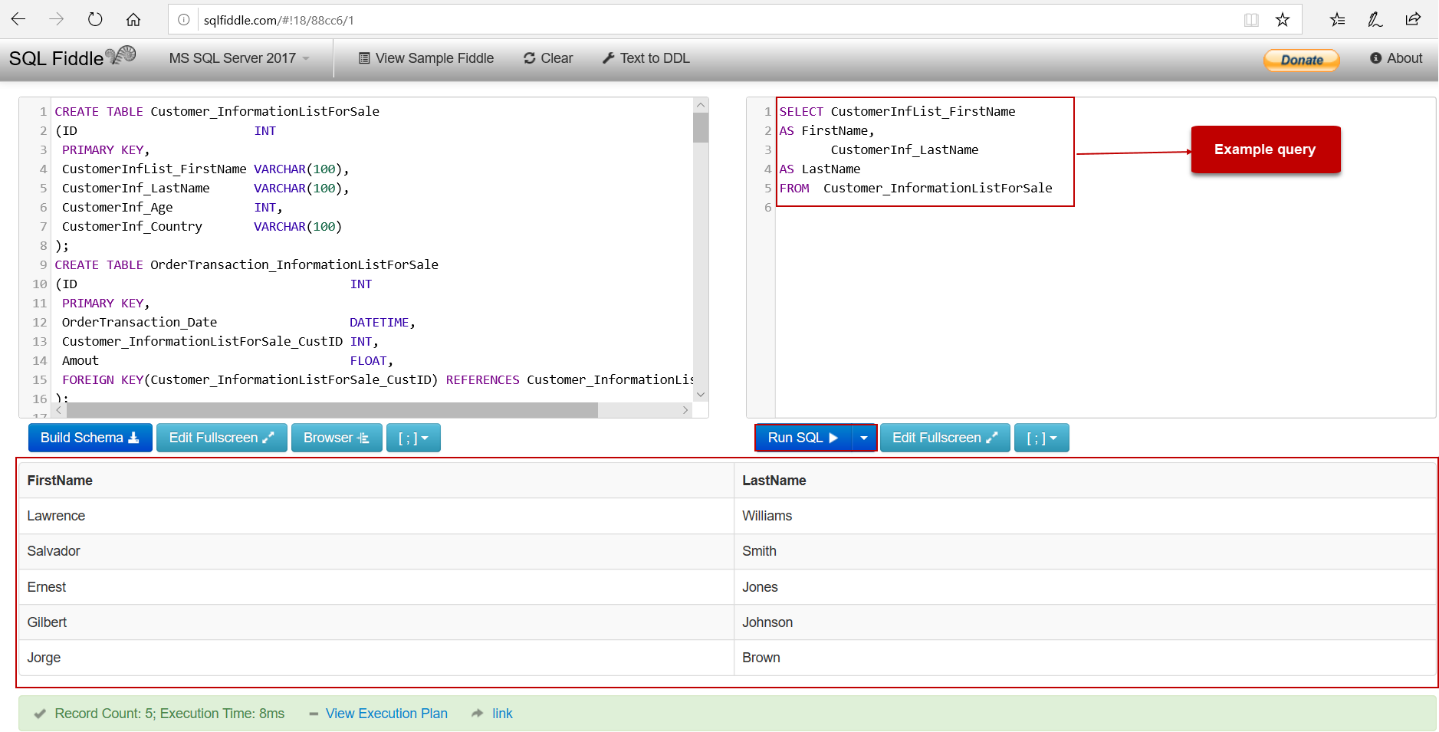
Here's a visual example of a query and its output. Notice how CustomerInfList_FirstName becomes the much cleaner FirstName in the results.
Important Syntax Rules:
- Spaces in Aliases: If your alias contains spaces (e.g., "First Name"), you must enclose it in double quotes (
"). If it's a single word, quotes are optional (first_name AS FirstName). ASis Optional: You can often omit theASkeyword itself (e.g.,first_name "First Name"). However, usingASmakes your query more explicit and easier for others to read, which is a good habit to build.
For a quick reference on these syntax rules, you can consult the following resource.
W3Schools provides a very direct and simple reference for SQL syntax. This page is useful for quickly confirming how to use AS.
Briefly review the 'Alias for Columns' section. Note the two examples: one for a simple alias and one showing how to handle an alias with spaces.
3. Practical Application: A Product Design Scenario
Let's return to our streaming service example. You're working on a project to improve the onboarding experience for new users. Your product manager asks for a report listing the first 100 users who signed up, including their email, country, and subscription plan.
The users table has columns named email, country, and plan_type. To make the report ready for presentation, you want the headers to be "User Email", "Location", and "Subscription Plan".
Here is how you would write the query:
SELECT
    email AS "User Email",
    country AS "Location",
    plan_type AS "Subscription Plan"
FROM
    users;
When you run this in Metabase, the resulting table will have clean, descriptive headers, ready to be shared or added to a dashboard.
Aliasing Calculated Columns
A very powerful use of AS is to name a column that you create yourself. For example, you can combine columns or perform a calculation.
Imagine you want to create a personalized greeting. You can combine a static string of text with a value from a column. In standard SQL, you use the || operator to concatenate (join) text.
SELECT
    'Welcome user from ' || country AS "Welcome Message"
FROM
    users;
This query would produce a single column named "Welcome Message" with values like:
- "Welcome user from USA"
- "Welcome user from Germany"
- "Welcome user from Brazil"
Without AS, the database would give this new column a generic, unhelpful name (like ?column? or the full formula). The alias is essential here.
4. Practice Exercise
Now it's your turn. Using the same users table from our streaming service example, write a query to solve the following task.
Task: You are preparing data for a user research panel focusing on users of the 'family' plan. Create a report that shows the user_id and the created_at timestamp for these users. Rename the columns to User ID and Signup Date for clarity.
Click to reveal the solution
SELECT
    user_id AS "User ID",
    created_at AS "Signup Date"
FROM
    users;
Note: In a future lesson, we'll learn how to filter this list to show only the users on the 'family' plan using the WHERE clause.
Conclusion
Great job! You've added a simple but powerful tool to your SQL toolkit. Being able to rename columns with AS is a fundamental skill for moving from raw data extraction to creating polished, understandable reports.
Key Takeaways:
- The
ASkeyword creates a temporary alias for a column in your query results. - Aliasing is crucial for making reports in tools like Metabase clear and professional.
- Use double quotes (
" ") for aliases that contain spaces (e.g.,"Signup Date"). ASis not just for existing columns; it's essential for naming new columns created from calculations or text combinations.
Next Lesson:
In our next lesson, we'll continue building on our SELECT statement by learning two more handy keywords:
DISTINCT: To find the unique values in a column (e.g., what are all the different countries our users are from?).LIMIT: To sample a small number of rows, which is perfect for quickly exploring large tables without waiting for a huge query to run.