Recommended resources
The freely available resources this lesson will direct you to.
Welcome back! In the previous lesson, we saw how to create branching paths in our code using the if-else if-else ladder. This structure is powerful and flexible, allowing you to evaluate a series of different conditions.
Today, we'll explore another tool for controlling program flow: the switch statement. You can think of switch as a specialized and often cleaner alternative to a long if-else if chain, specifically for situations where you need to check a single variable against a list of distinct, constant values. This lesson will cover its syntax, how it works, and when to choose it over the if-else if structure you already know.
1. The switch Statement: An Alternative to if-else if
Imagine you have a variable and you want to perform a different action for each specific value it might have (e.g., if day == 1, do this; if day == 2, do that; if day == 3, do something else). You could write this with an if-else if-else ladder, but it can become repetitive. The switch statement is designed precisely for this scenario, making the code more readable and organized.
Let's begin with a video that introduces the concept and basic syntax of a switch statement.
#11: Switch Statement in C | [2025] C Programming for Beginners
The video "#11: Switch Statement in C" from Programiz introduces the switch statement as an alternative to lengthy if-else chains and then breaks down its fundamental syntax.
Watch from the beginning to the syntax explanation. Pay attention to the keywords: switch, case, and default.
As the video explained, the basic structure looks like this:
switch (expression) {
    case constant_value_1:
        // code to execute if expression == constant_value_1
        break;
    case constant_value_2:
        // code to execute if expression == constant_value_2
        break;
    ...
    default:
        // code to execute if expression matches no cases
        break;
}
The expression inside the switch parentheses (which must evaluate to an integer or character type) is checked against each case label. When a match is found, the code inside that case is executed.
2. The Mechanics: break, Fall-through, and default
The switch statement has some unique behaviors that are crucial to understand, particularly the roles of the break and default keywords.
break: When the program hits abreakstatement, it immediately exits the entireswitchblock and continues execution at the line following the closing brace}.- Fall-through: If you omit the
breakstatement, something interesting happens: the program will execute the code for the matching case, and then continue executing the code in all the subsequent cases until it hits abreakor the end of theswitchblock. This is called "fall-through." default: This case is optional. It acts like the finalelsein anif-else ifladder, catching any value that doesn't match one of the specifiedcaselabels.
This flowchart provides a great visual for how the control flows through a switch statement.
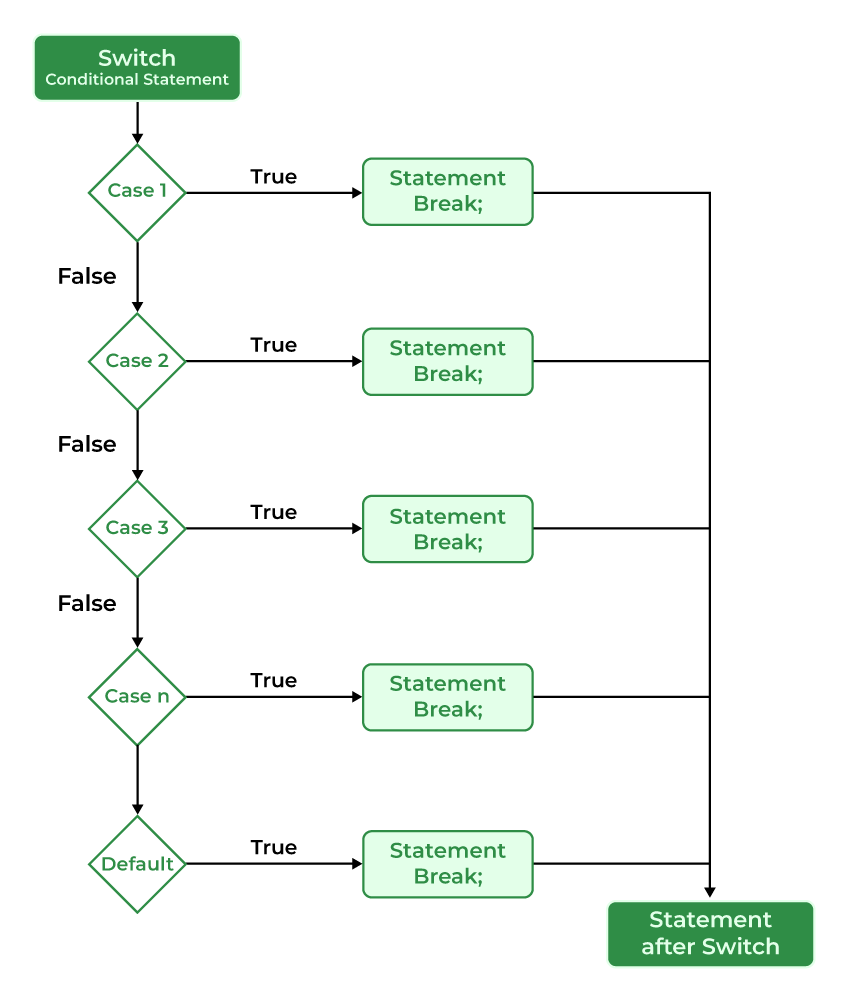
Now, let's watch a practical example that clearly demonstrates the importance of break and what happens when you leave it out.
#11: Switch Statement in C | [2025] C Programming for Beginners
Continuing with the Programiz video, this segment provides a complete coding example for printing the day of the week and then explicitly demonstrates the "fall-through" behavior by removing the break statements.
Watch from the day-of-week example to see a full switch in action. Then, continue from the break explanation to see why this keyword is so important for getting the correct behavior.
3. Rules and Common Patterns
There are a few important rules to remember when using switch:
- Integral Expression: The expression in
switch()must evaluate to an integral type, such asintorchar. You cannot use floating-point types likefloatordouble. - Constant Case Labels: The values for each
casemust be constant literals (e.g.,1,'A',50) or constant expressions. You cannot use variables as case labels (e.g.,case x:wherexis a variable). - Unique Case Labels: All
caselabels within a singleswitchblock must be unique.
The following resource provides a clear summary of these rules.
This article from TutorialsPoint details the rules and constraints for using switch statements in C.
Read the section titled "Rules for Using the switch-case Statement" to solidify your understanding of what is and isn't allowed.
Grouping Cases
Sometimes, you want to perform the same action for multiple different case values. Instead of writing the same code in each case, you can take advantage of the "fall-through" behavior intentionally. By stacking case labels without any code or break statements between them, you can group them.
#11: Switch Statement in C | [2025] C Programming for Beginners
This part of the Programiz video shows a clever use of fall-through to group multiple cases, simplifying the code for a weekday/weekend checker.
Watch the segment from the weekday/weekend example. This demonstrates how to execute the same block of code for case 2, case 3, case 4, case 5, and case 6.
4. Practical Exercise: A Simple Calculator
The switch statement is perfect for building menu-driven programs. A classic example is a simple calculator that performs an operation based on a character input by the user (+, -, *, /).
Your task is to compile, run, and then modify a calculator program.
Action: Create a file named calculator.c. Copy, paste, compile, and run the following code. Test it with different operators and numbers.
#include <stdio.h>

int main() {
    char operator;
    double num1, num2;

    printf("Enter an operator (+, -, *, /): ");
    scanf(" %c", &operator); // Note the space before %c to consume whitespace

    printf("Enter two operands: ");
    scanf("%lf %lf", &num1, &num2);

    switch (operator) {
        case '+':
            printf("%.1lf + %.1lf = %.1lf\n", num1, num2, num1 + num2);
            break;
        case '-':
            printf("%.1lf - %.1lf = %.1lf\n", num1, num2, num1 - num2);
            break;
        case '*':
            printf("%.1lf * %.1lf = %.1lf\n", num1, num2, num1 * num2);
            break;
        case '/':
            // Check for division by zero
            if (num2 != 0) {
                printf("%.1lf / %.1lf = %.1lf\n", num1, num2, num1 / num2);
            } else {
                printf("Error: Division by zero is not allowed.\n");
            }
            break;
        // --- YOUR MODIFICATION GOES HERE ---

        default:
            printf("Error! Operator is not correct\n");
    }

    return 0;
}
Your Task:
Modify the program to add one more operation: modulo (the remainder of a division).
- The operator character is
%. - Modulo only works with integers. You will need to cast the
doubleoperands tointfor the calculation. For example:(int)num1 % (int)num2. - Add a new
case '%':to theswitchstatement in the location indicated by the comment. - Make sure to also handle division by zero for the modulo operation.
Test your modified program to ensure the new modulo case works correctly.
Conclusion
You've now added another essential control structure to your C programming toolkit. The switch statement provides a clear and efficient way to handle decisions based on a single variable matching one of several discrete values.
Key Takeaways:
switchis a multi-way branch statement that is often more readable than an equivalentif-else ifladder.- The
switchexpression must be of an integral type (likeintorchar). - The
breakstatement is crucial for exiting theswitchblock and preventing unintended "fall-through." - Fall-through can be used intentionally to group cases that share the same code.
- The
defaultcase acts as a catch-all for any value not matched by a specificcase.
In our next lesson, we will move from making decisions to performing repetitions. You will learn about the while loop, which allows you to execute a block of code repeatedly as long as a certain condition remains true. This will open up a whole new world of programming possibilities.