Recommended resources
The freely available resources this lesson will direct you to.
Welcome back! In our last lesson, we built the foundation for decision-making by learning how to construct boolean expressions using comparison and logical operators. You learned to ask your program questions like age > 17 or (gpa >= 3.5) && is_enrolled. Now, it's time to teach the program how to act on the "true" or "false" answers it gets.
This lesson is all about controlling the flow of your program. We will implement conditional logic using the if-else if-else statement. This structure is the primary way in C to execute different blocks of code based on different conditions, making your programs dynamic and intelligent.
1. The Basic if Statement: A Simple Decision
Let's start with the simplest form of a decision: executing a piece of code only if a condition is true. This is done with the if statement. Its structure is straightforward: if the boolean expression in the parentheses evaluates to true (any non-zero value), the code block inside the curly braces {} is executed. If it's false (zero), the block is skipped entirely.
The following video provides a clear introduction to the if statement.
#9: If Else Statements in C | [2025] C Programming for Beginners
The video "#9: If Else Statements in C" from Programiz begins by explaining the syntax and demonstrating the basic if statement with a voting eligibility example.
Watch the first part of the video, from the beginning to the if example. Notice how the program's output changes depending on whether the input age meets the condition.
2. Choosing Between Two Paths: if-else
The if statement is great for "do this or do nothing" scenarios. But what if you want to do one thing if the condition is true, and a different thing if it's false? This is where the else clause comes in. By adding an else block, you create a two-way branch in your code. The program will execute either the if block or the else block, but never both.
Let's continue with the same video to see how this works.
#9: If Else Statements in C | [2025] C Programming for Beginners
This segment of the Programiz video introduces the else clause to provide an alternative action when the if condition is not met.
Watch the portion explaining the if-else structure from the else clause. This demonstrates how to provide feedback for both eligible and ineligible voters.
For a quick written summary and another example (checking if a number is even or odd), you can refer to this article.
This article by Programiz provides a concise explanation of the if-else construct.
Find the section titled "C if...else Statement". Review the syntax, the flowchart, and the "even or odd" example to solidify your understanding.
3. Handling Multiple Possibilities: The if-else if-else Ladder
Often, you need to choose from more than two options. For example, a number can be positive, negative, or zero. A student's grade could be A, B, C, D, or F. To handle these multi-path decisions, we can chain conditions together using the if-else if-else structure, often called an "else-if ladder".
The logic flows from top to bottom:
- The first
ifcondition is checked. If it'strue, its code block runs, and the rest of the ladder is skipped. - If it's
false, the program moves to the firstelse ifand checks its condition. If that'strue, its block runs, and the rest is skipped. - This continues down the ladder until a
truecondition is found. - If none of the
iforelse ifconditions aretrue, the finalelseblock (which is optional) is executed as a default case.
This flowchart visually represents the logic:
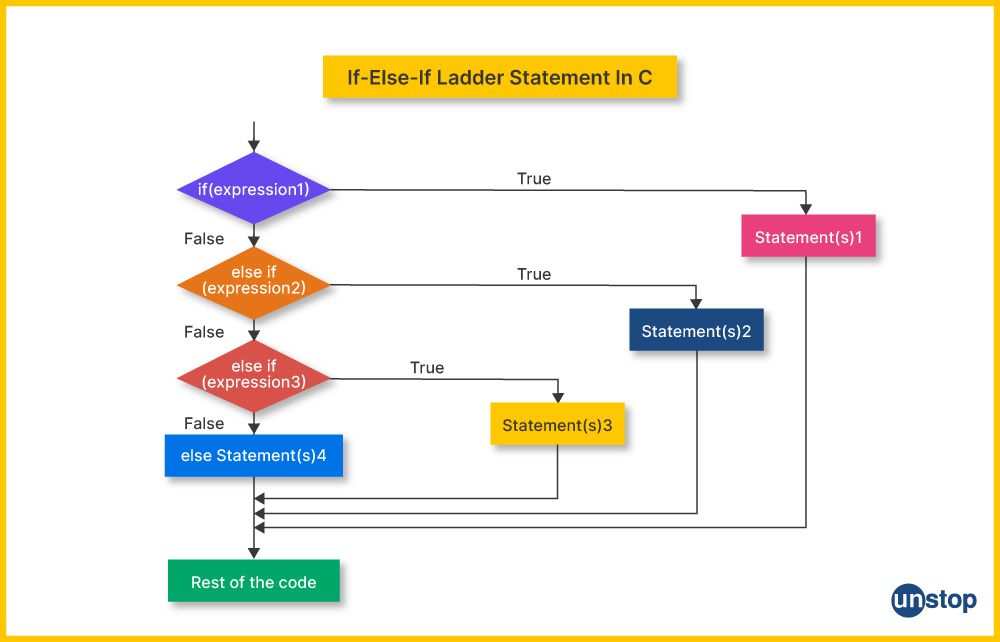
The next video offers a fantastic, detailed explanation of how this ladder works, using a flowchart similar to the one above.
C_30 else if ladder in C | C Programming Tutorials
In "else if ladder in C" from Jenny's Lectures CS IT, the presenter breaks down the concept, syntax, and execution flow of the else-if ladder.
Watch the first part of this video from the beginning. Focus on the syntax explanation and especially the flowchart walkthrough, which clearly demonstrates how the program control skips the remaining checks once a condition is met.
Now, let's see a practical coding example that uses the else if ladder and incorporates the logical operators we learned in the last lesson.
#9: If Else Statements in C | [2025] C Programming for Beginners
Returning to the Programiz video, this segment expands the voting example to handle multiple invalid age ranges, creating a perfect if-else if-else scenario.
Watch from the else if example. Pay close attention to how else if is used to add more checks and how the logical OR (||) operator is used to combine two conditions (age > 120 || age < 0) into a single, more efficient check.
4. Practical Exercise: Grade Calculator
It's time to write some code. Your task is to create a program that takes a numerical score (0-100) from the user and prints the corresponding letter grade based on a common grading scale. This is a classic problem for practicing the if-else if-else ladder.
Action: Create a new file named grades.c. Write, compile, and run the following program. Your job is to complete the logic inside the if-else if-else structure.
#include <stdio.h>

int main() {
    int score;

    printf("Enter the score (0-100): ");
    scanf("%d", &score);

    printf("Your grade is: ");

    // --- YOUR LOGIC GOES HERE ---
    // Use an if-else if-else ladder to determine the grade.
    // Grade scale:
    // 90-100: A
    // 80-89:  B
    // 70-79:  C
    // 60-69:  D
    // 0-59:   F
    // Also, handle invalid scores (less than 0 or greater than 100).

    if (score > 100 || score < 0) {
        printf("Invalid Score\n");
    } else if (score >= 90) {
        printf("A\n");
    } else if (score >= 80) {
        printf("B\n");
    } else if (score >= 70) {
        printf("C\n");
    } else if (score >= 60) {
        printf("D\n");
    } else {
        printf("F\n");
    }
    // --- END OF YOUR LOGIC ---

    return 0;
}
A quick note on the logic: Notice that for the 'B' grade, we only need to check score >= 80. We don't need to write score >= 80 && score < 90. Why? Because if the score were 90 or higher, the first if condition (score >= 90) would have already been true, and the program would have never reached the else if check for 'B'. This is the power of the sequential evaluation in an else-if ladder.
Test your program with a few different scores to see if it works as expected (e.g., 95, 82, 70, 61, 45, -5, 110).
Conclusion
Today you've mastered one of the most fundamental control structures in programming. By using if, else if, and else, you can direct your program's execution down multiple paths, allowing it to respond intelligently to different inputs and states.
Key Takeaways:
- The
ifstatement executes a block of code only if its condition istrue. - The
if-elsestatement provides two alternative paths of execution. - The
if-else if-elseladder allows for choosing between multiple paths by checking conditions sequentially from top to bottom. - Only one block of code in an entire
if-else if-elsestructure will ever be executed. - The final
elseacts as a default or "catch-all" case when no other conditions are met.
In our next lesson, we will explore the switch statement, which offers an alternative to the if-else if ladder for handling specific types of multi-path decisions, particularly when checking a variable against a list of constant values.