Recommended resources
The freely available resources this lesson will direct you to.
Hello! Welcome to the second module of our course, where we'll start making our programs much more intelligent. In our last lesson, you learned how to make your programs interactive by reading user input with scanf. You even got a small preview of decision-making when we added a check to prevent division by zero in our calculator exercise. That simple check, if (num2 != 0), is the key to what we're exploring today.
This lesson focuses on the core of decision-making in C. Our goal is to learn how to use comparison and logical operators to construct boolean expressions. These expressions are essentially questions that a program can ask, which always result in an answer of either "true" or "false". Mastering them is the first and most crucial step toward controlling the flow of your programs.
1. Boolean Expressions: The Foundation of Decisions
At its heart, a decision in a program boils down to evaluating whether a certain condition is true or false. In programming, an expression that results in a true or false value is called a boolean expression.
In C, there's a simple rule for this:
- The integer
0represents false. - Any non-zero integer (typically
1) represents true.
While you can use 0 and 1 directly, modern C provides a more readable way to work with boolean values through the stdbool.h header file. Including this header gives you access to the _Bool data type (which you can use via the alias bool), and the keywords true and false.
The following video introduces this concept and shows how to use boolean variables in practice.
#8: Boolean and Comparison Operators in C Programming
This video, "#8: Boolean and Comparison Operators in C Programming" by Programiz, starts by explaining the bool data type and its relationship with integers.
Watch the first part of the video from the beginning. Focus on how to include stdbool.h, declare bool variables, and how true and false are printed as 1 and 0 respectively.
Using bool, true, and false makes your code self-documenting and easier to understand, so we'll adopt this practice moving forward.
2. Comparison (Relational) Operators
Comparison operators, also known as relational operators, are used to compare two values. The result of the comparison is always a boolean value (true or false).
Here are the six comparison operators in C:

A very common mistake for beginners is to use a single equals sign (=) for comparison. Remember:
=is the assignment operator:x = 5means "put the value 5 into the variable x".==is the equality operator:x == 5means "is the value of x equal to 5?".
The next segment of the Programiz video demonstrates each of these operators with clear examples.
#8: Boolean and Comparison Operators in C Programming
This part of the video walks through each of the comparison operators.
Watch the segment from Comparison operators. Pay attention to how each operator is used with variables and literal values, and observe the 1 (true) or 0 (false) result in each case.
For a quick text-based reference and another code example, you can also review the following resource.
This section from the Programiz article on C operators provides a handy table and a complete code example showing all the relational operators in action.
In the article, find the heading "C Relational Operators". Review the table and the code under "Example 4: Relational Operators" to reinforce what you saw in the video.
3. Logical Operators
Often, a simple comparison isn't enough. You might need to check if multiple conditions are true at the same time, or if at least one of several conditions is met. This is where logical operators come in. They are used to combine or modify existing boolean expressions.
C has three logical operators:
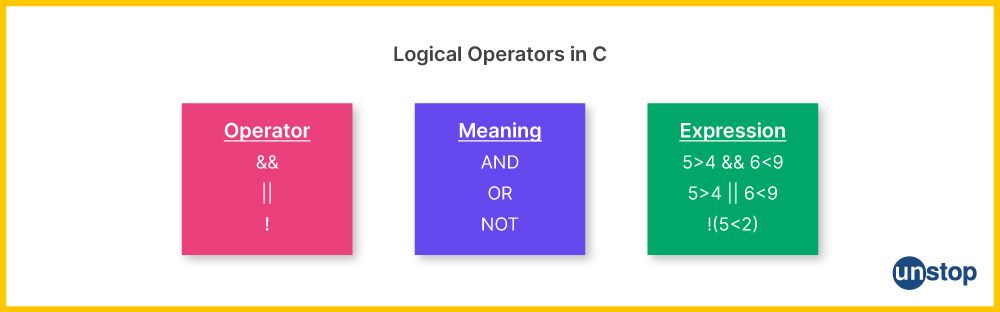
Their behavior is defined by "truth tables," which show the result for every possible combination of inputs.
This article from TutorialsPoint provides clear, simple truth tables for each logical operator.
Read the sections titled "Logical AND (&&) Operator", "Logical OR (||) Operator", and "Logical NOT (!) Operator". Focus on understanding the truth tables, as they are the formal definition of how these operators work.
To summarize the truth tables:
&&(AND): The result istrueonly if both operands aretrue.||(OR): The result istrueif at least one operand istrue.!(NOT): This is a unary operator (it takes only one operand) and it simply inverts the value.!truebecomesfalse, and!falsebecomestrue.
Let's see these operators in a practical context with the final segment of the Programiz video.
#8: Boolean and Comparison Operators in C Programming
This final part of the video demonstrates how to combine multiple boolean expressions using logical operators.
Watch from Logical operators. This will show you how to build more complex conditions, like checking if an age and height are both within a certain range.
4. Practical Exercise: Evaluating Conditions
Now it's time to put these concepts into practice. Your task is to write a C program that evaluates several boolean expressions and prints the results. This will help solidify your understanding of how these operators work before we use them to control program flow in the next lesson.
Action: Create a new file named conditions.c. Type, compile, and run the following code. Before you run it, try to predict the output (1 for true, 0 for false) for each printf statement.
#include <stdio.h>
#include <stdbool.h> // Include for bool, true, and false

int main() {
    int age = 25;
    double gpa = 3.5;
    bool is_enrolled = true;

    // --- Expression 1: Is the person a typical college student? ---
    // Condition: age is greater than 17 AND less than 30.
    bool is_college_age = (age > 17) && (age < 30);
    printf("1. Is college age? %d\n", is_college_age);

    // --- Expression 2: Is the student eligible for honors? ---
    // Condition: GPA is 3.5 or higher AND is currently enrolled.
    bool eligible_for_honors = (gpa >= 3.5) && is_enrolled;
    printf("2. Eligible for honors? %d\n", eligible_for_honors);

    // --- Expression 3: Is the person a non-traditional student? ---
    // Condition: age is 30 or older OR their GPA is less than 2.0.
    bool non_traditional = (age >= 30) || (gpa < 2.0);
    printf("3. Is non-traditional student? %d\n", non_traditional);

    // --- Expression 4: Is the student NOT enrolled? ---
    // Condition: Using the NOT operator.
    bool not_enrolled = !is_enrolled;
    printf("4. Is not enrolled? %d\n", not_enrolled);

    // --- Expression 5: A check that will be false ---
    // Condition: age is exactly 25 AND gpa is greater than 3.8.
    bool specific_check = (age == 25) && (gpa > 3.8);
    printf("5. Is age 25 AND gpa > 3.8? %d\n", specific_check);

    return 0;
}
Parentheses () are used in the expressions above to group operations for clarity. While C has rules of precedence (e.g., && is evaluated before ||), using parentheses is a good habit to ensure your code behaves exactly as you intend and is easy for others to read.
Conclusion
In this lesson, you've learned how to construct the questions that allow programs to make decisions. These are fundamental skills that separate a simple script from a powerful application.
Key Takeaways:
- Boolean expressions are statements that evaluate to
true(represented by1or any non-zero value) orfalse(represented by0). - The
stdbool.hlibrary gives us thebooltype andtrue/falsekeywords for more readable code. - Comparison operators (
==,!=,>,<,>=,<=) are used to compare two values. - Logical operators (
&&,||,!) are used to combine or invert boolean expressions to form more complex conditions. - Using parentheses is a best practice to ensure your expressions are evaluated in the order you intend.
You are now fully prepared for our next lesson, where we will take these boolean expressions and use them with if-else if-else statements. This will allow you to finally control which parts of your code execute, making your programs truly dynamic and responsive.