Recommended resources
The freely available resources this lesson will direct you to.
Hello! In our last few lessons, we focused on controlling the flow of our programs by making decisions with if-else and switch statements. These tools allow code to execute conditionally. Today, we'll explore a different kind of control: repetition. Instead of running a block of code just once, we'll learn how to execute it multiple times using loops.
This lesson introduces the while loop, one of the fundamental looping constructs in C. You will learn how to write a loop that repeats a block of code as long as a specific condition remains true. This is a crucial step towards writing more powerful and dynamic programs that can process data, wait for user input, or perform tasks without you having to write the same line of code over and over again.
1. The Anatomy of a while Loop
At its core, a loop is a structure that repeats a block of code. The while loop is perhaps the most straightforward type: it checks a condition, and if the condition is true, it executes the code block. Then it checks the condition again, and repeats the process until the condition becomes false.
This structure typically involves three key parts:
- Initialization: Setting up a variable that the loop will use to control its execution (often called a counter or loop variable).
- Condition: The boolean expression that is checked before each potential execution of the loop's body.
- Update: A statement inside the loop that modifies the loop variable, working it towards the point where the condition will become false.
Let's watch a video that breaks down this structure with a clear, simple example.
while loop C | Programming Tutorial
The video "while loop C | Programming Tutorial" from the Portfolio Courses channel provides an excellent introduction to the structure of a standard while loop.
Watch the first part of the video, from the beginning to the basic example. Focus on how the i variable is initialized, checked in the while condition, and updated within the loop body.
The general syntax is clean and simple:
// 1. Initialization
int i = 0;

// 2. Condition
while (i < 5) {
    // Loop body
    printf("Executing loop...\n");

    // 3. Update
    i++;
}
The loop checks the condition i < 5 before executing the body. This is why it's called an entry-controlled or pre-tested loop. The flow of execution can be visualized with a flowchart.
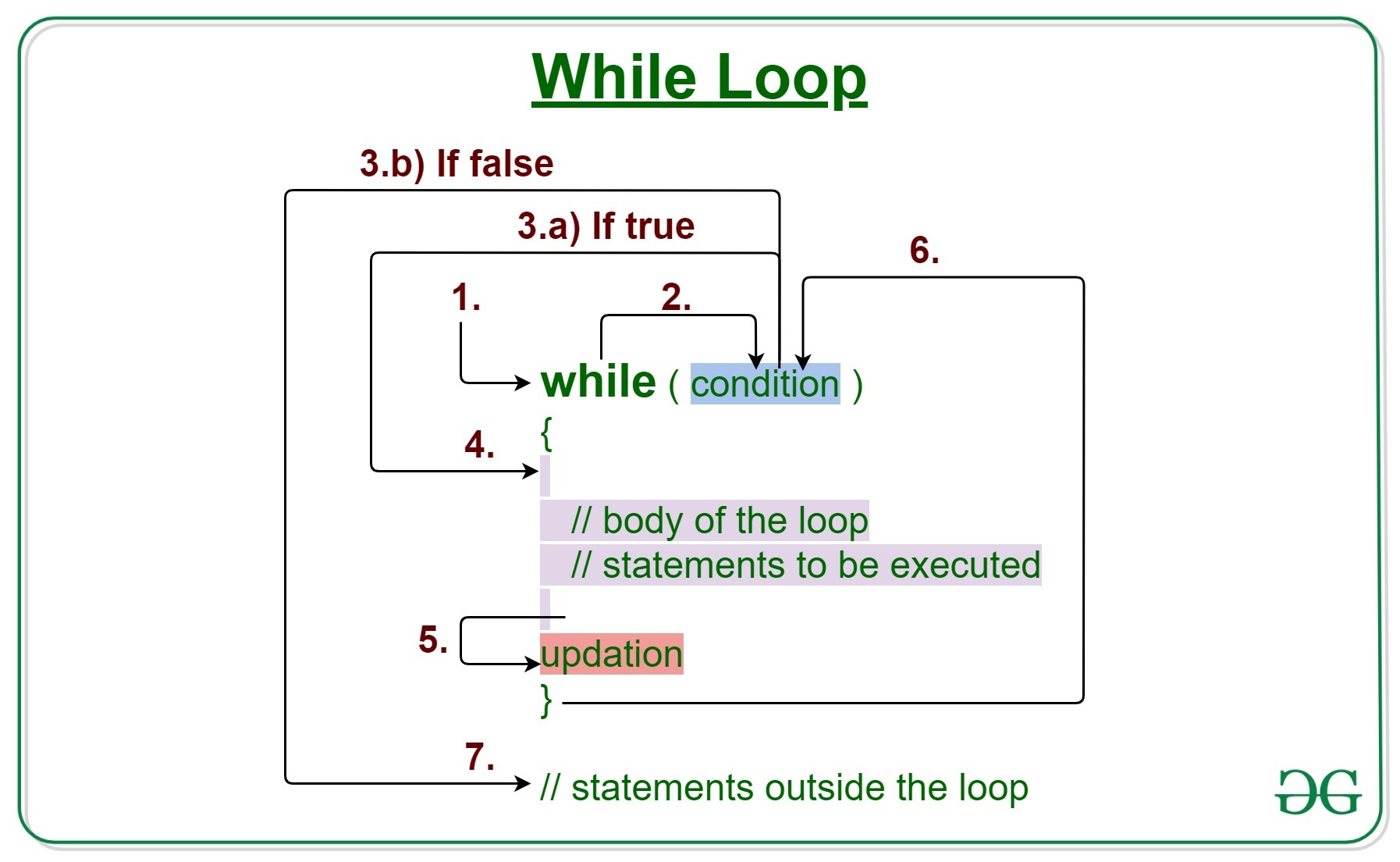
The logic in the flowchart corresponds to these steps:
- The
whilecondition is evaluated. - If the condition is false, the loop body is skipped entirely, and the program continues with the code after the loop.
- If the condition is true, the code inside the loop body is executed.
- After the body is executed, control returns to step 1 to re-evaluate the condition.
2. Common Scenarios and Pitfalls
Because the condition is tested at the start, and the loop's continuation depends on that condition eventually becoming false, there are two important edge cases to understand.
What if the condition is initially false?
If the condition in a while loop is false the very first time it's checked, the body of the loop will never execute.
What if the condition never becomes false?
If you forget the update step (e.g., you forget i++), or if your logic is flawed such that the condition always remains true, you will create an infinite loop. The program will get stuck executing the loop body forever, or until it runs out of memory or is manually stopped.
This next video segment demonstrates both of these scenarios.
while loop C | Programming Tutorial
Continuing with the Portfolio Courses video, these sections clearly demonstrate what happens when the loop condition is initially false and how an infinite loop can occur.
First, watch the part on a loop that never runs. Then, watch the segment explaining infinite loops.
3. Counter-Controlled vs. Sentinel-Controlled Loops
So far, we've seen counter-controlled loops, where we use a variable to count a specific number of iterations. This is useful when you know exactly how many times you need to repeat an action.
However, a while loop is also exceptionally useful when you don't know how many iterations are needed. An indefinite or sentinel-controlled loop continues until a specific event occurs, such as the user entering a special value (the "sentinel").
This is a common pattern for interactive programs. For example, you might want to keep prompting a user for input until they type "quit" or enter -1.
Let's see an example of this in action.
while loop C | Programming Tutorial
This final segment from the Portfolio Courses video demonstrates an indefinite loop that waits for the user to enter a specific value to quit.
Watch from the user input example. Notice how the loop's continuation depends on the user's input, not a fixed counter.
4. Putting It All Together: A Practical Program
Now that we have the theory down, let's see how these pieces come together in a complete, practical program. The following video builds a multiplication table based on user input, which is a perfect demonstration of a counter-controlled while loop that also integrates scanf and printf.
#12: while Loop in C Programming | [2025] C Programming for Beginners
The video "#12: while Loop in C Programming" by Programiz provides a great step-by-step walkthrough of creating a multiplication table.
Watch the segment from the multiplication table example. Pay attention to how the count variable is initialized, checked, and incremented to generate the table up to 10.
5. Your Turn: Calculate the Sum
It's time to write your own while loop. Your task is to write a program that asks the user for a positive integer N and then calculates the sum of all numbers from 1 to N.
For example, if the user enters 5, your program should calculate 1 + 2 + 3 + 4 + 5 and print the result, 15.
Action: Create a new file named sum.c. Use the following code as a starting point and fill in the missing logic for the while loop.
#include <stdio.h>

int main() {
    int n;
    int sum = 0;
    int i = 1; // Initialization for our loop counter

    printf("Enter a positive integer: ");
    scanf("%d", &n);

    // --- YOUR WHILE LOOP GOES HERE ---
    // The loop should continue as long as 'i' is less than or equal to 'n'.
    // Inside the loop, you should:
    // 1. Add the current value of 'i' to 'sum'.
    // 2. Increment 'i'.

    // Your code here

    printf("The sum of numbers from 1 to %d is %d.\n", n, sum);

    return 0;
}
Once you've attempted to solve it, you can check your work against the solution below.
Click to see the solution
#include <stdio.h>

int main() {
    int n;
    int sum = 0;
    int i = 1; // Initialization for our loop counter

    printf("Enter a positive integer: ");
    scanf("%d", &n);

    // This loop continues as long as our counter 'i' is not past 'n'.
    while (i <= n) {
        sum = sum + i; // Add the current number to the total sum
        i++;           // Increment the counter to move to the next number
    }

    printf("The sum of numbers from 1 to %d is %d.\n", n, sum);

    return 0;
}
Conclusion
In this lesson, you've learned how to harness the power of repetition using the while loop. This is a massive step forward, enabling you to write code that can perform tasks hundreds or thousands of times without any extra effort.
Key Takeaways:
- The
whileloop executes a block of code as long as a given condition is true. - It is an entry-controlled loop, meaning the condition is checked before the loop body runs.
- A standard counter-controlled loop requires initialization, a condition, and an update step to avoid an infinite loop.
whileloops are ideal for both counter-controlled situations (definite iteration) and sentinel-controlled situations where the number of iterations is unknown (indefinite iteration).
In our next lesson, we'll look at the for loop. While a while loop can do anything a for loop can, you'll see that the for loop provides a more compact and readable syntax specifically for the counter-controlled patterns we practiced today.