Recommended resources
The freely available resources this lesson will direct you to.
Welcome to the next lesson in our journey through C programming. In the previous lesson, we explored the while loop, which allows us to repeat a block of code as long as a condition is true. We saw how this requires three distinct parts: an initialization, a condition check, and an update step.
Today, we'll build directly on that knowledge by learning about the for loop. The for loop is specifically designed for situations where we need to iterate a known number of times—a pattern we called "definite iteration" or a "counter-controlled loop." You'll find it offers a more compact and organized way to write the same logic we built with while loops, which helps make our code cleaner and less prone to errors.
By the end of this lesson, you will be able to write a for loop to perform definite iteration over a sequence.
1. Introducing the for Loop
The for loop is a cornerstone of programming for a reason: it elegantly packages the three essential components of a counter-controlled loop (initialization, condition, and update) into a single, easy-to-read line.
Let's start with a quick video that introduces the for loop and breaks down its purpose and structure.
This video from the Bro Code channel, "C for loops in 3 minutes! 🔁", provides a fast-paced and clear introduction.
Watch the first two segments of the video. The first part, the introduction, explains what a for loop does. The second part, the three statements, details the core components of the loop's syntax.
As the video explained, the for loop is defined by three statements enclosed in parentheses, separated by semicolons.
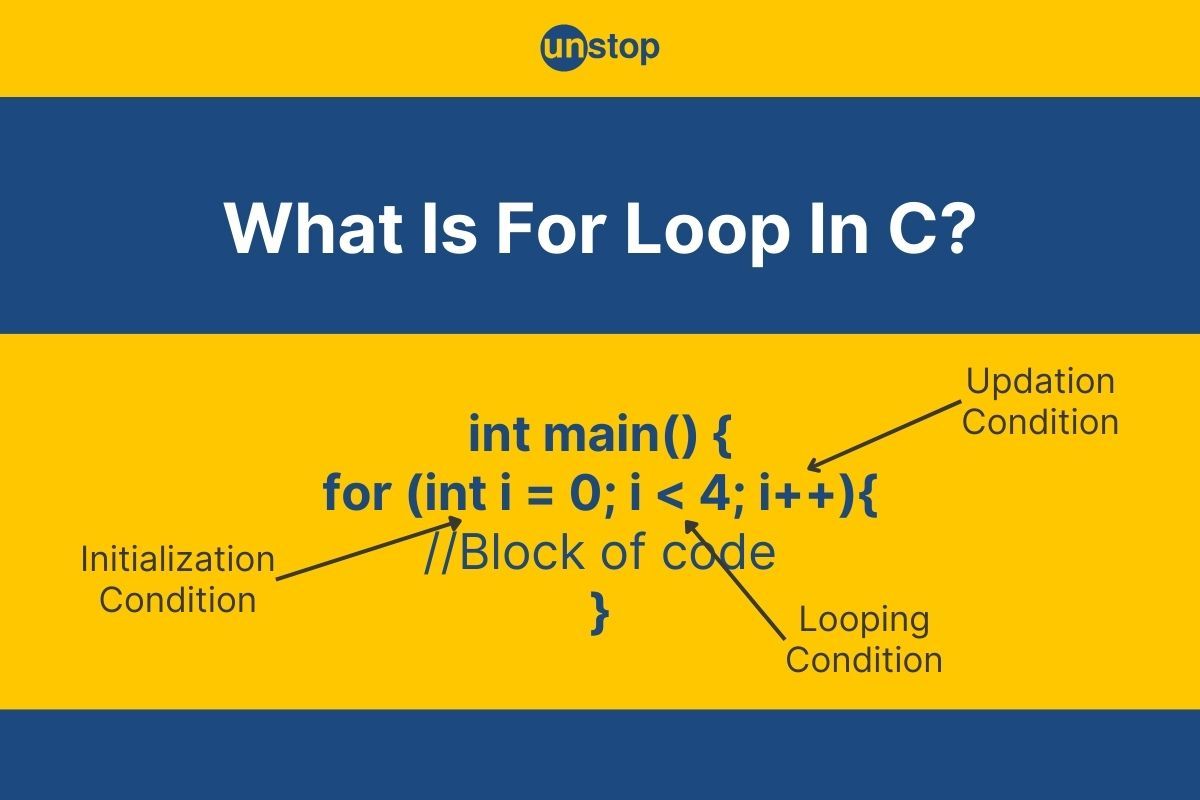
The general syntax is:
for (initialization; condition; update) {
    // Code to be executed in each iteration
}
- Initialization: This happens only once when the loop starts. It's typically where you declare and initialize a loop counter variable (e.g.,
int i = 0;). - Condition: This boolean expression is checked before each iteration. If it's true, the loop body executes. If it's false, the loop terminates.
- Update: This happens after each iteration. It's used to modify the loop counter, bringing it closer to the termination condition (e.g.,
i++).
To solidify your understanding of the syntax and the flow of execution, please read the following sections from a detailed article on the topic.
This article from Programiz provides a clear, textual explanation of the for loop's syntax and execution flow.
Read the sections titled "for Loop" and "How for loop works?". Pay close attention to the step-by-step description of the execution order.
2. The Execution Flow
The order of execution is crucial. A for loop doesn't just execute its three parts from left to right. The flow is as follows:
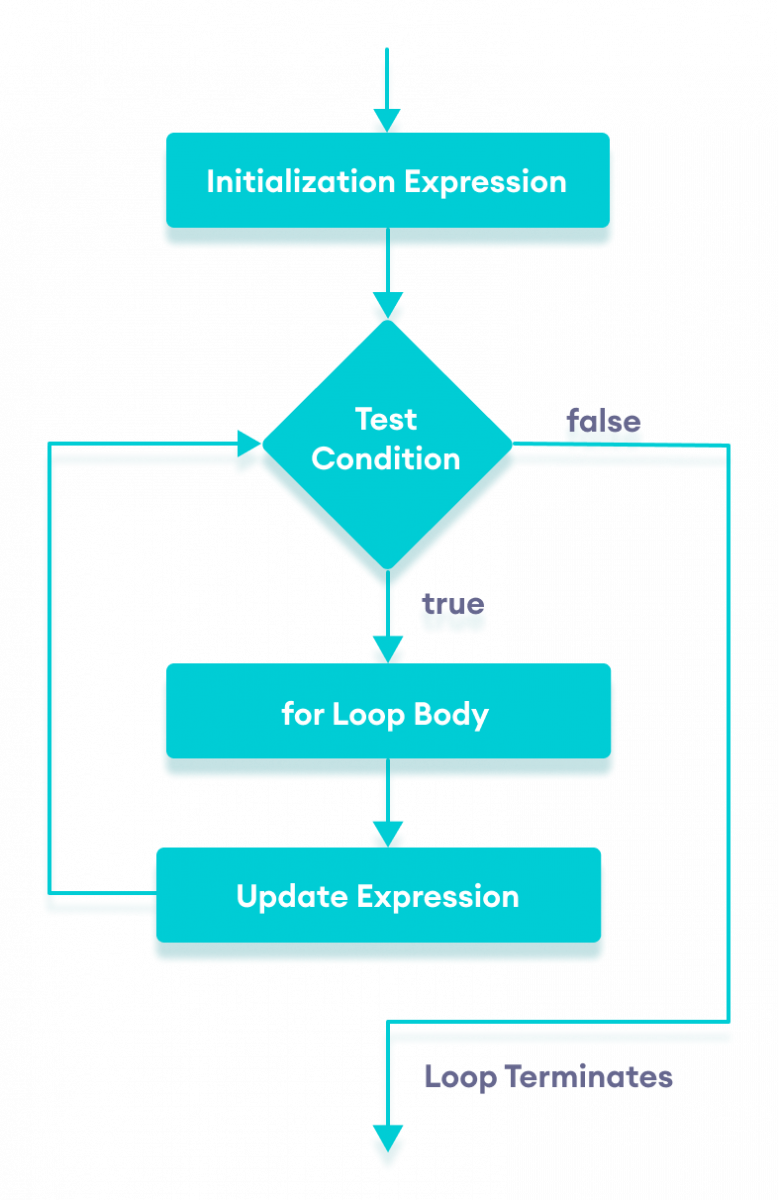
- Initialization runs once.
- The Condition is checked.
- If the condition is false, the loop ends.
- If the condition is true, the Loop Body is executed.
- The Update statement is executed.
- Go back to step 2 (check the Condition again).
3. Comparing for and while Loops
You might have noticed that the logic in the for loop flowchart is identical to the counter-controlled while loop we built in the last lesson. That's because a for loop is, in essence, a specialized version of a while loop. Any for loop can be rewritten as a while loop.
For example, this for loop:
for (int i = 1; i <= 5; i++) {
    printf("%d\n", i);
}
Is equivalent to this while loop:
int i = 1; // Initialization
while (i <= 5) { // Condition
    printf("%d\n", i);
    i++; // Update
}
The for loop's advantage is that it keeps the loop control logic together, making the code more readable and reducing the risk of mistakes like forgetting the i++; update step, which would cause an infinite loop.
This next video does an excellent job of demonstrating this equivalence by refactoring a while loop into a for loop.
This clip from Neso Academy's video "for and while Loops" directly compares the two loop structures.
Watch the segment from for loop explanation. The presenter shows a while loop and then rewrites it as a for loop, highlighting how they perform the same steps.
4. Practical Examples and Variations
The for loop is very flexible. You are not limited to just incrementing by one. You can count down, or count by any step you need.
Let's return to the Bro Code video for some quick demonstrations of these variations.
First, watch the demonstration of a basic counting loop. Then, see how you can change the loop's behavior by counting differently, including counting down or by larger steps.
Now, let's look at two complete code examples from the Programiz article you read earlier. The second example should look very familiar, as it solves the same problem from our last lesson's exercise.
These examples demonstrate the for loop in complete, compilable programs.
Review "Example 1: for loop" (printing numbers 1 to 10) and "Example 2: for loop" (calculating the sum of n natural numbers). Notice how the second example is a more compact solution to the problem you solved with a while loop.
5. Your Turn: The Multiplication Table
It's time to put your new knowledge into practice. Your task is to write a program that asks the user for a number, then prints its multiplication table up to 10.
For example, if the user enters 7, the output should be:
7 * 1 = 7
7 * 2 = 14
7 * 3 = 21
...
7 * 10 = 70
Action: Create a new file named table.c. Use the starter code below and implement the for loop to generate the table.
#include <stdio.h>

int main() {
    int number;

    printf("Enter a number to see its multiplication table: ");
    scanf("%d", &number);

    // --- YOUR FOR LOOP GOES HERE ---
    // Use a for loop that runs 10 times (from i = 1 to i = 10).
    // Inside the loop, print one line of the multiplication table.
    // For example: printf("%d * %d = %d\n", number, i, number * i);

    // Your code here

    return 0;
}
Once you have written and tested your code, you can compare it with the solution below.
Click to see the solution
#include <stdio.h>

int main() {
    int number;

    printf("Enter a number to see its multiplication table: ");
    scanf("%d", &number);

    printf("--- Multiplication Table for %d ---\n", number);

    // This loop initializes a counter 'i' at 1.
    // It continues as long as 'i' is less than or equal to 10.
    // After each iteration, 'i' is incremented by 1.
    for (int i = 1; i <= 10; i++) {
        printf("%d * %d = %d\n", number, i, number * i);
    }

    return 0;
}
Conclusion
In this lesson, you've mastered the for loop, a powerful tool for definite iteration. By grouping initialization, condition, and update into one line, it provides a clean, readable, and robust structure for counter-controlled loops.
Key Takeaways:
- The
forloop syntax isfor (initialization; condition; update). - It's specifically designed for definite iteration, where the number of repetitions is known beforehand.
- The execution flow is: initialize (once), then cycle through condition check, body execution, and update.
- A
forloop is often a more structured and less error-prone alternative to awhileloop for counter-controlled tasks.
So far, our loops run from start to finish. But what if you need to exit a loop early or skip a single iteration? In our next lesson, we will explore the break and continue statements, which give us even more precise control over how our loops behave.