Recommended resources
The freely available resources this lesson will direct you to.
In our last lesson, we mastered the for loop, a structured way to repeat code a specific number of times. We saw how both for and while loops execute their entire code block on each iteration, continuing until their main condition becomes false. However, sometimes we need more granular control—a way to exit a loop prematurely or to skip a single, specific iteration.
This lesson introduces two powerful keywords that provide this control: break and continue. You will learn how to use break to terminate a loop on command and how to use continue to bypass the rest of an iteration and proceed to the next one. Mastering these statements will allow you to write more efficient and responsive loops.
1. The break Statement: Exiting a Loop Early
The break statement gives you an "emergency exit" from a loop. When C encounters break inside a for or while loop, it immediately terminates the loop and execution continues at the first statement after the loop block.
It's almost always used inside an if statement, allowing you to exit the loop when a special condition is met, regardless of the loop's main continuation condition.
Let's watch a video that demonstrates how break works in both for and while loops.
#14 : break and continue in C | C Programming for Beginners
The video "#14 : break and continue in C" from Programiz provides clear, step-by-step examples.
Please watch the following three segments: The basic concept: This introduces the break statement and shows its immediate effect. Using break with if: This shows the most common use case—placing break inside a conditional to exit a for loop when a specific value is reached. break in a while loop: This demonstrates using break to terminate an infinite while (1) loop based on user input.
As you saw, break provides a clean way to handle termination conditions that are more complex than a simple counter.
For a textual summary and a helpful flowchart, you can review the first part of this article.
This article from Programiz clearly explains the break statement with a code example and a visual flowchart.
Read the section titled "C break", including its subsections "How break statement works?" and "Example 1: break statement". Pay attention to the flowchart which visualizes the jump out of the loop.
2. The continue Statement: Skipping an Iteration
What if you don't want to exit the loop entirely, but just want to skip the rest of the current iteration? That's exactly what the continue statement is for.
When C encounters continue, it immediately stops executing the current iteration's code and jumps to the next one.
- In a
forloop, it jumps to the update expression (e.g.,i++). - In a
whileloop, it jumps to the condition check.
This is useful for filtering out data or skipping certain steps based on a condition, without ending the entire process.
#14 : break and continue in C | C Programming for Beginners
Let's return to the Programiz video to see how continue works.
Watch the segment from the continue statement. The video does a great job of replacing the break from the previous example with continue to highlight the difference in behavior.
Notice how break stops everything when i == 3, while continue just skips the printf for that one iteration and keeps the loop going for i = 4 and i = 5.
You can also read about continue in the Programiz article.
This part of the article explains the continue statement, complementing the video you just watched.
Read the section titled "C continue" and its subsections. The flowchart here clearly shows how continue causes the program flow to loop back early.
3. Visualizing the Control Flow
The difference between a normal loop, one with continue, and one with break can be summarized with flowcharts.
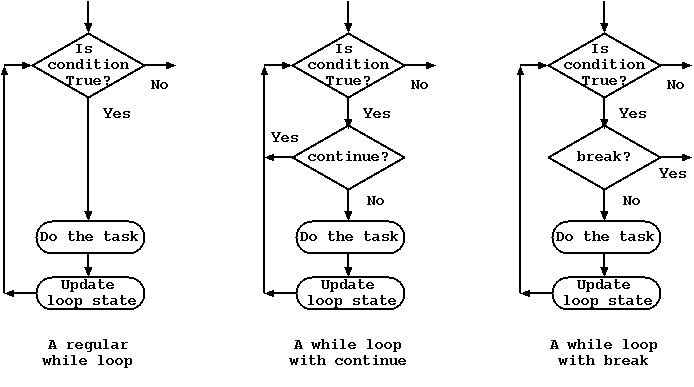
- Normal Loop: The task is always performed if the condition is true.
continue: Anifcondition can cause a "short-circuit," skipping the task for the current iteration and moving to the next.break: Anifcondition can terminate the loop entirely, moving execution outside the loop structure.
4. A Practical Example: Combining break and continue
break and continue are often used together to handle complex logic within a single loop. A common pattern is to process user input: continue might be used to ignore invalid input, while break could be used to stop when the user enters a specific "quit" command.
This next video segment demonstrates exactly such a scenario.
#14 : break and continue in C | C Programming for Beginners
The final segment of the Programiz video ties everything together with a practical program.
Watch from the combined example. The program is designed to: Take numbers from the user in a loop. Use continue to skip printing odd numbers. Use break to terminate the loop if the user enters a non-positive number.
A Word of Caution with while and continue
There's a classic pitfall when using continue in a while loop. Consider this code:
int i = 0;
while (i < 10) {
    if (i == 4) {
        continue; // Jumps back to the 'while (i < 10)' check
    }
    printf("%d\n", i);
    i++; // This line is skipped when i is 4!
}
When i is 4, continue is executed. The i++ at the end of the loop is skipped. The program jumps back to the while (i < 10) check. Since i is still 4, the condition is true, continue is executed again, and so on. The result is an infinite loop.
To fix this, you must ensure the loop's counter is updated before the continue statement, like this:
int i = 0;
while (i < 10) {
    if (i == 4) {
        i++;       // Manually update before continuing
        continue;
    }
    printf("%d\n", i);
    i++;
}
This is a key reason for loops are often safer for these scenarios, as the update part (i++) runs automatically after each iteration, even when continue is used.
5. Your Turn: Input Validation Loop
Now it's time to apply what you've learned. You will write a program that asks the user to enter up to 5 numbers for a sum. The loop should handle special conditions.
Your task:
Write a program that:
- Uses a
forloop to iterate exactly 5 times. - Inside the loop, prompts the user to enter an integer.
- Calculates a running total of the numbers entered.
- Special Rules:
- If the user enters a number greater than 100, skip it (don't add it to the total) and print a message like "Skipping value > 100." Then,
continueto the next iteration. - If the user enters a negative number, stop the loop immediately. Then,
breakout of the loop.
- If the user enters a number greater than 100, skip it (don't add it to the total) and print a message like "Skipping value > 100." Then,
- After the loop finishes (either by completing 5 iterations or by breaking early), print the final sum.
Use the starter code below and fill in the logic.
#include <stdio.h>

int main() {
    int i;
    int number;
    int sum = 0;

    printf("Enter up to 5 integers. Enter a negative number to stop.\n");

    for (i = 1; i <= 5; ++i) {
        printf("Enter number %d: ", i);
        scanf("%d", &number);

        // --- YOUR LOGIC GOES HERE ---

        // 1. Check if the number is negative. If it is, break the loop.

        // 2. Check if the number is greater than 100.
        //    If it is, print a warning and continue to the next iteration.

        // 3. If neither of the above is true, add the number to the sum.
        sum += number;
    }

    printf("\nFinal sum: %d\n", sum);

    return 0;
}
Click to see the solution
#include <stdio.h>

int main() {
    int i;
    int number;
    int sum = 0;

    printf("Enter up to 5 integers. Enter a negative number to stop.\n");

    for (i = 1; i <= 5; ++i) {
        printf("Enter number %d: ", i);
        scanf("%d", &number);

        // If the number is negative, terminate the loop immediately.
        if (number < 0) {
            printf("Negative number entered. Halting.\n");
            break;
        }

        // If the number is too large, skip it and go to the next iteration.
        if (number > 100) {
            printf("Skipping value > 100.\n");
            continue;
        }

        // If the number is valid, add it to the sum.
        // This line is only reached if break or continue were not executed.
        sum += number;
    }

    printf("\nFinal sum: %d\n", sum);

    return 0;
}
Conclusion
You now have two new tools, break and continue, to precisely manage the flow of your loops. They allow you to write more robust and flexible code that can react to changing conditions during execution.
Key Takeaways:
breakterminates the innermost loop it is in, immediately transferring control to the code following the loop.continueskips the remainder of the current loop iteration and proceeds directly to the next iteration's condition check and update.- Both are almost always used with an
ifstatement to control loop behavior based on a specific condition. - Be careful when using
continueinwhileloops to avoid infinite loops by ensuring the loop variable is updated correctly.
In our previous lessons, our loops have been simple, single-level structures. But what happens when you put a loop inside another loop? In the next lesson, we will explore nested loops and learn how to trace their complex execution paths—a fundamental skill for solving more advanced problems. We'll also see that break and continue only affect the innermost loop they reside in, a crucial detail when working with nested structures.