Recommended resources
The freely available resources this lesson will direct you to.
Hello! In the last lesson, you used if, elif, and else to decide what to do with one observation. A loop lets you apply the same decision to a whole collection without copying the code for every record. That is a basic building block for inspecting and preparing data before machine learning.
Allow about 40 minutes: roughly five minutes for video, eight minutes for the short readings, and the rest to run and modify the notebook examples.
Visit each item in a collection
Watch the opening of For Loops in Python | Python for Beginners by Alex The Analyst. Focus on what happens to the loop variable each time Python visits a new item.
For Loops in Python | Python for Beginners
Alex The Analyst demonstrates how a for loop visits the values in a list and runs its body for each one.
Watch the list example, from the diagram of a collection through the notebook output. Notice the colon after the loop header and the indented statement that repeats.
Here is the same structure applied to readings:
readings = [18.5, 22.0, 20.0]

for reading in readings:
    print("Reading:", reading)

print("All readings checked.")
Python takes the first value from readings, assigns it to reading, and runs the indented body. It does the same for the second and third values. Only then does it run print("All readings checked."), which is outside the loop because it is not indented.
The loop variable reading is a name for the current item. You can choose another meaningful name; it does not have to match the collection’s name. As with an if statement, the colon begins a block, and indentation defines which statements belong to it. If readings were an empty list, the body would not run at all, but the final print would still run.
Put a decision inside the repeated operation
Your earlier conditional classified a single observation. Now each item can be a dictionary, and the loop can apply that conditional to each dictionary in turn:
observations = [
    {"reading": 18.5, "valid": True},
    {"reading": 22.0, "valid": True},
    {"reading": 17.5, "valid": False},
    {"reading": 20.0, "valid": True},
]

for observation in observations:
    if not observation["valid"]:
        label = "invalid"
    elif observation["reading"] < 18.0:
        label = "low"
    elif observation["reading"] >= 22.0:
        label = "high"
    else:
        label = "within range"

    print(observation["reading"], label)
The output is:
18.5 within range
22.0 high
17.5 invalid
20.0 within range
There are two levels of indentation here. The if chain belongs to the loop, so it runs for every observation. Each label assignment belongs to one branch of that chain. The final print is still inside the loop, but outside the if chain: it runs once per observation, after that observation has received a label.
This is a useful distinction when reading code. A line aligned with for runs after the entire loop; a line indented under for runs for each item. The invalid reading receives invalid even though its number is below 18.0, because the validity check comes first—just as it did in the previous lesson.
Build a result across iterations
Printing each decision lets you inspect it, but data preparation often needs a result you can use later: perhaps a list of usable readings and a count of how many there are. Read the first two “Practice Accumulating” examples in Plotting and Programming in Python: For Loops from Software Carpentry. They show two related patterns: updating a number and adding items to a list.
Plotting and Programming in Python: For Loops
Software Carpentry’s examples show how a loop can build a result rather than merely print each item.
Find “Practice Accumulating” after “Reversing a String.” Read the “Total length of the strings in the list” prompt and solution, followed by “List of word lengths” under “Practice Accumulating (continued).” Stop after its solution prints lengths, before the next “Practice Accumulating (continued)” prompt about concatenating words. Compare the two solution patterns: one updates a running total; the other grows a list.
Apply both patterns to the observations list from the preceding cell:
valid_readings = []
valid_count = 0
valid_total = 0

for observation in observations:
    if observation["valid"]:
        valid_readings.append(observation["reading"])
        valid_count = valid_count + 1
        valid_total = valid_total + observation["reading"]

print(valid_readings)
print(valid_count)
print(valid_total)
This prints [18.5, 22.0, 20.0], then 3, then 60.5. The three result variables are initialized before the loop. Each valid observation changes them; the invalid one changes none of them. The prints are after the loop, so they show the completed results rather than an intermediate result for each record.
valid_total = valid_total + observation["reading"] may look unusual if you read = as mathematical equality. In Python it is assignment: compute a new value using the current total, then store that value as the total. Likewise, .append(...) adds one item to the existing list.
Keep initialization outside the loop. If valid_total = 0 were indented inside it, the total would restart at zero for every observation. In a notebook, rerun this whole cell after changing observations; rerunning only the loop while retaining an old total would count some records twice.
Choose what to iterate over
A list of observations is not the only collection you can loop over. For a dictionary, decide whether you need its keys, its values, or both. Watch the dictionary portion of the same video, then compare its .values() and .items() examples with the code below.
For Loops in Python | Python for Beginners
The dictionary example demonstrates selecting values or key–value pairs while looping.
Watch dictionary iteration, from the creation of the dictionary through the .items() output. Focus on what the loop variable receives when .values() is used, and what the two variables receive when .items() is used.
readings_by_period = {"baseline": 18.5, "recent": 22.0}

for period in readings_by_period:
    print(period)

for period, reading in readings_by_period.items():
    print(period, reading)
The first loop prints the keys (baseline and recent): looping directly over a dictionary gives you its keys. The second loop receives a key and its associated value on each iteration. If you only need values, use readings_by_period.values(). For a list of dictionaries, as in our earlier example, loop over the list to get one whole observation dictionary at a time.
Sometimes you need a specified number of repetitions rather than items from an existing collection. Python’s range() supplies numbers for that purpose. Read the brief explanation and examples in the official Python tutorial:
4. More Control Flow Tools — Python 3.14.0 documentation
The Python documentation explains why range(5) produces five iterations but does not include the number 5.
In Section 4.3, “The range() Function,” begin with “If you do need to iterate over a sequence of numbers” and inspect the range(5) example. Read the end point rule, then look at the range(5, 10) example immediately below it. Stop before the paragraph beginning “To iterate over the indices of a sequence.”
for position in range(3):
    print(position)
This prints 0, 1, and 2: the end point is excluded. range(3) is useful when those numbers—or exactly three repetitions—are what you need. When you already have a collection and only need its items, for observation in observations: expresses your intent more directly.
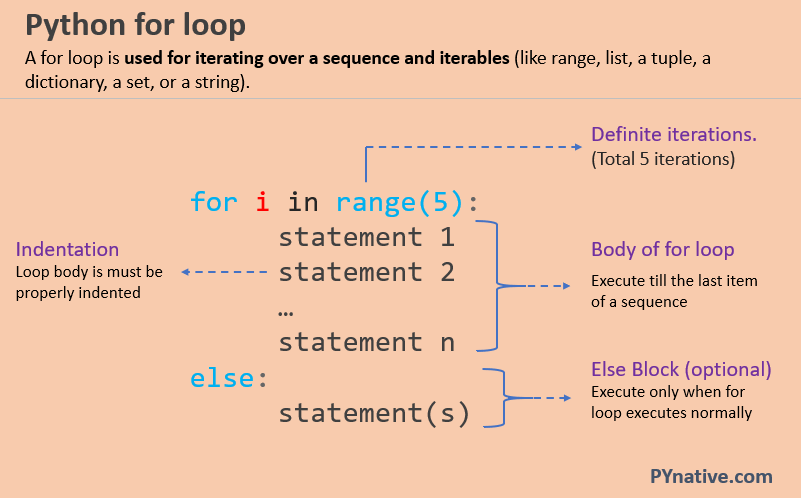
The image’s else is attached to the loop, not to an if statement. It runs after the loop finishes without a break; it does not run once per item.
Takeaways
Use for item in collection: to repeat an indented operation for every item. Put a conditional inside the loop when each item needs its own decision. Initialize totals or output lists before the loop, update them inside it, and inspect the completed results afterward. Iterate directly over a list for its items; use dictionary methods when you need values or key–value pairs, and range() when you need a sequence of numbers.
Next, you will package a repeated piece of logic into a function so you can call it with different inputs without rewriting its steps.