Recommended resources
The freely available resources this lesson will direct you to.
- Python Tutorial for Beginners 6: Conditionals and Booleans - If, Else, and Elif Statementswww.youtube.com
- Conditionals: if, elif, else statements | Python for Beginners Lesson 5 | Code with Kyliewww.youtube.com
- 2 if-else and flow controlautomatetheboringstuff.com
- Lecture 1 - CS50's Introduction to Programming with Pythoncs50.harvard.edu
Hello! Last lesson, you stored observations in lists and dictionaries and retrieved fields such as observation["reading"] and observation["valid"]. You also know that comparisons produce True or False. Now you can use those values to decide which statements run—for example, whether to accept a reading, flag it, or skip it.
Allow about 40 minutes to watch the video excerpts, read the explanations, and run the examples in your notebook. The central idea is simple, but the details matter: indentation determines what is conditional, and the order of checks determines which outcome you get.
Make one block conditional
An if statement tests a condition. If the condition is true, Python runs its indented block; if it is false, Python skips that block and continues with the code below it.
Watch the selected portions of Python Tutorial for Beginners 6: Conditionals and Booleans – If, Else, and Elif Statements by Corey Schafer. His examples use programming-language names and account checks; we will apply the same structures to observations.
Python Tutorial for Beginners 6: Conditionals and Booleans - If, Else, and Elif Statements
Watch Corey Schafer’s introduction to conditional blocks, alternative branches, and combined conditions. Pay particular attention to how indentation and the first satisfied condition affect execution.
Watch if and else for the basic syntax and the distinction between = and ==. Continue with multiple choices to see elif, then combined conditions for and, or, and not. You can stop there; later portions introduce details we do not need yet.
Here is a small observation like the ones you created last lesson. Run the entire cell:
observation = {"reading": 18.5, "valid": True}

if observation["valid"]:
    print("Use reading:", observation["reading"])

print("Record checked.")
Because "valid" holds True, both messages appear. Change it to False and rerun the cell: only Record checked. appears. That last print is not indented, so it runs regardless of the condition.
Read the structure carefully: if is followed by a condition and a colon; the next line begins an indented block. Four spaces is the usual indentation. Every statement you want controlled by that if must have the same indentation. A colon without an indented block is an error, and accidentally removing indentation can make code run when you meant to skip it.
A condition can be a stored boolean, as above, or a comparison:
reading = observation["reading"]

if reading < 18.0:
    print("Below the chosen lower limit")
Here < compares values. Likewise, == checks whether values are equal; a single = assigns a value. The limit 18.0 is just an example rule, not a universal definition of a low reading.
Choose between two paths
Sometimes skipping a block is not enough: you need one action when a condition holds and another when it does not. Add else, aligned with if:
if observation["valid"]:
    status = "ready"
else:
    status = "rejected"

print(status)
Exactly one of these two blocks runs. else has no condition of its own: it handles the cases for which the if condition was false. Because both branches assign status, the final print has a value to use either way. If you assigned status only inside the if block, a false condition could leave it unset. In a notebook, an older value from a previously run cell might even conceal that mistake, so rerun the whole cell when checking your logic.
Notice that print(status) is outside both branches. Conditional statements choose a path, then execution continues after the conditional structure.
Choose among several paths
Suppose you want to distinguish four outcomes: invalid, low, high, and within a chosen range. An elif (“else if”) adds a condition that Python checks only when earlier conditions in the chain were false:
observation = {"reading": 18.5, "valid": True}

if not observation["valid"]:
    label = "invalid"
elif observation["reading"] < 18.0:
    label = "low"
elif observation["reading"] >= 22.0:
    label = "high"
else:
    label = "within range"

print(label)
For this observation, the result is within range. The first check uses not to reverse the validity flag: not True is False. Python then checks whether the reading is below 18.0, followed by whether it is at least 22.0. Neither is true, so the else block runs.
The flowchart below shows the defining behavior of an if–elif–else chain: Python checks the next condition only after the preceding one is false. Once a condition is true, it runs that branch and skips the remaining branches.
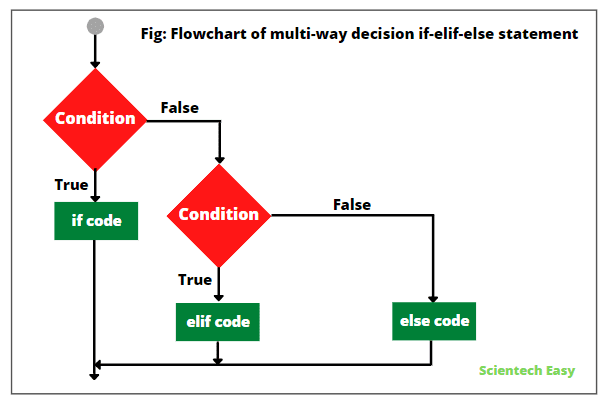
The order is consequential. Our validity check comes first so an invalid observation receives the label invalid, regardless of its reading. The boundaries matter too: a valid reading of exactly 18.0 is not low, while one of exactly 22.0 is high. Change the dictionary values to try those boundaries, and then try "valid": False with a reading of 23.0.
Even when conditions overlap, a chain selects the first matching branch. For example, this ordering would mislabel a reading of 23.0:
reading = 23.0

if reading >= 18.0:
    print("At least 18")
elif reading >= 22.0:
    print("At least 22")
Only At least 18 prints. The second condition is also mathematically true, but Python never tests it: the first branch has already been selected. Put more specific checks first when a broad earlier check would otherwise absorb them.
An else is optional. Without one, it is possible that no branch in an if–elif chain runs. With one, exactly one branch runs, provided execution reaches the chain.
Separate decisions and combined conditions
An elif chain represents one choice among alternatives. Two independent if statements are different: Python tests both, so both blocks may run.
reading = 23.0

if reading >= 18.0:
    print("Meets the lower limit")

if reading >= 22.0:
    print("Meets the upper limit")
This prints both messages. That is appropriate if you genuinely want two separate checks. If you want exactly one label, use a single if–elif–else chain instead.
You can also combine questions within one condition. and requires both parts to be true; or requires at least one; not reverses a boolean result:
observation = {"reading": 23.0, "valid": True}

if observation["valid"] and observation["reading"] >= 22.0:
    print("Review valid high reading")

if observation["reading"] < 18.0 or observation["reading"] >= 22.0:
    print("Outside the chosen range")
Both messages print for this observation. Each side of or states a complete comparison; together they describe readings outside the range from 18.0 up to, but not including, 22.0.
For a data-processing rule, make the categories and boundary choices explicit before coding them. A conditional faithfully applies the rule you write—even if you used > where you intended >=, or placed a broad check before a more specific one. Running your cell with values at and immediately around each boundary is an effective way to see whether the code expresses your intended rule.
Takeaways
Use if to run a block only when its condition holds. Add else for an alternative, or elif for more mutually exclusive choices. Indentation defines each block; an if–elif–else chain checks conditions in order and runs at most one branch. Use separate if statements when multiple checks should be able to act independently, and combine conditions with and, or, and not when one decision needs more than one test.
Next, you will use loops to apply an operation across a collection of observations, rather than changing and rerunning a cell for each one.