Recommended resources
The freely available resources this lesson will direct you to.
Hello! In the previous lesson, you used a loop to apply the same decision to several observations. A function lets you give that decision a name and use it whenever you need it, with different inputs each time. This is useful in machine learning code, where a small transformation often needs to work consistently across many records.
Allow about 40 minutes for this lesson: roughly seven minutes of video, seven minutes of reading, and the remaining time to run and inspect the notebook examples.
Define a function, then call it
Watch the opening parts of Functions in Python are easy by Bro Code. The examples print their results for now; focus on how a function is defined, when its body runs, and how values reach its parameters.
Functions in Python are easy 📞
Bro Code introduces functions as reusable code, then demonstrates arguments and parameters.
Watch definition and calling for the role of def, indentation, and the parentheses in a call. Then watch inputs and order to see arguments matched to parameters, including what changes when their order changes. Stop before the billing example.
Here is a small function you can run in a notebook cell:
def describe_reading(reading):
    print("Reading:", reading)

describe_reading(18.5)
describe_reading(22.0)
The output is:
Reading: 18.5
Reading: 22.0
The line beginning with def defines the function. describe_reading is its name; reading is a parameter, a name for an input the function will receive. The colon and indentation mark the function body, just as they marked the bodies of your loops and conditionals.
Running the definition alone does not print a reading. Each call—the function name followed by parentheses—runs the body once. In describe_reading(18.5), 18.5 is an argument: the actual value supplied for the parameter reading. On the next call, that parameter receives 22.0 instead.
A loop repeats an operation over a collection. A function packages an operation so you can call it from different places, including inside a loop. But printing is not always the most useful thing that operation can do.
Return a value you can use
Watch the return-value portion of the same video. Notice the difference between displaying a calculation and making its result available to the code that called the function.
Functions in Python are easy 📞
Bro Code shows how return hands a calculated value back to a function call.
Watch returning results. Focus on the addition example: the call supplies two values, the function calculates with them, and the returned result can be stored in another variable.
This image traces a call to a squaring function. It is a sketch rather than complete runnable code: the # code lines stand for omitted statements.
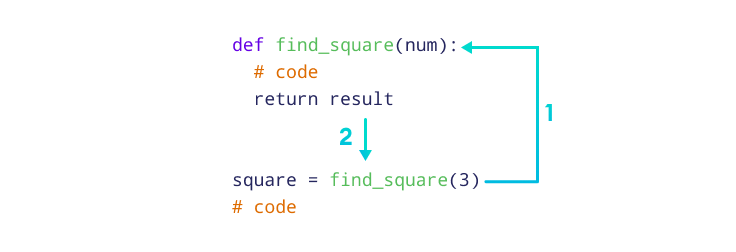
Here is the complete version to run:
def find_square(num):
    result = num * num
    return result

square = find_square(3)
print(square)
It prints 9. When Python evaluates find_square(3), num receives 3. The body calculates result, then return result ends that call and supplies 9 at the call site. The assignment stores that returned value under the name square. The name outside the function does not have to match result inside it.
A returned value can also be used directly in a larger expression:
print(find_square(4))       # 16
print(find_square(5) + 1)   # 26
That is the key distinction: print() displays a value; return gives a value to the caller. For a closer look at the syntax, read the relevant parts of Programiz’s Python Functions tutorial:
Python Functions (With Examples)
Read Programiz’s explanation to connect function definitions, calls, parameters, and return values in one worked example.
Under “Create a Function,” read the definition. Under “Calling a Function,” read the call explanation. Continue through “Python Function Arguments” and “Parameters and Arguments,” reading the input examples. Finally, under “The return Statement,” read the square example. You can stop before “The pass Statement.” Focus on what belongs in the definition’s parentheses versus the call’s parentheses.
Put a function inside the loop you already know
Last lesson, a conditional assigned a label to each observation. We can make that decision into a function that returns a label rather than printing it:
def label_reading(reading, valid):
    if not valid:
        return "invalid"
    if reading < 18.0:
        return "low"
    if reading >= 22.0:
        return "high"
    return "within range"
This function has two parameters. For example, label_reading(17.5, False) returns "invalid". The validity check comes first, so an invalid observation is not labelled "low" merely because its number is small.
Each return ends the current function call. Consequently, the later conditions run only if the earlier ones did not return. That is why this version does not need elif or else.
Now call it for every observation:
observations = [
    {"reading": 18.5, "valid": True},
    {"reading": 22.0, "valid": True},
    {"reading": 17.5, "valid": False},
    {"reading": 20.0, "valid": True},
]

labels = []

for observation in observations:
    label = label_reading(observation["reading"], observation["valid"])
    labels.append(label)

print(labels)
The result is:
['within range', 'high', 'invalid', 'within range']
The loop still controls which records are visited. The function controls how one record’s label is decided. On every iteration, the two argument values come from the current dictionary. Their order matters: reading expects the number, while valid expects the boolean. Returning from label_reading does not stop the outer loop; the loop continues with the next observation.
Watch for display without a returned result
A function that only prints can appear to work until you try to use its result:
def printed_square(num):
    print(num * num)

value = printed_square(3)
print(value)
This displays:
9
None
The first line comes from inside printed_square. The function has no return, so its call gives back None—Python’s value for “no result.” That is what gets stored in value. If another calculation needs the square, use the earlier find_square function, which returns it.
In a notebook, run the cell containing a function’s definition before a cell that calls it. If you edit the definition, rerun that cell before testing the call again; otherwise, the notebook may still use the earlier version.
Takeaways
Define a function with def, parameters, a colon, and an indented body. Call it by supplying arguments in parentheses; the body runs for each call. Use return when the caller needs a result it can store, combine with other values, or collect in a loop. Use print() when you want to display something—do not mistake that display for a returned value.
Next, you will use functions supplied by a Python library: the call-and-result pattern stays familiar, even when someone else has written the function.