Recommended resources
The freely available resources this lesson will direct you to.
- Build Your First App with Claude Code (No Experience Needed)www.youtube.com
- Can I Vibe Code A Mobile App? - Vibe-coding Flutterwww.youtube.com
- Flutter vs React Native: Complete 2025 Framework Comparison Guide | Blogwww.thedroidsonroids.com
- React Native vs Flutter vs Expo vs Lynx: 2026 Guidewww.groovyweb.co
Hello! In our previous lesson, we surveyed the landscape of mobile app development and identified cross-platform frameworks as the modern "sweet spot" for efficiently building apps that run on both iOS and Android. This approach is particularly powerful for vibe coding, as it allows you to generate a single codebase that reaches the widest possible audience.
Today, we'll zoom in on the two undisputed leaders in the cross-platform world: React Native and Flutter. You've almost certainly seen your AI assistant generate code using one of these, or mention them in its instructions. This lesson will demystify what these tools are, how they work, and most importantly, why they are so incredibly useful for turning your design ideas into functional mobile apps.
The Problem They Solve: "Write Once, Run Anywhere"
Before we compare them, let's revisit the core problem they solve. Historically, if you wanted an app in both the Apple App Store and the Google Play Store, you had to build two separate apps from scratch—one in Apple's language (Swift) and one in Google's (Kotlin). This meant double the work, double the cost, and double the maintenance headaches.
Cross-platform frameworks were created to solve this. They promise a "write once, run anywhere" approach, which has become a game-changer for startups, solo creators, and anyone looking to build and iterate quickly.
Flutter vs React Native: Complete 2025 Framework Comparison Guide | Blog
This article from The Droids On Roids provides excellent context on why cross-platform development has become so popular, framing the exact problem that React Native and Flutter were designed to solve.
Read the section The rise of mobile app development frameworks to understand the shift away from platform-specific development and the challenges it presented.
This desire to build an app for both platforms without writing two sets of code is a very common starting point, as you can see in this short video from a creator exploring mobile app development for the first time.
Can I Vibe Code A Mobile App? - Vibe-coding Flutter
In this clip from the Memberstack Team channel, the creator, who is used to vibe-coding web apps, decides to tackle a mobile app and immediately gravitates towards Flutter for its cross-platform capabilities.
Watch from the beginning to hear him describe the need for a native mobile experience, and then jump to his reasoning for choosing Flutter. Notice how his goal is to target both the iOS and Android stores from the start.
Meet the Contenders: A Tale of Two Philosophies
React Native and Flutter are both cross-platform frameworks, but they achieve their goal in fundamentally different ways. This difference in philosophy is crucial to understand, especially from a design perspective.
Let's start with a high-level comparison.
Flutter vs React Native: Complete 2025 Framework Comparison Guide | Blog
The same article contains a fantastic, dense comparison table that summarizes the key attributes of each framework.
Study the full comparison table. Pay attention to the creator (Google vs. Meta), the programming language (Dart vs. JavaScript), and the general notes on UI development.
The most important difference lies in how each framework handles the User Interface (UI).
1. React Native: The Native Chameleon
React Native, created by Meta (Facebook), uses JavaScript, the language of the web. Its core philosophy is to act as a bridge to the phone's actual native components.
When your React Native code says "create a button," it doesn't draw a button itself. Instead, it sends a message across this bridge to the phone's operating system, saying, "Hey iOS, give me one of your standard buttons," or "Hey Android, I need one of your standard buttons."
- The Result: The app's UI is built using the same fundamental building blocks as a true native app. A button on an iPhone will look and feel exactly like an iPhone button, because it is an iPhone button. This makes the app a "native chameleon"—it naturally adapts to the look and feel of the platform it's running on.
- For a Designer: This is great for creating apps that feel deeply integrated with the operating system. The downside is that you might have subtle visual inconsistencies between the iOS and Android versions that you need to account for in your design and code.
2. Flutter: The Artist's Canvas
Flutter, created by Google, takes a completely different approach. It uses a language called Dart and its philosophy is one of total rendering control.
Flutter does not use the phone's native components. Instead, it ships with its own high-performance graphics engine (called Skia, the same engine that powers Google Chrome and Android itself). Flutter uses this engine to draw every single pixel on the screen, from the buttons to the text to the animations.
- The Result: Your app's UI is like a painting on a blank canvas. Because Flutter controls every pixel, it can guarantee that the app will look exactly the same on a brand-new iPhone, an old Android phone, a web browser, and even a desktop computer.
- For a Designer: This is a dream for brand consistency and creative expression. You can achieve "pixel-perfect" designs that are not constrained by the native UI components of iOS or Android.
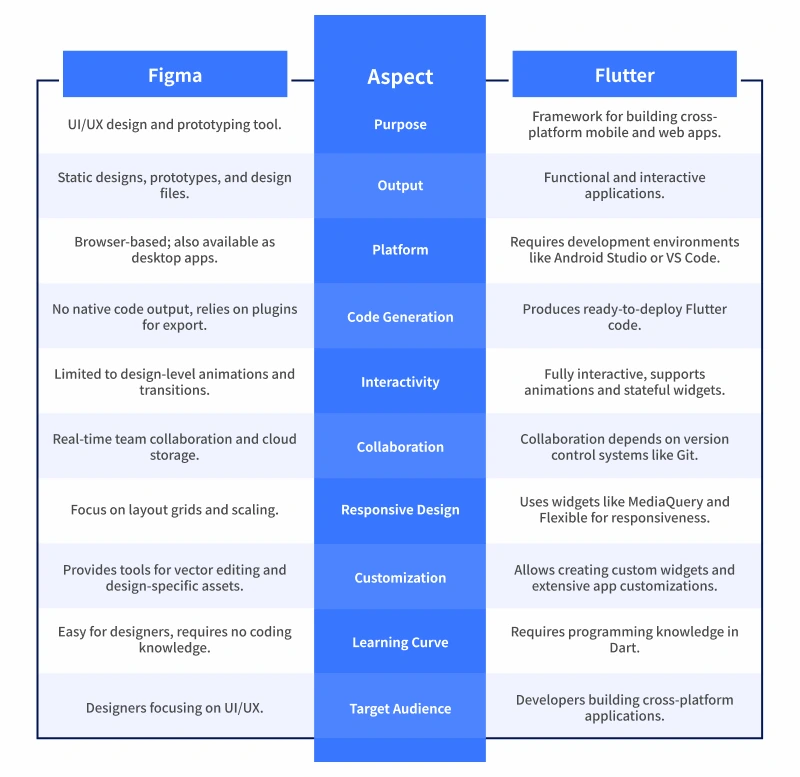
This table provides a fantastic comparison from a designer's point of view, comparing the static world of Figma with the interactive world of Flutter.
Why They're So Useful for Vibe Coding
Now that you know what they do, let's connect this to why they are the go-to tools for vibe coding mobile apps.
React Native's Edge: The Power of JavaScript and Expo
React Native's biggest advantage is its use of JavaScript.
- Massive Ecosystem: JavaScript is arguably the most popular programming language on the planet. This means there's a vast community and an enormous number of pre-built packages and solutions available.
- AI Fluency: Because of its popularity, LLMs like Claude and ChatGPT have been trained on an immense corpus of JavaScript and React Native code. This means they are generally more "fluent" and effective at generating high-quality React Native code compared to code in less common languages.
- The Secret Weapon: Expo. When you ask an AI to create a React Native app, it will almost always use a toolset called Expo. Think of Expo as "React Native with the hard parts handled for you." It's a managed layer on top of React Native that simplifies everything from project setup to seeing your app on your phone.
The following video is a perfect demonstration of the vibe coding workflow with React Native and Expo.
Build Your First App with Claude Code (No Experience Needed)
This video from Code with Beto walks through building an app with Claude Code, and it perfectly illustrates the role of Expo in the React Native ecosystem.
Watch these key segments: Choosing React Native & Expo: The creator explains that using React Native with Expo means the app will work on both iOS and Android without needing to install complex developer tools like Xcode. Explaining Expo Go: He shows the Expo Go app on his phone, demystifying it as a simple way to view and test the project you're working on, saving hours of setup time. Live Preview: He starts the project and scans a QR code to instantly see the app running on his physical device. This immediate feedback loop is a hallmark of modern cross-platform development.
This workflow—using an AI to generate React Native code within an Expo project and previewing it instantly on your phone with Expo Go—is the essence of vibe coding a mobile app today.
Flutter's Edge: The Designer's Dream
While React Native has an AI advantage, Flutter's strength lies in its ability to bring a designer's vision to life with uncompromising fidelity.

The "blank canvas" approach means what you design is what you get, everywhere. This is why many tools are emerging to automate the conversion of Figma designs directly into Flutter code. For projects where a unique, highly-branded, and animated UI is critical, Flutter is often the superior choice.
Flutter vs React Native: Complete 2025 Framework Comparison Guide | Blog
This article includes perspectives from different roles, including developers and designers, which offer valuable real-world insights into the frameworks' strengths.
First, read the Designers' perspective section to see how each framework is viewed from a design standpoint. Then, review the quotes from industry experts in the section "React Native vs Flutter from app owners' perspective". Note how they praise Flutter's ability to build the best UX without compromise.
So, Which One Should You Choose?
There is no single "best" framework. The right choice depends entirely on your project's goals and your priorities.
React Native vs Flutter vs Expo vs Lynx: 2026 Guide
This guide from Groovy Web provides a clear, actionable decision framework that is perfect for guiding your prompts to an AI assistant.
Read the section titled "The Ultimate Decision Framework." It provides concise bullet points outlining when to choose React Native, Flutter, or Expo.
Here's a simplified summary for your vibe coding journey:
-
Start with React Native + Expo if:
- You want the fastest path from idea to a working app on your phone.
- You want to leverage the best possible AI code generation capabilities.
- Your app uses relatively standard UI patterns.
- Over-the-air updates (pushing small changes without a full App Store review) are important.
-
Choose Flutter if:
- Your app has a highly custom, branded UI with complex animations.
- Pixel-perfect visual consistency across all platforms is non-negotiable.
- Raw performance is the most critical factor (e.g., for an app with game-like elements).
- Your design vision is the top priority, and you're willing to accept that the AI might be slightly less fluent in Dart.
Conclusion
You now have a solid understanding of what React Native and Flutter are and the distinct philosophies behind them. React Native acts as a JavaScript bridge to native components, making it a pragmatic and AI-friendly choice, especially with the streamlined Expo workflow. Flutter provides a powerful rendering engine to paint a consistent, pixel-perfect UI across all platforms, making it a designer's favorite for creative control.
Both are exceptional tools that empower you to move beyond web apps and build rich, installable mobile experiences. By understanding their core differences, you can give much more precise and strategic instructions to your AI co-pilot, guiding it to build the right foundation for your app idea.
In our previous lessons, we've covered app security and now the technologies for building the app itself. The next logical step is to understand the gateway to your users: the app stores. In our next lesson, we will begin the publishing journey by detailing the requirements and costs for getting an Apple Developer account, the first step to getting your app onto iPhones and iPads.