Recommended resources
The freely available resources this lesson will direct you to.
- Web Apps vs. PWA vs. Hybrid vs. Native: What's the Difference?www.youtube.com
- Is a Web or Native App Better? (Or Should You Build a PWA?)www.youtube.com
- Native vs Hybrid vs Cross-Platform vs Progressive Web Apps: Choose the Right Mobile App Developmentsoftjourn.com
- Web Apps vs. PWA vs. Hybrid vs. Native: What's the Difference?bubblehacks.substack.com
Welcome back! In our previous lesson, we dove into the critical, yet often overlooked, world of application security. We saw that building a secure app isn't just a technical detail; it's fundamental to earning user trust and is a prerequisite for being accepted into curated marketplaces like the Apple App Store.
This brings us to a crucial strategic question you'll face as an app creator: once your "vibe-coded" masterpiece is ready, what kind of app is it, and how will it reach your users? Will they download it from an app store, or will they access it through a web browser? The path you choose will have major implications for your design, development process, cost, and user experience.
In this lesson, we will demystify the main mobile development approaches. We'll explore the differences between native apps, cross-platform apps, hybrid apps, and progressive web apps (PWAs). By the end, you'll understand the trade-offs of each approach, enabling you to make informed decisions and give precise instructions to your AI coding assistant.
The Spectrum of App Development
Before we examine each type, it's helpful to think of them on a spectrum. On one end, you have applications built specifically for a single operating system (like iOS or Android). On the other end, you have applications that are independent of any platform and run anywhere.
The following video provides a fantastic overview of this spectrum and introduces the four key concepts we'll be discussing.
Web Apps vs. PWA vs. Hybrid vs. Native: What's the Difference?
This video from the Build With Damian channel, "Web Apps vs. PWA vs. Hybrid vs. Native," sets the stage by placing each app type on a scale from platform-independent to native.
Watch the introduction from the beginning to understand this core concept of a spectrum.
Now that we have a mental model of this spectrum, let's get acquainted with each of the four main contenders.
Meet the Contenders
The best way to understand these concepts is to read their definitions and see how they relate to each other. The following article from Softjourn provides clear, concise explanations of each approach.
Native vs Hybrid vs Cross-Platform vs Progressive Web Apps: Choose the Right Mobile App Development
This article serves as a great introduction to the terminology and core ideas behind each development strategy.
First, read the brief overview section, "What Are the Differences..." Then, read the dedicated "What is..." section for each of the four types: What is a Native App? What is a Hybrid App? What is a Cross-Platform App? What is a Progressive Web App?
After that reading, you should have a foundational understanding. Let's summarize and clarify the most important distinctions:
- Native: The bespoke suit. Tailor-made for one platform (iOS or Android) using the platform's own language (Swift for iOS, Kotlin for Android). It offers the best performance and the most authentic user experience.
- Web App: A website. You access it through a browser like Chrome or Safari. It's built with web technologies (HTML, CSS, JavaScript).
- Hybrid: The "wrapper." It's essentially a web app packaged inside a basic, empty native app. This allows it to be listed on app stores, but because it's still rendering a webpage, performance and the user experience can feel compromised.
- Cross-Platform: The modern "build once, run anywhere" solution. You write code in one language (like JavaScript with React Native), and the framework compiles it into actual native UI components for both iOS and Android. It's a significant step up from Hybrid in terms of performance and feel.
A special note on Progressive Web Apps (PWAs): this term can be confusing. A PWA is not a separate category but rather an enhancement of a standard web app. It uses modern browser features to give a web app more "native-like" capabilities.
This short clip explains what makes a web app "progressive."
Is a Web or Native App Better? (Or Should You Build a PWA?)
The video "Is a Web or Native App Better?" from Coaching No Code Apps has a very clear and concise explanation of PWAs.
Watch the section that explains what a PWA is and how it adds native-like layers to a standard web app.
In essence, a PWA can be installed on a user's home screen, send push notifications (with some limitations on iOS), and even work offline to a limited extent. It bridges the gap between web and native without needing an app store.
The Strategic Choice: A Designer's Guide to Trade-Offs
As a product designer, you know that every decision is a trade-off. Choosing a development approach is perhaps one of the biggest trade-offs you'll make. It's a balance between cost, time, performance, and user experience.
This comparison chart gives a fantastic at-a-glance overview of these trade-offs.
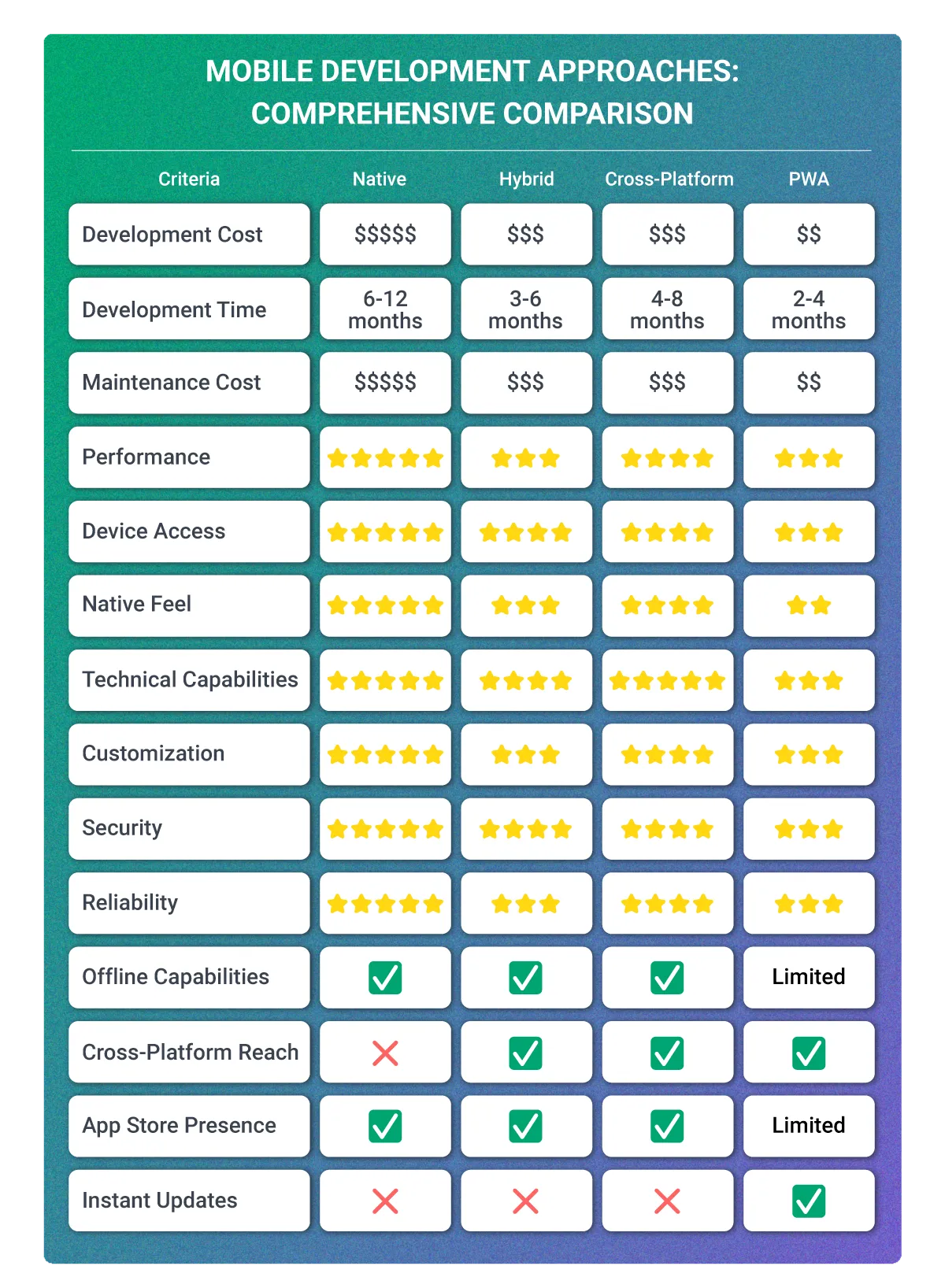
Let's focus on the criteria most important to you as a designer: User Experience (UX) and Design.
How an app feels is paramount. Does it have smooth animations? Does it follow the platform's conventions for navigation and gestures? Does it feel responsive or laggy? The development approach has a direct impact on this.
Native vs Hybrid vs Cross-Platform vs Progressive Web Apps: Choose the Right Mobile App Development
The Softjourn article we looked at earlier has an excellent section dedicated entirely to the UX implications of each choice. This is critical from a designer's perspective.
Please read the full section titled "How Do User Experience and Design Differ..." Pay close attention to the descriptions of native fluidity versus the limitations of a hybrid app's web view.
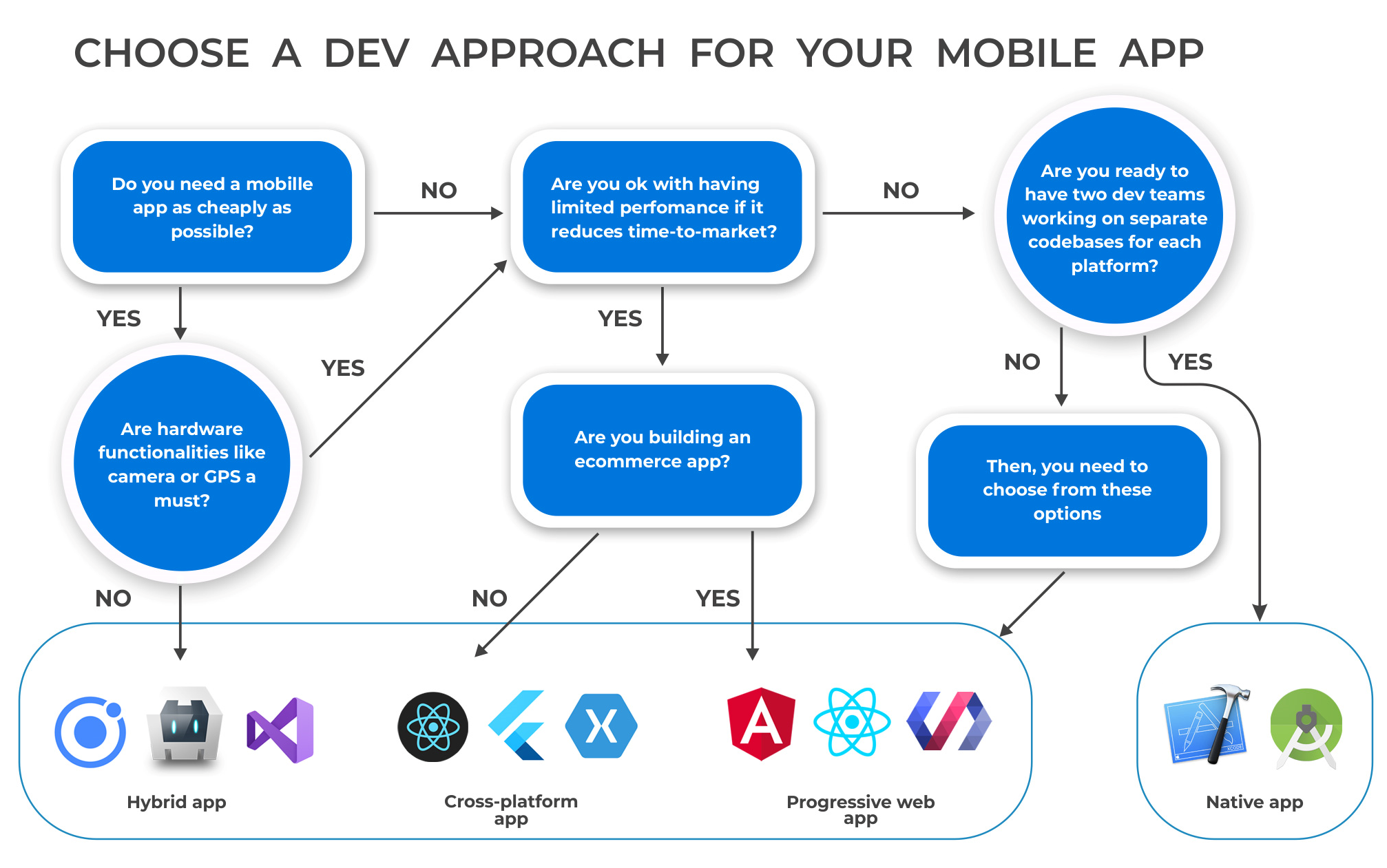
To put it all together, you can use a decision-making flowchart to guide your thinking. When you have a new app idea, walking through these questions can help you quickly narrow down the best path forward.
Guiding Your AI Co-Pilot
Understanding these differences empowers you to be a better "vibe coder." Instead of just asking Claude to "make an app," you can now provide strategic direction based on your product goals.
Here are a few examples of how your prompts might change:
-
Before: "Make me a social media app for drone pilots."
-
After: "I want to build an MVP for a social media app for drone pilots. The goal is to get it on both the iOS and Android App Stores quickly. Let's use a cross-platform approach with React Native. The user experience should feel fluid, but we can accept minor deviations from the native look and feel to prioritize speed."
-
Before: "Create a website for my 3D printing projects."
-
After: "Let's build a portfolio site for my 3D printing projects. I want it to be super fast and accessible, and I want users to be able to save it to their home screen for easy access. Let's build it as a Progressive Web App (PWA) using Next.js."
-
Before: "I need an app that lets you control a robot arm."
-
After: "I'm designing an app to control a custom robot arm over Bluetooth. It needs extremely low latency and direct access to the phone's hardware. Performance and responsiveness are the absolute top priorities. Let's build a native iOS app using Swift to start."
By specifying the type of app, you are guiding the AI to make better architectural choices from the very beginning.
Conclusion
You now have a framework for thinking about one of the most fundamental decisions in app development. There is no single "best" approach—only the one that best fits your specific project's constraints and goals.
Key Takeaways:
- Native: Best performance and UX, but highest cost and effort. Ideal for demanding apps like games, editors, or hardware-intensive tools.
- PWA: Easiest to build and deploy, instant updates, and widest reach. Perfect for content-focused apps, simple tools, and MVPs where app store presence isn't critical.
- Hybrid: A legacy compromise. It gets you in the app stores with a web-based codebase but often suffers from poor performance and a clunky feel. Generally, modern Cross-Platform solutions are a better choice.
- Cross-Platform (React Native, Flutter): The sweet spot for many startups and vibe coders. It offers near-native performance and UX with the efficiency of a single codebase, making it ideal for launching on both iOS and Android simultaneously.
In our last lesson, we saw how crucial security is for getting into the app stores. Now, you understand the different kinds of packages you can prepare for submission. In our next lesson, we will zoom in on the approach most relevant to you: Cross-Platform development. We'll take a closer look at what frameworks like React Native and Flutter do, and why they have become such powerful tools for bringing ideas to life on mobile.