Recommended resources
The freely available resources this lesson will direct you to.
Hello! Welcome back to our course on AI Engineering.
In our last lesson, we explored the "what" and "why" of transfer learning and fine-tuning. You learned that instead of training a model from scratch, we can adapt a powerful, pre-trained model to a new, specific task. This approach saves enormous amounts of time and data.
Today, we transition from theory to practice. You will learn how to fine-tune a pre-trained Transformer model on a custom text dataset using the Hugging Face Trainer API. The Trainer is a high-level utility that handles the complex, boilerplate code of a training loop, allowing you to focus on configuring your model and data. This is a significant step up from the from-scratch neural network you built in NumPy, where you had to manage every detail of the forward pass, backpropagation, and weight updates yourself.
The Trainer API: An Overview
The Trainer API orchestrates the entire fine-tuning process. You provide it with the necessary components, and it handles the rest. Before we dive into the code, let's look at a high-level diagram of what we're about to build.
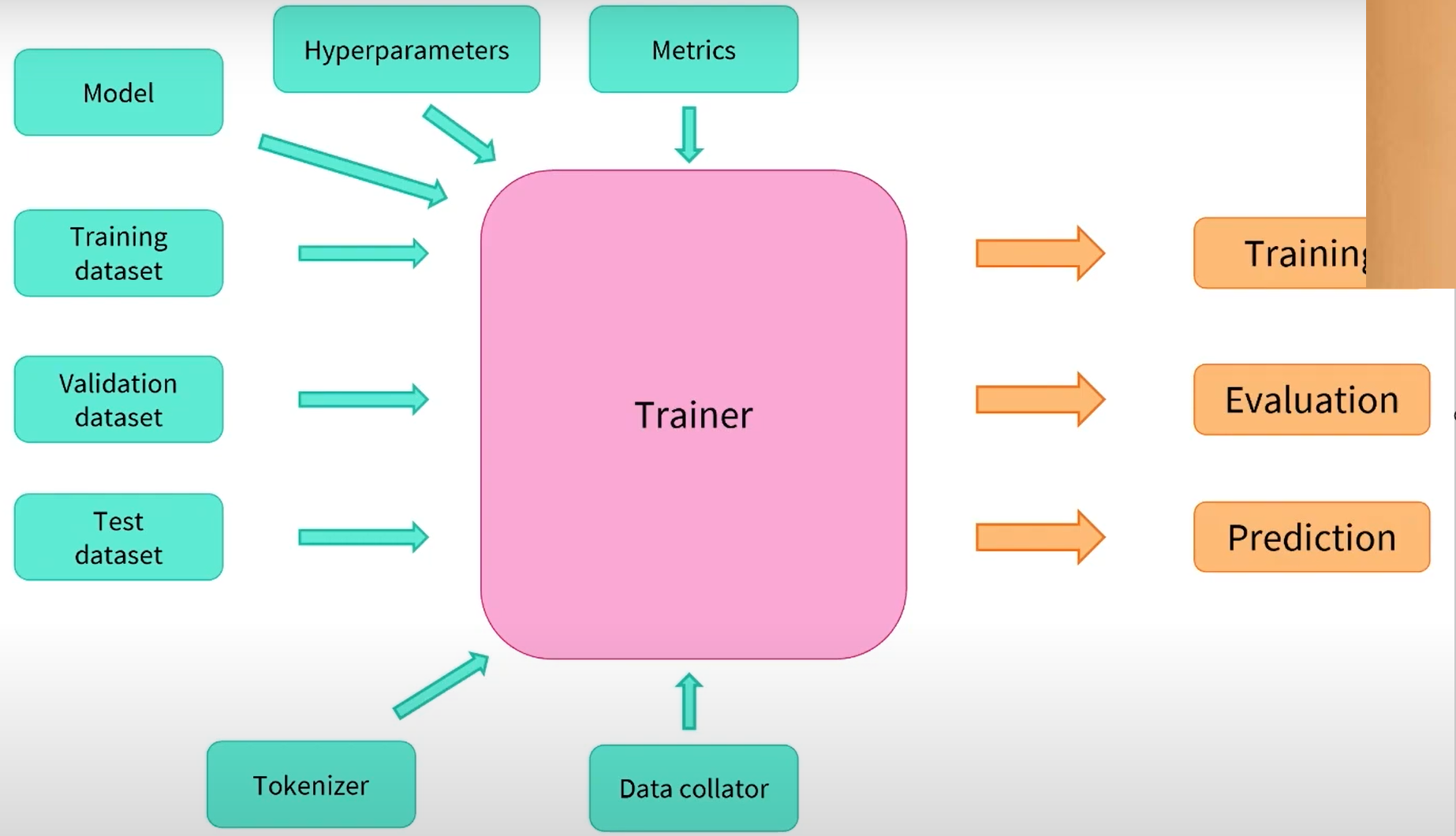
As you can see, our main job is to prepare these five ingredients:
- A pre-trained model with a head suitable for our task.
- Tokenized datasets for training and validation.
- Hyperparameters defined in a
TrainingArgumentsobject. - A function to compute metrics.
- A tokenizer to process data on the fly.
Let's walk through this process step-by-step.
The Fine-Tuning Workflow with the Trainer
We will follow the complete workflow for fine-tuning a text classification model. The video below from Hugging Face is an excellent, practical guide that we will use as our foundation for this lesson.
Simple Training with the 🤗 Transformers Trainer
This video, 'Simple Training with the 🤗 Transformers Trainer', provides a complete walkthrough of the fine-tuning process, from loading data to training the model and getting predictions.
First, watch the introductory segment from 00:42 to 01:58 to understand what the Trainer API is and why it's useful.
Now, let's break down the process into concrete steps.
Step 1: Loading and Preparing the Dataset
Just as in classic machine learning, the first step is always to load and understand your data. With Hugging Face, we can easily load datasets from the Hub, explore them, and then tokenize them to prepare them for the model.
Simple Training with the 🤗 Transformers Trainer
Let's see how to load a dataset, explore its features, and tokenize it for our model.
Watch the segment from 01:58 to 11:03. Pay close attention to: Loading a dataset from the Hub using load_dataset. Converting to a Pandas DataFrame for exploration (a familiar step for you). Creating label-to-ID mappings, which are crucial for the model. The process of tokenizing the entire dataset using the .map() method.
Step 2: Configuring the Model and Training Arguments
Once the data is ready, we need to set up the two most important components: the model itself and the hyperparameters that will guide its training.
-
The Model: We'll load a pre-trained model checkpoint using
AutoModelForSequenceClassification. As we discussed in the last lesson, this attaches a new, randomly initialized classification head to the pre-trained body. We must provide the model with the number of labels and our ID-to-label mappings so it can produce meaningful outputs. -
Training Arguments: The
TrainingArgumentsclass is a central configuration object where you define all hyperparameters. This includes the learning rate, number of epochs, batch size, where to save checkpoints, and evaluation strategy.
The following text from the Hugging Face course documentation provides a clear, written guide to this step.
Fine-tuning a model with the Trainer API - Hugging Face
This guide explains how to set up the TrainingArguments and instantiate the model.
Read the sections under the 'Training' heading. Focus on how TrainingArguments is defined and how AutoModelForSequenceClassification is instantiated. Notice the warning you get—it confirms that a new head is being added for our specific task.
Step 3: Defining Evaluation Metrics
During training, the Trainer will report the loss by default. However, loss is not always an intuitive measure of performance. We want to see metrics we can easily interpret, like accuracy or F1-score. To do this, we create a compute_metrics function that the Trainer can call during evaluation.
The video below demonstrates how to define this function and explains why F1-score is a better metric than accuracy for imbalanced datasets.
Simple Training with the 🤗 Transformers Trainer
Let's define a function to compute evaluation metrics during training.
Watch the segment from 15:30 to 16:15. This part covers creating a compute_metrics function using scikit-learn's F1 score and the evaluate library.
We will explore model evaluation in much greater detail in the next lesson, but this gives you the essential piece needed for the training loop.
Step 4: Putting It All Together and Training
We've prepared all our ingredients. Now, it's time to instantiate the Trainer and start the fine-tuning process with a single command: trainer.train().
Simple Training with the 🤗 Transformers Trainer
With all components ready, let's instantiate the Trainer and launch the fine-tuning process.
Watch the final segment from 17:02 to 19:15. Observe how the Trainer is created by passing in the model, arguments, datasets, and tokenizer. See the training progress and how to use the final model with a pipeline.
This simple trainer.train() call abstracts away the entire training loop you implemented in NumPy: zeroing gradients, the forward pass, loss calculation, the backward pass (.backward()), and the optimizer step (.step()).
Advanced Customization (A Quick Look)
The Trainer API is powerful because it's simple to use, but it's not a rigid black box. You have options to customize its behavior for more advanced scenarios.
1. Customizing the Loss Function
What if your dataset is imbalanced, and you want the model to pay more attention to rare classes? You can't just use the standard cross-entropy loss. The Trainer allows you to subclass it and override the compute_loss method to implement custom logic, such as using weighted loss.
Simple Training with the 🤗 Transformers Trainer
The Hugging Face video demonstrates a powerful customization: creating a custom trainer to handle class imbalance by implementing a weighted loss function.
Watch the segment from 11:03 to 14:49. You don't need to memorize the code, but understand the concept: you can create a custom class that inherits from Trainer and override methods like compute_loss to inject your own logic.
2. Freezing Layers (Feature Extraction)
In the previous lesson, we discussed the difference between full fine-tuning and feature extraction (freezing the base model). While the Trainer defaults to fine-tuning all layers, you can implement feature extraction by manually setting the requires_grad attribute of the base model's parameters to False before passing the model to the Trainer.
The video below gives a clear demonstration of how to do this.
Fine-Tuning BERT for Text Classification (w/ Example Code)
This video shows the practical steps for freezing the parameters of the base model, effectively turning the fine-tuning process into feature extraction or partial fine-tuning.
Watch the segment from 13:03 to 15:33. Focus on the logic of iterating through model parameters and setting param.requires_grad = False to freeze them. This directly connects to the theory from our last lesson.
This technique is a great way to start if you have a small dataset, as it's faster and less prone to overfitting.
Conclusion
Today you've learned the end-to-end practical workflow for fine-tuning a Transformer model. The Trainer API is an indispensable tool for AI Engineers, as it provides a robust and customizable framework that handles the complexities of deep learning training loops.
Key Takeaways:
- Fine-tuning with the
Trainerinvolves five main steps: preparing the data, configuring the model, definingTrainingArguments, setting up acompute_metricsfunction, and instantiating theTrainer. - The
trainer.train()command encapsulates the entire training loop, including forward/backward passes, gradient updates, and logging. - The
TrainingArgumentsclass is the central hub for controlling all hyperparameters of your training run. - The
Traineris flexible. You can customize its behavior, such as the loss function, by subclassing it, or you can control which layers are trained by freezing parameters before training.
Preview of the Next Lesson
You've successfully fine-tuned a model! But the job isn't done. How do you know if it's actually good? Is it better than the off-the-shelf model? In the next lesson, we will dive deep into model evaluation. You will learn how to evaluate a fine-tuned model using appropriate NLP metrics such as accuracy, precision, recall, and F1-score, and how to interpret tools like a confusion matrix to understand your model's strengths and weaknesses.