Recommended resources
The freely available resources this lesson will direct you to.
Welcome back! In our last lesson, we established why your app needs a "brain" or a long-term memory—a database—to store information like user profiles and posts. We saw how organizing data into related tables, much like creating interconnected components in a design file, prevents chaos and keeps information consistent.
Now, we'll address the next practical question your AI assistant will prompt you with: which service should you use to provide this database? We'll compare the two most popular choices in the "vibe coding" world: Firebase and Supabase. This lesson will demystify what these platforms offer beyond just a database, helping you understand their core differences so you can make an informed choice for your projects.
Beyond the Database: Backend-as-a-Service (BaaS)
When your AI suggests using Firebase or Supabase, it's not just recommending a database. It's pointing you to a Backend-as-a-Service (BaaS) platform. Think of a BaaS as a pre-packaged toolkit that handles all the common, repetitive backend tasks for you. Instead of building a server, managing user logins, and setting up file storage from scratch, a BaaS gives you all of these as ready-to-use services. This lets you, and your AI assistant, focus on the unique features and user experience of your app.
The following article from Zapier, written from the perspective of someone building their own tools, perfectly introduces why these platforms are so useful.
Supabase vs. Firebase: Which is best?
This article frames the Firebase vs. Supabase discussion within the context of 'vibe coding,' which aligns perfectly with our focus.
Read the introduction, from the beginning down to the end of the first section. It clearly explains that BaaS platforms exist to let you focus on solving problems rather than getting lost in server configuration.
Both Firebase and Supabase provide the three essential services you'll almost always need:
- A Database: To store your app's data.
- Authentication: To manage user sign-ups and logins.
- File Storage: To handle user-uploaded files like profile pictures or documents.
While they offer similar services, they are built on fundamentally different philosophies, especially concerning the database.
The Core Difference: How They Organize Data
The single most important distinction between Firebase and Supabase is how their databases are structured. This choice affects everything from how you think about your data to how much your app might cost to run.
-
Supabase uses a Relational Database (PostgreSQL). Think of this as a highly organized set of spreadsheets. You define the columns for each table upfront (e.g., a
Userstable must have anID,Name, andEmailcolumn). Data is structured, and relationships between tables are explicit. This is similar to the relational model we discussed in the last lesson. -
Firebase uses a NoSQL Document Database (Firestore). Think of this like a digital filing cabinet with folders (
collections) and documents inside. Each document is a flexible file (in a format called JSON) where you can store whatever information you want. You don't have to define a strict structure beforehand.
This visual comparison makes the difference clear:
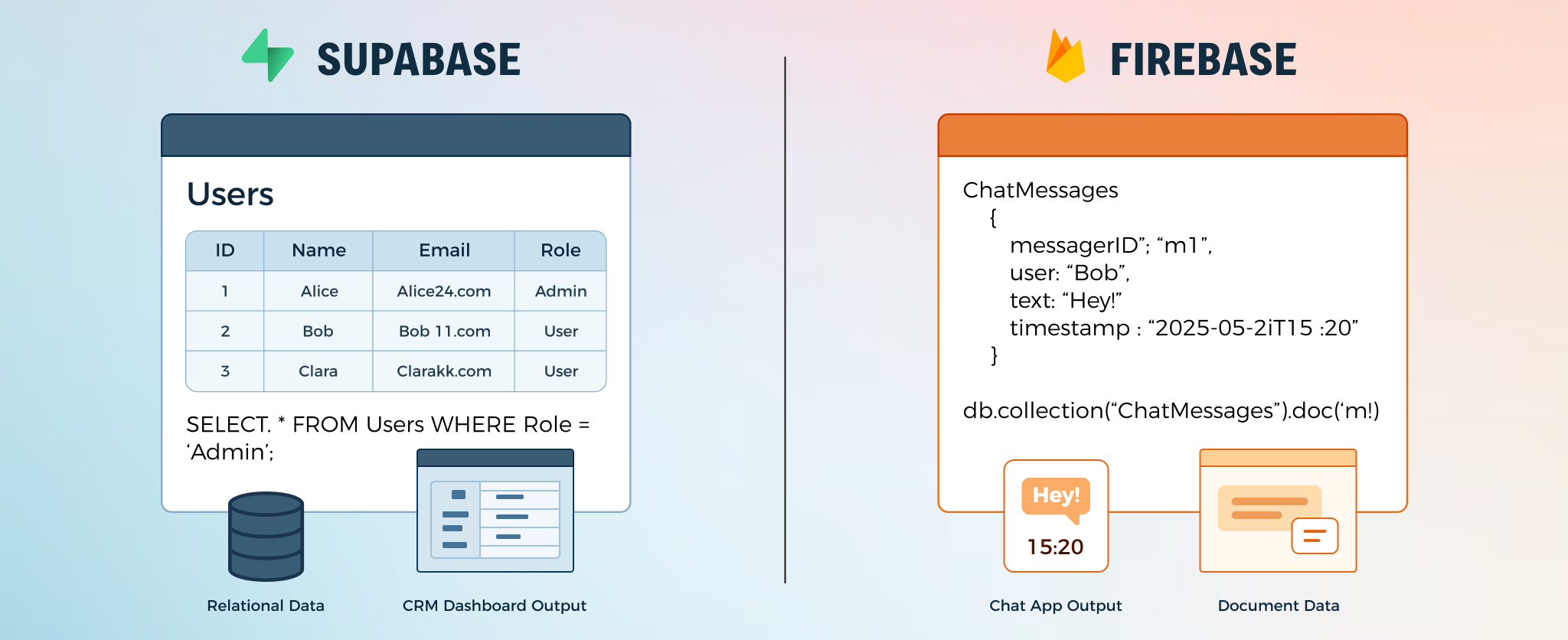
This isn't just a technical detail; it's a practical choice about how you want to work. The following video explains why this is the central decision you'll make.
Supabase vs Firebase: Which Backend Should You Actually Use in 2026?
This video gets straight to the point, framing the SQL vs. NoSQL difference as the primary factor in choosing between the two platforms.
Watch from the summary. The key takeaway is that this one difference—SQL vs. NoSQL—influences how you model data, how your app scales, and how much it costs.
Let's dig into what this means for your vibe coding workflow.
Supabase vs. Firebase: Which is best?
This section of the Zapier article provides excellent, non-technical explanations for each database type and gives concrete examples of when to use them.
Read the section titled "Supabase is best for structured data, while Firebase excels at flexibility." Pay attention to the analogies: Supabase is like a spreadsheet, and Firebase is like a system of folders and files. Notice the examples given for each: Supabase is great for a ticketing system or CMS, while Firebase is ideal for a live chat app.
Comparing the Core Services: A Practical Look
Now that you understand the main database difference, let's see how their other core services stack up.
1. Authentication (User Logins)
Authentication is the process of verifying who a user is, typically through sign-up, login, and logout functions. This is a critical feature for any app with user accounts.
The good news is that both Firebase and Supabase make this incredibly simple. They provide everything you need to add login with email/password, as well as social logins like "Sign in with Google" or "Sign in with Apple."
This short clip from a developer who built the same app on both platforms confirms just how similar they are in this area.
Firebase vs Supabase — I Built The Same App With Both
The creator offers a direct comparison based on hands-on experience, which is very valuable.
Watch this brief segment on authentication. The key point is that for both platforms, implementing authentication is straightforward and the developer experience is very similar.
Both platforms offer a wide array of login methods, giving you flexibility in how you let users access your app.
2. File Storage
Most apps that allow users to create content also need a place to store files, like profile pictures, uploaded images for a gallery, or PDFs for a document-sharing app. Both Firebase and Supabase provide a service for this, usually called Cloud Storage.
Just like with authentication, setting up file storage is a very similar and simple process on both platforms. You create a "bucket" (which is just a container for your files) and set security rules for who can upload or download files.
Firebase vs Supabase — I Built The Same App With Both
Continuing with the same video, let's look at the comparison for storage.
Watch the quick overview of cloud storage. The conclusion is the same: it's very simple to use and set up on both platforms, with no major advantage for either.
Head-to-Head Comparison: The Key Differences
So, if Authentication and Storage are similar, the choice really comes down to the database and a few other crucial factors. This table provides a great at-a-glance summary.

Let's unpack two more critical points from that table: being Open Source and Pricing.
-
Open Source (Supabase) vs. Proprietary (Firebase): Supabase is "open source," which means its code is public and can be run on any server. The practical benefit for you is avoiding "vendor lock-in." If you ever decide to move away from Supabase's hosting, you can take your entire backend and run it somewhere else. Firebase is "proprietary," owned by Google. Migrating your app off of Firebase is much more difficult because its technology is specific to Google's ecosystem.
-
Pricing:
- Firebase uses a pay-as-you-go model. After a generous free tier, you pay for every read, write, and delete operation. This is great for starting out, but costs can become unpredictable and escalate quickly if your app suddenly becomes popular or if your code accidentally creates a loop of database requests.
- Supabase uses a more predictable, tiered pricing model. You pay a fixed monthly fee for a set amount of usage. This makes budgeting much easier and protects you from surprise bills.
This article provides a clear breakdown of the pricing and free tiers for both services.
Firebase Vs Supabase Comparison: Features, Pricing And More
This article offers a direct, data-driven comparison of the pricing models.
Read the section titled "Pricing Models And Cost Structure", including the table. Focus on the difference between "Pay-as-you-go" (Firebase) and "Tier-based" (Supabase) and what that means for cost predictability.
Conclusion: Which One Should You Choose?
There is no single "best" choice—it depends entirely on what you're building. Your goal is to match the tool to the job.
-
Choose Firebase if:
- You are prototyping very quickly and your data structure is likely to change.
- Your app needs best-in-class real-time features, like a collaborative whiteboard or a chat app.
- You want to get started as fast as possible for an MVP and aren't worried about long-term structure yet.
-
Choose Supabase if:
- Your app has structured data with clear relationships (e.g., a blog with users, posts, and comments; an e-commerce store with products and orders).
- You want predictable costs and want to avoid surprise bills.
- You value ownership and want to avoid being locked into a specific vendor. As a hobby builder, this can be a significant advantage for long-term projects.
This final video clip summarizes this decision-making process perfectly.
Supabase vs Firebase: Which Backend Should You Actually Use in 2026?
This concluding segment gives clear, actionable advice on when to pick each platform.
Watch the final summary from "when to use one versus the other." This condenses all the points we've discussed into a simple checklist for your future projects.
You are now equipped to understand why your AI assistant might recommend one of these services over the other, and you can even guide its choice based on the needs of your project.
Key Takeaways:
- Firebase and Supabase are Backend-as-a-Service (BaaS) platforms that bundle a database, user authentication, and file storage.
- The main difference is their database: Firebase uses a flexible NoSQL (document) model, while Supabase uses a structured SQL (relational) model.
- Firebase is excellent for rapid prototyping, apps with unclear data structures, and real-time collaboration.
- Supabase is ideal for apps with structured data, predictable pricing, and avoiding vendor lock-in due to its open-source nature.
- For core services like Authentication and File Storage, both platforms offer similar, easy-to-use solutions.
In our next lesson, we will move from theory to practice. You'll choose one of these platforms and set up your very first backend project, creating a database that your app can connect to.