Recommended resources
The freely available resources this lesson will direct you to.
In our last lesson, we explored WebSockets, the technology that enables real-time, two-way conversations in your app, like a live chat or a collaborative design canvas. We established that for most app functions, communication happens through a request-response cycle via APIs. But this raises a crucial question: when your app requests information, where does it get it from? And when a user creates something new, where does that information go so it isn't lost forever?
This lesson moves from how apps talk to how they remember. We will demystify the concept of a database. You will learn what a database is, why it's structured the way it is, and most importantly, how to recognize when your app idea absolutely needs one. This is a foundational piece of the puzzle that will help you understand why your AI assistant insists on setting up services like Supabase or Firebase.
What is a Database? Your App's Brain
At its core, a database is just a structured collection of information. Think of it as your app's long-term memory. Without it, any user you create, any post you write, or any setting you save would vanish the moment you close the browser tab.
The following article offers a simple but powerful analogy to start with.
What Is a Database & Why Does Every App Need One? | Bubble
This article from Bubble, a no-code platform, excels at explaining technical concepts in accessible ways.
Read the introduction and the section titled "What is a database?". The analogy of clothes sorted in drawers versus a random pile on the floor is a perfect mental model for what a database does: it brings order to information.
This idea of organized storage is central. When you're vibe coding, your AI assistant will often suggest tools like Supabase or Firebase. These are services that provide ready-to-use databases. As you can see in the "Vibe Coding Tech Stack" guide, a database is a fundamental layer of your application.
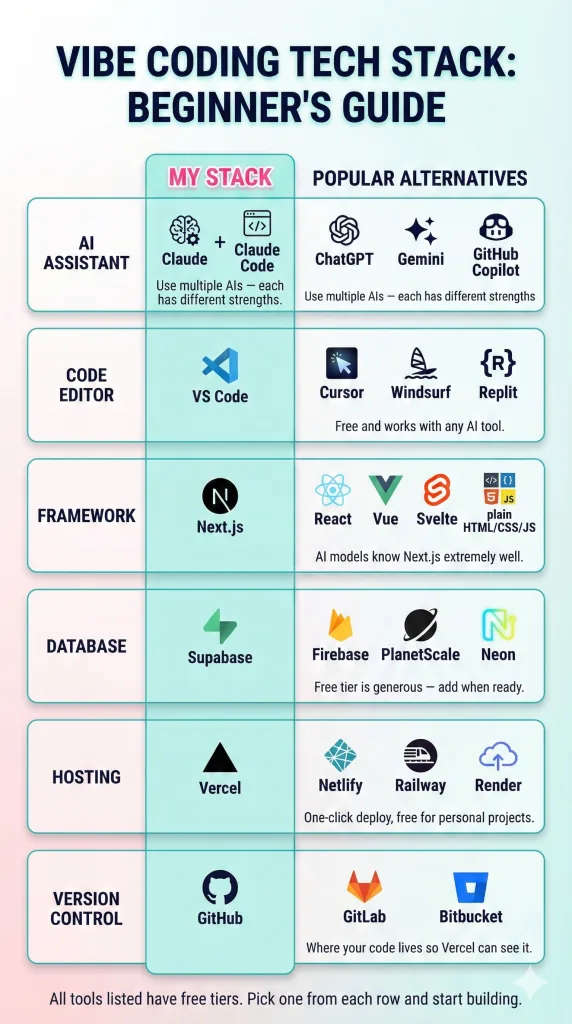
But why can't we just use a simple file, like a big spreadsheet, to store everything? Let's watch a short video that brilliantly illustrates the problem with that approach.
Database Tutorial for Beginners
This video from Lucid Software uses a simple e-commerce example to show why a single, massive spreadsheet quickly becomes a chaotic mess.
Watch from the beginning until the end of the problem description. Notice the issues that arise as the online cat store gets more popular: Redundant Information: The same customer's details are entered multiple times. Inconsistent Data: The customer moves, so now there are multiple, conflicting addresses. Disorganization: It's hard to find a specific order or tell which "Mary Johnson" is the right one.
This chaos is precisely what a database is designed to prevent.
How Databases Bring Order: Tables and Relationships
The solution to the messy spreadsheet is to break the information down into logical, organized groups. Instead of one giant sheet, you create separate, smaller ones for distinct things: one for customers, one for products, and one for orders. In database terminology, these are called tables.
Let's see how this works in practice by continuing the video.
Database Tutorial for Beginners
The video now demonstrates the elegant solution: separating data into distinct tables and then connecting them.
Continue watching from where the solution is introduced. Pay close attention to how the single spreadsheet is broken into three tables: Customers, Products, and Orders. The most important part is seeing how they are connected. The Orders table doesn't repeat all the customer and product information. Instead, it just references the Customer ID and the Product ID.
This concept of using a unique ID to link information between tables is the superpower of most databases. As a designer, you can think of it like creating components in Figma. You don't copy and paste a button 100 times; you create one main component and then use instances of it everywhere. If you need to change the button's color, you change the main component, and all instances update automatically.
Similarly, if a customer updates their address, you only have to change it in one place—the Customers table. Every order associated with that customer's ID will now automatically be linked to the new, correct address.
The diagram below visualizes this exact relationship.
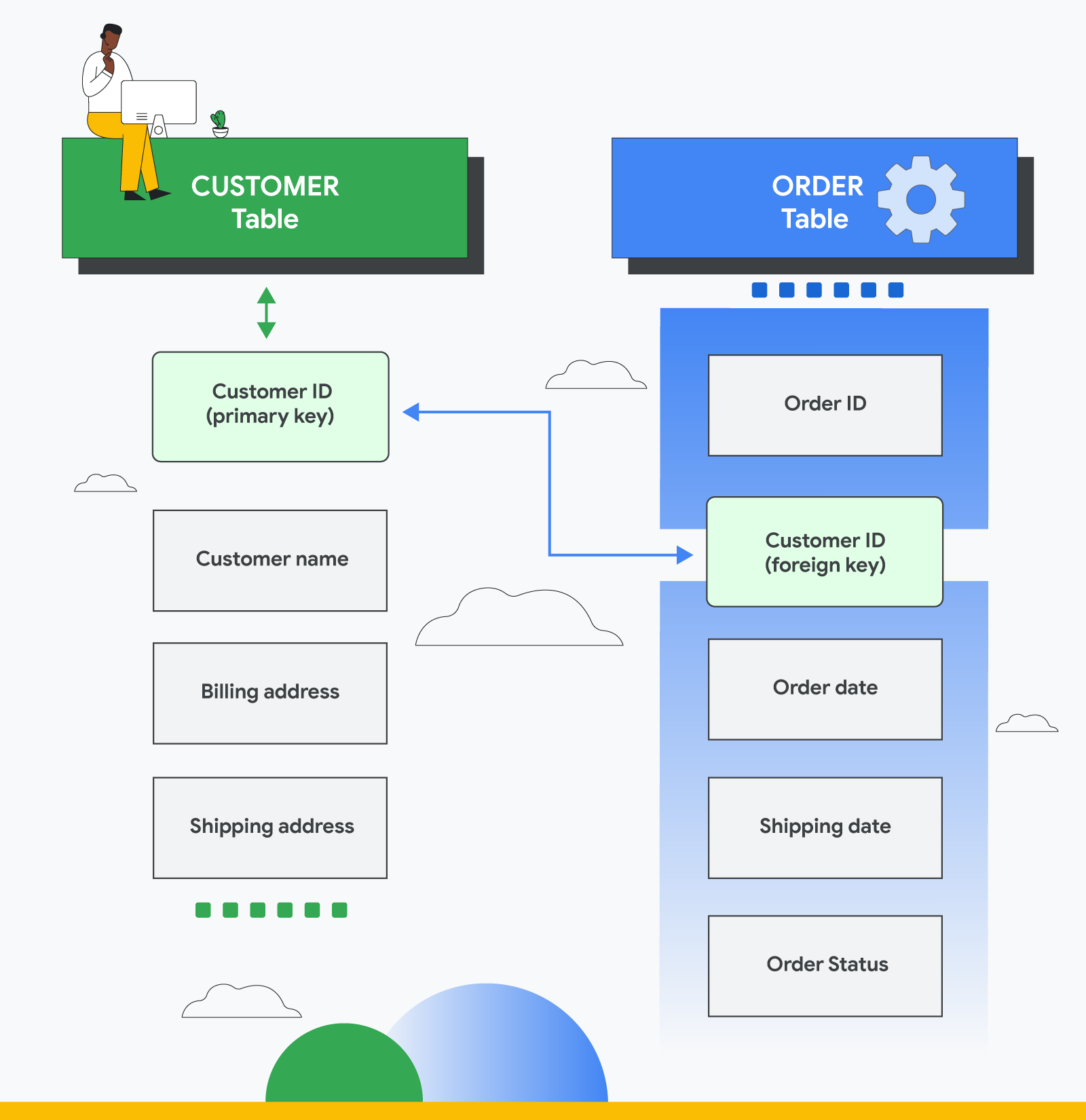
This structure, where data is organized into tables that relate to one another, is called a relational database. It's the most common type and is what powers services like Supabase.
When Do You Need a Database? A Practical Checklist
So, how do you know if the app you're asking your AI to build needs a database? The answer lies in the features you want. An excellent article on "vibe coding" provides a simple pattern-recognition approach.
Vibe Code like a Pro: A complete guide for non-tech folks
This article is written for non-technical builders and provides a fantastic, practical guide for thinking about your app's structure.
Focus on the section titled "Step 3: Model". The list under "The pattern recognition approach" is your key checklist.
Let's turn that into a simple set of questions you can ask yourself about your app idea:
- Does my app need to remember users? (e.g., user accounts, profiles, login/logout)
- If yes, you need a
userstable.
- If yes, you need a
- Can users create, save, or upload things? (e.g., posts, photos, to-do items, comments)
- If yes, you need a table for each of those things (a
poststable, aphotostable, etc.).
- If yes, you need a table for each of those things (a
- Do these created things belong to a user? (e.g., "my posts," "my photos")
- If yes, you need to link your
poststable back to youruserstable with auser_id, just like in the video example.
- If yes, you need to link your
- Can users interact with each other's creations? (e.g., liking a post, commenting on a photo)
- If yes, you'll need tables for those interactions (a
likestable, acommentstable) that link both the user and the item they interacted with.
- If yes, you'll need tables for those interactions (a
If you answer "yes" to any of these, your app needs a database. If your app is just a simple, static portfolio that displays information but doesn't allow users to sign up or create anything, you might not need a database at all.
The Big Picture: Where the Database Fits
Now, let's zoom out and see how the database fits with the other parts of an application we've discussed, like the frontend and backend. The following video gives a perfect overview of the entire flow.
Frontend, API, Backend and Database explained
This video animates the entire request cycle, clearly showing the distinct role each component plays.
Watch the video from the beginning through the booking confirmation. As you watch, trace the journey of a user's action: Frontend: Tina interacts with the user interface in her browser. API Request: When she clicks "search," the frontend sends a request to the backend. Backend: The backend (the server-side logic) receives the request. It understands it needs to find apartments. Database Query: The backend asks the database, "Give me all available apartments in Zurich." Database Response: The database finds the information and sends it back to the backend. API Response: The backend packages the data neatly and sends it back to the frontend. Frontend Update: The frontend receives the data and displays the list of apartments to Tina. When she books an apartment, the same cycle happens again, but this time the backend tells the database to update the apartment's status to "booked."
This sequence is the fundamental dance of almost every modern web application. Your vibe coding process generates the code for each of these parts, and now you can visualize how they all work together.
Conclusion
You've now demystified one of the most important components of any real application. A database isn't just a technical requirement; it's the organized, reliable memory that allows your app to store information, manage relationships between data, and ultimately, provide persistent and meaningful functionality to your users.
Key Takeaways:
- A database is an organized collection of information, like a set of well-sorted drawers for your app's data.
- Without a database, any information your app generates (like user accounts or posts) would be lost.
- Most databases are relational, meaning they store data in tables (like spreadsheets) that are linked together using unique IDs. This avoids data redundancy and inconsistency.
- You need a database whenever your app requires users to sign up, create, save, or interact with content that needs to be remembered.
- The database works with the backend and API to store and retrieve the information that the frontend displays to the user.
In our next lesson, we will take this conceptual understanding and make it concrete. You'll learn about two of the most popular database services for vibe coders, Firebase and Supabase, and you will set up your very first database project.