Recommended resources
The freely available resources this lesson will direct you to.
Welcome back to your professional English course. In our previous lesson, we established a strategy for decoding structured technical documentation by separating the main idea from supporting details. We learned that a quick skim gives you the "what" and "why," while a deeper scan reveals the "how."
Today, we will sharpen our focus on the first part of that process: skimming. Our goal is to apply this skill to technical articles—from blog posts and tutorials to research papers—so you can quickly extract an author's primary arguments and proposed solutions. For you, as both a software engineer and a technical writer, this is a critical efficiency tool. It allows you to stay current with new technologies without being overwhelmed and to quickly analyze other authors' work to inform your own.
The Strategic Value of Skimming
In software engineering, the firehose of new information is constant. New frameworks are released, new versions of existing tools introduce breaking changes, and research papers propose novel architectures. It is impossible to read everything in depth. This is where skimming moves from a simple reading trick to a strategic professional skill. It's not about being lazy; it's about being selective with your most valuable resource: your attention.
The goal of skimming is not to understand every detail but to perform reconnaissance. You are creating a mental map of the article to answer a single, critical question: Is this worth my time to read deeply?
Andrew Ng, a prominent figure in AI, provides a compelling example of this in a Stanford lecture. He notes that to prepare for his team's weekly discussion of two research papers, he needs to skim five or six. This isn't a shortcut; it's a necessary filtering process used at the highest levels of the field.
Let's hear him describe his approach.
Stanford CS230: Deep Learning | Autumn 2018 | Lecture 8 - Career Advice / Reading Research Papers
In this segment from his "Deep Learning" course, Andrew Ng explains that reading a paper from the first word to the last is inefficient. He advocates for a multi-pass approach to quickly grasp the core ideas.
Watch the section from 06:59 to 09:08. Pay close attention to his "first pass" strategy, which involves reading the title, abstract, and figures to get a high-level summary.
Ng's point is that the most important information is often condensed in specific places. By targeting these first, you can build a strong initial understanding in a fraction of the time.
A Multi-Pass Skimming Method
Let's formalize Ng's advice into a concrete, multi-pass method you can apply to any technical article. An article's structure is a gift from the author; it's the most direct path to their thinking. Headings and subheadings are the skeleton of the argument.
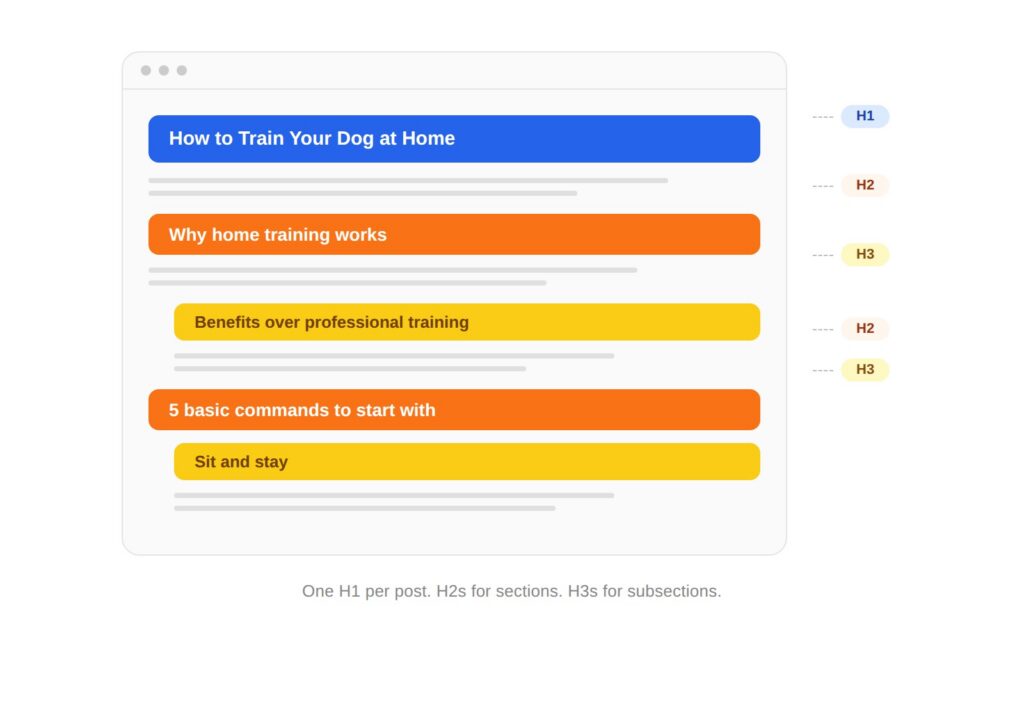
Here is a systematic way to skim, moving from the highest level of abstraction down to the specific points.
Pass 1: The 30,000-Foot View (Titles, Headings, and Visuals)
Your first pass should take no more than 60-90 seconds. You are looking for the absolute highest-level summary.
- Read the Title and Subtitle: They state the topic and the author's main claim.
- Scan all Headings and Subheadings: Read them in order. This is the author's outline.
- Look at Figures, Diagrams, and Code Blocks: As Andrew Ng mentioned, especially in technical papers, a single architectural diagram or results table can summarize the entire work. Read the captions.
Pass 2: The Core Argument (Introduction and Conclusion)
Authors know that many people will only read the beginning and the end. They place their most polished summaries there to make their case.
A short video from Smekens Education provides a great, concise summary of this classic skimming technique.
Teach how to skim read long texts 📚
This video explains the standard method for skimming informational text, which is highly effective for technical articles.
Watch from the beginning of the strategy to the end. The key takeaway is to read the first and last paragraphs in their entirety.
Pass 3: The Supporting Logic (First and Last Sentences)
Now that you have the overall argument, you can quickly flesh it out by grabbing the topic sentence of each paragraph. This is where you find the author's proposed solutions and supporting arguments.
How to Read Technical Books Effectively - Recep Inanc
This article by Recep Inanc, a software engineer, details his personal strategy for reading technical material. His description of "Skimming" provides excellent, practical advice.
Please read section 2. Skimming. Focus on his method of reading the first and last sentences of each paragraph and looking at code snippets. Notice his important self-discipline tip: "I do not linger."
By the end of these three passes, you should be able to state the author's main argument and describe their proposed solution or key findings. You will have achieved the lesson's learning outcome without yet having "read" the article in full.
An Advanced Framework: Microwave, Oven, or AI Prep?
Now that you have the mechanics, let's add a strategic layer. Not all reading serves the same purpose. An article from Speed Reading Lounge introduces a powerful mental model for classifying your reading tasks, which is especially relevant given your background in AI-assisted tools.
Skimming and Scanning - AI Strategies
This article distinguishes between different types of reading and proposes a modern workflow that incorporates AI, aligning perfectly with your technical interests.
First, read the section The Framework: Microwave, Oven, or AI Prep? to understand the difference between "microwave" material (fast, functional reading) and "oven" material (slow, immersive reading). Then, focus on the section describing AI Prep and the first workflow, AI-First Skimming, Human Verification. This demonstrates how you can leverage your prompt engineering skills to create a powerful, personalized reading assistant.
This framework gives you a sophisticated decision-making process:
- Is this "Microwave"? (e.g., a tutorial on a specific Flutter widget) -> Skim aggressively to find the one code block you need.
- Is this "Oven"? (e.g., a foundational paper on transformer architecture) -> Skim to get oriented, but schedule a deep, focused read.
- Not sure? Use "AI Prep." (e.g., a long industry report on the future of mobile development) -> Use an LLM with a targeted prompt to get a structured overview, helping you decide if it's microwave or oven material. This turns skimming into an interactive dialogue with the text, guided by your AI tools.
This hybrid approach, combining your manual skimming skill with AI-driven pre-analysis, is a C1-level professional competency.
Conclusion
In this lesson, we elevated skimming from a simple speed-reading tactic to a strategic tool for managing information overload. You've learned how to quickly deconstruct technical articles to find their core arguments and solutions.
Here are the key takeaways:
- Skimming is Strategic: It's a filtering mechanism to decide where to invest your deep-reading time.
- Use a Multi-Pass Method: Go from a high-level view (titles, headings, figures) to the core argument (intro/conclusion) and then to the supporting logic (first sentences of paragraphs).
- Classify Your Reading: The "Microwave" vs. "Oven" framework helps you match your reading strategy to your goal.
- Leverage Your AI Skills: Use "AI Prep" to get a structured preview of dense or unfamiliar texts, turning skimming into an efficient, AI-assisted workflow.
In our next lesson, we will focus on the complementary skill of scanning. While skimming gives you the big picture, scanning is about surgically extracting specific pieces of information, such as bug fixes, breaking changes, and new features from dense release notes. This will complete our foundational module on decoding complex technical texts.