Recommended resources
The freely available resources this lesson will direct you to.
Hello! Welcome to the first lesson in your journey to advance your professional English. This course is designed to build on your existing strengths as a software engineer and technical writer, equipping you with the linguistic tools to operate at a C1 level in your field.
Today, we begin Module 1, "Decoding Complex Technical Texts." Our goal for this lesson is to master the skill of identifying the main idea and supporting details in complex technical documentation, such as API specifications or SDK guides. This is a foundational skill that will not only make you a more efficient developer but also a more effective technical writer, as understanding how information is structured is key to presenting it clearly.
The Problem with "Just Google It"
As an experienced engineer, you know that while Stack Overflow can provide quick fixes, true mastery comes from understanding the underlying system. The same principle applies to documentation. Relying on scattered examples or forum answers is often inefficient and can lead to a superficial understanding. The long-term solution is to develop the skill of reading official documentation effectively.
Let's start with a short video that frames this common challenge for developers.
How To Read Documentations For Beginners
The video "How To Read Documentations For Beginners" from NeuralNine introduces why engaging with official documentation is a crucial skill, even when it feels easier to search for quick answers online.
Please watch the segment from the beginning until the end of the introduction. The speaker discusses the limitations of the "quick fix" approach and the long-term benefits of educating yourself through documentation.
The speaker's point is clear: reading documentation is not just about solving an immediate problem, but about building a fundamental understanding that serves you in the long run. Let's explore a strategic approach to do just that.
A Strategic Framework for Active Reading
Reading technical documentation is not like reading a novel from start to finish. It’s an active process of information extraction. A highly effective method is the two-pass approach: first, you grasp the overall picture, and then you dive in for the specifics.
A useful document from The Evergreen Writing Center, "Strategies for Critical Reading of Technical Writing," outlines this process. Although it mentions "journal articles," the principles apply directly to any dense technical text you'll encounter.
[PDF] Strategies for Critical Reading of Technical Writing
This guide provides a structured method for approaching technical texts. We will focus on the concepts of "pre-reading" and "re-reading."
In the document, please read the section titled Strategies for Critical Reading of Technical Writing: Primary Literature. Focus on step 2. Pre-reading, which is about skimming to get context, and the introduction to step 3. Re-reading, which is about a deeper, more detailed analysis.
This Pre-reading/Skimming phase is how you identify the main idea. You’re quickly assessing the purpose, scope, and overall structure of the document. The Re-reading phase is where you dig into the supporting details—the specific parameters, function descriptions, and implementation notes that you need to actually use the technology.
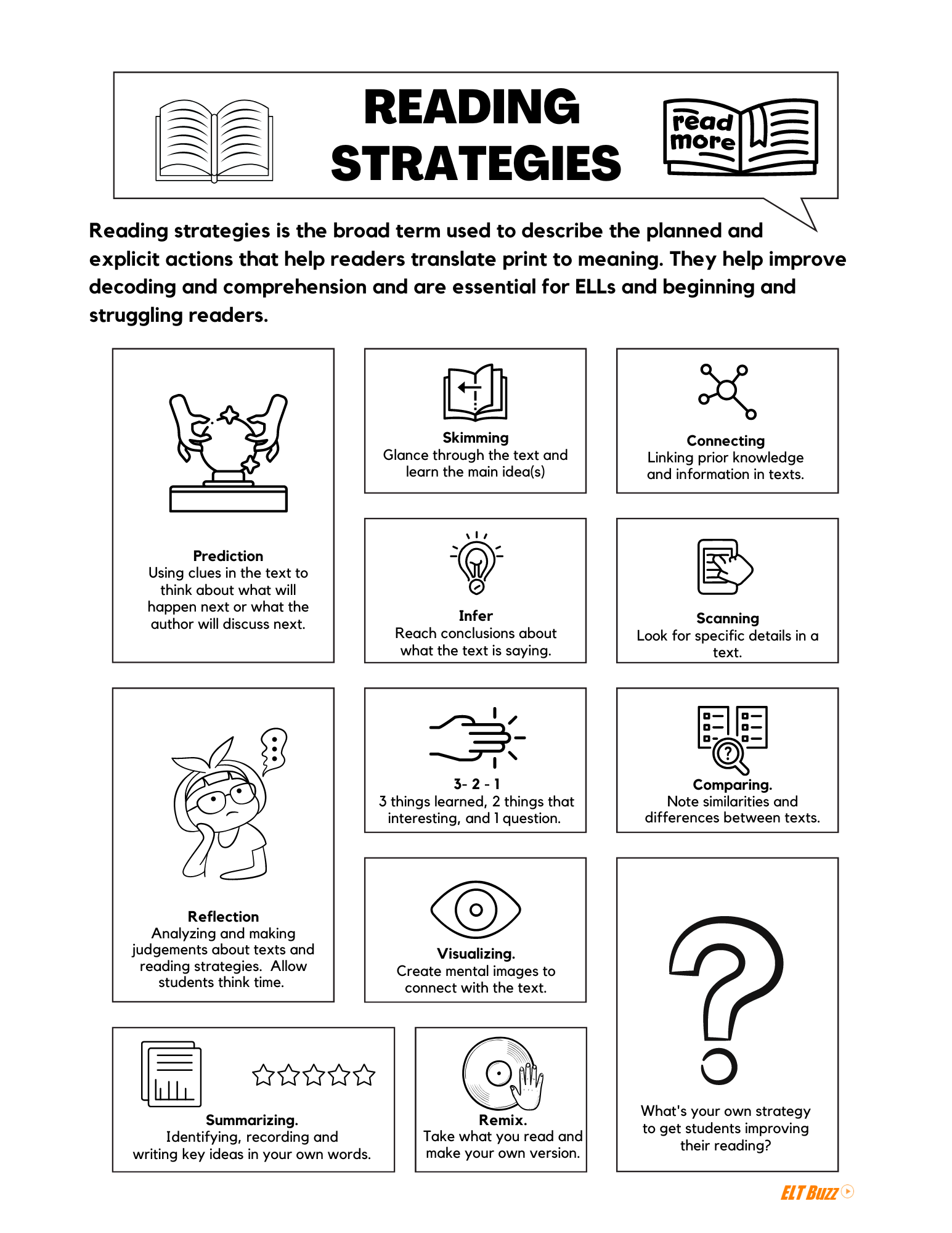
This visual guide summarizes several of these active reading strategies:
The Anatomy of Technical Documentation
To apply this reading strategy effectively, it helps to understand the "anatomy" of the documents you're reading. Just like a well-designed software system has a clear architecture, good documentation follows predictable patterns.
The book Software Engineering at Google provides excellent insights into how documentation is structured and why. The authors emphasize that you should first understand the document's purpose and intended audience.
Documentation Is Like Code - Software Engineering at Google
This chapter explains that documentation is not monolithic. Different types of documents serve different purposes and audiences, which dictates their structure and content.
First, read the section Know Your Audience. Pay attention to the distinction between experts and novices, and "seekers" versus "stumblers." This will help you predict what kind of information a document will prioritize. Next, read the section Documentation Types and the brief descriptions of the five main types that follow (Reference, Design, Tutorials, Conceptual, Landing pages). Understanding these categories is key to quickly identifying a document's main purpose.
So, before you even start reading, you can ask: Is this a tutorial meant for a novice, a piece of conceptual documentation for a team member, or an API reference for an expert "seeker"? Your answer will tell you where to find the main idea and what kind of supporting details to expect.
Most documentation for libraries and frameworks, like Pandas, NumPy, or even Spring Boot, follows a remarkably consistent structure. The next video walks through this common pattern.
How To Read Documentations For Beginners
The same NeuralNine video from earlier also breaks down the typical layout of a documentation website.
Watch the segment from 02:08 to 07:41, where the speaker identifies the three most common sections: Getting Started: The "hello world" guide. User Guide / Tutorials: More in-depth, task-oriented examples. API Reference: The detailed, encyclopedic listing of every class, method, and parameter. Then, jump to the recap at 15:36 for a concise summary of how to use each section.
This structure gives you a powerful mental model:
- Main Idea: Usually found in the "Getting Started" section, a "Conceptual Overview," or the introduction to a User Guide. This tells you what the library does and why you might use it.
- Supporting Details: Reside in the "API Reference." This is where you find the precise details of how to use it—the function signatures, parameter options, and return values.
Practice: Decoding an API Specification
Let's put this all together by analyzing a common piece of technical documentation: an API specification presented with Swagger UI.
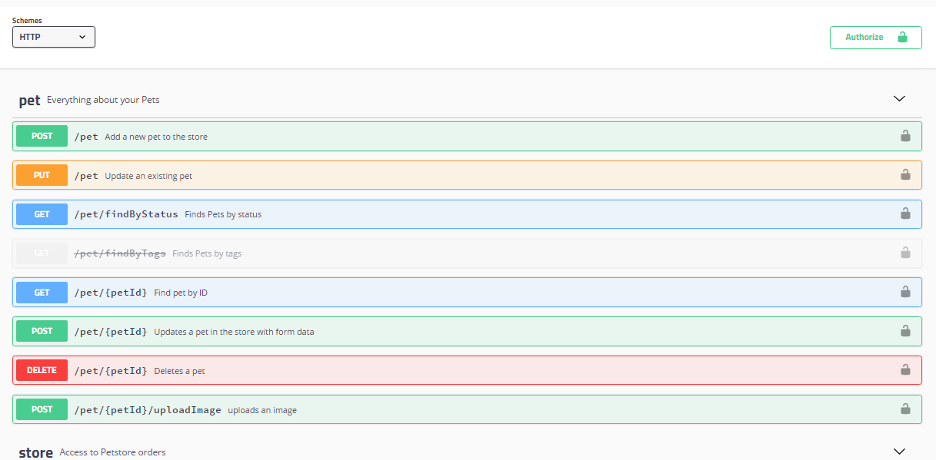
Imagine you need to integrate a new application with this "Petstore" API. Your task is to figure out what it does and how to perform basic operations.
1. Identify the Main Idea (Pre-reading/Skimming):
A quick scan reveals the main idea. The document is titled "pet," and the endpoints include paths like /pet, /pet/{petId}, and /pet/findByStatus. The main purpose of this API is clearly to manage a collection of "pet" resources. This includes adding, updating, finding, and deleting pets.
2. Identify Supporting Details (Re-reading/Scanning):
Now, you need the details to write your code. This is where you scan for specific information. Another short video will guide us through what to look for in API documentation.
Tips to read APIs documentation - Definite 2021 Guide | Build it with Jonas
This video, "Tips to read APIs documentation," specifically focuses on the key components of an API reference.
Please watch the section from 02:09 to 03:45. The speaker explains the critical information to look for, such as authentication, and maps common tasks to their corresponding HTTP methods (GET, POST, PATCH, DELETE).
Applying these concepts to the Swagger image:
- To add a new pet: You would look for a
POSTrequest. The green bar showsPOST /petwith the description "Add a new pet to the store." This is a key supporting detail. - To find a specific pet: You need its ID. The blue bar
GET /pet/{petId}("Find pet by ID") is the endpoint you'd use. The{petId}in the path indicates it requires a parameter. - To delete a pet: You'd use the
DELETEmethod. The red barDELETE /pet/{petId}("Deletes a pet") provides this functionality. - Authentication: The "Authorize" button at the top right is a strong visual cue. This supporting detail tells you that you will likely need an API key or token to use these endpoints. Clicking that button in a live interface would reveal the specific authentication scheme.
By combining a quick skim for the main idea with a detailed scan for specific endpoints and methods, you can efficiently decode what an API does and how to use it.
Conclusion
In this lesson, we established a strategic approach to reading complex technical documentation. You've learned that this is not a passive activity but a structured process of inquiry.
Here are the key takeaways:
- Read with purpose: Don't just read from top to bottom. Understand that different document types (tutorials, references) are for different audiences and tasks.
- Use a two-pass strategy: First, skim for the main idea by looking at titles, introductions, and "Getting Started" guides. Then, scan for supporting details in API references and specific examples.
- Understand the structure: Most documentation follows a pattern (Getting Started, User Guide, API Reference). Recognizing this pattern helps you navigate efficiently.
- For APIs, focus on endpoints: The main idea is the API's overall function. The supporting details are the specific HTTP methods (
GET,POST,DELETE), paths, parameters, and authentication requirements for each endpoint.
In our next lesson, we will build on the "skimming" skill we practiced today. We will focus on how to skim technical articles to quickly extract the author's primary arguments and proposed solutions. This will be especially relevant to your work as a technical writer and for staying current in a fast-paced field.