Recommended resources
The freely available resources this lesson will direct you to.
Hello again. Last lesson, you followed a service hostname through DNS resolution and saw that obtaining an IP address does not guarantee a connection. The next question is whether network policy permits the traffic to travel between the building-side client and that address.
In this lesson, you will learn to describe a network flow, compare it with a firewall rule, and determine which action applies when several rules could match. We will use an illustrative building-to-cloud connection and an Azure network security group (NSG) as examples; neither represents a documented Building X configuration. Allow about 35–40 minutes, including the resources.
Describe the flow before reading the rules
A firewall rule answers a narrower question than “Can this application work?” It decides whether traffic matching specified conditions is allowed or denied at a particular control point. To apply a rule, first describe the attempted connection from the perspective of the device or network where that rule is enforced.
Suppose a fictional building-side gateway has resolved a service hostname to 192.0.2.40. It starts a connection with these details:
| Flow detail | Illustrative value |
|---|---|
| Initiator and source IP | Building-side gateway, 10.20.4.18 |
| Source port | 51514 |
| Destination IP | 192.0.2.40 |
| Destination port | 443 |
| Protocol | TCP |
| Direction at a firewall protecting the gateway | Outbound |
The gateway’s source port identifies its end of this connection; destination port 443 identifies the port it is trying to reach. A rule permitting TCP destination port 443 does not thereby permit UDP port 443, TCP port 8443, or every connection to the destination.
Direction is relative to the protected interface or resource. This gateway-initiated flow is outbound at a control protecting the gateway. At a control protecting the receiving service, the arriving connection is inbound. Before judging a rule, establish where it is applied; otherwise, even a correctly read “allow” rule may be irrelevant.
Watch the opening of Professor Messer’s Understanding Firewall Rules for the idea of matching traffic against rule conditions and stopping at the applicable rule.
Understanding Firewall Rules - CompTIA Network+ N10-005: 5.5
Professor Messer explains the flow details used in rules and why their evaluation order matters. Use the video for the general method; the later Azure example will give us specific priority numbers and defaults.
Watch flow matching for how a rule compares connection details, then rule order for why an earlier broad rule can prevent a later specific rule from applying. Note that an implicit deny is common, but you must check the actual platform's defaults rather than assume every outbound policy denies unmatched traffic.
Check every condition—not just the port
A useful mental test is: Does this rule apply here, and do all its match conditions describe this flow? Typical conditions include direction, source and destination addresses or ranges, protocol, and source and destination ports. The rule’s action matters only once the flow matches.
Microsoft Learn’s Azure network security groups overview presents these fields together. Azure NSGs are one kind of network filter, not a universal description of every firewall.
Azure network security groups overview
Read Microsoft Learn's explanation of NSG security rules to connect the flow details above to actual rule fields. Pay particular attention to priority and to the distinction between a new connection and its response traffic.
In Security rules, begin at “Each rule specifies the following properties.” Read name and priority, then continue from the “Source or destination” row through the “Action” row in the rule fields. Immediately below that table, read flow evaluation and stateful responses. Focus on what must match for a new connection.
The five flow details Azure describes are source IP, source port, destination IP, destination port, and protocol. Direction selects whether you are examining inbound or outbound rules. An address condition may name one IP or a network range: for example, 10.20.4.0/24 includes 10.20.4.18 and 10.20.4.19. Any removes a restriction for that field; it does not remove the other conditions in the rule.
A reliable reading sequence is:
- Locate the control point and direction. Is this rule applied where the flow travels, and is the connection inbound or outbound there?
- Compare the addresses. Does the actual source fall within the rule’s source, and the actual destination within its destination?
- Compare protocol and ports. For our example, look for TCP and destination port 443; also check the source-port condition if the rule specifies one.
- Evaluate applicable rules in priority order. The first matching Azure NSG rule determines the action. In Azure, a lower priority number is evaluated first.
Failing any one match condition means this rule does not decide this flow. Continue to the next applicable rule. In particular, a rule labelled “Allow HTTPS” is not evidence of permission if its direction or source range does not match.
Work through a building-to-cloud rule set
Consider the following fictional outbound policy protecting a building-side network. Assume these are its applicable rules and that, for this example, any flow matching none of them is denied. The addresses and endpoint are for reasoning practice, not Building X requirements.
| Priority | Source | Destination | Protocol | Destination port | Action |
|---|---|---|---|---|---|
| 180 | 10.20.4.18 |
192.0.2.40 |
TCP | 443 | Allow |
| 200 | 10.20.4.0/24 |
192.0.2.0/24 |
TCP | 443 | Deny |
| 300 | 10.20.4.0/24 |
Any | TCP | 443 | Allow |
Assume each rule accepts any source port. For the gateway flow described earlier—10.20.4.18:51514 to 192.0.2.40:443 over TCP—priority 180 matches every condition. Its action is Allow, so evaluation stops. The deny at 200 does not reverse that result.
Now change only the source IP to 10.20.4.19. Priority 180 no longer matches, because it names 10.20.4.18 specifically. Priority 200 does match: both addresses fall within its stated ranges, and the protocol and destination port agree. This new flow is denied. Priority 300 would also describe it, but the firewall never reaches that rule for this flow.
Finally, keep source 10.20.4.19 and TCP port 443, but change the destination to 198.51.100.20. Neither priority 180 nor 200 matches the destination. Priority 300 matches and allows it. This is why “there is a deny rule” is no more decisive than “there is an allow rule”: the outcome depends on the first rule that matches the entire flow.
Notice that a narrow rule does not automatically beat a broad one. The exception at 180 works because it comes before the subnet-wide deny. Were its priority number higher than 200, that deny would match first. Similarly, changing the original connection from TCP to UDP would make all three displayed rules inapplicable; under this example’s stated default, it would be denied.
Read a real rule list without mistaking it for the whole path
The Azure portal screenshot below shows an inbound NSG rule list. Its custom RDP-rule has priority 300, TCP destination port 3389, Source Any, Destination Any, and action Allow. The lower rows are Azure default inbound rules.
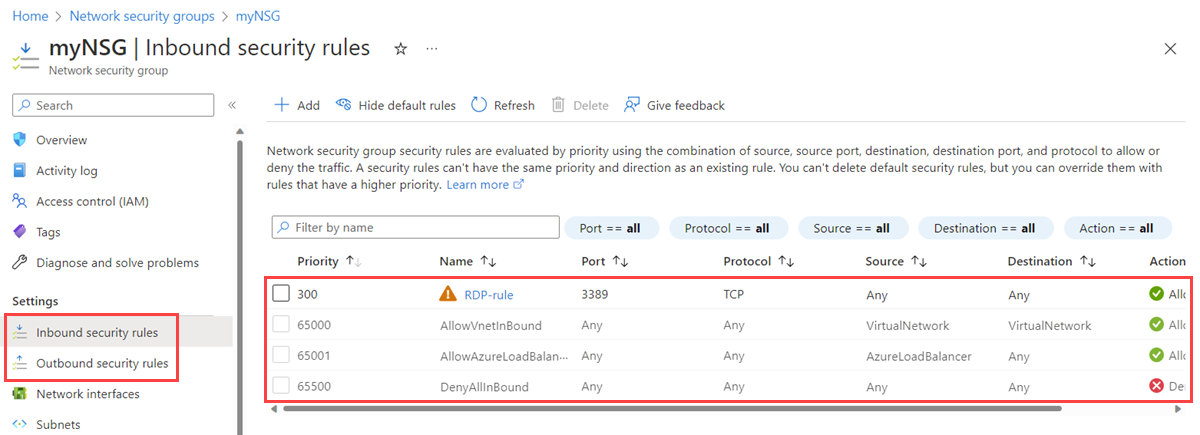
If this NSG applies to a receiving resource, a new inbound TCP connection to destination port 3389 that satisfies the displayed rule’s other conditions matches priority 300 before the default inbound rules. An inbound TCP connection to port 443 does not match that custom rule merely because both are TCP. Nor would this screenshot, by itself, establish whether a building-side gateway’s outbound connection is permitted: it shows inbound rules at one control point.
Read Azure’s defaults to understand what happens when a custom rule does not match. They also illustrate why the fictional policy’s “deny anything unmatched” assumption must not be copied onto Azure outbound traffic.
Azure network security groups overview
Return to Microsoft Learn's NSG overview for the rules Azure supplies automatically. Compare the inbound defaults visible in the screenshot with the separate outbound defaults.
In Default security rules, read the Inbound and Outbound subsections, from the default rules. Locate DenyAllInbound, AllowInternetOutBound, and DenyAllOutBound; note their priority order rather than assuming the inbound and outbound outcomes are identical.
In the documented NSG defaults, an inbound flow that matches neither a custom rule nor an earlier default allow eventually reaches DenyAllInbound. Outbound rules have a different default sequence, including AllowInternetOutBound before DenyAllOutBound. To determine an actual outcome, examine the applicable custom and default rules, not just the custom entries visible at first glance.
Azure NSGs are also stateful. If a new outbound connection is allowed, its response traffic does not require a separate inbound NSG allow rule for that same connection. This does not mean an unrelated, externally initiated inbound connection is allowed. And it does not guarantee that every other network control along the path permits the exchange.
State your conclusion at the right level
For a rule analysis, give a precise conclusion such as: “This new outbound TCP flow from 10.20.4.18 to 192.0.2.40 on destination port 443 is allowed by this policy, because priority 180 is its first matching rule.” Include the matching rule and the reason earlier rules did not match when relevant.
Avoid turning that into “the service is reachable.” The DNS answer may have changed; routing may be absent; another firewall or the destination host may block traffic; or the service may not accept the request. A firewall decision establishes permission at the control you examined, not success across the entire application connection. As an SME, that distinction makes a finding actionable: it identifies what has been established and what remains to be checked, without proposing an unnecessarily broad allow rule.
Key takeaways
To determine whether a firewall policy permits a specified new flow, identify its direction at the relevant control point, compare its source and destination, protocol, and ports with each rule, then apply the first matching rule according to that platform’s priority order. Check the actual defaults if no custom rule matches. For a stateful NSG, an allowed connection’s responses are handled differently from a new inbound connection.
Next, we move from network permission to cloud identity: tenants, users, roles, and permissions. A permitted network flow can reach a platform boundary without granting anyone access to its resources.