Recommended resources
The freely available resources this lesson will direct you to.
Hello again. Last lesson showed how a device uses its subnet mask and default gateway once it knows a destination IP address. A building-side client, however, may be configured with a service name rather than an IP address. Before it can make its application request, it needs to resolve that name.
In this lesson, we will follow a fictional Building X service endpoint through DNS resolution. You will see who finds the address, what root and authoritative servers contribute, and why a successful DNS lookup is only one part of a working building-to-cloud connection. Allow about 35–40 minutes, including the resources.
From a service name to an address
Suppose a building-side application is told to send data to https://telemetry.example.com/api/ingest. This is an illustrative address, not a documented Building X endpoint. It lets us separate three pieces of information:
telemetry.example.comis the hostname that DNS can look up.httpsidentifies how the application intends to communicate with the service./api/ingestidentifies a path the application requests after it connects.
DNS does not resolve the entire URL or decide whether the application may send data. For an IPv4 lookup, it can provide an A record containing an IP address for the hostname. An AAAA record serves the corresponding purpose for IPv6. With an address in hand, the client can make the network decision from last lesson: is that address local, or should traffic go to its default gateway?
IBM Technology’s What is DNS (Domain Name System)? gives a visual account of the lookup. Its example uses a website; while watching, treat the browser as our building-side client and the website name as our fictional service hostname.
What is DNS (Domain Name System)?
Watch IBM Technology’s “What is DNS (Domain Name System)?” to see why a client needs DNS and how a resolver finds an answer.
Watch names and addresses for the basic distinction. Then watch the lookup, focusing on which system asks each DNS server and on the point where the client finally receives an address.
The key handoff is easy to miss: the client normally asks its configured DNS resolver to find the answer. That resolver may already know it; otherwise, it does the further lookup on the client’s behalf. The resolver is not the service the client ultimately wants to contact.
Who answers the DNS question?
For a closer distinction between the two DNS roles, read the indicated parts of Cloudflare’s What is DNS? A recursive resolver works to answer the client’s question; an authoritative nameserver holds records for a domain it is responsible for.
What is DNS? | Learning Center
Read Cloudflare’s explanation of the recursive resolver and authoritative nameserver so you can identify their different jobs in the diagram below.
In “What’s the difference between an authoritative DNS server and a recursive DNS resolver?”, read the “Recursive DNS resolver” subsection from resolver’s job. Then read the “Authoritative DNS server” subsection from authoritative records. Notice that a resolver can return an answer without contacting an authoritative server every time.
Now use the diagram to trace an uncached lookup. Here, “DNS Server” is acting as the client’s resolver. The diagram uses contoso.com, not a Building X domain; the same division of responsibilities explains how a resolver could locate a service hostname under another public domain.
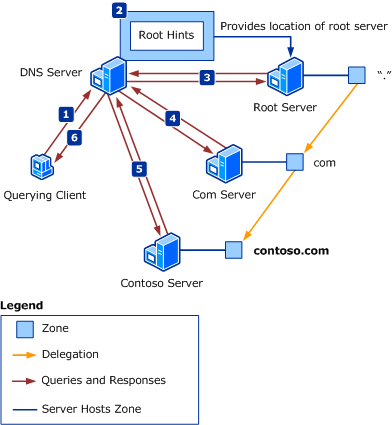
Read the numbered activity this way:
- The client asks its DNS server for a record. The request names what it wants—for example, an A record for a hostname.
- If that server cannot answer from a zone it serves or from cached information, it needs to locate other DNS servers. Root hints give it a starting point for contacting a root server.
- The root server supplies a referral toward the appropriate top-level domain, here
.com. The.comserver, in turn, supplies a referral toward the DNS server responsible forcontoso.com. - An authoritative server for the relevant name supplies the requested record if it exists. The resolver returns the answer to the client.
The resolver makes separate DNS queries as it follows those referrals. The diagram does not mean that the eventual application data passes through the root and .com DNS servers. Those servers help find DNS information; they are not intermediaries for the later connection to the service.
Microsoft Learn’s DNS queries and lookups adds one useful qualification to the picture: a DNS server checks what it already knows before using root hints.
DNS Queries and Lookups in Windows and Windows Server
Read Microsoft Learn’s “DNS server query process” to understand when a resolver needs the wider DNS hierarchy shown in the diagram.
In the “DNS server query process” subsection, begin at server decision process and stop after the explanation of root hints. Follow its checks for locally served records and cached records before it seeks help from other DNS servers. Root hints are a starting point, not the address of the requested service.
What record comes back for a service endpoint?
The answer depends on the name and record type requested. Watch the short selections from PowerCert Animated Videos’ DNS Records Explained for the three record types most useful here.
Watch the A, AAAA, and opening CNAME explanations in PowerCert Animated Videos’ “DNS Records Explained” to distinguish an address answer from a name alias.
Watch address records for A and AAAA, then name aliases for CNAME. Focus on what each record contains rather than the video’s website example. A CNAME is a DNS alias; it is not itself a browser redirect.
For our fictional endpoint, imagine the resolver finds the following records:
| Name queried | Illustrative DNS answer | What the client still needs |
|---|---|---|
telemetry.example.com |
CNAME: edge.example.net |
An address for edge.example.net |
edge.example.net |
A: 192.0.2.40 |
A network path to that address |
The CNAME supplies another name, not an IP address. Resolution continues until the client has a usable address record, or the lookup fails. The names and address in this table are documentation examples; they make no claim about Building X configuration.
This distinction matters operationally. A service hostname may resolve through an alias, and DNS answers can change. Do not assume that the hostname permanently identifies one fixed IP address, or that finding an A record establishes the port, application permissions, or service availability. The configured service address and current product documentation—not this example—determine what a real deployment requires.
Why a later lookup may look different
The full hierarchy is the useful model for learning DNS, but a client does not necessarily trigger every step on every request. Its local system or its recursive resolver may have cached a recent answer. A DNS record’s time to live (TTL) limits how long it may be kept in a DNS cache before a fresh answer is needed.
Read Cloudflare’s caching discussion with that contrast in mind: a cached result is still a DNS answer, even when the resolver does not visit the root or authoritative servers during this particular lookup.
What is DNS? | Learning Center
Return to Cloudflare’s “What is DNS?” for its explanation of where DNS answers can be cached and why a repeated lookup may take fewer steps.
Under “What is DNS caching? Where does DNS caching occur?”, read from TTL and browser cache. Continue through the “Operating system (OS) level DNS caching” subsection, from the local resolver to the end of that paragraph. The article’s ISP is one possible location for a recursive resolver; a building network may use a resolver provided by its own IT infrastructure.
Caching explains two otherwise surprising observations. A repeated lookup can succeed quickly without visible queries to the DNS hierarchy. Conversely, after a service’s DNS record changes, different clients may temporarily use different cached answers until their applicable TTLs expire. An organization’s DNS server may also answer some names from zones it serves locally, so not every name requires a public root-server lookup.
Put DNS in the building-to-cloud path
Return to the fictional building-side client. It has a hostname for a service. It asks its configured DNS resolver for an address, using cached information or further DNS queries as needed. Only after it has a usable address can it attempt the application connection.
The DNS resolver and the default gateway have different jobs. The resolver answers a question about a name. The gateway forwards IP traffic toward an off-subnet address. The client might need its gateway to reach its DNS resolver, the resolved service address, both, or neither, depending on where those destinations sit on its network. That is why “DNS works” and “the service is reachable” are different findings.
If a proposed Building X connection fails, this distinction helps narrow the evidence:
- No usable DNS answer: check the exact hostname being queried and whether the configured resolver can answer it.
- A DNS answer, but no connection: the hostname-to-address lookup worked; routing, firewall policy, the service, and other connection requirements still need examination.
- A connection, but no successful application exchange: DNS and basic reachability alone do not establish that the request is accepted.
For an actual Building X deployment, use its currently documented endpoint names and requirements. This lesson explains how to reason about their resolution; it does not supply a product endpoint list.
Key takeaways
DNS answers a client’s question about a hostname, often with an A or AAAA address record and sometimes via a CNAME alias. The client’s recursive resolver may answer from cache or consult other DNS servers; root and top-level-domain servers provide referrals that help it find the appropriate authoritative server. Once the client has an address, the subnet and gateway decision from last lesson becomes relevant—but DNS success alone does not prove the service connection will work.
Next, we will examine another reason a correctly resolved and routed connection might still be blocked: firewall rules.