Recommended resources
The freely available resources this lesson will direct you to.
- Default Gateway Explainedwww.youtube.com
- Networking Fundamentals – 02 – IP Address, Subnet Mask, Gatewaywww.youtube.com
- TCP/IP addressing and subnetting - Windows Clientlearn.microsoft.com
- IPv4 Addressing - CompTIA Network+ N10-009 - 1.7 - Professor Messer IT Certification Training Courseswww.professormesser.com
Hello again. Last lesson followed requests and responses between a client and a SaaS service. This time we will look beneath that exchange: before a device can send a request, it must decide whether the destination is on its local network or whether to hand the traffic to a router.
By the end, you should be able to read three settings in a sample IPv4 configuration—IP address, subnet mask, and default gateway—and explain the decision they support. That is a useful first step when assessing whether a building-side device can reach another system.
Three settings, three different jobs
An IP address identifies a network interface so that it can send and receive IP traffic. A subnet mask tells the device which part of that address identifies its local network. A default gateway is the local router address the device normally uses when the destination is outside that network.
Watch Default Gateway Explained from PowerCert Animated Videos for a visual account of how those settings work together. The video uses a different set of addresses from our example; concentrate on the decision the sending computer makes, rather than memorizing its numbers.
PowerCert Animated Videos' Default Gateway Explained shows why a local destination and a destination on another network take different paths.
Watch the router's role to distinguish traffic sent within a local network from traffic sent to its gateway. Continue with the subnet mask, which identifies the network portion of an address, and the two cases, which contrast a local destination with one reached through a gateway. For now, focus on the IP-level decision; you need not retain the video's details about hardware addresses.
The important distinction is that the gateway is not every device’s destination. If two devices are on the same local subnet, they can ordinarily exchange traffic through their local network without asking the router to forward it. If the destination is on a different subnet, the sender hands the packet to its gateway for forwarding.
Read the sample network
The diagram shows two networks joined by routers. Start with Computer 1, its switch, and Router 1 on the left. Then find Computer 2 and Router 2 on the right.
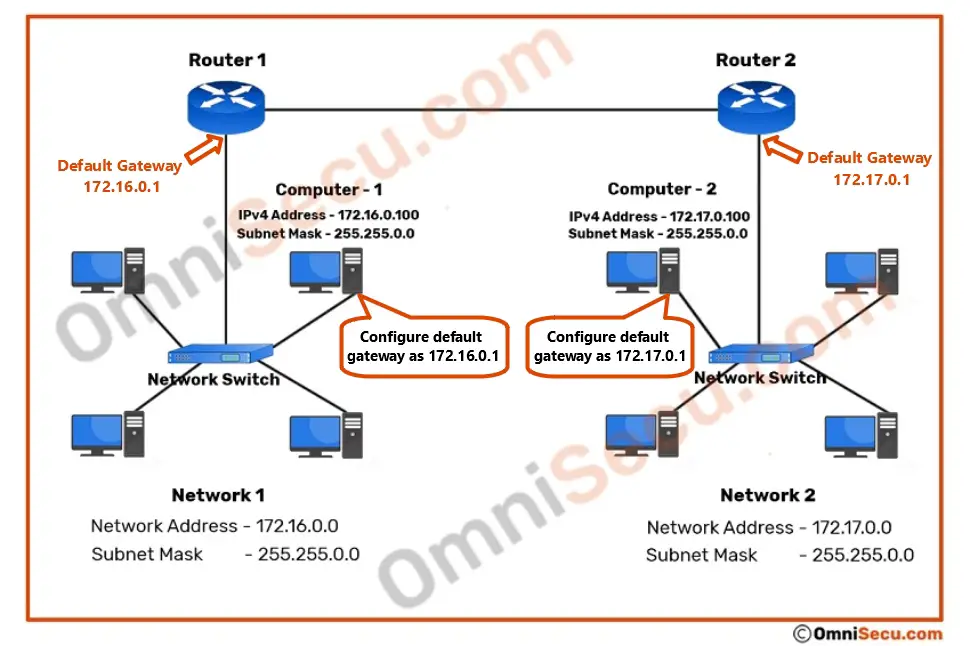
Read Computer 1’s configuration as a set:
| Setting | Computer 1 | What it means here |
|---|---|---|
| IP address | 172.16.0.100 |
Computer 1’s address on its network |
| Subnet mask | 255.255.0.0 |
The first two address numbers identify its subnet |
| Default gateway | 172.16.0.1 |
Router 1’s address on that same subnet |
An IPv4 address consists of four numbers, called octets. The mask is written in the same dotted format, but it is not another device’s IP address. With this particular mask, the two 255 octets mark the network portion and the two 0 octets mark the host portion. Computer 1 therefore belongs to network 172.16.0.0, commonly written 172.16.0.0/16; the /16 means that 16 bits identify the network.
The mask matters as much as the address. Computer 2’s address, 172.17.0.100, looks similar to Computer 1’s, but their network portions differ: 172.16 versus 172.17. With the masks shown, the computers are on different subnets.
How the mask produces a network address
The 255.255.0.0 mask makes the example easy to read one whole octet at a time. The underlying rule works at the bit level: retain the IP-address bits wherever the mask has a 1, and set the other bits to 0. The result is the network address. That is why the mask—not a guess based on how similar two addresses look—determines the subnet.
Microsoft Learn’s TCP/IP addressing and subnetting lays out this calculation for a different address and mask. Read its worked example to connect the convenient “first two octets” shortcut in our diagram to the general bit-level rule.
TCP/IP addressing and subnetting - Windows Client
Microsoft Learn's TCP/IP addressing and subnetting explains how an IPv4 address and subnet mask yield a network address.
In the “Subnet mask” section, begin with the worked example and stop after the paragraph identifying the network ID as 192.168.123.0 and the host address as 0.0.0.132. Follow how the mask's first 24 bits select the network portion. You can leave the subsequent table of other masks for later.
Apply the same rule to our diagram. Computer 1’s address 172.16.0.100 with mask 255.255.0.0 yields network address 172.16.0.0. Computer 2’s address 172.17.0.100 with that same mask yields 172.17.0.0.
Do not turn “compare the first two octets” into a universal rule. It works because this sample uses 255.255.0.0. A device using 255.255.255.0, for instance, would compare the first three octets. When reading an unfamiliar configuration, check its actual mask.
Decide whether the gateway is needed
Suppose Computer 1 is sending a packet. It uses its configured mask to find the network address of both its own IP address and the destination IP address, then compares the results.
| Destination from Computer 1 | Destination’s network using 255.255.0.0 |
Computer 1’s decision |
|---|---|---|
172.16.9.25 |
172.16.0.0 |
Local subnet; send on the local network |
172.17.0.100 |
172.17.0.0 |
Different subnet; send to default gateway 172.16.0.1 |
In the second case, the final destination remains 172.17.0.100. Computer 1 sends the packet to Router 1 as its first hop; it does not replace Computer 2 with the router as the intended recipient. The router then needs a way to forward the traffic toward the other network. The diagram depicts the routers connected, but does not show their routing configurations, so the picture alone does not prove that an end-to-end exchange will succeed.
Notice also why Computer 1’s gateway is 172.16.0.1, not 172.17.0.1. Computer 1 must be able to reach its gateway on its own local subnet. Computer 2 uses 172.17.0.1 because its gateway is on the right-hand subnet. “Default gateway” is thus a setting from a particular device’s point of view, not one address shared by every network.
What a configuration can—and cannot—tell you
These three settings offer a quick way to spot plausible configuration problems. If Computer 1 were mistakenly set to use mask 255.0.0.0, it would classify 172.17.0.100 as local: both addresses start with 172. It could then try to reach that remote destination on its local network instead of using Router 1. If its gateway were mistakenly set to 172.17.0.1 while retaining the correct 255.255.0.0 mask, the configured gateway would lie outside Computer 1’s local subnet.
Neither problem requires knowing how a SaaS application works. They arise before the application request can reach a remote service. Conversely, a sensible address, mask, and gateway establish only a plausible first step: they do not prove that routers have the necessary routes, that a firewall permits the traffic, or that the destination service is working. We will examine some of those questions in later lessons.
For a building-to-cloud connection, this gives you a precise way to begin reading a device configuration: identify the device’s own address, determine its local subnet from the mask, and check which local router it would use for an off-subnet destination. Keep that network decision separate from the client-server request the device may eventually send.
Key takeaways
An IP address identifies the device’s network interface; the subnet mask identifies its local network; and the default gateway identifies the local router normally used for destinations outside that network. In our sample, 172.16.0.100 with mask 255.255.0.0 is on 172.16.0.0/16, while 172.17.0.100 is on 172.17.0.0/16. Computer 1 therefore sends traffic for Computer 2 to its own gateway, 172.16.0.1.
Next, we will consider how a client finds a service’s IP address when it starts with a name instead: DNS resolution.