Recommended resources
The freely available resources this lesson will direct you to.
Hello! Your incident API now has routes, validation, and documentation that describe what clients can expect. This module turns to what happens while a request is being handled. Before introducing async and await syntax in the next lesson, you need a way to decide whether they belong in a particular piece of code.
Today you’ll distinguish CPU-bound work, blocking I/O, and non-blocking I/O, then use that distinction to choose between def and async def in FastAPI. Allow about 40 minutes for the video, reading, and examples.
First identify where the time goes
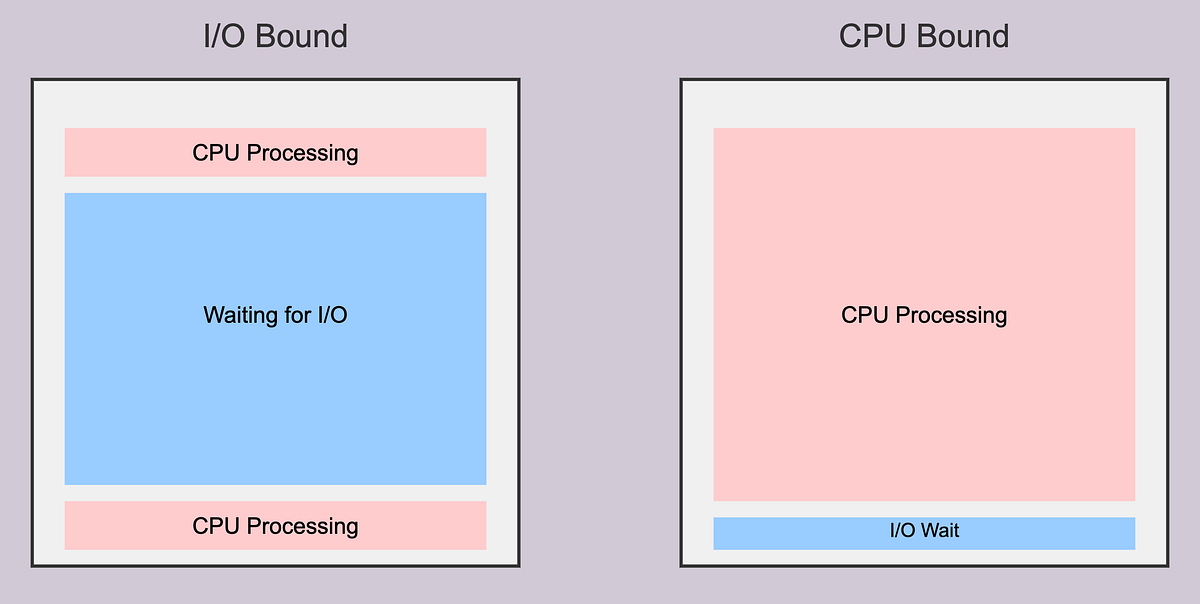
Consider an incident request that reads a record from a database and calculates a small display label. Both operations take time, but for different reasons. During the database query, the application mostly waits for another system. While calculating the label, its CPU does the work itself.
A task is I/O-bound when much of its elapsed time is spent waiting for input or output: a database response, a remote API, a network connection, or a file read. A task is CPU-bound when its elapsed time is dominated by computation, such as processing a large image or calculating statistics over a very large dataset. Real request handlers often contain both; classify the expensive part rather than assigning the whole handler a permanent label.
Read the relevant passages of FastAPI’s Concurrency and async / await documentation. They establish why waiting creates an opportunity for concurrency, whereas computation does not.
FastAPI’s documentation explains the two kinds of workload that drive this lesson’s design choice. Read for the distinction between time spent waiting and time spent computing, rather than for its broader performance claims.
Under “Technical Details,” find “Asynchronous Code.” Read the I/O explanation, then the following paragraph that names this work “I/O bound.” Later, under “Is concurrency better than parallelism?”, begin with the paragraph “Nope! That’s not the moral of the story.” Read the CPU contrast through the explanation of “CPU bound.” Focus on why switching between tasks helps during waits but does not itself shorten computation.
Concurrency means multiple tasks can make progress over an overlapping period—for example, one request can be handled while another awaits a database result. Parallelism means work actually executes at the same time on separate execution resources. Concurrency can improve how many I/O-heavy requests a server handles without making any individual database query run faster. CPU-heavy work may instead benefit from parallel execution, provided it can be divided appropriately.
Waiting can block—or give the server a turn
Knowing that an operation is I/O-bound is not yet enough to choose async def. The next question is what your code does while it waits.
A blocking call holds its current thread until it finishes. A synchronous database client, for example, typically makes its caller wait for the query result. A non-blocking asynchronous call can suspend the current task while it waits, allowing the event loop to run another ready task. That requires an async-capable library and an awaited operation; the word async on a surrounding function does not convert its calls.
Watch Code Collider’s How FastAPI Handles Requests Behind the Scenes for three short comparisons:
How FastAPI Handles Requests Behind the Scenes
Code Collider contrasts a blocking call inside an async route, an awaited pause inside an async route, and a blocking call inside a regular route. The demonstrations make the effect on overlapping requests visible.
Watch three routes to compare their observed request behavior. Then watch blocking versus yielding for the event-loop explanation, and FastAPI execution for the distinction between async routes and regular routes. The video uses sleep calls to simulate a wait: a timer is not a database or network I/O operation. Also treat its “separate thread per request” wording as a simplification; FastAPI runs regular routes using a bounded thread pool.
The event loop can switch to another request when an async task reaches an operation that actually yields control. By contrast, a blocking function called directly inside an async def route keeps the event-loop thread occupied. Other tasks on that loop cannot progress until the call returns.
Here is a small local demonstration, not a set of production endpoints:
import asyncio
import time

from fastapi import FastAPI

app = FastAPI()


@app.get("/demo/blocking-in-async")
async def blocking_in_async() -> dict[str, str]:
    time.sleep(2)
    return {"result": "done"}


@app.get("/demo/awaited-wait")
async def awaited_wait() -> dict[str, str]:
    await asyncio.sleep(2)
    return {"result": "done"}


@app.get("/demo/blocking-in-sync")
def blocking_in_sync() -> dict[str, str]:
    time.sleep(2)
    return {"result": "done"}
If overlapping requests reach the first route, time.sleep(2) blocks the event loop. In the second, await asyncio.sleep(2) suspends the task, so the loop can handle other requests during the wait. The third still uses a blocking call, but FastAPI runs a regular def route in its thread pool rather than executing its body on the event loop.
The middle route demonstrates yielding, not faster sleeping. A real non-blocking database request needs an async-capable database client; replacing a synchronous client call with await is not possible unless that client supplies an awaitable operation. Likewise, ordinary synchronous file access does not become non-blocking merely because it sits inside an async route.
Choose a route based on the calls it actually makes
FastAPI allows regular and async route functions in the same application. The choice belongs to each route’s implementation, not to an application-wide rule.
| Dominant work in an incident route | Practical choice | Reason |
|---|---|---|
| Awaiting queries from an async database client | async def |
The query can yield while waiting. |
| Calling a synchronous database client | def |
FastAPI runs the blocking route body in its thread pool. |
| Calling a synchronous remote-service client | def, unless you change how that call is handled |
Putting the same blocking call directly in async def would block the loop. |
| Looking up an incident in the current in-memory dictionary and doing a little validation | Either can work | There is no substantial I/O wait or CPU load to optimize. |
| Computing a large report from incident history | Neither declaration alone solves the bottleneck | Heavy computation still consumes CPU time. |
This matters for your current API. Its in-memory store does not perform a database round trip: changing an existing handler from def to async def would not turn its dictionary lookup into non-blocking I/O. When persistence is introduced later, revisit the choice based on the database library you actually use.
For an async client, the important shape of the code is:
async def read_incident_from_store(incident_id: int) -> object:
    return await async_store.get(incident_id)
Here async_store stands for an async-capable collaborator, not a client already present in your project. The await is meaningful only if get() returns an awaitable and cooperates with the event loop. If get() is a synchronous, blocking method, making the wrapper async def leaves the blocking behavior unchanged.
Read Real Python’s Python’s asyncio: A Hands-On Walkthrough for its practical warning about this distinction:
Python's asyncio: A Hands-On Walkthrough – Real Python
Real Python connects workload type to the available implementation: async I/O is useful for waits only when the operations and libraries support it.
In “Async I/O in Context,” go to “When to Use Async I/O.” Begin at its opening paragraph, where using async def with blocking operations is discussed, and read the blocking warning. Continue through the examples of suitable I/O-bound work. At the final paragraph, read the library requirement and finish that paragraph, which explains why the database wrapper must support async syntax.
There is a limit to the thread-pool alternative: threads are finite resources. Running a synchronous client in a def route protects the event loop from that route’s blocking call, but it does not make unlimited concurrent requests possible. It also does not turn pure Python CPU-heavy work into effective multi-core computation; in standard CPython, the global interpreter lock limits simultaneous execution of Python bytecode in threads. For substantial CPU-bound work, consider a separate process or worker rather than treating async def as an acceleration switch.
In practice, inspect the slow call itself. A route may combine a short calculation with an awaited database query; the calculation is harmless if it is brief. A route may also call a helper that performs a long synchronous network request; that helper still blocks even if the route’s outer signature says async def. If the bottleneck is uncertain, measure where time is spent before redesigning execution.
Takeaways
CPU-bound versus I/O-bound describes where time is spent. Blocking versus non-blocking describes whether a waiting call holds its execution thread or lets another task run. For FastAPI, use async def when you can await non-blocking operations; use a regular def route when its required calls are synchronous and blocking. Neither choice makes substantial CPU computation disappear.
The next lesson will put this decision into code: you’ll write and call async Python functions that await non-blocking I/O.