Recommended resources
The freely available resources this lesson will direct you to.
Hello! Your incident API now distinguishes successful responses from missing resources and invalid operations. In the previous lesson, you also checked that documented error responses matched what the server actually returned. This final lesson in the FastAPI essentials module applies the same discipline to the rest of the generated documentation: you’ll group operations with tags, give them useful summaries, and supply request examples that clients can select in /docs.
Allow about 40 minutes for the video, reading, code changes, and checks.
Make the operations navigable
As an API grows, a list of automatically named functions is not much of a guide for its clients. FastAPI generates OpenAPI from your route declarations, and /docs presents that specification as an interactive interface. You can improve the interface without changing an endpoint’s URL or its request-handling logic.
Watch the relevant portions of JVP Design’s Fast API Tutorial, Part 20: Path Operation Configuration. The examples use items and users; translate the documentation choices to your incident routes.
Fast API Tutorial, Part 20: Path Operation Configuration
JVP Design’s video shows where tags and summaries appear in Swagger UI, making the decorator options easier to interpret when you edit your own API.
Watch tags in action for route grouping, then summaries and descriptions for the difference between an operation’s short label and its expanded explanation. Notice that adding a tag organizes the docs; it does not change the route.
This documentation screenshot shows the result of tagging a different API: operations appear beneath the users and items headings rather than in one undifferentiated group.
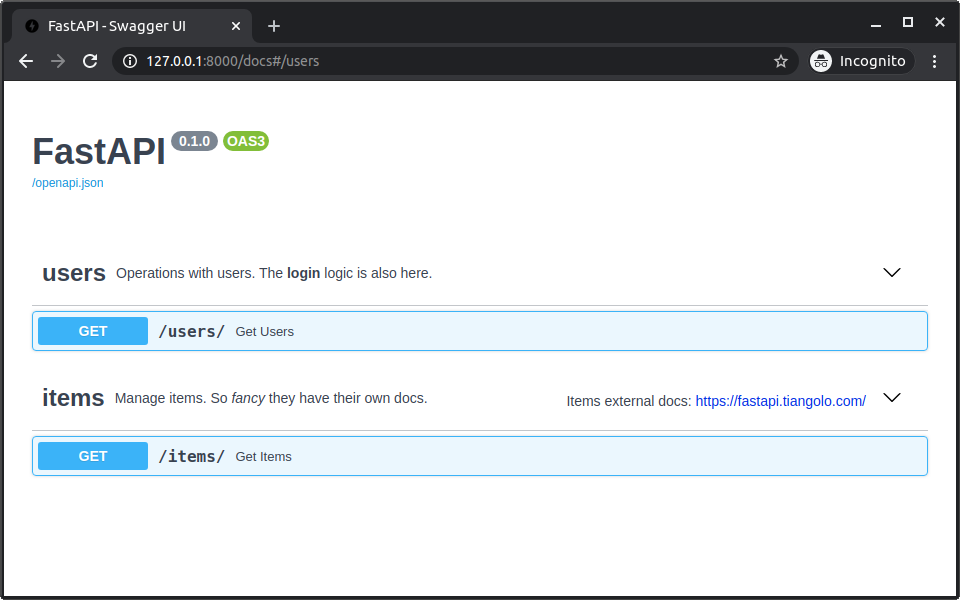
Start by adding tags=["incidents"] and a concise summary to each existing incident route. For the GET and archive routes from the previous lesson, the decorators and handlers can look like this:
@app.get(
    "/incidents/{incident_id}",
    response_model=IncidentPublic,
    responses={404: {"model": ErrorResponse}},
    tags=["incidents"],
    summary="Get an incident",
)
def read_incident(incident_id: int) -> IncidentPublic:
    return require_incident(incident_id)


@app.post(
    "/incidents/{incident_id}/archive",
    status_code=204,
    responses={
        404: {"model": ErrorResponse},
        409: {"model": ErrorResponse},
    },
    tags=["incidents"],
    summary="Archive an incident",
)
def archive_incident(incident_id: int) -> None:
    require_incident(incident_id)

    if incident_id in ARCHIVED_IDS:
        raise HTTPException(
            status_code=409,
            detail={
                "code": "incident_already_archived",
                "message": "Incident is already archived",
            },
        )

    ARCHIVED_IDS.add(incident_id)
Add a tag and summary to your existing PATCH route too, if you kept it. Be accurate about its current behavior: the earlier demonstration handler echoes proposed changes but does not update the in-memory store. A summary such as “Preview incident changes” is more honest than “Update an incident.”
A summary should help a reader distinguish operations at a glance. An optional description has room for behavior that a short label cannot convey—for example, that archiving an already archived incident returns 409. Tags, summaries, and descriptions improve the published contract; they do not implement that behavior.
Give clients examples they can use
A schema tells clients which fields and types are accepted. An example answers a different question: What might a complete request look like? It can make an unfamiliar endpoint quicker to try, but it must not contradict the schema.
FastAPI supports examples at more than one level. Read the indicated portions of its Declare Request Example Data documentation before choosing where yours belong.
Declare Request Example Data - FastAPI
FastAPI’s documentation distinguishes examples attached to a Pydantic model’s JSON Schema from examples attached to one operation’s request body. That distinction matters when you want several selectable examples in Swagger UI.
In “Extra JSON Schema data in Pydantic models,” inspect the model_config example and read its explanation; continue through the note about JSON Schema examples. Then, under “Body with multiple examples,” start at the paragraph beginning “When you do this, the examples will be part of” and read the UI limitation. Continue through “OpenAPI-specific examples” and the introduction to “Using the openapi_examples Parameter”; focus on why named examples are useful in /docs.
Use model-level json_schema_extra when an example belongs broadly to a reusable model. Here, you want two named examples specifically for creating an incident, visible in that operation’s request-body selector. Use Body(openapi_examples=...). This places the named examples on the OpenAPI request body, rather than relying on Swagger UI to display multiple JSON Schema examples.
Replace your existing POST /incidents decorator and handler signature with the version below; do not register a second POST route. Keep the handler’s store behavior from the previous lesson. Add Annotated and Body to your existing imports as needed.
from typing import Annotated

from fastapi import Body


@app.post(
    "/incidents",
    response_model=IncidentPublic,
    status_code=201,
    tags=["incidents"],
    summary="Create an incident",
    description="Create an incident from a validated report.",
)
def create_incident(
    incident: Annotated[
        IncidentCreate,
        Body(
            openapi_examples={
                "deployment_failure": {
                    "summary": "Deployment failure",
                    "description": "A report about a failing deployment.",
                    "value": {
                        "title": "Deployment fails",
                        "severity": "high",
                        "description": "Alerts firing after deployment",
                    },
                },
                "service_failure": {
                    "summary": "Service failure",
                    "description": "A report about requests failing.",
                    "value": {
                        "title": "Service requests fail",
                        "severity": "high",
                        "description": "Request failures observed",
                    },
                },
            }
        ),
    ],
) -> dict[str, object]:
    record: dict[str, object] = {
        **incident.model_dump(),
        "id": next(NEXT_ID),
        "internal_notes": "Internal triage only",
        "routing_token": "example-only",
    }
    public_incident = IncidentPublic.model_validate(record)
    INCIDENTS[public_incident.id] = public_incident
    return record
Both examples use "high", a severity established in the previous lesson’s working record. If your IncidentCreate schema requires other fields or uses different field names, adjust both example values to match it. Do not put internal notes, routing tokens, real credentials, or operational secrets in published examples.
The keys deployment_failure and service_failure identify examples in OpenAPI. Each entry’s summary labels a choice in the UI; its value is the JSON body a client can try. The screenshot below shows this kind of selector on a different request-body operation.
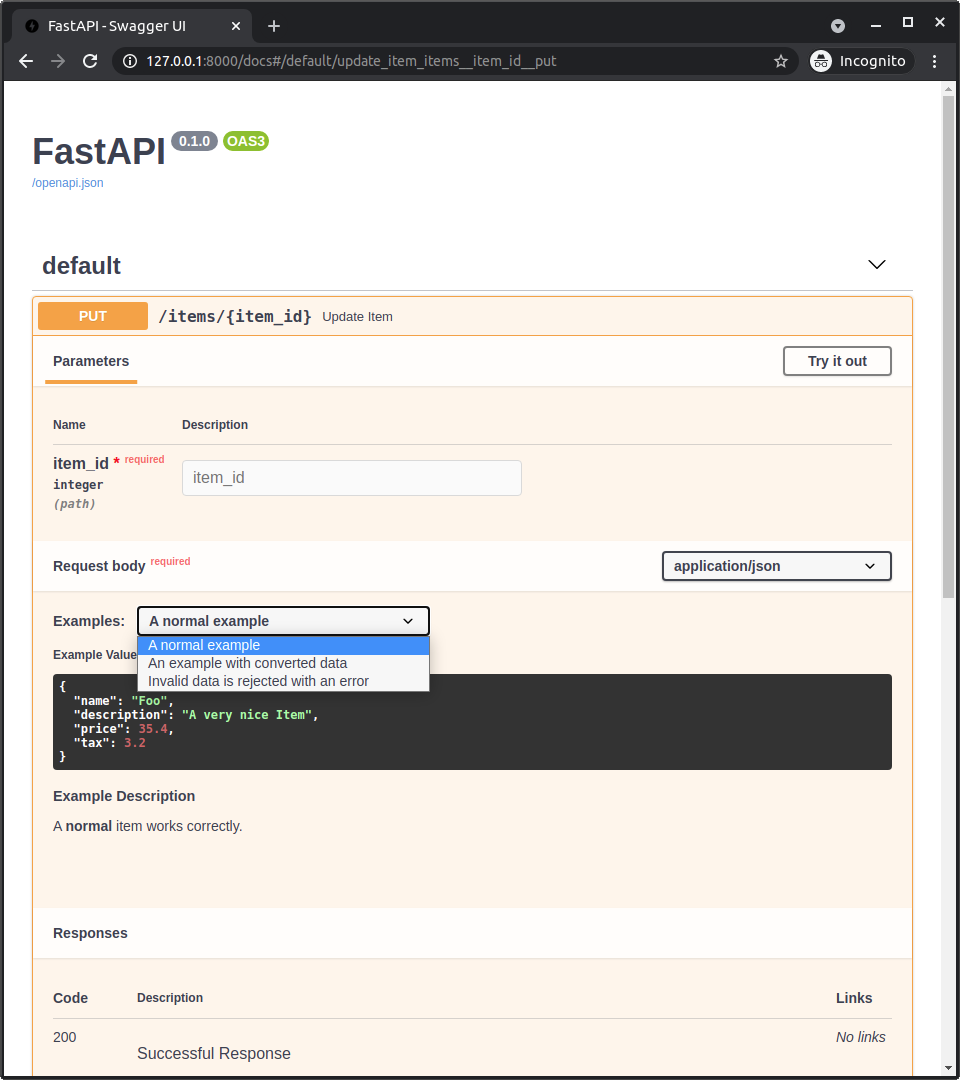
Examples are documentation, not validation rules. Declaring an example does not make its contents acceptable to IncidentCreate, nor does it alter how submitted requests are validated. The Pydantic request model remains the authority on accepted data.
Check the specification and the behavior
Restart or reload your development server and open /docs. Under incidents, confirm that the GET, POST, and archive operations have the intended summaries. Expand Create an incident and check that its request body offers both example choices. Selecting one should display its corresponding JSON value.
Then inspect /openapi.json directly. It is the generated specification behind the UI, and checking it helps distinguish missing metadata from a display issue. The following small script checks the POST metadata and validates every published example against your actual request model:
import json
from urllib.request import urlopen

from incident_api.schemas import IncidentCreate

with urlopen("http://127.0.0.1:8000/openapi.json") as response:
    schema = json.load(response)

operation = schema["paths"]["/incidents"]["post"]
print(operation["tags"])
print(operation["summary"])

examples = operation["requestBody"]["content"]["application/json"]["examples"]
for name, example in examples.items():
    IncidentCreate.model_validate(example["value"])
    print(name, "valid")
Run it while the development server is available. If validation fails, correct the published value or revisit whether the schema represents the request you intend—do not assume that a pleasant-looking example is a working one. Finally, use Try it out with one example and check that the endpoint still returns its intended 201 response. The documentation change should not have altered the POST handler’s runtime behavior.
Takeaways
Tags group related operations; summaries make them scannable; named request examples show clients concrete payloads they can select and send. These additions are most useful when they remain truthful to the implementation and request schema. Checking both /openapi.json and an actual request keeps the documentation from drifting away from the API.
You have now covered the essentials of designing and documenting this incident API. The next module turns to async execution and application architecture, where you’ll decide how request-handling work should run and how to separate the API from its services and infrastructure.